Problem
There’s a new version of SQL Server released and we’re mainly an on-premises SQL Server shop. We’ve been using Integration Services (SSIS) for years now for all our ETL and data integration needs. With Microsoft’s focus on cloud (Azure and Fabric), does it make sense to upgrade our SSIS packages? Are there any new features?
Solution
As with all previous releases of SQL Server (since 2005), SQL Server comes bundled with SSIS, an on-premises ETL tool. SSIS has matured into a stable, reliable and fast product, but hasn’t seen many updates or new features in the past years.
In this tip, we’ll cover all updates of the product in the SQL Server 2025 release. If you want to install SSIS 2025, you can find more information on how to do so in the tip SQL Server Integration Services 2025 Download, Install and Configure. The tip Get Started with SSIS 2025 explains how you can create your SSIS 2025 project and package in Visual Studio.
New Features or Updates in SSIS 2025
Here are some new features and updates in SSIS 2025.
ADO.NET Connection Manager
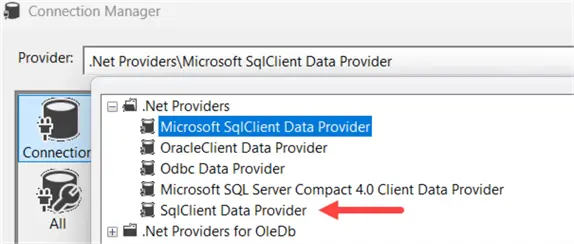
The ADO.NET connection manager now supports the Microsoft SqlClient Data Provider.
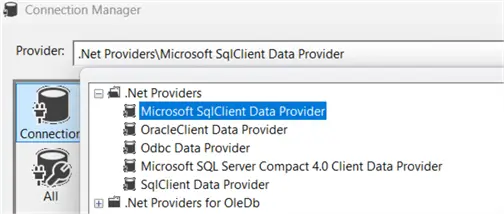
With this provider, newer security features such as TLS 1.3 and SQL Server’s Strict Encryption are supported. It also enables the use of Microsoft Entra ID. When you want to connect to Microsoft Fabric resources such as the warehouse, the SQL Analytics Endpoint or a Fabric SQL DB, you can only use Microsoft Entra ID as SQL Server authentication or Windows Authentication are not supported.
Authentication Options
In the ADO.NET connection manager configuration screen we can find these new authentication options:
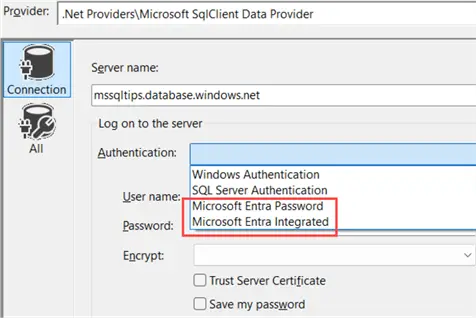
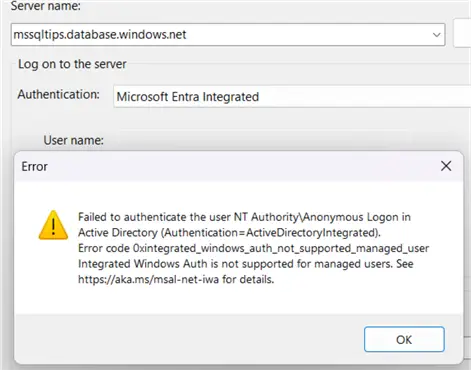
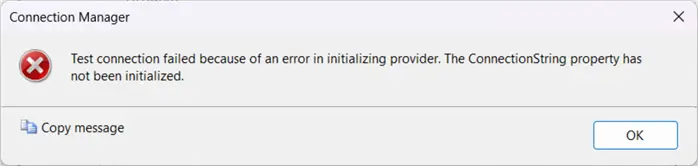
However, when we actually try to use the Integration option (Password authentication cannot be used as accounts now should have multi-factor authentication enabled), the following error is returned:
Other Options
The documentation for the SQLClient on the other hand lists many other options for Microsoft Entra ID authentication, such as interactive authentication, or authentication with a managed identity or a service principal. These options are actually a bit “hidden” in the ADO.NET connection manager. In the configuration screen, go to the All tab to view all possible properties for the connection manager.
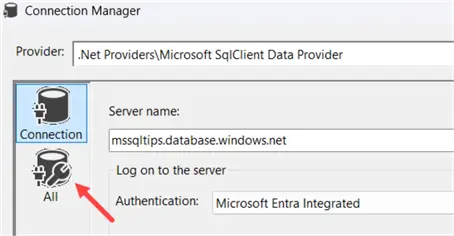
For the authentication property, we can see that the dropdown does list a lot more options than the dropdown in the Connection tab.
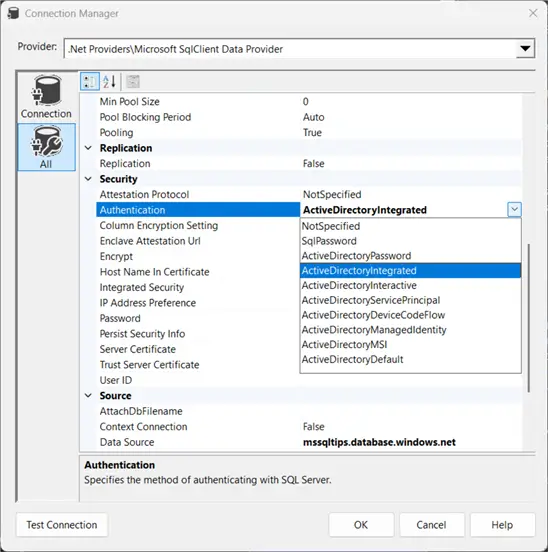
For example, we can use ActiveDirectoryInteractive to sign in using a pop-up. To make this work, we need to specify all required properties so that a valid connection string can be formed, otherwise the following error will be shown when you test the connection:
For interactive authentication, this is the user name (your e-mail address that you use to log into Microsoft Fabric or the Azure Portal) and a database name. When those are specified, we can successfully connect to a Fabric resource or to an Azure SQL DB:
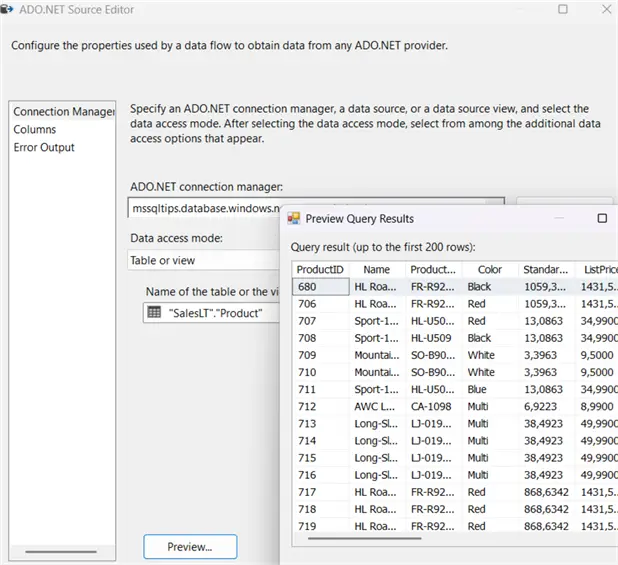
Interactive authentication works in Visual Studio, but it certainly won’t when the package is executed in the SSIS catalog. A set-up might be that developers use their own credentials when developing packages in Visual Studio, but once the package is deployed a parameter will override the connection string and another authentication method – such as service principal authentication – is used to connect.
If you’re using Azure Data Factory to host and run SSIS packages, there’s support for managed identity authentication. You can find more information on how to set this up in the documentation.
.NET API Microsoft.SqlServer.Dts.Runtime Namespace
If you use this namespace to create projects and packages programmatically and you upgrade to SQL Server 2025, your projects need to update the references and rebuild SSIS packages. For more information, check out the documentation.
SSIS Lift & Shift
For years it was already possible to migrate your existing SSIS solutions to Azure Data Factory using the Azure-SSIS Integration Runtime. Soon a similar feature will be available in Microsoft Fabric as well. At the time of writing this feature is in private preview. You can find more information here.
Deprecated or Discontinued Features in SSIS 2025
The following features are either discontinued or deprecated in SQL Server 2025:
- The Legacy SSIS Service – The SSIS service which enables the storage and monitoring of SSIS packages in the MSDB database is deprecated. This only impacts projects that still use the package deployment model. When you install SQL Server 2025, this service is still installed, but you can disable it in the SQL Server Configuration Manager. Disabling this service has no impact whatsoever on SSIS packages that are stored, managed and executed in an SSIS catalog.

- 32-bit mode is now also deprecated. The recent versions of SSMS and Visual Studio now only support 64-bit.
- The SQLClient Data Provider (SDS) connection type is deprecated.
- The Change Data Capture (CDC) components & service for Oracle by Attunity are discontinued, as well as the Microsoft Connector for Oracle. You can find more information in the official announcement. It’s recommended to migrate solutions to either Azure Data Factory or Microsoft Fabric.
- Hadoop related components (Hadoop Hive Task, Hadoop Pig Task, and Hadoop File System Task) are discontinued.
Key Takeaways
- SQL Server 2025 introduces updates for SSIS, including a new ADO.NET connection manager that supports Microsoft Entra ID and TLS 1.3.
- The new version provides enhanced security features and adds support for connecting to Azure Data Factory via managed identities.
- SSIS 2025 has deprecated several features, including the Legacy SSIS Service and 32-bit mode, while introducing Lift & Shift capabilities for Azure integration.
- Developers can now utilize interactive authentication in SSIS 2025, though it requires proper configuration for package deployment.
- Installing SSIS 2025 allows users to leverage Visual Studio for project development, with additional setup options available for Azure-related resources.
Next Steps
- You can learn more about SSIS in this tutorial.
- You can find more SQL Server 2025 tips in this overview.
- If you want to learn more about Azure Data Factory, there’s a tutorial. You can find all Fabric-related tips here.

Koen Verbeeck is a seasoned business intelligence consultant with over a decade of experience with the Microsoft Data Platform. He holds several certifications, including Azure Data Engineer. He’s a prolific writer, with over 375 articles on technologies such as Microsoft Fabric, SSIS, ADF, SSAS, SSRS, MDS, Power BI, Snowflake and Azure services. He has spoken at various events such as PASS, SQLBits, dataMinds Connect and many others. He frequently delivers educational webinars on MSSQLTips.com. For his efforts, Koen has been awarded the Microsoft MVP data platform award for many years.
- MSSQLTips Awards:
- Leadership Award (200+ Tips) – 2021
- Author of the Year – 2014/2020/2022
- Author Contender – 2024/2025


Thanks for this overview.