Problem
Shamir’s Secret Sharing is a cryptographic algorithm that allows a secret to be split into multiple components and shared among a group in such a way that the secret can only be revealed if a minimum number of components are combined. Is it possible to have this algorithm implemented in SQL Server without using external tools?
Solution
The Shamir´s secret sharing algorithm is based on polynomial interpolation over finite fields, and the formula is defined as:

Where  is the secret and the subsequent a´s are the number of shares needed to reconstruct the secret. If you have a threshold of three, the first one is the secret, then you are going to need more two, always as threshold minus one.
The prime number to be used must be greater than the secret value. There is a benefit in choosing a Mersenne prime, which are in the form of  , because they make modular reduction and arithmetic much faster and simpler on binary values when they are tied to a power of two.
In this tip, I will present two solutions, the first using only SQL Server and the other using Common Language Runtime (CLR) method.
T-SQL Solution for Shamir’s Secret Sharing
You can obtain the shared components in T-SQL, but if the secret is a big number the shares will look similar.
-- MSSQLTips (TSQL)

-- Define here the secret, minimum and the number of shares
DECLARE  @minimum int = 3
        ,@totalShares int = 8
        ,@secret int = 203518;

IF @minimum > @totalShares
BEGIN
    SELECT 'The number of shares is smaller than minimum!'
    RETURN;
END

DECLARE  @Prime bigint =  2147483647 -- Mersenne 2^31 - 1
        ,@i int
        ,@j int
        ,@k int
        ,@accum float
        ,@pId float
        ,@pVal float;

DECLARE      @Poly
    TABLE   (PolyId int
            ,PolyValue int);

DECLARE      @Shares
    TABLE   (ShareId int
            ,ShareValue bigint
            ,Delta float);

DECLARE      @Thresholds
    TABLE   (ThresholdId int
            ,ThresholdValue float);

INSERT INTO  @Poly
    VALUES  (0
            ,@secret);

SET @i = 1;
WHILE @i < @minimum  BEGIN
    INSERT INTO  @Poly
        VALUES  (@i
                ,FLOOR(RAND(CHECKSUM(NEWID())) * 123456) + 1); -- any number

    SET @i += 1;
END

SET @i = 0;
WHILE @i < @totalShares + 1 BEGIN
    SET @accum = '0';

    DECLARE crsPoly CURSOR FAST_FORWARD READ_ONLY FOR
        SELECT       PolyValue
            FROM     @Poly
            ORDER BY PolyId DESC;

    OPEN crsPoly
        FETCH NEXT FROM crsPoly INTO @j

        WHILE @@FETCH_STATUS = 0
            BEGIN

                SET @accum *= @i;
                SET @accum += @j;
                SET @accum = CONVERT(bigint,@accum) % @Prime;

                FETCH NEXT FROM crsPoly INTO @j
            END
    CLOSE crsPoly
    DEALLOCATE crsPoly

    INSERT INTO  @Shares
                (ShareId
                ,ShareValue)
        VALUES  (@i
                ,@accum);

    SET @i += 1;
END

SELECT * FROM @Poly;

-- Reconstruct the secret  ==================================================

INSERT INTO      @Thresholds
                (ThresholdId
                ,ThresholdValue)
    SELECT       ShareId
                ,ShareValue
        FROM     @Shares
        WHERE    ShareId IN
                (1,4,6,8);

IF (SELECT COUNT(*) FROM @Thresholds) < @minimum BEGIN
    SELECT 'The minimum number of shares not reached to reveal the secret!';
    RETURN;
END;

SET @i = 0;
WHILE @i < (SELECT COUNT(*) FROM @Thresholds) BEGIN
    SET @accum = 1;

    SELECT       @k = ThresholdId
        FROM     @Thresholds
        ORDER BY ThresholdId
                 OFFSET @i ROWS FETCH NEXT 1 ROWS ONLY;

    DECLARE crsShare CURSOR FAST_FORWARD READ_ONLY FOR
        SELECT       ThresholdId
                    ,ThresholdValue
            FROM     @Thresholds
            WHERE    ThresholdId <> @k;

    OPEN crsShare
    FETCH NEXT FROM crsShare INTO @pId,@pVal;

    WHILE @@FETCH_STATUS = 0 BEGIN
        SET @accum *= @pId / (@pId - @k);

        FETCH NEXT FROM crsShare INTO @pId,@pVal;
    END
    CLOSE crsShare
    DEALLOCATE crsShare

    UPDATE        @Shares
        SET        Delta = @accum * ShareValue
        WHERE   ShareId = @k;

    SET @i += 1;
END

SELECT * FROM @Shares;
SELECT ROUND(SUM(Delta),0) AS CheckSecret FROM @Shares;

GO
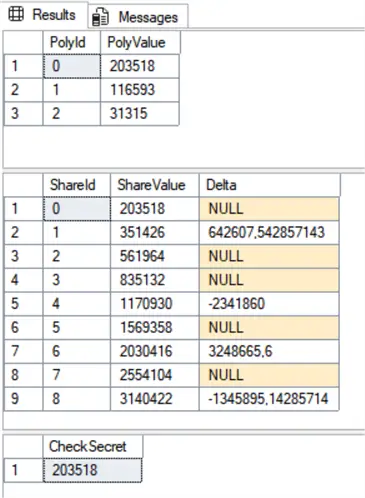
Resulting in
CLR Solution for Shamir’s Secret Sharing
The SQL Server bigint data type has a limitation with numbers greater than  . As such, I decided to use SQL Server CLR integration using a BigInteger data type in VB .NET. You will notice that when working with big integers I will retrieve them as strings. This is to demonstrate what is happening in the code. However, the best practice should be to use a varbinary data type.
Open Visual Studio:
- Get started choosing Create a new project
- Choose the template of Class Library (.Net framework) – Visual Basic
- I will call the Project SqlMathClr and click Create
- Rename the Class1.vb file to SqlMath.vb
- Replace the content of SqlMath.vb with the respective code below
- Build the solution
- Record the path of the created SqlMathClr.dll, in my case “E:\VS Projects\SqlMathClr\SqlMathClr\bin\Release”
SqlMath.vb code:
Imports System.Data.SqlTypes
Imports System.Numerics
Imports System.Security.Cryptography
Imports Microsoft.SqlServer.Server

Public Class SqlMath

    <SqlFunction(FillRowMethodName:="FillRow", TableDefinition:="BigNumber nvarchar(max)")>
    Public Shared Function MakeShares(minimum As Integer, shares As Integer, secretStr As SqlString) As IEnumerable
        Dim secret As BigInteger = BigInteger.Parse(secretStr.Value)

        Dim numbers As New ArrayList(shares)
        Dim prime As BigInteger = BigInteger.Pow(2, 61) - 1
        Dim poly As New ArrayList From {
            secret
        }

        For i As Integer = 1 To minimum - 1
            Dim bytes(secret.ToByteArray().Length - 1) As Byte
            Using rng As RandomNumberGenerator = RandomNumberGenerator.Create()
                rng.GetBytes(bytes)
            End Using
            Dim value As New BigInteger(bytes)
            poly.Add(BigInteger.Abs(value) Mod (secret - 1) + 1)
        Next

        For i As Integer = 1 To shares
            Dim accum As BigInteger = 0
            For j = poly.Count - 1 To 0 Step -1
                accum = BigInteger.Multiply(accum, i)
                accum = BigInteger.Add(accum, poly(j))
                accum = BigInteger.ModPow(accum, 1, prime)
            Next

            numbers.Add(Tuple.Create(i, accum))
        Next

        Return numbers
    End Function

    Public Shared Sub FillRow(obj As Object, ByRef point As SqlInt32, ByRef number As SqlString)
        Dim t = DirectCast(obj, Tuple(Of Integer, BigInteger))
        point = New SqlInt32(t.Item1)
        number = New SqlString(t.Item2.ToString)
    End Sub

    <SqlFunction(DataAccess:=DataAccessKind.None, IsDeterministic:=True, IsPrecise:=True)>
    Public Shared Function RecoverSecret(sharesSerialized As SqlString) As SqlString
        Dim prime As BigInteger = BigInteger.Pow(2, 61) - 1

        Dim shares As New List(Of Tuple(Of Integer, BigInteger))
        For Each part In sharesSerialized.Value.Split(";"c)
            If String.IsNullOrWhiteSpace(part) Then Continue For
            Dim xy = part.Split(":"c)
            shares.Add(Tuple.Create(Integer.Parse(xy(0)), BigInteger.Parse(xy(1))))
        Next

        Dim k As Integer = shares.Count
        Dim total As BigInteger = 0

        For i As Integer = 0 To k - 1
            Dim xi As BigInteger = shares(i).Item1
            Dim yi As BigInteger = ModPositive(shares(i).Item2, prime)
            Dim Li As BigInteger = 1

            For j As Integer = 0 To k - 1
                If i = j Then Continue For
                Dim xj As BigInteger = shares(j).Item1
                Dim num As BigInteger = ModPositive(-xj, prime)
                Dim den As BigInteger = ModPositive(xi - xj, prime)
                Dim invDen As BigInteger = ModInverseFermat(den, prime)
                Li = (Li * num) Mod prime
                Li = (Li * invDen) Mod prime
            Next

            total = (total + (yi * Li) Mod prime) Mod prime
        Next

        Return ModPositive(total, prime).ToString
    End Function

    Private Shared Function ModPositive(value As BigInteger, m As BigInteger) As BigInteger
        Dim r As BigInteger = value Mod m
        If r < 0 Then r += m

        Return r
    End Function

    Private Shared Function ModInverseFermat(a As BigInteger, p As BigInteger) As BigInteger
        a = ModPositive(a, p)
        If a.IsZero Then
            Throw New ArgumentException("Attempt to invert 0 mod p")
        End If

        Return BigInteger.ModPow(a, p - 2, p)
    End Function

End Class
SQL Server CLR
The first we need to enable CLR:
-- MSSQLTips (TSQL)

EXEC sp_configure 'clr enabled', 1;
RECONFIGURE;
GO
I will create a schema to group CLR all functions:
-- MSSQLTips (TSQL)

IF NOT EXISTS
    (SELECT      1
        FROM     sys.schemas
        WHERE    [name] = N'AsmMath')
    EXEC('CREATE SCHEMA [AsmMath]')
GO
For security reasons, it is necessary to add the dll as a trusted assembly. Be sure to change the path of your destination.
-- MSSQLTips (TSQL)

DECLARE @hash varbinary(64) =
    (SELECT HASHBYTES('SHA2_512', BulkColumn)
        FROM OPENROWSET(BULK 'E:\VS Projects\SqlMathClr\SqlMathClr\bin\Release\SqlMathClr.dll', SINGLE_BLOB) AS AssemblyBlob);

EXEC sp_add_trusted_assembly
    @assembly_hash = @hash,
    @description = N'SQL Math CLR assembly';
GO
Now it is necessary to register the assembly, creating or altering it. Change the path of your destination.
-- MSSQLTips (TSQL)

-- Register assembly
IF NOT EXISTS
    (SELECT      1
        FROM     sys.assemblies
        WHERE    [name] = N'SqlMathClr')
    CREATE ASSEMBLY [AsmMath]
        FROM 'E:\VS Projects\SqlMathClr\SqlMathClr\bin\Release\SqlMathClr.dll'
        WITH PERMISSION_SET = SAFE;
ELSE
    ALTER ASSEMBLY [AsmMath]
        FROM 'E:\VS Projects\SqlMathClr\SqlMathClr\bin\Release\SqlMathClr.dll'
        WITH PERMISSION_SET = SAFE;
GO
Now we are going to add all of the functions to the schema created.
-- MSSQLTips (TSQL)

CREATE FUNCTION AsmMath.ShamirMakeShares(@minimum int, @shares int, @secretStr nvarchar(MAX))
RETURNS TABLE (Pos int, BigNumber nvarchar(MAX))
AS EXTERNAL NAME [AsmMath].[SqlMathClr.SqlMath].MakeShares;
GO

CREATE FUNCTION AsmMath.ShamirRecoverSecret(@shares nvarchar(MAX))
RETURNS nvarchar(MAX)
AS EXTERNAL NAME [AsmMath].[SqlMathClr.SqlMath].RecoverSecret;
GO
Run this code to verify the assembler details:
-- MSSQLTips (TSQL)

SELECT       [name]
            ,[clr_name]
            ,[create_date]
            ,[modify_date]
    FROM     sys.assemblies
    WHERE    [name] = 'AsmMath';
GO
Here is the logic to remove the CLR objects:
-- MSSQLTips (TSQL)

DROP FUNCTION IF EXISTS AsmMath.ShamirMakeShares;
DROP FUNCTION IF EXISTS AsmMath.ShamirRecoverSecret;

DROP ASSEMBLY IF EXISTS AsmMath;
GO
SQL Server Testing
I am using a Mersenne prime of 2^61 which will generate a limitation for the secret value to a maximum value of 2,305,843,009,213,693,950 one less than the prime used.
-- MSSQLTips (TSQL)

DECLARE          @Points
    TABLE       (PointId int
                ,PointValue bigint);

-- Passing the mininum and number of shares and the secret
INSERT INTO      @Points
    SELECT       [Pos]
                ,[BigNumber]
        FROM     [AsmMath].[ShamirMakeShares]
                (3
                ,8
                ,'2025196119341929');

SELECT           [PointId]
                ,[PointValue]
    FROM         @Points;

-- Passing the minimum of required shares
DECLARE          @RecoverShares nvarchar(MAX) =
    (SELECT      STRING_AGG(CONCAT(PointId, ':', PointValue), ';')
        FROM     @Points
        WHERE    PointId IN
                (8,3,4));

SELECT AsmMath.ShamirRecoverSecret (@RecoverShares) AS Secret_8_3_4, '<-- OK' AS Chk;

-- Passing six shares
SET              @RecoverShares =
    (SELECT      STRING_AGG(CONCAT(PointId, ':', PointValue), ';')
        FROM     @Points
        WHERE    PointId IN
                (1,5,7,8,3,4));

SELECT AsmMath.ShamirRecoverSecret (@RecoverShares) AS Secret_1_5_7_8_3_4, '<-- OK' AS Chk;

-- Passing shares less than minimum required
SET              @RecoverShares =
    (SELECT      STRING_AGG(CONCAT(PointId, ':', PointValue), ';')
        FROM     @Points
        WHERE    PointId IN
                (1,5));

SELECT AsmMath.ShamirRecoverSecret (@RecoverShares) AS Secret_less_minimum, '<-- failed' AS Chk;
GO
Resulting in:
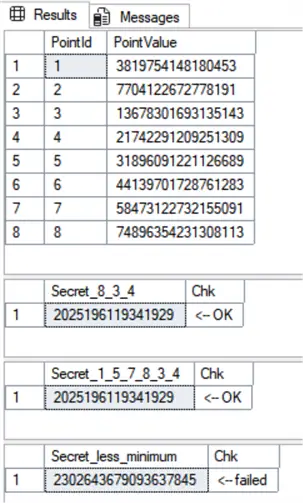
The first select shows the shares to be distributed to eight individual holders. In this tip I did not include additional encryption or secure transport that would be necessary to apply to the secret value and before distribution. For demonstration purposes, I left them unencrypted, so the steps are easy to understand.
To recover the secret, I am passing the shares in the format: 
For example, if the company finance department has a policy which enforces payment to a contractor only when at least 3 managers approve the payment, you can use Shamir secret share to create a flag to allow the payment. This can then be based on checking only if the result of the function ShamirRecoverSecret matches the secret value.
Key Takeaways
- Shamir’s secret sharing splits a secret into components for secure sharing among a group, requiring a minimum number of components to reveal the secret.
- Implementing Shamir’s secret sharing in SQL Server is possible using either T-SQL or CLR methods, with CLR supporting larger numbers.
- Choosing a Mersenne prime for calculations can simplify modular arithmetic, enhancing performance.
- The article provides a detailed step-by-step guide to set up the SQL CLR integration and demonstrates the process of sharing and recovering secrets.
- The solution does not include encryption, focusing instead on the core algorithm’s implementation within SQL Server.
Next Steps
- WIKIPEDIA – Shamir´s secret sharing
- Check out my recent tips:

Sebastião Pereira has over 40 years of experience in database development including T-SQL, algorithm design, machine learning and bringing innovative mathematical formulas to SQL Server. He started his career at a transnational fast-moving consumer goods (FMCG) company as an employee then later transitioning into a consultant role. He eventually founded his own company to develop software solutions for the healthcare industry. Sebastião is a respected award-winning author on MSSQLTips.com extending SQL Server capabilities beyond traditional workloads.
- MSSQLTips Awards
- Author of the Year – 2025
- Trendsetter (25+ tips) – 2025
- Rookie of the Year – 2024


