Problem
Ask any DBA about their primary role, and they will likely say it’s ensuring the health, availability, and recoverability of their database estate. One of the key ways to keep your SQL Servers available and recoverable is to have reliable HA (High Availability) and DR (Disaster Recovery) solutions in place.
However, designing a reliable HA/DR architecture isn’t easy. Depending on your RTO and RPO requirements, a reliable HA/DR design often requires additional hardware, VMs, licenses, and networking, along with ongoing maintenance. This extra infrastructure can also lead to cluster sprawl as the number of SQL Server instances continues to grow.
Another challenge is that HA and DR are often handled separately. HA might safeguard a local SQL Server instance, whereas DR could involve a different site or a cloud environment, along with recovery procedures. These factors make designing and testing more complex and nearly impossible to explain to the business, which, at the end of the day, often makes the spending decisions.
How can DBAs protect their SQL Server workloads across environments without turning HA and DR into a collection of disconnected designs?
Solution
This is where DxEnterprise comes into play. DxEnterprise is a SQL Server-focused HA/DR solution from DH2i that provides clustering, simplified failover control, secure connectivity, and management tools to support SQL Server workloads across platforms and locations. It integrates with SQL Server Availability Groups, which manage data synchronization between replicas, while DxEnterprise helps manage clustering and failover.
Think of DxEnterprise as an air traffic controller for SQL Server availability, helping direct where workloads should flow when something goes wrong.
The core idea behind DxEnterprise is that HA and DR can be treated as a single availability model. In other words, it blurs the line between HA and DR by allowing local and remote nodes to participate in the same availability strategy.
Reasons to Choose DxEnterprise
The risk of going without an HA/DR solution could mean losing millions of dollars in revenue if a disaster strikes, and you are down for an extended period. Beyond the monetary loss, the damage to your organization’s and your personal reputation could be irreversible. In that sense, an HA/DR solution serves as an insurance policy for your critical SQL Server workloads.
For these reasons alone, your database environment needs an HA/DR solution. You could try building and maintaining a custom solution, but that often means stitching together multiple technologies and hoping they work when needed. Or, you could choose a proven solution built specifically for SQL Server availability.
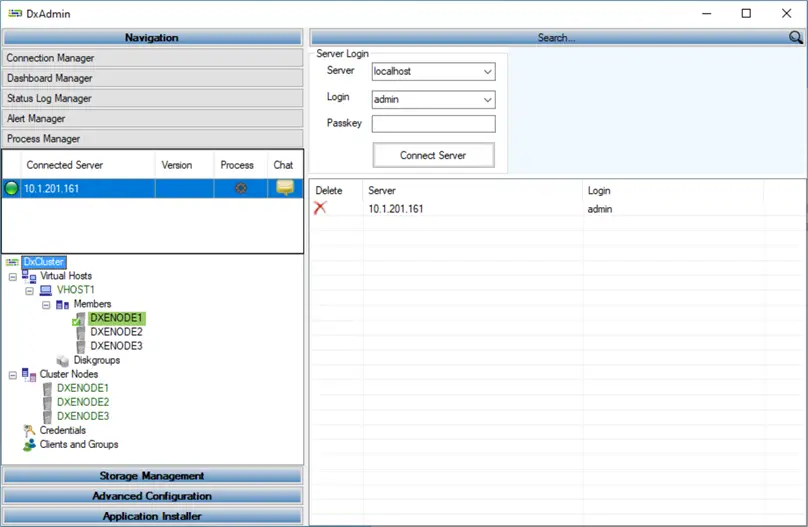
So why choose DxEnterprise? I’ve listed a few benefits DxEnterprise offers below.
- Minimize downtime by failing over SQL Server workloads to another node during a failure.
- Reduce HA/DR complexity by using a SQL Server-focused solution to consolidate instances onto fewer cluster nodes
- Treat HA and DR as one availability strategy, not two separate solutions
- Support mixed environments across operating systems and cloud providers
- Easily migrate SQL Server to the cloud and across platforms using Availability Groups
- Simplify cross-site connectivity using secure tunneling instead of VPNs, private data links, or public ports
- With v26, monitor database health, not just node and instance health
- Reduce total cost with fewer nodes and VMs
Now, let’s spend a few minutes looking at a few of these.
Reducing HA/DR Complexity Through Consolidation
One of the biggest advantages DxEnterprise brings is its ability to consolidate multiple SQL Server instances, including named instances, across fewer cluster nodes. More clusters usually mean more nodes, VMs, patching, monitoring, and failover testing. You might be asking how DxEnterprise makes this happen. Well, let’s look at an example.
In a traditional SQL Server failover cluster design, each instance may need its own cluster. For example, with three SQL Server instances, you might set up the following:
- SQL Server Instance 1 is configured as a two-node cluster.
- SQL Server Instance 2 is a two-node cluster.
- SQL Server Instance 3 is also set up as a two-node cluster.
That design gives each instance a failover target, but if each instance is placed in its own two-node cluster, it creates 3 clusters of 2 nodes, for a total of 6 nodes, each split into its own separate HA island.
When we bring in DxEnterprise’s model, the pattern shifts to:
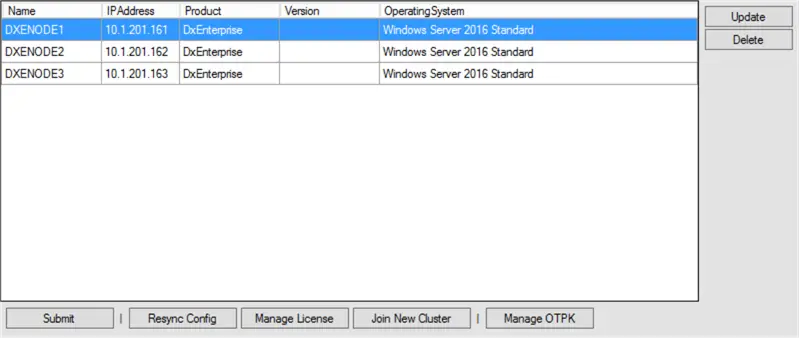
One three-node DxEnterprise cluster that is comprised of:
- SQL Server Instance 1 runs on Node 1
- SQL Server Instance 2 runs on Node 2
- SQL Server Instance 3 runs on Node 3
Each node now serves as a failover target for others, increasing useful availability rather than remaining isolated.
Treating HA and DR as One Availability Strategy
Previously, I mentioned that DxEnterprise blurred the line between HA and DR. Let’s dig a little deeper into what that means. As a DBA, you know that HA often involves failing over to a server within the same region, data center, or availability zone to minimize downtime. By contrast, DR usually refers to recovery in another location, such as a different region or data center.
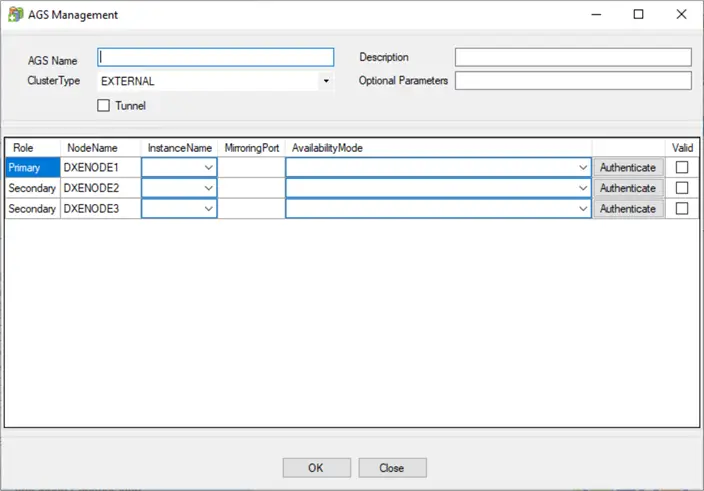
DxEnterprise helps bring those two frameworks together by allowing servers across locations to participate in a shared availability design. With SQL Server, DxEnterprise works with Availability Groups to keep replicas in sync across nodes. That availability design can include on-prem nodes, Azure or AWS nodes, or Kubernetes containers, depending on the supported DxEnterprise and SQL Server Availability Group configuration.
This matters because DR does not need to be a completely separate solution. For a DBA, instead of managing an HA solution for local failures and a completely separate DR solution for site-level outages, you can think in terms of a single availability strategy spanning multiple locations.
Easily Migrate to the Cloud
Migrating from on-premises SQL Server to the cloud can be challenging even for the most skilled DBAs, especially when you need to minimize downtime during the cutover. With DxEnterprise, you can add cloud-based nodes to your DxEnterprise cluster and use SQL Server Availability Groups to synchronize data. Once the cloud replica is ready, you can fail over to it.
This approach can provide DBAs with a cleaner migration path because the cloud environment is integrated into the availability design before the final cutover, making SQL Server database migration easier.
Supporting Mixed Environments
Another challenge DBAs routinely face is the complexity of integrating multiple environments, including cloud and OS environments. DH2i recognized the need to bring multiple environments together and, over time, DxEnterprise added support for Linux nodes in addition to Windows. This means you no longer need a Windows-only configuration; you can have both Windows and Linux configurations in your HA design.
Today, DxEnterprise is unified across Windows, Linux, VMs, containers, Kubernetes, and the cloud. This gives DBAs a streamlined way to manage HA across hybrid environments.
DH2i also offers DxOperator for organizations running SQL Server in Kubernetes or OpenShift, which helps automate and manage container-based SQL Server deployments.
Secure Cross-Site Connectivity
When SQL Server needs to communicate across data centers or cloud providers in a traditional cross-site configuration, complex networking through VPNs, private data links, or public ports can quickly become a major source of configuration, maintenance, and cost overhead.
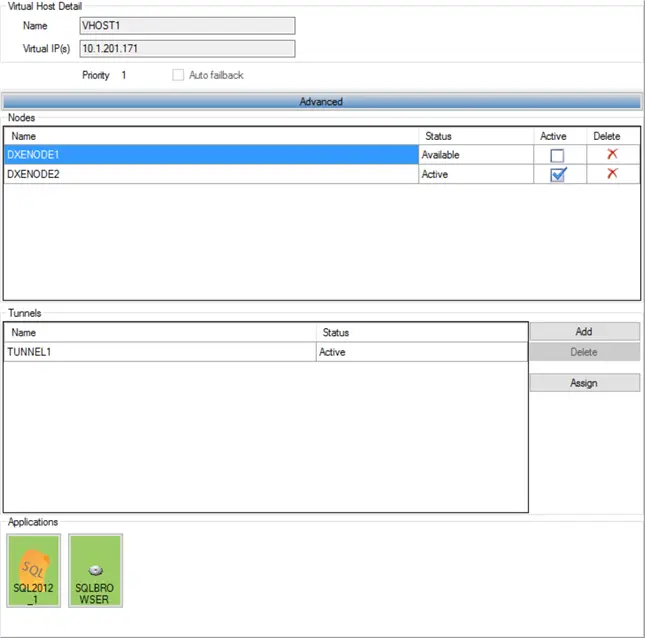
DxEnterprise can eliminate the need for public ports, VPNs, or private data links by creating a private tunnel between sites or replicas, allowing SQL Server data to flow across it. This networking transport layer enables secure, private data flow between locations.
Additionally, DxEnterprise’s Availability Group tunneling is optimized for SQL Server, significantly boosting I/O throughput for cross-site data replication.
New Features in DxEnterprise v26 and DxOperator v2
The release of DxEnterprise v26 and DxOperator v2 introduced several new features. Let’s take a minute to look at a few of them.
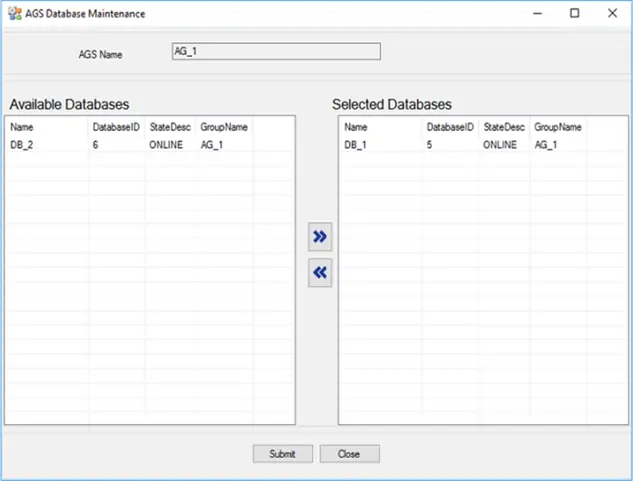
Database-Level Health Monitoring
One of the most important features in the DxEnterprise v26 release was database-level health monitoring, along with AG quorum enforcement and checks for database health issues such as stalled I/O. In prior versions, you could tell if there were issues at the node and SQL Server instance levels, but DxEnterprise did not provide this same database-level AG health visibility, which was a major gap.
After all, a SQL Server instance could be running while the database supporting a critical application is unavailable. No longer, if a monitored database is offline or unavailable, DxEnterprise can automatically fail over to the secondary node. This new feature reduces the likelihood of learning long after the fact that an application is down.
DxEnterprise also supports resource-level policies for CPU, memory, disk I/O, and network I/O. These additions give DBAs another way to control when a failover should occur.
Support for Rolling Upgrades
Performing a rolling upgrade is like servicing one plane while the rest of the fleet keeps flying. With DxEnterprise, you can update one machine at a time, fail over to the updated machine, and continue the upgrade process without treating the environment as an all-or-nothing maintenance event. For container-based deployments, this same idea extends to rolling out new images as part of the upgrade process.
Keep Applications Running While Scaling
DxOperator v2 helps reduce interruptions during scale-up and scale-down operations. This is especially helpful when scaling down because you don’t want Kubernetes to remove a container hosting an important SQL Server replica without safely handling the AG state. The ability to scale down is also important because you don’t want to pay for extra resources during an application’s slower season.
Reduce Total Cost
Now, let’s get to the topic that will interest the business stakeholder, who is often the one writing the check. Beyond providing a highly available environment for your SQL Server workloads, DxEnterprise can also deliver significant cost savings.
As mentioned earlier, one of the software’s capabilities is its ability to help reduce the number of nodes. Fewer nodes can translate into lower hardware or VM costs, reduced management overhead, and fewer Windows Server and SQL Server licenses to maintain. Since Basic Availability Groups are part of SQL Server 2025 Standard Edition, some workloads may achieve additional cost savings.
By stacking SQL Server instances on fewer machines, DBAs can run multiple instances while maintaining HA. On Linux, this can be done using containers, meaning each SQL Server instance does not need its own full machine. Let’s take a look at a simple Windows-based example.
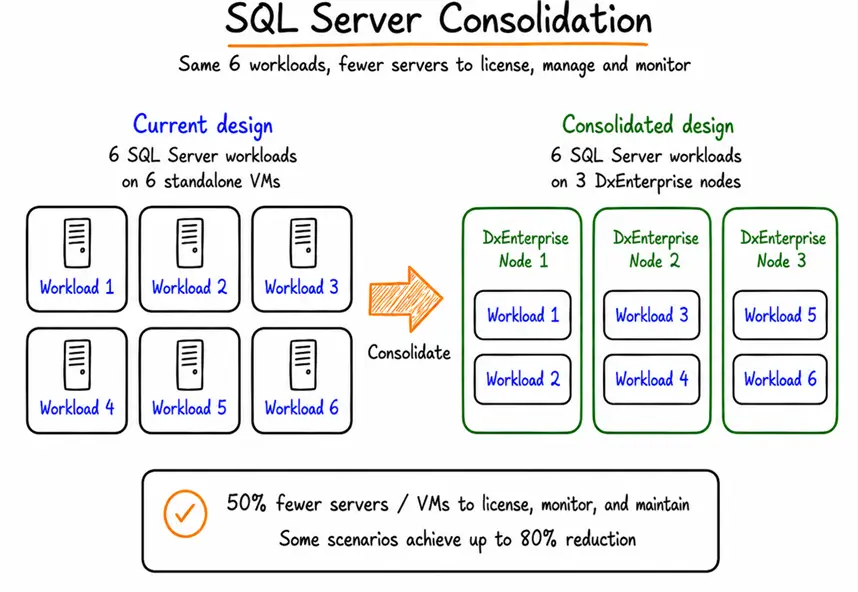
Imagine an environment with six standalone SQL Server VMs handling smaller departmental workloads. In the current design, the organization has:
- Current design: 6 SQL Server workloads running on 6 standalone SQL Server VMs with Windows OS
- Consolidated design: 6 SQL Server workloads running on 3 DxEnterprise nodes
- Result: 50% fewer servers / VMs to license, monitor, and maintain
Similar to the example above, DH2i’s client experience has shown that this consolidation approach can result in a 50% reduction in nodes, with some larger consolidation scenarios reaching up to 80%.
Getting Started with DxEnterprise
For DBAs who like trying new technologies before buying, DH2i offers a DxEnterprise developer license for non-production use. This means you don’t have to commit to anything up front.
Here’s my advice. First, pick a non-production SQL Server environment. Set up a small HA/DR scenario, see how failover works, and get a good feel for DxAdmin, the main user interface for DxEnterprise. Once you are ready, contact one of their sales representatives for more information on pricing and the license structure.
You can also download the software or container image and review DH2i’s support resources.
Next Steps
- Try it before you buy it with the developer license. Visit the DH2i Trial page to sign up today.
- Watch one of the many informative videos on the DH2i resource center. Start with WSFC vs DxEnterprise: Reduce HA Costs by Shrinking Infrastructure Footprint.
- Have you heard about Kubernetes but are not sure where to start? Carla Abanes wrote “Run SQL Server on Kubernetes” to help you get started. And DH2i has a Kubernetes tutorial to help you try out Kubernetes right on your Windows machine.

Jared Westover is a SQL Server specialist with two decades of industry experience covering T-SQL development, performance tuning, administration and Microsoft Fabric. He is currently a software architect at Crowe, an author at Pluralsight and primary contributor at sqlhabits.com. On MSSQLTips.com, Jared is a respected award-winning author for his clever T-SQL solutions and bringing to light new real-world solutions to age-old development problems.
- MSSQLTips Awards
- Achiever Award (75+ tips) – 2026
- Author of the Year – 2023
- Author Contender – 2024/2025