Problem
SQL Server 2025 is the latest version of Microsoft SQL Server. This release’s major focus is to integrate SQL Server’s relational database capabilities with artificial intelligence, including built-in AI features and Fabric integrations, to enable the development of modern data applications. Are you familiar with SQL Server 2025? No, not a problem! This tip will guide you to useful features, enhancements, and improvements.
Solution
SQL Server 2025 leaps forward as an enterprise database with artificial intelligence. This new version is secure by design, integrates data with Fabric, enhances performance to support missing critical databases, offers new features for high availability and disaster recovery, and boosts productivity with AI-focused development.
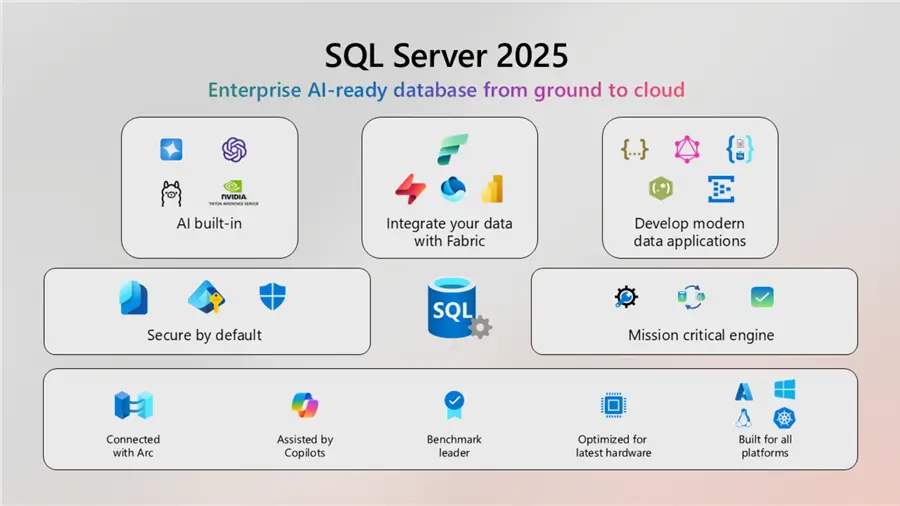
Image Source: Microsoft
This article divides the features into the following categories:
- Edition-related changes
- Built-In Artificial Intelligence Capabilities
- Development features and enhancements
- DBA features and enhancements
- Performance Enhancements
- High Availability and Disaster Recovery Improvements
- Security Changes
- Microsoft Fabric Integration
- Discontinued features
Edition-related changes
SQL Server 2025 with Standard Developer edition
SQL Server 2022 or earlier versions include Standard, Developer, Enterprise, and Express editions. The Developer edition features are the same as the Enterprise version. However, if you are using the Standard edition in the production environment and the Developer edition in the development environment, your code or feature might break if you do not check whether the supported feature is available in the Standard edition or not.
Three are two variants of Developer edition in SQL Server 2025:
- Standard Developer edition – equivalent to Standard Edition
- Enterprise Developer Edition – equivalent to Enterprise Edition
Standard Edition Enhancements
- SQL Server 2025 supports up to 32 cores (16 cores in SQL 2022) and 256 GB (128 GB in SQL Server 2022) max server memory.
- It supports the Resource Governor feature as well. Previously, resource governor was an enterprise edition feature.
Express Edition Changes:
SQL Server 2025 increased the maximum database size from 10 GB to 50 GB.
Discontinued Editions with SQL Server 2025
- Express with Advanced Service (SQLEXPRADV) edition
- Web Edition
Additional Information:
- Editions and supported features of SQL Server 2025
- SQL Server 2025 download
- SQL Server 2025 Express Edition Download, Install and Configure
- Install SQL Server 2025 Standard Developer Edition for Linux on AWS EC2
SQL Server 2025 Built-In Artificial Intelligence Capabilities
SQL Server 2025 has built-in AI capabilities into the relational engine with supported databases and features. Let’s look at these AI-related features.
Vector Data Types
The Vector represents an ordered array of numbers to provide structural information. This vector representation is also known as embeddings.
SQL Server 2025 supports the vector data type to store vector data. For example, [0.1, 2,30] represents a vector with three dimensions.
- Minimum dimensions: 1
- Maximum dimensions: 1998
The following code creates a table with a Vector data type with three dimensions.
CREATE TABLE ProductDemo (
    ProductName      NVARCHAR(100),
    Vectors VECTOR(3)
);

INSERT INTO ProductDemo (ProductName, Vectors) VALUES
    ('Laptop',   '[0.9, 0.1, 0.2]'),
    ('Mouse',    '[0.2, 0.8, 0.1]'),
    ('Keyboard', '[0.3, 0.7, 0.2]');

select * from ProductDemo 
Additional Information:
Vector Indexing
Vector index creates an approximate index on the vector column. Its purpose is to increase the performance of nearest neighbors semantic search.
Vector functions
These scalar functions support various operators on the vectors. A few useful functions are below:
- Vector_Distance
- Vector_Search
- Vector_Norm
- Vector_Normalize
- VectorProperty
Additional Details: Vector functions
Vector Similarity Search
Traditionally, SQL queries use the keyword search using the equality operator (=) for exact match and the like operator to get the rows containing the keywords. However, the Vector Similarity search uses the semantic closeness or distance measures for the data retrieval.
Suppose I have a table [Products] that contains data for various products, category along with their description and price.
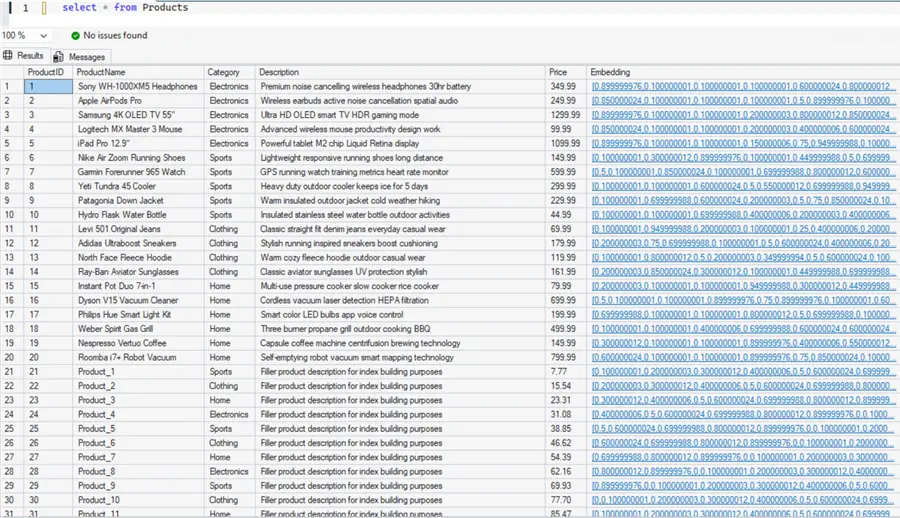
Now, the user requirement is to get wireless headphones with noise cancellation. Traditionally, you can use the following query to get appropriate search results using the like operator.
SELECT
    ProductID,
    ProductName,
    Category,
    Price,
    'LIKE keyword match' AS search_method
FROM dbo.Products
WHERE Description LIKE '%noise cancel%'
   OR Description LIKE '%wireless%'
   OR ProductName LIKE '%headphone%'
   OR ProductName LIKE '%earb%'
ORDER BY ProductName;
SQL Server supports followings Common Distance Metrics for comparison
- Cosine Similarity – Measures the angle between vectors, ignores magnitude. Best for text/NLP.
- Euclidean Distance – Straight-line distance between two points. Best for numeric/spatial data.
- Dot Product – Magnitude-aware angle. Best for unit-normalized vectors.
Search Strategies
- Exact kNN (VECTOR_DISTANCE)
- ANN indexing (VECTOR_SEARCH)
- Hybrid search (either kNN or ANN)
The following vector similarity search using the Exact kNN shows how you get better results compared to the traditional search.
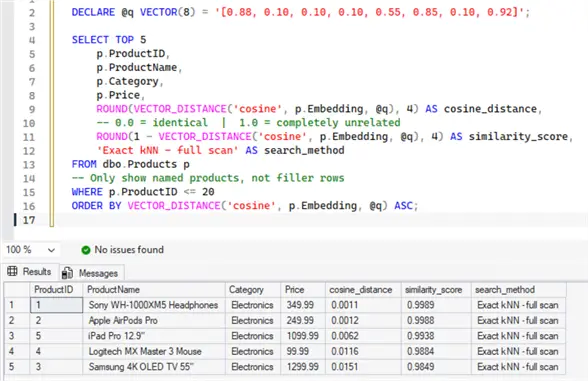
Additional Information:
- Vector data type
- Vector functions
- SQL Server 2025 Vector Search
- SQL Server Semantic Search using New AI Features
- A Practical Introduction to Vector Search in SQL Server 2025
- AI-Powered Search in SQL Server 2025
AI Models Integration
SQL Server 2025 supports creating external models for inference, embedding generation, and intelligent data processing. These models allow SQL Server to generate the embeddings and enable similarity search after storing the vector data. You can define an AI model that can specify the model endpoint location, authentication method, and intended usage.
Supported AI models:
Additional Details: CREATE EXTERNAL MODEL
Embedding generation: SQL Server 2025 can generate the embeddings using an existing AI model definition. You can use the function AI_GENERATE_EMBEDDINGS to return an array of embeddings.
AI Framework Integration
SQL Server 2025 integrates with popular AI orchestration frameworks such as LangChain, Semantic Kernel, and the .NET AI ecosystem (including Microsoft.Extensions.AI). These frameworks can use SQL Server 2025 as a vector store and data source, allowing developers to build AI-powered applications — such as RAG pipelines, semantic search, and intelligent agents — directly on top of their existing SQL Server data platform without moving data to a separate service.
AI-Assisted Development with Copilot
SQL Server Management Studio also supports AI integrations using the Microsoft Copilot. This allows users to help write T-SQL code with AI and ask questions about the database, objects, and environments. It includes:
- Document assistance helps in understanding the code as a summary. It also adds comments on the individual lines for code explanation.
- Explain Assistance: It provides in-depth information about the query clauses and syntax in the chat window.
- Fix assistant: It can help fix any formatting, syntax, or even logical errors with the explanation of the issue and details of all changes.
- Refactor assistant: SSMS can analyze the query and identify the anti-patterns used in the query. It can also suggest and make changes in the code as per best practice.
Example of SSMS Copilot

Additional Information:
- SSMS Copilot to Boost Productivity and Efficiency
- SQL Server Management Studio and Copilot
- What’s New in SSMS 22
- SQL Server Management Studio 22 Download, Install and Configure
Development Features and Enhancements
SQL Server 2025 improves the development velocity with modern programming paradigms. It includes adding new features and enhancing existing features. Let’s look at development focus improvements.
Native RegEx Support
SQL Server 2025 introduces new functions to eliminate the CLR integrations or workarounds for pattern matching including
For example, the REGEXP_COUNT() function counts the occurrence of a pattern matched in a string. The following code uses the REGEXP_COUNT to determine the password complexity.
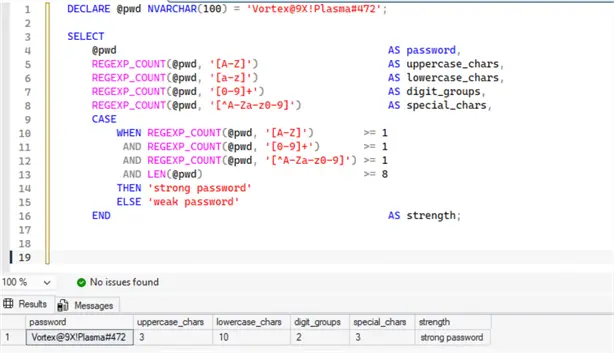
Similarly, the following code shows the use of the REGEXP_LIKE and REGEXP_SUBSTR functions.
DROP TABLE IF EXISTS #MyContacts;
CREATE TABLE #MyContacts (
    id  INT,
    [data] NVARCHAR(500)
);

INSERT INTO #MyContacts VALUES
(1, 'Rajendra Gupta | rajendra.gupta@gmail.com | +91-85222222 | DOB: 1988-05-01'),
(2, 'Manoj  | Manoj.h@Yahoo.com  | 76666666     | DOB: 1990-05-30'),
(3, 'Peter   | NA      | +1 777777777 | DOB: 1980-07-04'),
(4, 'Chris Liu    | chris.lu@company.co.in | +1 22222222 | DOB: 1995-03-22');
GO

SELECT
    id,
    [data],
       CASE
        WHEN REGEXP_LIKE([data], '[A-Za-z0-9._%+-]+@[A-Za-z0-9.-]+\.[A-Za-z]{2,}')
        THEN 1 ELSE 0
    END AS has_valid_email,
    REGEXP_SUBSTR([data], '[A-Za-z0-9._%+-]+@[A-Za-z0-9.-]+\.[A-Za-z]{2,}')
    AS extracted_email
   FROM #MyContacts;
Additional Information:
- REGEXP_COUNT to Count Occurrences in Text
- REGEXP_LIKE Function
- Split strings with Regular Expressions
- SQL Regex Functions Overview
- Extract Text using Regular Expressions with SQL Server 2025 Function REGEXP_INSTR
JSON Enhancements
JavaScript Object Notation (JSON), is a popular, lightweight, and language-independent data-interchange format used for storing and transporting data. Most of the cloud providers (Azure, AWS, Google Cloud) use JSON for APIs and cloud native services.
SQL Server 2025 enhances JSON capabilities with the following changes.
JSON data type
SQL Server 2025 introduces the JSON data type for storing JSON data effectively, compared to NVARCHAR used in previous versions. This data type is optimized for reads and writes for queries using JSON processing. It also supports compression for storage savings.
CREATE TABLE Orders
(
    order_id INT,
    order_details JSON NOT NULL
);
Modify method for the JSON data type
SQL Server 2025 supports modifying the JSON documents stored in a JSON data type column using the modify method.
The following code uses the JSON_MODIFY() function to update the JSON documents.
DROP TABLE IF EXISTS JsonTable;
CREATE TABLE JsonTable (
    id       INT  PRIMARY KEY,
    jsondata JSON                  -- native JSON type, SQL Server 2025+
);

INSERT INTO JsonTable (id, jsondata)
VALUES (1, '{"a":"laptp", "b":"10000", "c":true}');

INSERT INTO JsonTable (id, jsondata)
VALUES (2, '{"a":"Mobile", "b":"5000", "c":true}');

UPDATE JsonTable
SET jsondata = JSON_MODIFY(jsondata, '$.a', 'Laptop')
WHERE id = 1;

UPDATE JsonTable
SET jsondata = JSON_MODIFY(jsondata, '$.c', 'false')
WHERE id = 2;

SELECT
    id,
    JSON_VALUE(jsondata, '$.a') AS product_name,
    JSON_VALUE(jsondata, '$.b') AS price,
    JSON_VALUE(jsondata, '$.c') AS in_stock
FROM JsonTable;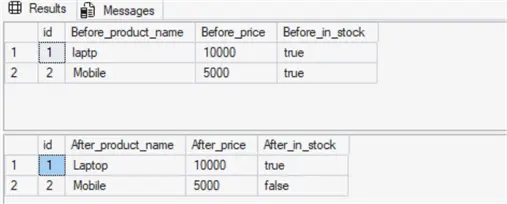
JSON_Contains Function
This function is useful to search for a value in the JSON document path.
The following example uses the JSON_CONTAINS function to search for orders that contain the item laptop.
DROP TABLE IF EXISTS #Orders;
CREATE TABLE #Orders (
    OrderID  INT PRIMARY KEY,
    Details  JSON
);

INSERT INTO #Orders VALUES
(1, '{"customer": "John", "items": ["Laptop", "Mouse", "Keyboard"], "total": 85000}'),
(2, '{"customer": "Alis",   "items": ["Phone", "Charger"],            "total": 32000}'),
(3, '{"customer": "Ket", "items": ["Laptop", "Monitor"],           "total": 120000}'),
(4, '{"customer": "Dave",  "items": ["Keyboard", "Mouse"],           "total": 4500}');
SELECT
    OrderID,
    JSON_VALUE(Details, '$.customer')   AS customer,
    JSON_VALUE(Details, '$.total')      AS total
FROM #Orders
WHERE JSON_CONTAINS(Details, 'Laptop', '$.items[*]') = 1;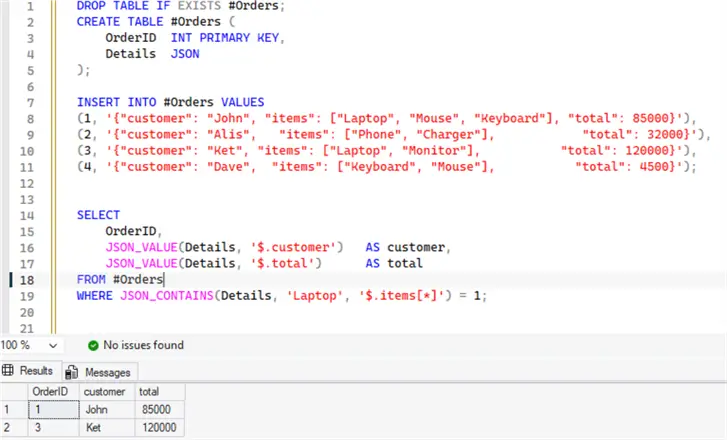
JSON Index
SQL Server 2025 supports adding an index on the JSON data type column for performance improvements. The following example creates a JSON index on the content column with JSON datatype.
DROP TABLE IF EXISTS docs;
CREATE TABLE docs
(
    content JSON,
    id INT PRIMARY KEY
);
CREATE JSON INDEX json_content_index
    ON docs (content);
JSON Array Wildcards and Range Support
SQL Server 2025 expands JSON path expressions to support array wildcards and ranges, making it easier to query multiple elements at once.
- Wildcard (*) – selects all elements in an array
- Index lists/ranges – select specific or multiple positions
ANSI SQL WITH ARRAY WRAPPER in JSON_QUERY
SQL Server 2025 adds support for the ANSI-standard WITH ARRAY WRAPPER clause in JSON_QUERY. Ensures the result is always returned as a JSON array, even if:
- A single value is selected
- Multiple values are returned
Additional Information:
- JSON data type
- JSON_MODIFY
- JSON INDEX
- The New JSON Index in SQL Server 2025
- JSON Data Extract from SQL Server 2025
Change Event Streaming
SQL Server 2025 adds a new data integration capability – Change Event Streaming (CES). The CES streams SQL Server data changes (DML’s) into the Azure Event Hub in near real time. It simplifies building event-driven architectures, supports seamless data integration, enables real-time analytics, and helps track changes to sensitive data with minimal overhead.
- It builds event driven system with minimal overhead and data integration.
- It allows users to build real-time analytics on top of the relational database.
- Administrators can track sensitive data changes and help in auditing\monitoring.
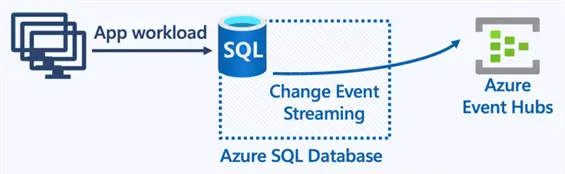
Image source: devblogs
Additional Information:
Fuzzy String Matching
The fuzzy string-matching uses methods to find strings that are similar but not the same. Many times, it becomes difficult to identify strings due to typos, misspellings, different formats, or slight variations in the wording. Fuzzy string matching uses algorithms to detect similar-sounding strings.
SQL Server 2025 supports the following fuzzy functions:
drop table if exists #SpellDifference
CREATE TABLE #SpellDifference
(
    UK NVARCHAR (50), -- UK English word
    US NVARCHAR (50)  -- US English word
);

INSERT INTO #SpellDifference (UK, US)
VALUES ('Colour', 'Color'),
       ('Flavour', 'Flavor'),
       ('Centre', 'Center'),
       ('Theatre', 'Theater'),
       ('Organise', 'Organize'),
       ('Analyse', 'Analyze')

SELECT UK,
       US,
       EDIT_DISTANCE_SIMILARITY(UK, US) AS Similarity
FROM #SpellDifference
WHERE EDIT_DISTANCE_SIMILARITY(UK, US) >= 75
ORDER BY Similarity DESC;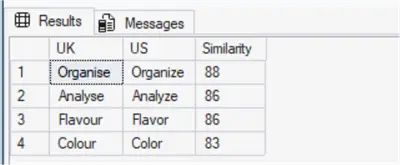
DBA Features and Enhancements
SQL Server 2025 improves enhancements for helping DBAs in performance tuning, high availability, security, and reducing the complexity.
Key enhancements include TempDB space governance, accelerated database recovery for temporary workloads, enterprise-grade security enabled by default, and significant improvements to Always On Availability Groups.
Optimized Locking
Suppose you start a transaction to update 1000 rows on a table. This update might require 1000 exclusive row locks (X) held until the end of the transaction.
To remove this bottleneck, SQL Server 2025 introduced a new transaction locking mechanism – Optimized locking. Its focus is on minimizing the lock blockings and memory consumption for concurrent transactions. It uses the concepts of transaction ID (TID) locking and lock after qualification (LAQ).
Now, with optimized locking, updating 1,000 rows in a table might require 1,000 X row locks, but each lock is released as soon as each row is updated, and only one X TID lock is held until the end of the transaction. It releases the locks quickly and improves workload concurrency.
Note: This feature works on top of the accelerated database recovery (ADR) feature. It generates the following error if ADR is not enabled on the specific database.

You can use the following query to enable ADR.
ALTER DATABASE [mssqltips] SET ACCELERATED_DATABASE_RECOVERY = ON (PERSISTENT_VERSION_STORE_FILEGROUP = [PRIMARY]) WITH NO_WAIT
GO
You can enable optimized locking for an SQL Server database with the following query:

TempDB Optimization
- ADR or Accelerated database recovery: SQL Server 2025 supports accelerated database recovery (ADR) for transactions in the TempDB database. It improves transaction rollback performance and overall database resilience.
- TempDB on tmpfs (Linux): SQL Server 2025 supports the tmpfs filesystem for the TempDB. The tmpfs utilizes RAM for enhancing performance.
- TempDBspace resource governance: SQL Server 2025 supports TempDB resource governance to enforce a limit on TempDB space consumption by a workload group. If a request or query exceeds the limit, the resource governor aborts it. This feature helps DBAs to improve reliability and avoid outages by runaway queries or workloads from consuming a large amount of space in the TempDB.
Additional Information:
Optimized sp_executesql
SQL Server 2025 improves the sp_executesql performance by following the same serialized compilation behavior as stored procedures and triggers. For identical batches (ignoring parameter differences), SQL Server attempts to acquire a compile lock to ensure only one compilation occurs at a time. When multiple sessions execute the same batch concurrently, the first session obtains the lock, compiles the query, and stores the plan in the cache. Other sessions wait for the lock, then reuse the cached plan once it becomes available.
When this option is disabled, identical batches executed via sp_executesql may compile independently and in parallel, leading to multiple compiled plans being added to the cache, which can result in duplication or unnecessary plan replacements.
To enable OPTIMIZED_SP_EXECUTESQL at the database level, use the following Transact-SQL statement:
ALTER DATABASE SCOPED CONFIGURATION SET OPTIMIZED_SP_EXECUTESQL = ON;
Time-Bound Extended Event Sessions
SQL Server Extended Events captures the relevant monitoring data for the events configured. However, you should not run too many extended event sessions or configure them for a specific duration. Currently, in SQL Server 2022 or before, there was no way to automatically stop the extended events. You need to stop them manually or create a SQL Server Agent Job to stop them.
SQL Server 2025 resolves this issue with a configurable duration for extended event sessions. You need to add the MAX_DURATION argument when creating or modifying the session to convert it to time bound extended event session.
It automatically stops an extended event session after a configured time limit elapses. This helps avoid situations where sessions might be left running indefinitely by mistake, consuming resources and potentially generating a large amount of data.
Acceptable values: SECONDS | MINUTES | HOURS | DAY
Maximum supported duration in the MAX_DURATION parameter: 24 days
The following screenshot shows a maximum duration of 5 minutes set in the extended event [SQL SP].
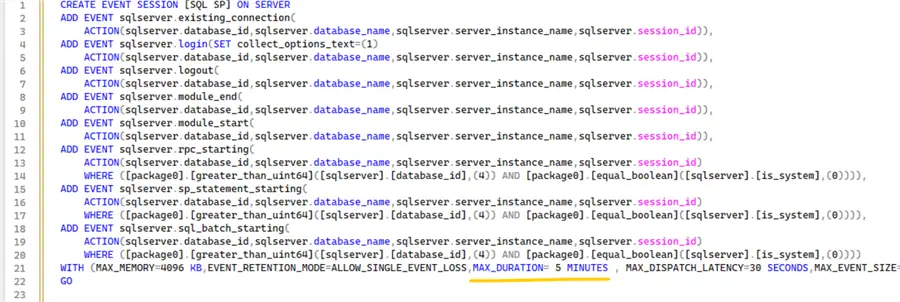
You can query sys.server_event_sessions to check the maximum duration set in the extended event.
select name, max_duration from sys.server_event_sessions where max_duration>0
Additional Information:
Performance Enhancements
SQL Server 2025 includes a comprehensive set of performance improvements for high-concurrency workloads, large-scale dynamic SQL environments, and analytic query patterns.
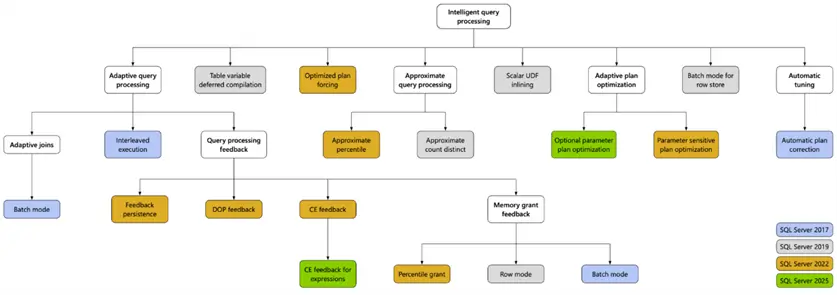
Intelligent Query Processing Suite Enhancements
The following diagram shows the new features added in SQL Server 2025 Intelligent Query Processing Suite.
Cardinality estimation (CE) feedback for expressions
SQL Server query optimizer uses the cardinality estimation for optimizing the query execution plan. An inaccurate cardinality estimation can lead to poor query performance.
SQL Server 2025 adds Cardinality Estimation (CE) feedback for expressions. It helps the query optimizer to learn from the previous execution’s feedback and adjust its row estimations in further executions. This helps SQL Server generate more accurate estimates and better query plans. It is mainly suitable for cases where the optimizer is unable to optimize due to differences in the estimated and actual row counts.
Optional Parameter Plan Optimization (OPPO)
Optional Parameter Plan Optimization (OPPO) in SQL Server 2025 improves performance for parameterized queries with optional filters (e.g., @param IS NULL OR column = @param). Using the OPPO, SQL Server optimizer creates multiple plan variants subject to different parameter scenarios. This reduces parameter-sensitive plan issues and improves overall query stability and efficiency.
ALTER DATABASE SCOPED CONFIGURATION
SET OPTIONAL_PARAMETER_OPTIMIZATION = ON;
Additional Information:
- SQL Server 2025 OPPO and PSPO
- Cardinality estimation (CE) feedback for expressions
- Optional parameter plan optimization (OPPO)
ZSTD Backup compression algorithm
SQL Server 2025 supports the ZSTD compression algorithm for faster and more effective backup compression than the previous MS_XPRESS algorithm.
Additional Information:
High Availability and Disaster Recovery Improvements
SQL Server 2025 introduces significant enhancements to Always On Availability Groups (AGs), improving recovery performance, operational flexibility, and administrative simplicity.
Always On Availability Group Enhancements
Asynchronous Page Redo
When an availability group fails over, replicas must establish a common recovery point to stay synchronized and continue data movement. As part of this process, undo-of-redo may occur, where a secondary replica rolls back transactions to align with that recovery point. This is especially common during disaster recovery (DR) failovers to asynchronous replicas using FAILOVER_ALLOW_DATA_LOSS.
In some DR scenarios, network latency between replicas can slow down the undo-of-redo process as roles switch.
To address this, SQL Server 2025 (17.x) improves the synchronization mechanism by enabling asynchronous, batched page requests, which speeds up undo-of-redo and enhances failover performance.
Fast Failover for Persistent Health Issues
SQL Server 2025 allows setting the value of the RestartThreshold parameter that controls the failover when a replica encounters a persistent health problem.
RestartThreshold =0 -> It allows the AG group to be less tolerant of transient failures and failover immediately.
Expanded Backup Support on Secondary Replicas
In addition to copy-only and transaction log backups, full and differential backups can now be performed on secondary replicas. These further offload backup workloads from the primary replica and improve resource utilization.
Simplified Listener Management
Currently, in SQL Server 2022 or before, to remove a listener IP address, you need to drop and recreate the listener. It increases the administration complexity and downtime for the application briefly.
SQL Server 2025 introduces a new parameterto remove the listener IP address without deleting the listener.
Improved health check timeout diagnostics
SQL Server 2025 logs the performance monitoring counters in the Windows cluster log in case of any health check timeout detection. It helps to troubleshoot and diagnose the issues quickly.
Configure AG Group Commit Waits in Milliseconds
Changes made within a transaction aren’t visible outside it until the transaction is committed. In an Always On availability group, a transaction is considered committed only after all synchronous secondary replicas acknowledge that the commit has been hardened. This requires fast propagation of commit information from the primary to all secondaries.
SQL Server uses write-ahead logging to ensure ACID properties, recording changes as log blocks that are sent and applied to secondary replicas. Since SQL Server 2016, a default 10 ms delay is used to group multiple commits into a single log block before sending, improving efficiency.
SQL Server 2025 (17.x) introduces the availability group commit time configuration option, allowing you to control this delay. By adjusting the commit time (in milliseconds), you can balance:
- Efficiency: Larger batches reduce network overhead and improve replication performance on busy systems
- Latency: Shorter delays send transactions faster to secondaries, which is beneficial for latency-sensitive workloads
This gives more flexibility to tune replication behaviour based on business needs. Read about Configure AG Group Commit Waits in Milliseconds.
Control communication flow for availability groups
SQL Server uses the Universal Communication Service (UCS) protocol for transmitting logs and monitoring the synchronization in the Always on Availability Groups. It also uses a flow control mechanism to prevent the secondary AG replica from falling too far behind. The flow control mechanism is less efficient for the high-latency networks or geo-replications.
SQL Server 2025 improves this mechanism with the UCS send boxcars server configuration. This configuration controls the max number of UCS boxcars (group of packets) that can be sent from AG primary to secondary replica.
SQL Server 2025 supports full and differential backups on any secondary replicas in addition to copy-only backups.
Additional Information:
- Always On Availability Groups
- Server configuration: availability group commit time (ms)
- ALTER AVAILABILITY GROUP
- Availability group asynchronous page request dispatching improvement
- Control communication flow for availability groups
- Improved health check timeout diagnostics
Security Changes
SQL Server 2025 works on the Zero Trust Principle at the core of security. It introduces the following features:
Integration with Microsoft Entra
SQL Server 2025 (17.x) adds support for Microsoft Entra managed identities, enabling secure authentication without the need to manage credentials manually.
Managed identities are automatically handled by Azure and allow applications to authenticate seamlessly with services that support Microsoft Entra authentication. In SQL Server 2025, these managed identities support inbound connections and outbound connections. This simplifies security management and reduces the risk associated with credential handling.
Security Cache Invalidation
Security cache improvements in SQL Server 2025 focus on reducing the overhead of permission checks and authentication-related operations, especially in high-concurrency workloads.
SQL Server maintains a security cache to store Login and user authentication info, Permission checks (GRANT/DENY results), Token and access validation data. This avoids recalculating permissions for every query.
Security cache invalidations can occur at both the database and server levels. When they happen, all existing cache entries are cleared, forcing subsequent queries and permission checks to follow a full “no cache” path until the cache is rebuilt. This can significantly impact performance—especially under heavy workloads—as all active sessions must regenerate their security cache entries. Frequent invalidations can further amplify this overhead. Additionally, invalidations in the master database are treated as server-wide, affecting all databases on the instance.
SQL Server 2025 introduces a more granular approach by allowing per-login security cache invalidation. Instead of clearing the entire cache, only entries associated with the affected login are invalidated. For example, granting new permissions to login L1 no longer impacts the cached tokens of login L2.
Initially, this improvement applies to CREATE, ALTER, and DROP LOGIN operations, as well as permission changes for individual logins. However, group logins still trigger server-wide cache invalidation.
Enhanced Password Protection
SQL Server 2025 uses the PBKDF – password-based key derivation function for safeguarding the passwords. This algorithm hashes the password with 100,000 iterations and makes it hard to gain access with brute force attacks. It helps customers comply with NIST SP 800-63b guidelines.
TDS 8.0 and TLS 1.3
SQL Server 2025 adds support for Tabular Data Stream (TDS) 8.0 and Transport Layer Security (TLS) 1.3. TDS 8.0 enforces strict encryption protocols to secure data in transit. It aligns with today’s encryption standards and enables secure-by-default configurations.
Linux Custom Password Policy
You can enforce a custom password policy for SQL Server on Linux using mssql-conf. This new functionality closes a long-standing security gap and brings Linux deployments in line with enterprise-grade password governance.
Ransomware Protection
SQL Server 2025 supports Azure immutable storage. We can take database backups on the immutable storage that can’t be modified or deleted, as defined by immutability. It helps to safeguard against ransomware attacks.
Enterprise-grade Security by Default
SQL Server 2025 enforces encryption by default (TLS 1.3), uses stronger key derivation (PBKDF), and integrates directly with Microsoft Entra ID (Azure AD) for identity-based access.
Additional Information:
- Secure by default: What’s new in SQL Server 2025 security
- SQL Server 2025 is Now Generally Available
- Security cache improvements
- PBKDF for password hashes is on by default
- Create Microsoft Entra logins and users with nonunique display names
- Support custom password policy on Linux
- Configure TLS 1.3 encryption with TDS 8.0 support
Microsoft Fabric Integration
Mirroring in Fabric brings data from various systems together into a single analytics platform. It is a low-cost and latency solution.
SQL Server 2025 supports mirroring to Fabric with simplified configuration, better performance, and reliability. It enables:
- Near Real-Time Analytics – No need for batch ETL jobs
- Reduced Data Movement Complexity – Eliminates custom pipelines in SSIS, ADF, etc.
- Unified Data Platform for analytical workloads in Fabric and Power BI
- Secure and Managed – Works with Microsoft Entra (AAD)
Discontinued Features
- Data Quality Services (DQS)
- Master Data Services (MDS)
- Synapse Link
- Purview Access Policies
Planned for future removal:
- Hot Add CPU
- Lightweight Pooling (Fiber Mode)
Next Steps
- Explore SQL Server 2025 features and be familiar with them.
- Download and install SQL Server 2025 and start working on it.
- Stay tuned for detailed tips on SQL Server 2025 features.

Hi! I am Rajendra Gupta, Database Specialist and Architect, helping organizations implement Microsoft SQL Server, Azure, Couchbase, AWS solutions fast and efficiently, fix related issues, and Performance Tuning with over 14 years of experience.
I am the author of the book “DP-300 Administering Relational Database on Microsoft Azure.” I can be reached at: Rajendra.gupta16@gmail.com for any consulting help.
- MSSQLTips Awards:
- Author of the Year – 2022 | Author Contender – 2021/2023/2024 | Champion Award (100+ tips) – 2020


