Problem
I have data coming into my SQL Server database as JSON. Before I start parsing it which is quite intensive, I need to check if some values are present in the JSON. Is there a function I can use to do this? Let’s see what the new JSON_CONTAINS function in SQL Server 2025 can do.
Solution
The JSON file format has been supported in SQL Server since SQL Server 2016 with the introduction of functions like OPENJSON and JSON_VALUE. For an excellent introduction to the capabilities of SQL Server 2016 see these tips Advanced JSON Techniques in SQL Server Part 1, Part 2 and Part 3.
With each release, more functionality to handle JSON data has been added. Recently, the JSON data type (this tip has an good overview of which features were introduced in which version) was implemented in Azure SQL DB, which now has found its way into SQL Server 2025. This latest release of SQL Server is in preview at the time of writing. In contrast with many new SQL Server features, this preview includes new functionality that is only available in SQL Server 2025 and not in the cloud counterparts such as Azure SQL DB. One of those new features is the new function JSON_CONTAINS, the subject of this tip.
If you want to try out the SQL Server 2025 preview, you can either use a pre-configured VM image with SQL Server CTP 2.1 in Azure, or if you want the latest version of the preview (Release Candidate 0 a the time of writing) you can create an Azure VM and install SQL Server 2025 yourself. Keep in mind that functionality displayed in the preview might change when the final version release of SQL Server 2025.
The JSON_CONTAINS Function
The new JSON_CONTAINS function checks if a certain value occurs in a path of a JSON document. The syntax is as follows:
--MSSQLTips.com
JSON_CONTAINS(json document, searched value [, json path])
The first parameter is an expression in either the JSON data type, or in a character string value that contains JSON (such as NVARCHAR(MAX)).
JSON_CONTAINS Example
Let’s illustrate with an example. If you have the Adventure Works sample database installed (check out the tip Install AdventureWorks Database for SQL Server 2025), you can use the following script to create a table with the new JSON data type:
--MSSQLTips.com
DROP TABLE IF EXISTS dbo.JsonTest;
CREATE TABLE dbo.JsonTest
(
     Id             INT IDENTITY(1,1) PRIMARY KEY
    ,CustomerKey    INT
    ,Title          NVARCHAR(8)
    ,FirstName      NVARCHAR(50)
    ,MiddleName     NVARCHAR(50)
    ,LastName       NVARCHAR(50)
    ,Suffix         NVARCHAR(10)
    ,EmailAddress   NVARCHAR(50)
    ,Phone          NVARCHAR(20)
    ,JsonData       JSON
);
INSERT INTO dbo.JsonTest(
     CustomerKey
    ,Title
    ,FirstName
    ,MiddleName
    ,LastName
    ,Suffix
    ,EmailAddress
    ,Phone
    ,JsonData)
SELECT
     CustomerKey
    ,Title
    ,FirstName
    ,MiddleName
    ,LastName
    ,Suffix
    ,EmailAddress
    ,Phone
    ,(
    SELECT
         CustomerKey    AS [CustomerKey]
        ,Title          AS [Name.Title]
        ,FirstName      AS [Name.FirstName]
        ,MiddleName     AS [Name.MiddleName]
        ,LastName       AS [Name.LastName]
        ,Suffix         AS [Name.Suffix]
        ,EmailAddress   AS [ContactInfo.EmailAddress]
        ,Phone          AS [ContactInfo.Phone]
    FOR JSON PATH, WITHOUT_ARRAY_WRAPPER
    ) myjson
FROM AdventureWorksDW2022.dbo.DimCustomer;
We can now run the following query:
--MSSQLTips.com
SELECT FirstName, LastName
FROM dbo.JsonTest
WHERE JSON_CONTAINS(JsonData,'David','$.Name.FirstName') = 1;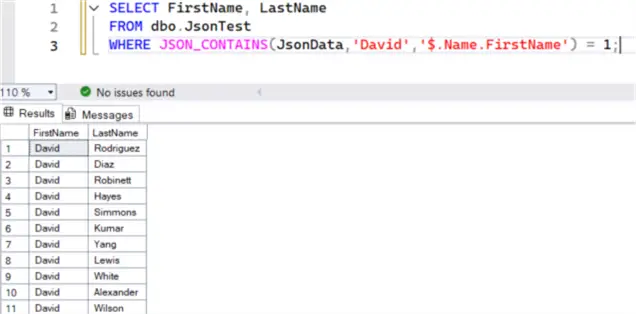
Using Path
In this example, the path ‘$.Name.FirstName’ was used. If no path is specified, the default ‘$ ‘ is used which means the entire JSON document is searched. Interestingly enough, when the path parameter is omitted, the query doesn’t return any results.
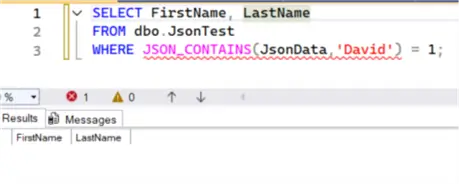
This is most likely a limitation of the preview, as the documentation states that the path parameter is currently required, even though it’s listed as optional. This behavior might change with the official release of SQL Server 2025.
Using Wildcards
You can also specify wildcards in the JSON path parameter. For example:
--MSSQLTips.com
SELECT FirstName, LastName
FROM dbo.JsonTest
WHERE JSON_CONTAINS(JsonData,'David','$.Name.*') = 1;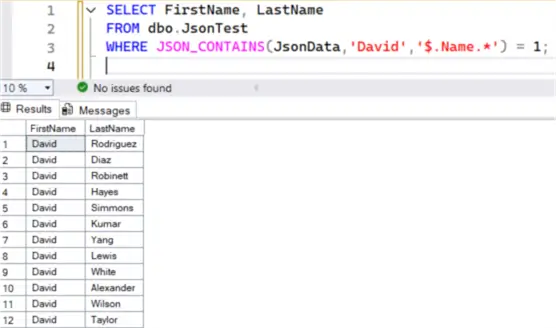
This means we’re searching for David in any of the properties of the Name object, instead of only searching in the FirstName property. However, using the path ‘$ .*’ isn’t an alternative for searching the entire document. This path will instruct JSON_CONTAINS to search on the first nodes of the root of the JSON document. The following query won’t return a match, since ‘David’ is text and the Name object is of the JSON type.
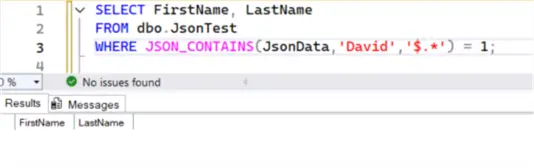
On the other hand, if we search for the integer 11000 we do get a match since this value is found in the CustomerKey property which is a node of the root.
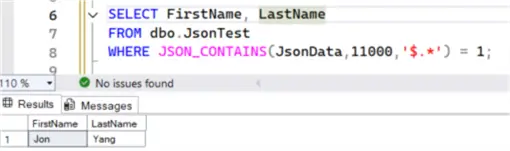
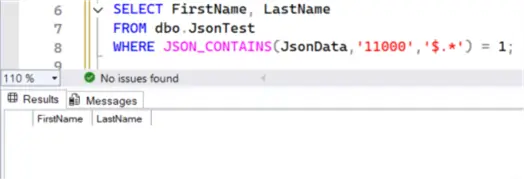
There’s no implicit conversion of data types when using JSON_CONTAINS. If we would search for the string ‘11000’ no match is found since the CustomerKey is stored as an integer in the JSON document.
Search Arrays
It’s also possible to search arrays. Suppose we have the following JSON document:
{
   "a": [1,2,3,4],
   "b": [5,6],
   "c": [7,8,[9,10]]
}
If we want to search the array a for the value 1, we can use the following path:
--MSSQLTips.com
DECLARE @myjson AS JSON = '{"a": [1,2,3,4], "b":[5,6], "c": [7, 8, [9,10]]}';
SELECT value_found = JSON_CONTAINS(@myjson, 1,'$.*[*]');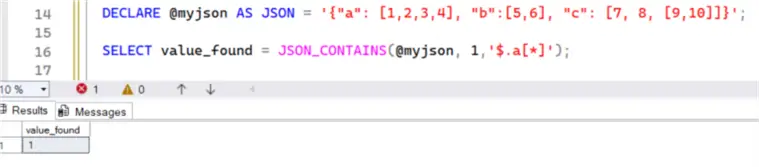
If we would like to search in any of the arrays of the first level, we can use two wildcards:
--MSSQLTips.com
SELECT value_found = JSON_CONTAINS(@myjson, 1,'$.*[*]');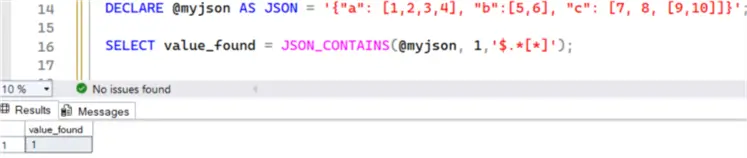
Using numbers, you can also search for values in specific elements of an array. For example, with the following query we’re searching for the number 3 in the first 3 elements of the array a:
--MSSQLTips.com
SELECT value_found = JSON_CONTAINS(@myjson, 3,'$.a[0 to 2]');
The first element can be inspected by using the ordinal 0:
--MSSQLTips.com
SELECT value_found = JSON_CONTAINS(@myjson, 3,'$.a[0]');
The last element can be found by using the “last” keyword:
--MSSQLTips.com
SELECT value_found = JSON_CONTAINS(@myjson, 3,'$.a[last]');
Nested Arrays
It’s also possible to search inside nested arrays:
--MSSQLTips.com
SELECT value_found = JSON_CONTAINS(@myjson, 9,'$.c[last][*]');
This can also be combined with multiple wildcards:
--MSSQLTips.com
SELECT value_found = JSON_CONTAINS(@myjson, 9,'$.c[*][*]');
To search within nested arrays inside all arrays of our JSON document, we can use the following path:
--MSSQLTips.com
SELECT value_found = JSON_CONTAINS(@myjson, 9,'$.*[*][*]');
For more information about JSON paths, check out the documentation.
Advantage of using JSON_CONTAINS instead of JSON_VALUE or JSON_QUERY in search
For many of the examples above, we could’ve also used the JSON_VALUE function. For example, searching for “David” as first name becomes:
--MSSQLTips.com
SELECT FirstName, LastName
FROM dbo.JsonTest
WHERE JSON_VALUE(JsonData,'$.Name.FirstName') = 'David';
Here we are comparing the result of the JSON_VALUE function with the item we’re searching for.
The biggest difference between JSON_CONTAINS and JSON_VALUE for searching values is that JSON_CONTAINS can handle arrays and wildcards, while JSON_VALUE needs a JSON path that points to a scalar value. If you want to handle arrays, you could use JSON_QUERY and then either parse the result or convert the result to a string and use traditional string search methods.
Using our JSON array example from before, we can use JSON_QUERY like this to search if array a contains the number 3:
--MSSQLTips.com
DECLARE @myjson AS JSON = '{"a": [1,2,3,4], "b":[5,6], "c": [7, 8, [9,10]]}';
SELECT [key], [value]
FROM OPENJSON(JSON_QUERY(@myjson,'$.a'))
WHERE [value] = 3;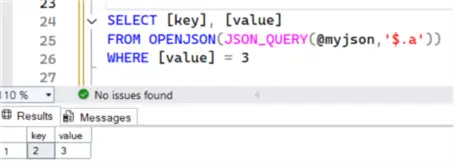
Using data type conversion to string we can use the following method:
--MSSQLTips.com
DECLARE @myjson AS JSON = '{"a": [1,2,3,4], "b":[5,6], "c": [7, 8, [9,10]]}';
SELECT value_found = IIF(CONVERT(VARCHAR(100),JSON_QUERY(@myjson, '$.a')) LIKE '%3%',1,0);
It’s clear that if we have search requirements that would span multiple nodes or arrays, or even nested arrays, that using JSON_QUERY would become much more complex, while JSON_CONTAINS remains straightforward due to its wildcard capabilities.
Next Steps
- For more information about JSON in SQL Server, check out the tip Introducing JSON for SQL Server 2016. Also check out the tip SQL Server JSON Functions JSON_OBJECTAGG and JSON_ARRAYAGG for other new JSON functions.
- For an introduction to JSON itself, please read the tip SQL JSON Examples for Formatted Data and Data Transfer.
- You can find all SQL Server 2025 related tips in this overview.

Koen Verbeeck is a seasoned business intelligence consultant with over a decade of experience with the Microsoft Data Platform. He holds several certifications, including Azure Data Engineer. He’s a prolific writer, with over 375 articles on technologies such as Microsoft Fabric, SSIS, ADF, SSAS, SSRS, MDS, Power BI, Snowflake and Azure services. He has spoken at various events such as PASS, SQLBits, dataMinds Connect and many others. He frequently delivers educational webinars on MSSQLTips.com. For his efforts, Koen has been awarded the Microsoft MVP data platform award for many years.
- MSSQLTips Awards:
- Leadership Award (200+ Tips) – 2021
- Author of the Year – 2014/2020/2022
- Author Contender – 2024/2025


This was educative!