Problem
JSON is a complex data type used for representing objects with various properties. With JSON you follow the key-value pattern where the key is a string and the value can be of different data types. What are some common ways to work with JSON in SQL Server?
Solution
The goal of this document is to provide an overview of working with JSON in SQL Server 2025 using T-SQL. We will go over the following scenarios: get any dataset as JSON, query native JSON, and finally convert JSON to XML. Comparing JSON to XML with their inherent advantages and disadvantages is out of the scope of this article. Both data types have a place in the data domain depending on the use case, however JSON is considered the more modern and interoperable option.
Setup
To follow this document hands on, you need to:
- Install SQL Server 2025. Follow this link to register for a free trial.
- Next, import the Adventure Works 2022 sample database to your newly installed SQL Server. To get the database backup file follow this link. For a step-by-step guide on how to import the backup check this article here.
Having some data let us examine how we can work with JSON in SQL Server 2025 using T-SQL.
FOR JSON AUTO
First, let us try to get some sales data by also calculating sales quantity by dividing each Line Total by the Unit Price:
--MSSQLTips.com T-SQL
SELECT TOP 10
           Cust.CustomerID
           , OrderHeader.CustomerID
           , OrderHeader.SalesOrderID
           , OrderHeader.STATUS
           , SalesDetails.ProductID
           , SalesDetails.UnitPrice
           , SalesDetails.LineTotal
           , SalesDetails.LineTotal / SalesDetails.UnitPrice Qty
FROM       Sales.Customer Cust
INNER JOIN Sales.SalesOrderHeader OrderHeader
ON         Cust.CustomerID = OrderHeader.CustomerID
INNER JOIN Sales.SalesOrderDetail SalesDetails
ON         OrderHeader.SalesOrderID = SalesDetails.SalesOrderID
ORDER BY   Cust.CustomerID FOR JSON AUTO;
To do a “sanity check” of the result set, let us run the query up to and including the ORDER BY clause:
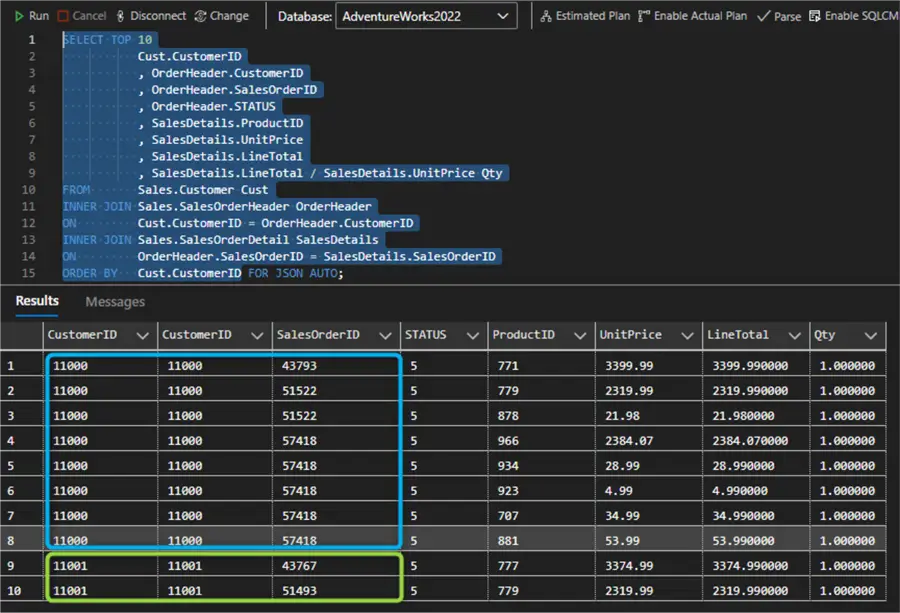
For each customer (two of them in total: 11000 and 11001) we get the Sales Order ID and related details. Now, let us run the full statement including the FOR JSON AUTO clause. AUTO mode formats the JSON output automatically based on the query structure:
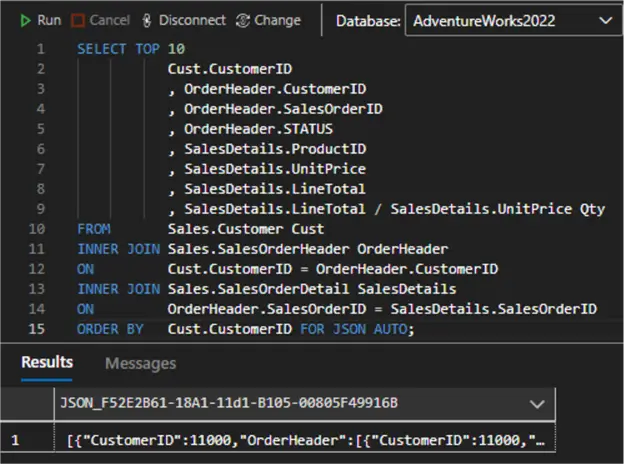
Note that unlike SSMS where the JSON output will be an unformatted string, Azure Data Studio automatically detects and formats the JSON result set. What the expanded JSON object looks like:
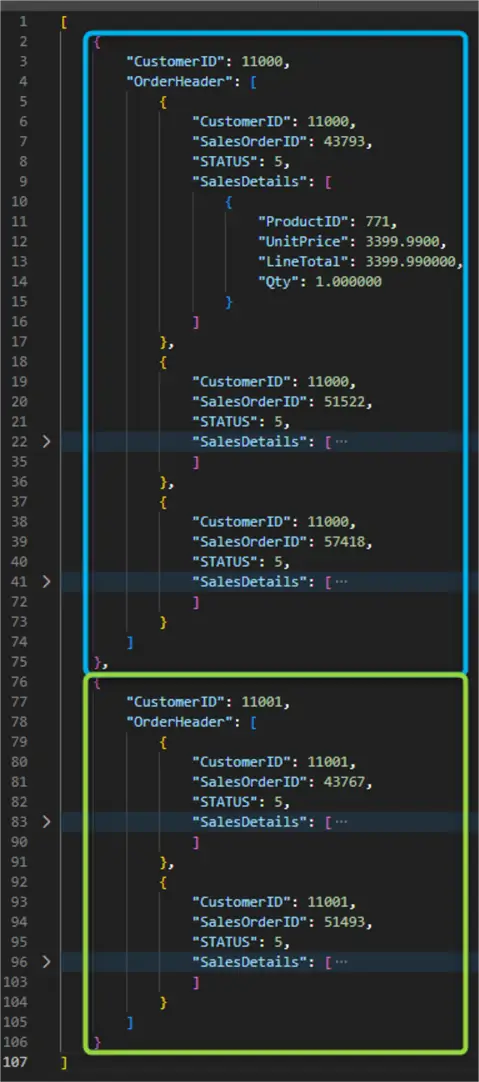
Here is what we see:
- We get an array of JSON objects
- There are two top-level objects, one for each customer (blue and green) we got initially
- Each customer has an array of OrderHeader
- Each Order Header has property keys and an array of SalesDetails.
Therefore, the result is formatted according to the way we structured the query initially:
- The number of elements in the JSON array is equal to the number of rows in the results of the SELECT statement before the FOR JSON clause is applied
- Each row in the results of the SELECT statement, before the FOR JSON clause is applied, becomes a separate JSON object in the array.
- Each column in the results of the SELECT statement, before the FOR JSON clause is applied, becomes a property of the JSON object.
FOR JSON PATH
Another way to generate a JSON result set is to use the PATH clause. With PATH we gain full control of the output.
--MSSQLTips.com T-SQL
SELECT TOP 10
           Cust.CustomerID
           --, OrderHeader.CustomerID
           , OrderHeader.SalesOrderID
           , OrderHeader.STATUS
           , SalesDetails.ProductID
           , SalesDetails.UnitPrice
           , SalesDetails.LineTotal
           , SalesDetails.LineTotal / SalesDetails.UnitPrice Qty
FROM       Sales.Customer Cust
INNER JOIN Sales.SalesOrderHeader OrderHeader
ON         Cust.CustomerID = OrderHeader.CustomerID
INNER JOIN Sales.SalesOrderDetail SalesDetails
ON         OrderHeader.SalesOrderID = SalesDetails.SalesOrderID
ORDER BY   Cust.CustomerID
FOR JSON PATH;
Note I had to comment out the CustomerID column from the OrderHeader table. FOR JSON PATH does not allow duplicate keys:
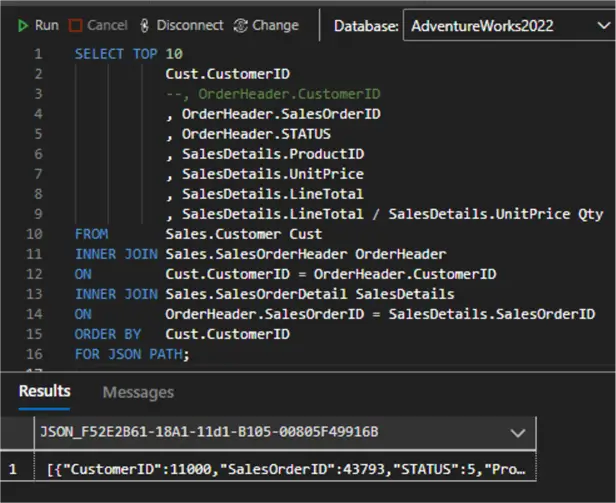
The expanded JSON result set:
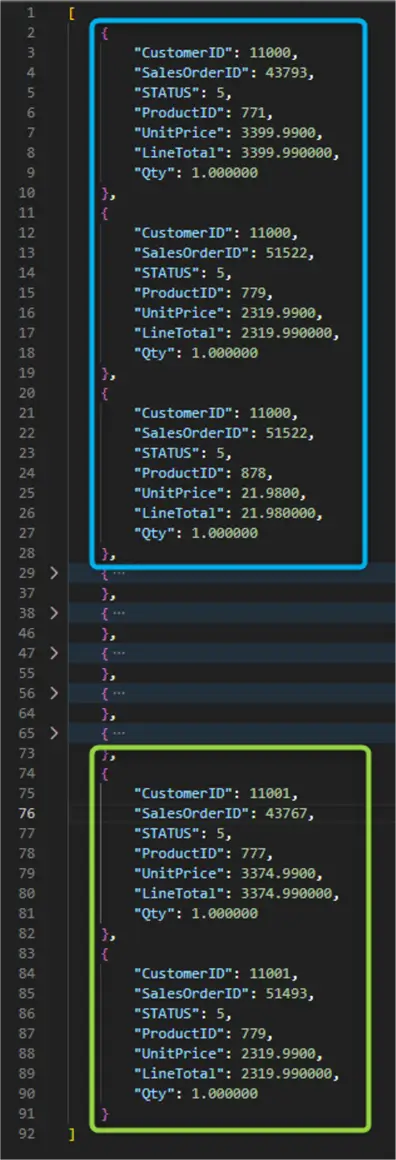
We get an array of ten JSON objects corresponding to the overall row count of ten from the original query.
FOR JSON PATH with explicit key names
The PATH mode gives us the option to specify dot-separated column names allowing fine-grained control of the structure, as well as nesting of the resulting JSON object. Using column aliases, we can define our own keys and hierarchy. Here is an example:
--MSSQLTips.com T-SQL
SELECT TOP 10
           Cust.CustomerID
           , OrderHeader.SalesOrderID 'OrderInfo.ID'
           , OrderHeader.STATUS 'OrderInfo.Status'
           , SalesDetails.ProductID 'Details.ProductID'
           , SalesDetails.UnitPrice 'Details.UnitPrice'
           , SalesDetails.LineTotal 'Details.Total'
           , SalesDetails.LineTotal / SalesDetails.UnitPrice 'Details.Qty'
FROM       Sales.Customer Cust
INNER JOIN Sales.SalesOrderHeader OrderHeader
ON         Cust.CustomerID = OrderHeader.CustomerID
INNER JOIN Sales.SalesOrderDetail SalesDetails
ON         OrderHeader.SalesOrderID = SalesDetails.SalesOrderID
ORDER BY   Cust.CustomerID
FOR JSON PATH;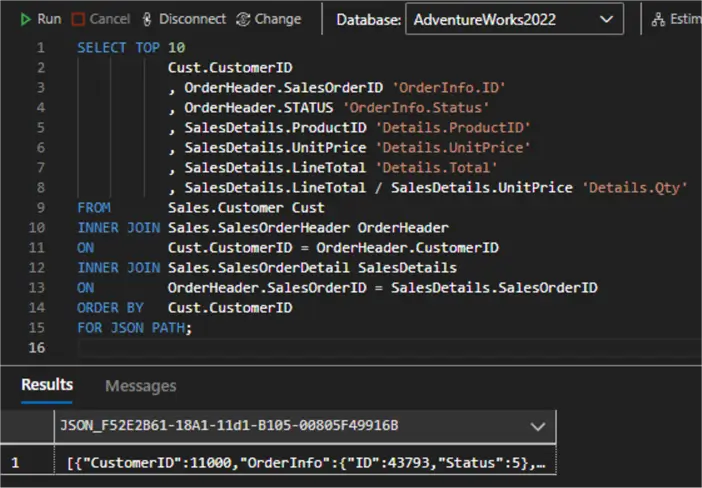
The expanded JSON result set:
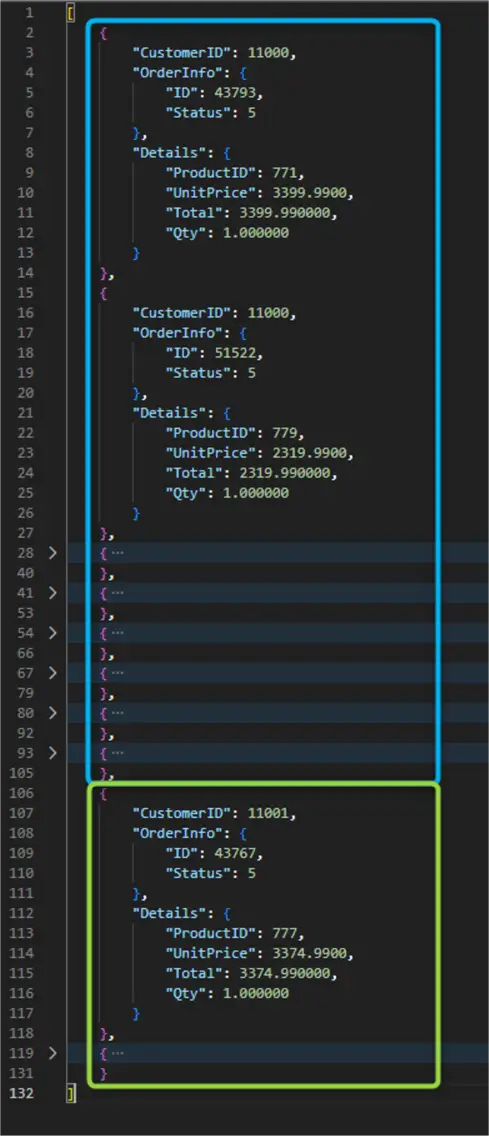
We still get an array of JSON objects; however, each object follows a hierarchy defined by the column names. The following key-values pairs are present:
- “CustomerID”: integer for Customer ID
- “OrderInfo”: nested JSON object with ID and Status keys
- “Details”: nested JSON object with ProductID, UnitPrice, Total, and Qty keys.
FOR JSON PATH, ROOT
The final optional clause for FOR JSON PATH is ROOT. Now we can specify a name for the root node:
--MSSQLTips.com T-SQL
SELECT TOP 10
           Cust.CustomerID
           , OrderHeader.SalesOrderID 'OrderInfo.ID'
           , OrderHeader.STATUS 'OrderInfo.Status'
           , SalesDetails.ProductID 'Details.ProductID'
           , SalesDetails.UnitPrice 'Details.UnitPrice'
           , SalesDetails.LineTotal 'Details.Total'
           , SalesDetails.LineTotal / SalesDetails.UnitPrice 'Details.Qty'
FROM       Sales.Customer Cust
INNER JOIN Sales.SalesOrderHeader OrderHeader
ON         Cust.CustomerID = OrderHeader.CustomerID
INNER JOIN Sales.SalesOrderDetail SalesDetails
ON         OrderHeader.SalesOrderID = SalesDetails.SalesOrderID
ORDER BY   Cust.CustomerID
FOR JSON PATH, ROOT('Sales');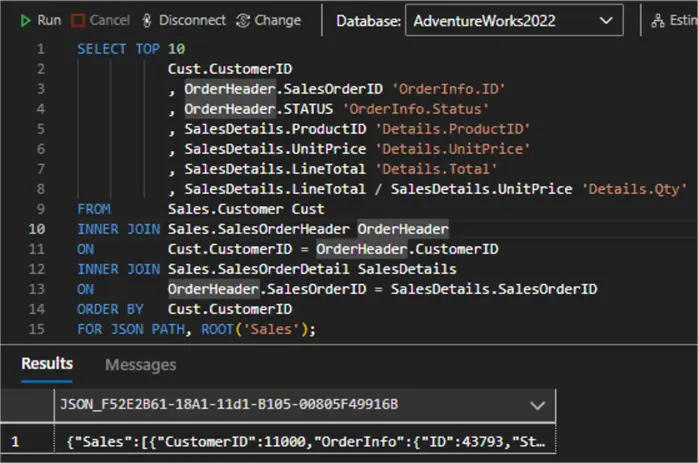
Expanding the JSON result set:
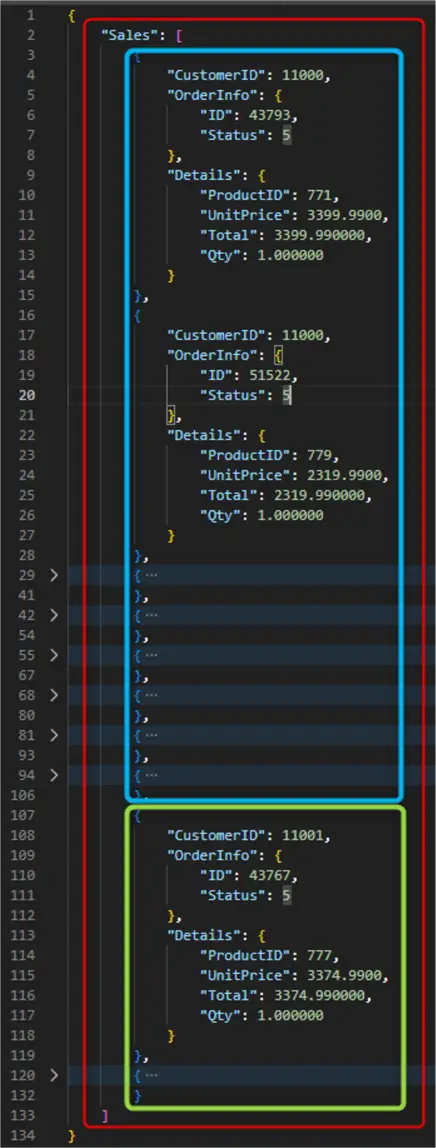
While the ROOT clause is optional, it allows us to specify a root element that will contain the array of JSON objects. This approach may be useful if a downstream system requires the JSON result set to have a root node.
INCLUDE_NULL_VALUES
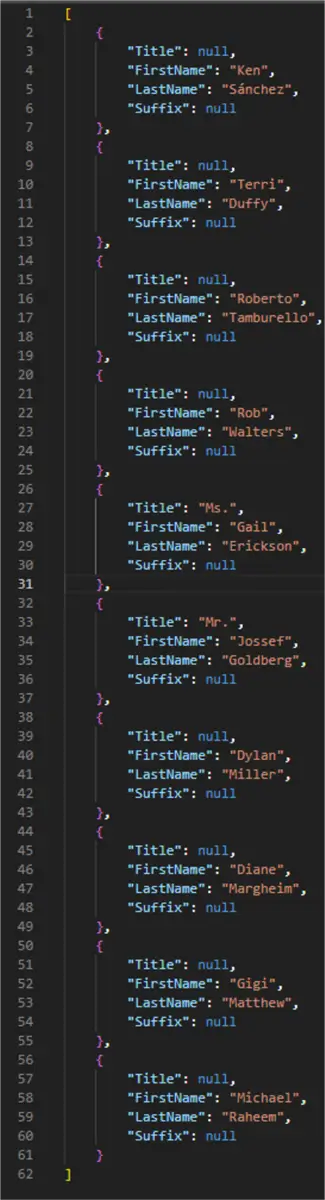
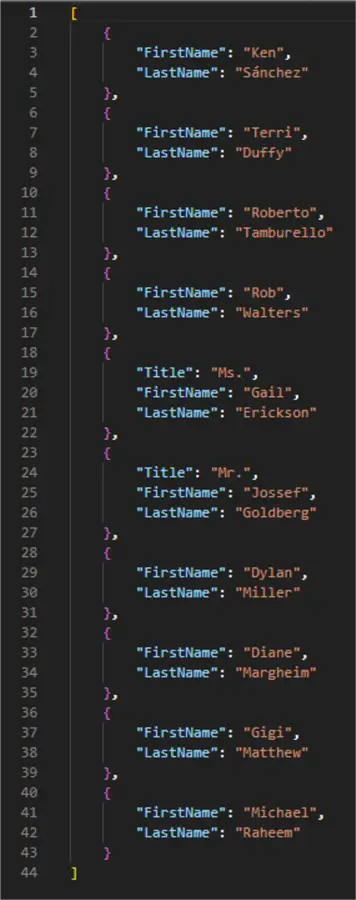
There is one last optional clause that we should cover. That is INCLUDE NULL VALUES. As the name suggests, omitting the clause, like in the previous examples, excludes any null values the query might have returned. Adding the clause explicitly includes the null values to the pertinent keys. This approach is better demonstrated with the Person table:
--MSSQLTips.com T-SQL
SELECT TOP 10
       Title ,
       FirstName ,
       LastName ,
       Suffix
FROM   Person.Person FOR JSON AUTO,
       INCLUDE_NULL_VALUES;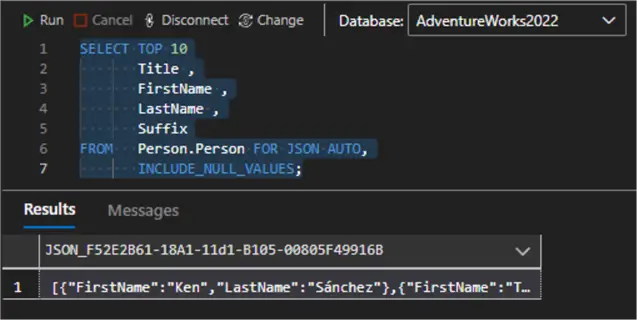
| With INCLUDE_NULL_VALUES | Without INCLUDE_NULL_VALUES (default) |
 |  |
Querying Native JSON
Next, to demonstrate querying a native JSON datatype column, we can use one of the approaches from the previous sections to generate a JSON result set. While SQL Server 2025 supports a native JSON data type, our sample database does not have such a column in the schema. So let us declare and set a JSON variable:
--MSSQLTips.com T-SQL
DECLARE @result_set JSON
SET @result_set = (
SELECT TOP 1000
         [ProductID]
         , [Name]
         , [ProductNumber]
         , [Color]
         , [SafetyStockLevel]
         , [ReorderPoint]
         , [StandardCost]
         , [ListPrice]
FROM     [Production].[Product]
ORDER BY ProductID
FOR JSON AUTO, ROOT('Products'), INCLUDE_NULL_VALUES);
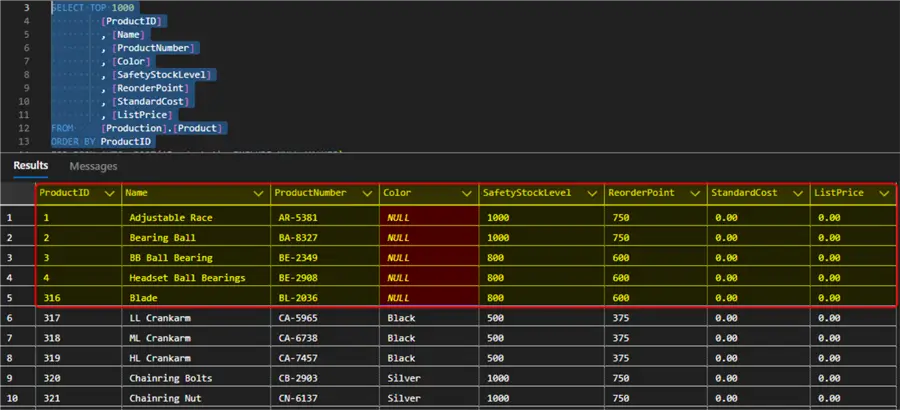
Let us do a quick data sanity check by running the Select statement only without the JSON clause. We are going to focus on the highlighted rows for the next examples:
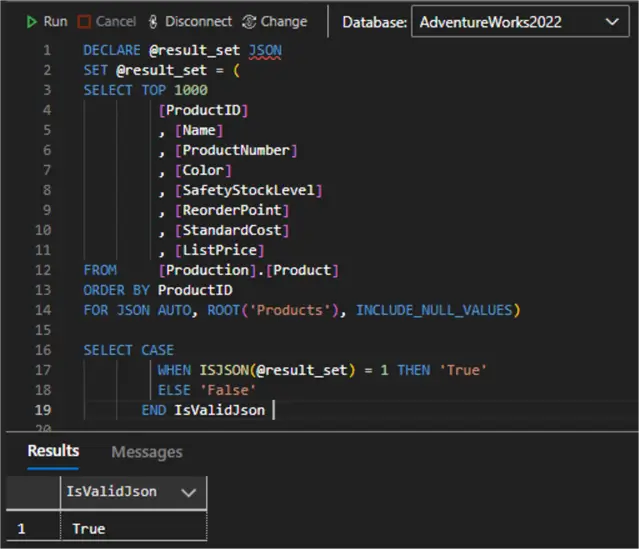
Next, let us check if we have a valid JSON object using the ISJSON expression:
SELECT CASE
         WHEN ISJSON(@result_set) = 1 THEN 'True'
         ELSE 'False'
       END IsValidJson;
As expected, our JSON check passes:
Querying JSON Using JSON_VALUE
We can use the JSON_VALUE syntax to extract a scalar value from our JSON object. We must provide an expression (JSON) and path to the value we are looking for:
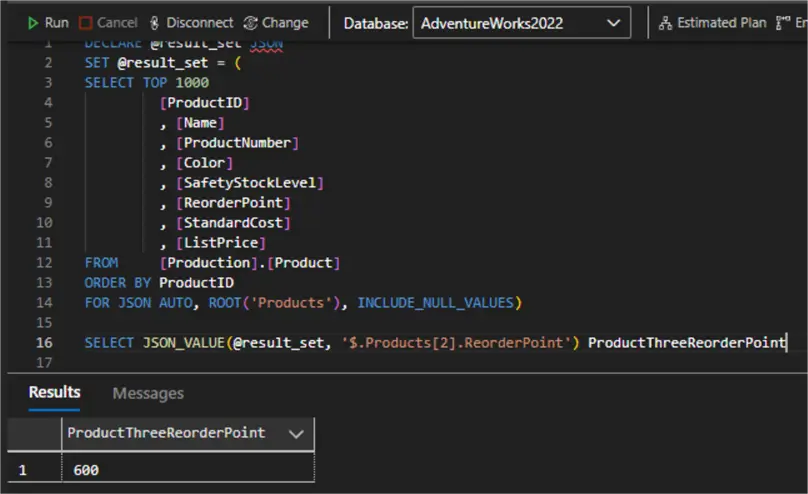
SELECT JSON_VALUE(@result_set, '$.Products[2].ReorderPoint');Here we get the ReorderPoint value for product three. Notice that instead of the ProductID column value (3) we used the array index (2) to get to that value:
Querying JSON Using JSON_QUERY
The JSON_QUERY syntax extracts an object or an array from the JSON string. We must provide an expression (JSON), path to the value we are looking for, and the WITH ARRAY WRAPPER clause:
SELECT
       JSON_QUERY(@result_set, '$.Products[0, 2, 4].Name' WITH ARRAY WRAPPER) ProductNames
       , JSON_QUERY(@result_set, '$.Products[0, 2, 4].Color' WITH ARRAY WRAPPER) ProductColors
FROM @result_set;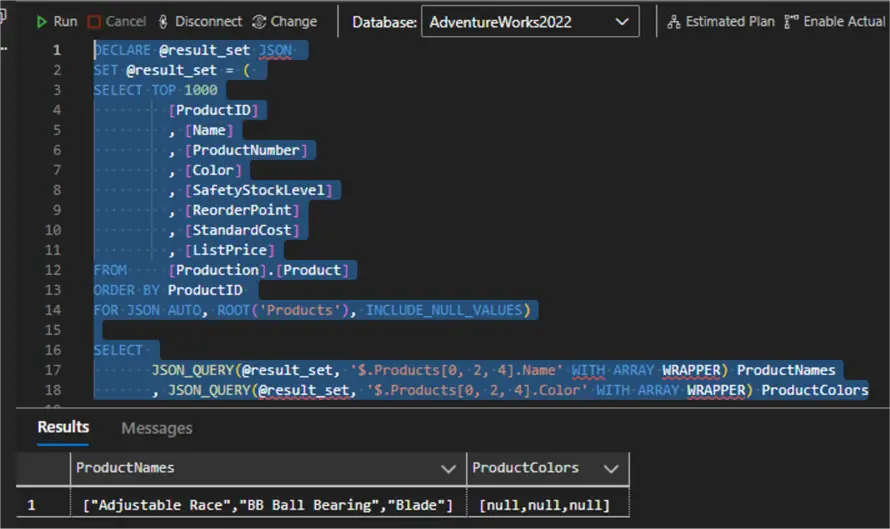
What happens here:
- We access the first (0), third (2) and fifth (4) elements of the Products root node
- We call the Name and Color properties respectively
- We got an ordered pair of arrays containing the names and colors respectively.
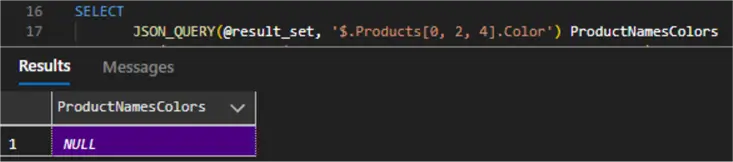
Notice that if the value is not an object or an array, WITH ARRAY WRAPPER becomes mandatory. Otherwise, the return value will be null:
JSON to XML
Using the Products table we can simulate getting a JSON output. Then we can store it in some table because the FOR XML clause requires a table to generate XML.
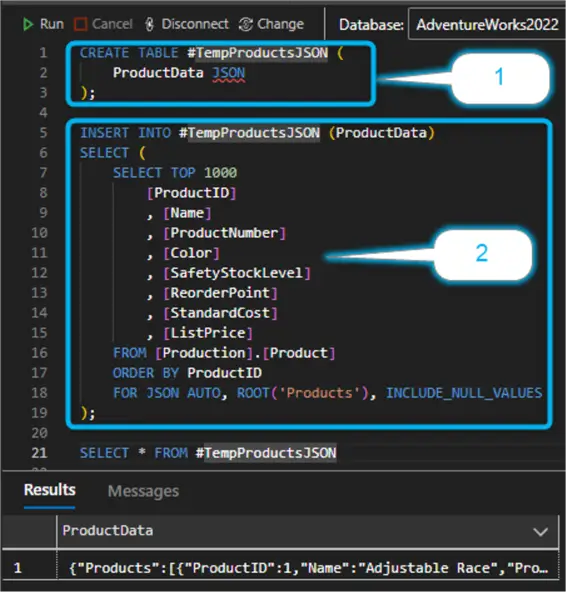
Therefore, we can create a temp table #TempProductsJSON (1) with a single column of JSON type, then insert the JSON result set from the original query (2):
--MSSQLTips.com T-SQL
CREATE TABLE #TempProductsJSON (
    ProductData JSON
);

INSERT INTO #TempProductsJSON (ProductData)
SELECT (
    SELECT TOP 1000
        [ProductID]
        , [Name]
        , [ProductNumber]
        , [Color]
        , [SafetyStockLevel]
        , [ReorderPoint]
        , [StandardCost]
        , [ListPrice]
    FROM [Production].[Product]
    ORDER BY ProductID
    FOR JSON AUTO, ROOT('Products'), INCLUDE_NULL_VALUES
);
Next, we must query the JSON column in the temp table using JSON_VALUE to construct an intermediate result set that will be the source for the final XML result set:
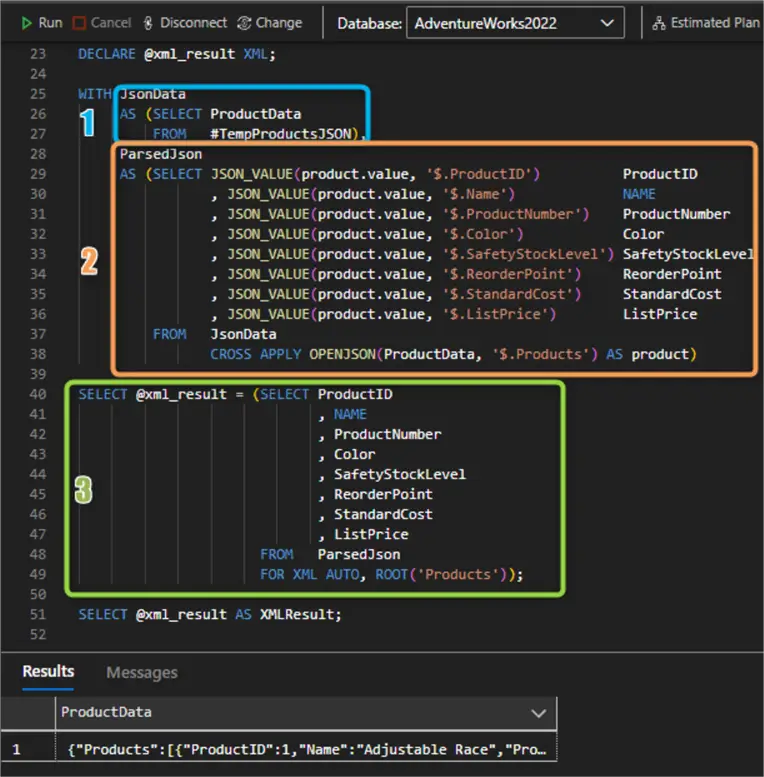
DECLARE @xml_result XML;

WITH JsonData
     AS (SELECT ProductData
         FROM   #TempProductsJSON),
     ParsedJson
     AS (SELECT JSON_VALUE(product.value, '$.ProductID')          ProductID
                , JSON_VALUE(product.value, '$.Name')             NAME
                , JSON_VALUE(product.value, '$.ProductNumber')    ProductNumber
                , JSON_VALUE(product.value, '$.Color')            Color
                , JSON_VALUE(product.value, '$.SafetyStockLevel') SafetyStockLevel
                , JSON_VALUE(product.value, '$.ReorderPoint')     ReorderPoint
                , JSON_VALUE(product.value, '$.StandardCost')     StandardCost
                , JSON_VALUE(product.value, '$.ListPrice')        ListPrice
         FROM   JsonData
                CROSS APPLY OPENJSON(ProductData, '$.Products') AS product)

SELECT @xml_result = (SELECT ProductID
                             , NAME
                             , ProductNumber
                             , Color
                             , SafetyStockLevel
                             , ReorderPoint
                             , StandardCost
                             , ListPrice
                      FROM   ParsedJson
                      FOR XML AUTO, ROOT('Products'));

SELECT @xml_result AS XMLResult;
The first CTE (1) JsonData just returns the single-row single-column result set containing the JSON string. The second CTE (2) ParsedJSon extracts the values from the JSON object and uses CROSS APPLY to join the result from the table-valued function OPEN_JSON. The result is the Cartesian product between each row from the temp table and each individual JSON. We assign the result to the initially declared XML variable (3). Running a SELECT on the xml_result will give us the final XML result set:

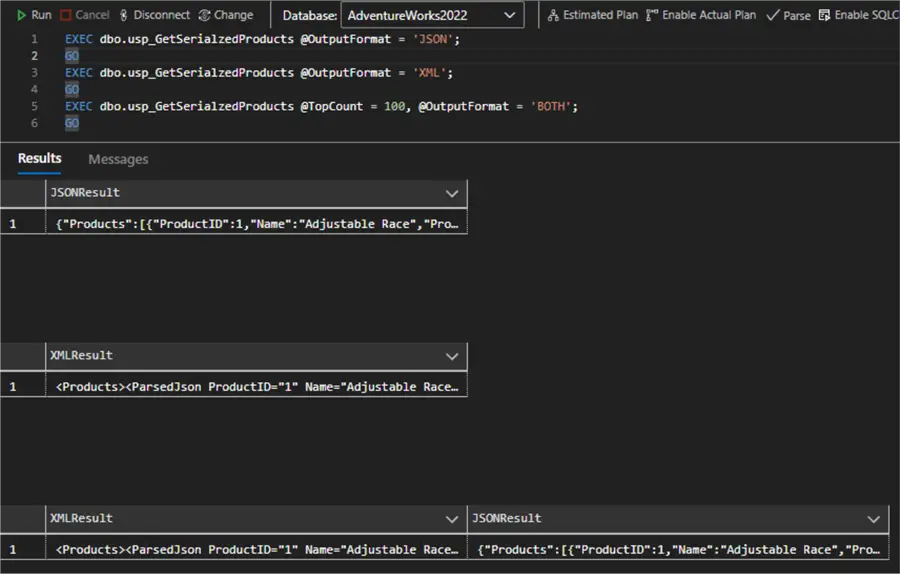
As a further modification, the FOR XML AUTO clause can be added directly after CROSS APPLY in the second CTE. I have chosen the more verbose approach to demonstrate how everything works. To make this example more complete, here is a stored procedure code definition example that parametrizes the top count and type of output:
CREATE PROCEDURE dbo.usp_GetSerialzedProducts
    @TopCount INT = 1000,
    @OutputFormat NVARCHAR(10) = 'XML' -- 'XML', 'JSON', or 'BOTH'
AS
BEGIN
    SET NOCOUNT ON;

    BEGIN TRY
        IF @TopCount <= 0 OR @TopCount > 10000
        BEGIN
            RAISERROR('TopCount must be between 1 and 10000', 16, 1);
            RETURN;
        END

        IF @OutputFormat NOT IN ('XML', 'JSON', 'BOTH')
        BEGIN
            RAISERROR('OutputFormat must be XML, JSON, or BOTH', 16, 1);
            RETURN;
        END

        CREATE TABLE #TempProductsJSON (
            ProductData JSON
        );

        DECLARE @sql NVARCHAR(MAX) = N'
        INSERT INTO #TempProductsJSON (ProductData)
        SELECT (
            SELECT TOP (' + CAST(@TopCount AS NVARCHAR(10)) + N')
                [ProductID]
                , [Name]
                , [ProductNumber]
                , [Color]
                , [SafetyStockLevel]
                , [ReorderPoint]
                , [StandardCost]
                , [ListPrice]
            FROM [Production].[Product]
            ORDER BY ProductID
            FOR JSON AUTO, ROOT(''Products''), INCLUDE_NULL_VALUES
        );';

        EXEC sp_executesql @sql;

        DECLARE @xml_result XML;
        DECLARE @json_result JSON;

        IF @OutputFormat IN ('JSON', 'BOTH')
        BEGIN
            SELECT @json_result = ProductData FROM #TempProductsJSON;
        END

        IF @OutputFormat IN ('XML', 'BOTH')
        BEGIN
            WITH JsonData AS (
                SELECT ProductData
                FROM #TempProductsJSON
            ),
            ParsedJson AS (
                SELECT
                    JSON_VALUE(product.value, '$.ProductID') AS ProductID,
                    JSON_VALUE(product.value, '$.Name') AS Name,
                    JSON_VALUE(product.value, '$.ProductNumber') AS ProductNumber,
                    JSON_VALUE(product.value, '$.Color') AS Color,
                    JSON_VALUE(product.value, '$.SafetyStockLevel') AS SafetyStockLevel,
                    JSON_VALUE(product.value, '$.ReorderPoint') AS ReorderPoint,
                    JSON_VALUE(product.value, '$.StandardCost') AS StandardCost,
                    JSON_VALUE(product.value, '$.ListPrice') AS ListPrice
                FROM JsonData
                CROSS APPLY OPENJSON(ProductData, '$.Products') AS product
            )
            SELECT @xml_result = (
                SELECT
                    ProductID,
                    Name,
                    ProductNumber,
                    Color,
                    SafetyStockLevel,
                    ReorderPoint,
                    StandardCost,
                    ListPrice
                FROM ParsedJson
                FOR XML AUTO, ROOT('Products')
            );
        END

        IF @OutputFormat = 'XML'
        BEGIN
            SELECT @xml_result AS XMLResult;
        END
        ELSE IF @OutputFormat = 'JSON'
        BEGIN
            SELECT @json_result AS JSONResult;
        END
        ELSE IF @OutputFormat = 'BOTH'
        BEGIN
            SELECT
                @xml_result AS XMLResult,
                @json_result AS JSONResult;
        END

        DROP TABLE #TempProductsJSON;

    END TRY
    BEGIN CATCH
        IF OBJECT_ID('tempdb..#TempProductsJSON') IS NOT NULL
            DROP TABLE #TempProductsJSON;

        DECLARE @ErrorMessage NVARCHAR(4000) = ERROR_MESSAGE();
        DECLARE @ErrorSeverity INT = ERROR_SEVERITY();
        DECLARE @ErrorState INT = ERROR_STATE();

        RAISERROR(@ErrorMessage, @ErrorSeverity, @ErrorState);
    END CATCH
END
GO
Now the stored procedure combines the examples so far:
Conclusion
In this article we examined several different ways of converting a SELECT statement to JSON output. We also investigated how to query a native JSON column or variable. Finally, we covered how to convert the output from JSON to XML for data transformation purposes with or without a stored procedure wrapper.
Next Steps
- What’s new in SQL Server 2025 Preview
- SQL Server 2025 Public Preview now available
- AdventureWorks sample databases
- Install AdventureWorks Database for SQL Server 2025
- Format JSON Output Automatically with AUTO Mode
- Format Nested JSON Output with PATH Mode
- SQL JSON Examples for Formatted Data and Data Transfer
- SQL Server ISJSON for valid Value, Array or Object JSON format
- JSON Data Type in Azure SQL Database
- Process JSON files with SQL Server
- JSON_QUERY
- JSON_VALUE
- Compare JSON_VALUE and JSON_QUERY

Hristo Hristov is a seasoned data professional with 10+ years of experience spanning the intersection of data engineering and smart manufacturing solutions. Since 2017, he has specialized in implementing advanced analytics solutions for bridging the IT/OT gap.
A technical writer with over 80 published articles on data and AI technologies, Python development, and cloud solutions. Passionate about transforming complex data into business value through innovative applications of Azure Data Platform, Python, IoT solutions, databases, and other cloud technologies.
Currently applying Industry 4.0 best practices, focusing on IoT connectivity, and implementing data and AI systems in manufacturing. Hristo holds a degree in Data Science and several Microsoft certifications covering SQL Server, Power BI, and related technologies.
- MSSQLTips Awards
- Achiever Award (75+ tips) – 2026
- Rookie of the Year – 2021
- Author Contender – 2022/2023/2024/2025