Problem
I need to construct JSON from data in our database, but I find the existing FOR JSON PATH limited when the data is not located in one single row but rather scattered over multiple rows. Is there another method on how to handle JSON data in SQL Server? Learn how to use the new SQL Server JSON Functions JSON_OBJECTAGG and JSON_ARRAYAGG in this article.
Solution
Two new T-SQL functions have been introduced to create JSON artifacts from your data: JSON_OBJECTAGG and JSON_ARRAYAGG. Both are aggregation functions and help you create JSON statements from data that is stored in multiple rows.
In this tip, we’ll give you an introduction to both functions. At the time of writing, the two new functions are only available in Azure SQL DB, Azure SQL Managed Instance, and Fabric SQL Database. Future version of SQL Server should include these functions.
JSON_OBJECTAGG Function
The JSON_OBJECTAGG function has the following syntax:
--MSSQLTips.com
JSON_OBJECTAGG(<json_key> : <json_value> [NULL ON NULL | ABSENT ON NULL])
Typically, it will be used together with a GROUP BY clause, as it is an aggregation function. Let’s illustrate its purpose with an example. The following query uses the AdventureWorks sample database to create a table modeled as key/value pairs.
--MSSQLTips.com
DROP TABLE IF EXISTS #KeyValueJson;

SELECT CustomerID, ValueType = 'FirstName', [Value] = FirstName
INTO #KeyValueJson
FROM SalesLT.Customer
UNION ALL
SELECT CustomerID, ValueType = 'MiddleName', [Value] = MiddleName
FROM SalesLT.Customer
UNION ALL
SELECT CustomerID, ValueType = 'LastName', [Value] = LastName
FROM SalesLT.Customer
UNION ALL
SELECT CustomerID, ValueType = 'CompanyName', [Value] = CompanyName
FROM SalesLT.Customer
UNION ALL
SELECT CustomerID, ValueType = 'Email', [Value] = EmailAddress
FROM SalesLT.Customer;
If we use FOR JSON PATH on this table, we would get a JSON object for every row. This would be the result for CustomerID 1:
[
   {
      "CustomerID": 1,
      "ValueType": "FirstName",
      "Value": "Orlando"
   },
   {
      "CustomerID": 1,
      "ValueType": "MiddleName",
      "Value": "N."
   },
   {
      "CustomerID": 1,
      "ValueType": "LastName",
      "Value": "Gee"
   },
   {
      "CustomerID": 1,
      "ValueType": "CompanyName",
      "Value": "A Bike Store"
   },
   {
      "CustomerID": 1,
      "ValueType": "Email",
      "Value": orlando0@adventure-works.com
   }
]
However, we want a single JSON object per customer. With the new JSON_OBJECTAGG, we can easily achieve this:
--MSSQLTips.com
SELECT
     CustomerID
    ,MyJSON = JSON_OBJECTAGG(ValueType:Value)
FROM #KeyValueJson
GROUP BY CustomerID
ORDER BY CustomerID;
From the results, we can see that there’s no explicit sorting of the properties. Sometimes FirstName is the first property, sometimes it’s Email. There’s an optional clause to handle NULL values. For example, some customers don’t have a middle name, which results in a NULL value in the MiddleName column. When you add NULL ON NULL to the function, you will get an explicit NULL value in the resulting JSON object:

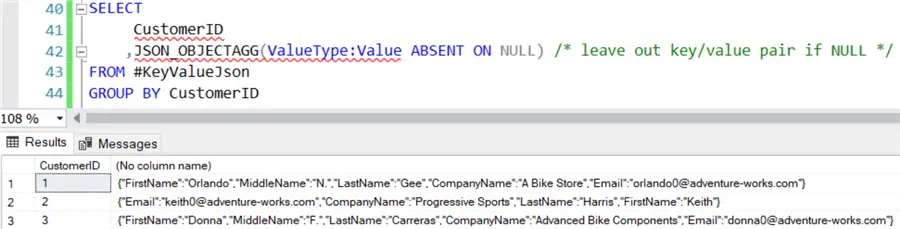
This is the default behavior. The other option is ABSENT ON NULL, which will only drop the property from the JSON document. As you can see from the following result set, the customer with ID 2 now doesn’t have a MiddleName property:
JSON_ARRAYAGG Function
The JSON_OBJECTAGG function is used to create a JSON object containing various properties. The JSON_ARRAYAGG function, on the other hand, can be used to construct an array of objects of the same type. Its syntax is as follows:
--MSSQLTips.com
JSON_ARRAYAGG(value expression [order by clause] [NULL ON NULL | ABSENT ON NULL])
Example Using JSON_ARRAYAGG Function
Let’s illustrate this new function with an example. Suppose we have a digital meter at home that keeps track of the electricity usage (in kWh) your home consumes. The meter keeps track of the kWh spent in a 15-minute interval. This means we have 96 measured values each day (with the exception of days where there’s a switch between time zones). Each meter value is stored as a new row in a table. With the following script, we can generate random sample values for three different customers:
--MSSQLTips.com
DROP TABLE IF EXISTS #MeasuredValues;
SELECT
     Customer
    ,QuarterOfHour = s.[value]
    ,MeasuredValue = (100.0 * RAND(CONVERT(VARBINARY,NEWID())))
INTO #MeasuredValues
FROM (VALUES('A'),('B'),('C')) tmp(Customer)
CROSS JOIN GENERATE_SERIES(1,96) s;
The GENERATE_SERIES function is used to create a series of numbers from 1 to 96. The NEWID function is used to generate a unique seed for the RAND function, which results in a different random number for each row.

We need to create a JSON document with the metered values, so we can send this to the utility provider for billing purposes. Ideally, we have one single array with the metered values, instead of 96 different items in the JSON. With FOR JSON PATH, we don’t get the desired result:

JSON_ARRAYAGG Function Example
With the new JSON_ARRAYAGG function, we can aggregate on the customer and construct one single array with the metered values.
--MSSQLTips.com
SELECT
     Customer
    ,MeasuredValues = JSON_ARRAYAGG(CONVERT(NUMERIC(7,3),MeasuredValue)
                                    ORDER BY QuarterOfHour
                                    NULL ON NULL)
FROM #MeasuredValues
GROUP BY Customer
ORDER BY Customer;
Unlike with JSON_OBJECTAGG, we can now specify an explicit ordering with the (optional) ORDER BY clause within the function itself. In our use case, this is important as we want to preserve the order in which the values were metered, so we can do analysis on which points in time during the day our customers consume the most electricity. The handling of NULL values is also important. If for some reason the meter is malfunctioning, we want a NULL value for the missing quarters, otherwise we can’t map the other values against their respective points in time. Like JSON_OBJECTAGG, we can specify NULL ON NULL to get an explicit NULL value (this does mean however there needs to be a row present for that specific point in time), with a NULL value for the MeasuredValues column. If you don’t need to keep NULL values, you can opt for the ABSENT ON NULL option. In contrast with JSON_OBJECTAGG, ABSENT ON NULL is the default option for JSON_ARRAYAGG.
Conclusion
With JSON_OBJECTAGG and JSON_ARRAYAGG, we now have two powerful new functions at our disposal for creating JSON objects and arrays. When you have complex requirements for a JSON document that are hard or impossible to implement with the FOR JSON PATH|AUTO clause, we can use these functions to pre-process the data and to get all the data points into one single row.
Next Steps
- You can find the official documentation of these new functions here and here.
- If you want to try out this new functionality, you can spin up an Azure SQL DB and use the scripts from this tip. The same functionality is also available in the Fabric SQL Database.
- There’s an interesting video from the Data Exposed Azure SQL Blog that showcases the new JSON functionality.
- For more tips about T-SQL, you can check out this overview.

Koen Verbeeck is a seasoned business intelligence consultant with over a decade of experience with the Microsoft Data Platform. He holds several certifications, including Azure Data Engineer. He’s a prolific writer, with over 375 articles on technologies such as Microsoft Fabric, SSIS, ADF, SSAS, SSRS, MDS, Power BI, Snowflake and Azure services. He has spoken at various events such as PASS, SQLBits, dataMinds Connect and many others. He frequently delivers educational webinars on MSSQLTips.com. For his efforts, Koen has been awarded the Microsoft MVP data platform award for many years.
- MSSQLTips Awards:
- Leadership Award (200+ Tips) – 2021
- Author of the Year – 2014/2020/2022
- Author Contender – 2024/2025


The new JSON_OBJECTAGG function seems very interesting. However, I need something even more sophisticated. I need to pull nested JSON results. For example, there could be a single order but have multiple items within an order. The JSON results have many orders and within each order there are many items. Can JSON_OBJECTAGG handle that, and if so, can you please provide an example?