Problem
Often new T-SQL functionality is released first in the Azure cloud environment, before it makes its way to the on-premises SQL Server product. Recently, a new T-SQL function and operator went general available in Azure SQL DB (and Azure SQL Managed Instance): UNISTR and the ANSI SQL string concat operator (||). In this tip, we’ll introduce you to both concepts.
Solution
If you want to try out this new T-SQL functionality, you can create a free Azure SQL DB, or you can create a Microsoft Fabric trial and use a Fabric SQL DB.
The New UNISTR Function
The first new function is UNISTR, which can be used to work with Unicode encoded characters in text, such as international or special characters and even emojis. It has the following syntax:
--MSSQLTips.com
UNISTR('expression' [, 'unicode escape character']- expression is a character expression using any of the following data types: char, varchar, nchar or nvarchar. If you’re using char or varchar, the collation should be a valid UTF-8 collation. You can find more information in the documentation about Unicode support.
- unicode escape character is a single character that is used as a user-defined escape sequence, with a default of “\” (backslash). The escape sequence are \xxxx for UTF-16 codepoints, or \+xxxxxx for full Unicode codepoints.
Examples
Let’s illustrate with some examples. The Unicode codepoint for the heart emoticon is 2764, so if we put this in an expression inside UNISTR, we get the following:
--MSSQLTips.com
SELECT UNISTR(N'I \2764 MSSQLTips');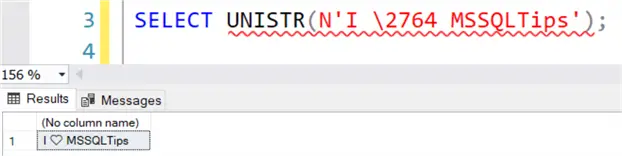
Let’s say we want to replace the heart with an emoji of a database (there actually isn’t one, but the oil drum emoticon is pretty close). The code point is 1F6E2. However, when we replace this in the string, we don’t get the result we want:
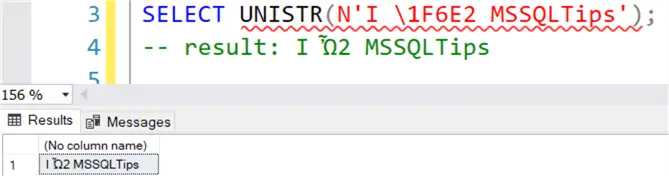
This is because the hexadecimal codepoint is longer than 4 characters, which means we need to use the full escape sequence. We need 6 characters, so the codepoint is preceded with a +0. The plus indicates we’re using the full escape sequence, and the 0 is added so there’re 6 characters.
--MSSQLTips.com
SELECT UNISTR(N'I \+01F6E2 MSSQLTips');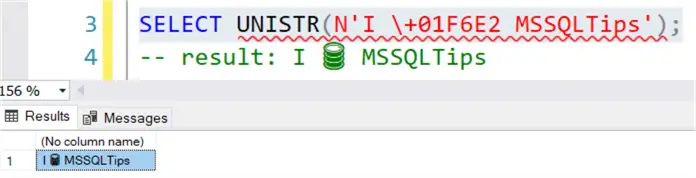
If we drop the 0, we will get an error saying an invalid Unicode escape sequence was used.

Keep this in mind when you’re searching for the correct Unicode character sequence. For example, when I searched for the “cat emoji” in Unicode, I found the following page stating the Unicode character is “U+1F408”. To use this in UNISTR, the Unicode escape sequence becomes:
--MSSQLTips.com
SELECT UNISTR(N'I \+01F408 cats');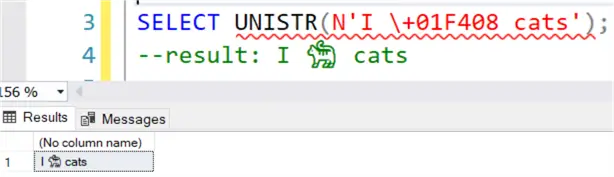
The Omega character is “U+03A9”, and to embed this in text we can either use the shorter escape sequence, or the long one with 2 preceding zeros:
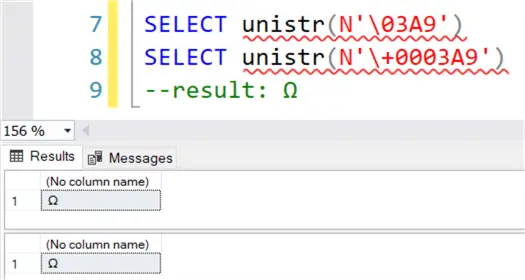
There’s a T-SQL function named STR, but it’s not related at all to the new UNISTR function. STR is used to convert numeric data into varchar.
What about NCHAR?
T-SQL already supports Unicode with the NCHAR function (not to be confused with the NCHAR data type). There are two big differences:
- NCHAR accepts an integer as input. Depending on the codepage, it accepts values between 0 and 65535 or 1114111.
- it can only return one single Unicode character at a time, while UNISTR can handle multiple Unicode characters inside a string expression.
The integer corresponding with a Unicode character can be found with the UNICODE function. For example:
--MSSQLTips.com
SELECT UNICODE(N'Ω'); -- returns 937
SELECT NCHAR(937); -- returns Ω 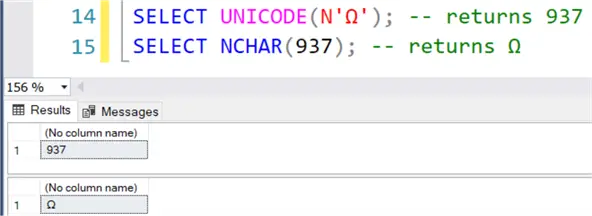
However, depending on your collation, some characters (like the cat emoji) need to be represented by two NCHAR (which is the UTF-16 representation):
--MSSQLTips.com
SELECT NCHAR(0xD83D) + NCHAR(0xDC08);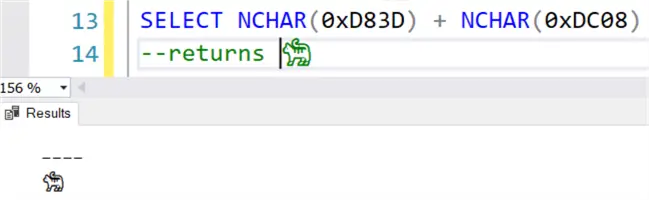
If you use the UNICODE function on this Unicode character, you’ll only get the integer representation of the first character (0xD83D = 55357):
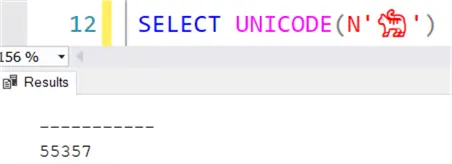
Working with the new UNISTR avoids those issues since you can work with the UNICODE codepoint directly.
The ANSI SQL string concatenation operator ||
Another new T-SQL functionality is the || operator, which handles string concatenation.
For example:
SELECT 'Hello' || ' ' || 'MSSSQLTips.com!'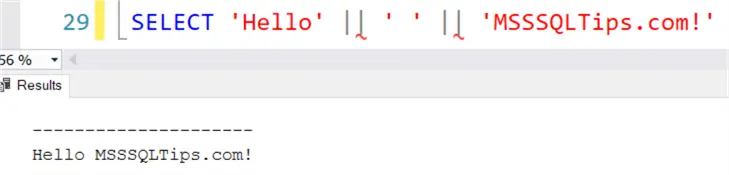
This operator adheres to the ANSI SQL standard which might make code migrations between different platforms easier. It’s also an alternative to the existing methods of concatenation, which are the + operator and the CONCAT function.
Differences
There are some differences between the new operator and the other two, so let’s take a look. The + operator doesn’t implicitly convert data types:
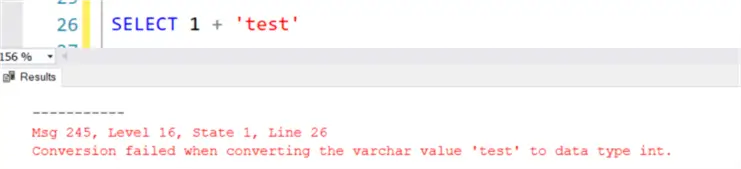
It expects character or binary data types as input (and they should be able to be implicitly converted to another). If another data type is present, you’ll get an error. The new operator doesn’t have this limitation:
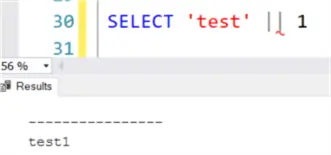
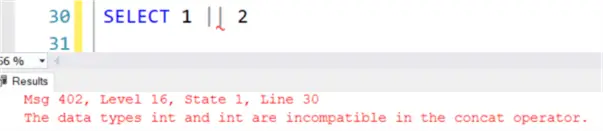
However, at least one of the inputs needs to be a character data type (or all inputs should be binary). If this isn’t the case, an error is thrown:
CONCAT is Flexible
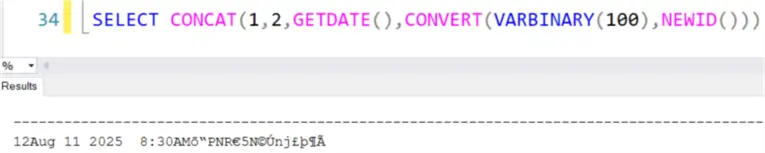
The CONCAT function is the most flexible, it can concatenate any data type (that can be converted to string) and it will do this automatically for you:
Another difference is the handling of NULL values.
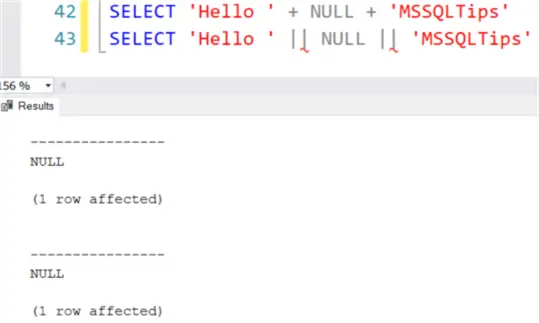
Both the + and || operator will return NULL when at least one of the inputs contains NULL:
However, this behavior can be changed for the + operator by setting the option CONCAT_NULL_YIELDS_NULL:
--MSSQLTips.com
SET CONCAT_NULL_YIELDS_NULL OFF;
SELECT 'Hello ' + NULL + 'MSSQLTips';
SELECT 'Hello ' || NULL || 'MSSQLTips';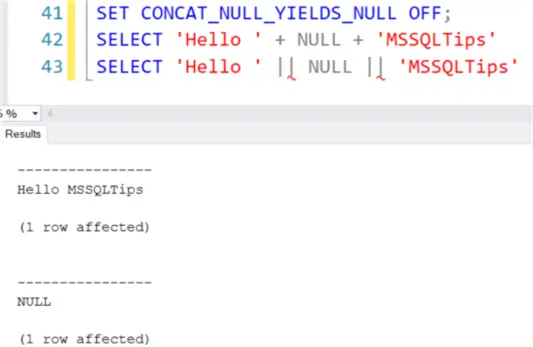
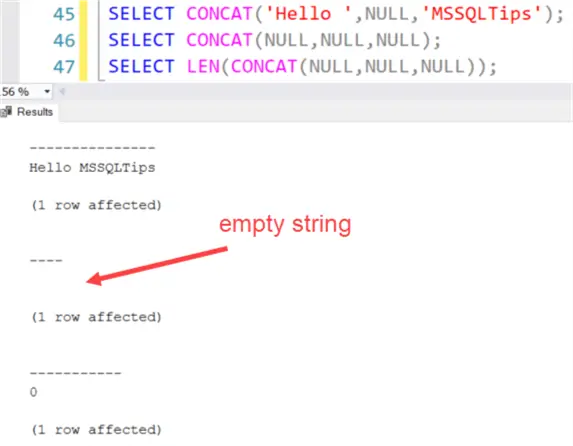
However, this setting is deprecated and shouldn’t be used. The new || operator ignores this setting and adheres to the ANSI standard. The CONCAT function will convert NULL values to an empty string. Even if all inputs are NULL, it will still return an empty string.
The concatenation methods are consistent in their behavior with respect to truncation. All of them will truncate to 8000 characters:
--MSSQLTips.com
DECLARE @var VARCHAR(6000);
SELECT @var = REPLICATE('X',5000);

SELECT LEN(@var + @var);
SELECT LEN(@var || @var);
SELECT LEN(CONCAT(@var,@var));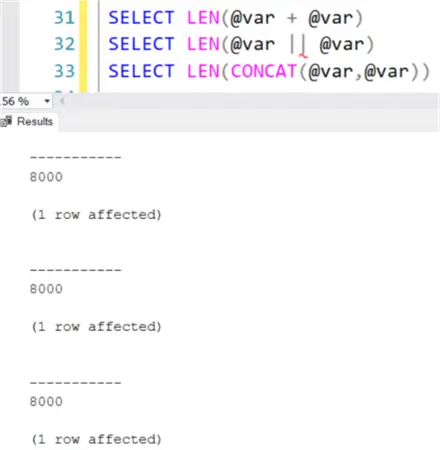
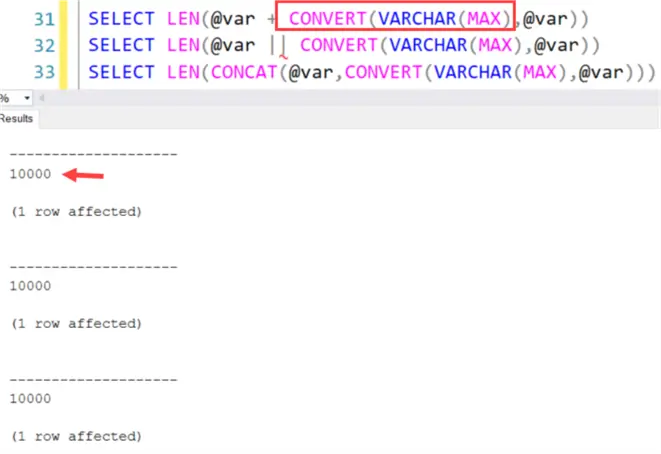
However, if one of the inputs is a “large value type” (such as VARCHAR(MAX)), there’s no truncation for either of these options:
Next Steps
- You can read more about this new T-SQL functionality in the official announcement.
- There’s also a CONCAT_WS function, which includes a separator (WS stands for “with separator”). Read more about it in the tip SQL CONCAT_WS Function Use and Examples. You can learn more about the CONCAT function in the tip SQL CONCAT Function Use and Examples.
- There’re also interesting tips about Unicode support in SQL Server:
- You can find a list of all T-SQL tips in this overview.

Koen Verbeeck is a seasoned business intelligence consultant with over a decade of experience with the Microsoft Data Platform. He holds several certifications, including Azure Data Engineer. He’s a prolific writer, with over 375 articles on technologies such as Microsoft Fabric, SSIS, ADF, SSAS, SSRS, MDS, Power BI, Snowflake and Azure services. He has spoken at various events such as PASS, SQLBits, dataMinds Connect and many others. He frequently delivers educational webinars on MSSQLTips.com. For his efforts, Koen has been awarded the Microsoft MVP data platform award for many years.
- MSSQLTips Awards:
- Leadership Award (200+ Tips) – 2021
- Author of the Year – 2014/2020/2022
- Author Contender – 2024/2025


