Overview
The CONCAT_WS function is used to concatenate 2 or more strings with a separator. This was introduced with SQL Server 2017.
Explanation
Syntax
CONCAT_WS(separatorString, stringToConcatenate1, stringToConcatenate1 [,stringToConcatenateN])Parameters
- SeparatorString – String or expression to separate concatenated strings.
- stringToConcatenate1 – This is the first string that we want to concatenate.
- stringToConcatenate2 – This is the second string that we want to concatenate.
- stringToConcatenateN – This is the Nth string that we want to concatenate. You can concatenate between 2-254 strings.
Simple CONCAT_WS example
Below is a simple example of using CONCAT_WS. We will concatenate 2 simple strings separated by comma.
SELECT CONCAT_WS(',','HELLO','MY','WORLD') AS OUTPUTThis returns the following text message.
HELLO,MY,WORLD Using CONCAT_WS against a Table and Column
The next example will use the AdventureWorks database and will concatenate data with different data types.
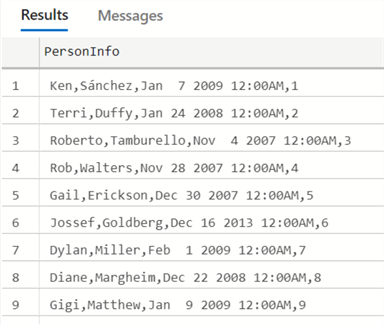
SELECT CONCAT_WS(',',[FirstName],[LastName],ModifiedDate,BusinessEntityID) AS PersonInfo
FROM [Person].[Person]
The data will be displayed separated by commas. Dates and integers are converted to text so the output is one long string.
CONCAT_WS with NULL values
The following example shows what happens if we concatenate strings with NULL values.
SELECT CONCAT_WS(',',[FirstName],NULL,[LastName]) AS PersonInfo
FROM [Person].[Person]
The result displayed is the following. The NULL value is ignored and the concatenation still works fine.

String Contains Same Character as the CONCAT_WS Separator Value
Note that sometimes the strings or expressions to concatenate could be the same. This isn’t an issue, but it may be confusing why there might be additional separators in the string output.
The following examples shows this scenario.
SELECT CONCAT_WS(',','If I were you,','I would play faster') AS OutputThe output shows 2 commas. The first is part of the first string and the second is the separator value.

To solve the problem, we can use a different separator as shown below.
SELECT CONCAT_WS(';','If I were you,','I would play faster') AS OutputThe output would be as follows: If I were you,;I would play faster
Another solution would be to use the REPLACE function to replace existing commas in the string.
SELECT CONCAT_WS(',',REPLACE('If I were you,',',',';'),'I would play faster') AS OutputThe output would be as follows: If I were you;,I would play faster
Error message in CONCAT_WS function
A common error message is the following:
'CONCAT_WS' is not a recognized built-in function nameThis error message occurs in older SQL Server versions like SQL Server 2016 or older. If you have this error, check your SQL Server version with the SELECT @@VERSION. The CONCAT_WS function was introduced in SQL Server 2017.
CONCAT_WS Error Invalid Number of Arguments
Another common error is this one.
The concat_ws function requires 3 to 254 arguments.The function requires at least 3 arguments, for example, the following statement has only 2 arguments.
SELECT CONCAT_WS(',','a') AS OutputAdditional Information
- CONCAT and CONCAT_WS function in SQL Server
- Concatenate SQL Server Columns into a String with CONCAT()
- SQL CONCAT

Daniel Calbimonte is a Microsoft Most Valuable Professional, Microsoft Certified Trainer and Microsoft Certified IT Professional for SQL Server. He is an accomplished SSIS author, teacher at IT Academies and has over 10 years of experience as a QE and developer for SQL Server related software. He has worked for the government, oil companies, web sites, magazines and universities around the world. Daniel also regularly speaks at SQL Servers conferences and blogs.
- MSSQLTips Awards: Author of the Year Contender – 2015-2018, 2022, 2023 | Champion (100+ tips) – 2018


