Overview
The PATINDEX function is used to get the first occurrence of a pattern from a string/expression. The function returns an integer value of where the pattern exists in the string if found otherwise it returns 0.
Explanation
Syntax
PATINDEX('pattern', expression)Parameters
- pattern – this is an expression like wildcards or other operators to find.
- expression – the string or expression we want to look for an occurrence.
Simple PATINDEX Example
The following example will show the position of the colon in the character string provided. The % is a wildcard and means any character, so the pattern we are looking for below is “anyCharacter : anyCharacter”.
SELECT PATINDEX('%:%','Location: Italia') as position
Detect Numbers in a Specific Position Using PATINDEX
The following detects when a number occurs in position 4 or higher. Again we are using % for any character and then [0-9] which means any value between 0 to 9. So the pattern is “anyCharacter anyNumber anyCharacter”.
SELECT TOP (1000) [AddressID], [AddressLine1]
FROM [Person].[Address]
WHERE PATINDEX('%[0-9]%', AddressLine1) > 4
So below only records where AddressLine1 has a number starting in position 4 or later is returned.
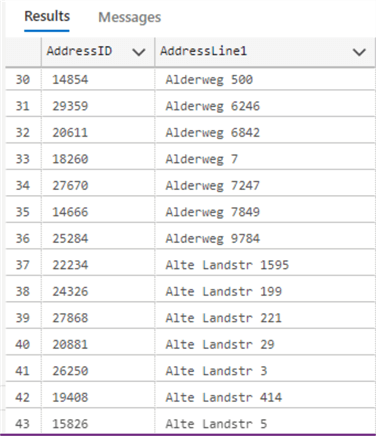
Detect Strings that Start with a Letter Using PATINDEX
Most of the AddressLine1 records in the AdventureWorks sample database start with a number. The following query will detect rows where AddressLine1 starts with a letter in position 1. Again we are using % for any character and then [Aa-Zz] which means any letter either upper case or lower case. So the pattern is “anyCharacter anyLetter anyCharacter”.
SELECT TOP (1000) [AddressID], [AddressLine1]
FROM [Person].[Address]
WHERE PATINDEX('%[Aa-Za]%', AddressLine1) = 1
PATINDEX Example Using Variables
The next example looks for rows where the value set in a variable is found in AddressLine1. We use a variable to store the pattern and then invoke the variable as a function parameter.
DECLARE @mypattern varchar(30)='%#%'

SELECT TOP (1000) [AddressID], [AddressLine1]
FROM [Person].[Address]
WHERE PATINDEX(@mypattern, AddressLine1) > 0
Below we can see rows where # exists in AddressLine1.

Additional Information

Daniel Calbimonte is a Microsoft Most Valuable Professional, Microsoft Certified Trainer and Microsoft Certified IT Professional for SQL Server. He is an accomplished SSIS author, teacher at IT Academies and has over 10 years of experience as a QE and developer for SQL Server related software. He has worked for the government, oil companies, web sites, magazines and universities around the world. Daniel also regularly speaks at SQL Servers conferences and blogs.
- MSSQLTips Awards: Author of the Year Contender – 2015-2018, 2022, 2023 | Champion (100+ tips) – 2018


