Overview
The ASCII function is used to return the ASCII value for the first character in a string.
Explanation
Syntax
ASCII(character)Parameters
- character – this is a valid character or number within the ASCII values
Simple ASCII Example
If we run the following code:
SELECT ASCII(1)
SELECT ASCII(2)
SELECT ASCII('3')
SELECT ASCII('A')
SELECT ASCII('B')
SELECT ASCII('C')
We get the following values, which correspond to the ASCII values for the characters 1,2,3,A,B,C:
49
50
51
65
66
67
Get ASCII Value from Variable
We can also create a variable to hold a string and then get the ASCII value.
DECLARE @string nvarchar(10) = 'T'
SELECT ASCII(@string)
The ASCII value “T” is 84.
If we run the following for the word “Test”.
DECLARE @string nvarchar(10) = 'Test'
SELECT ASCII(@string)
The result is still 84, because the ASCII function just uses the first character in the string.
Get ASCII Value from Table Column
In this example, we use the ASCII function on a column from a table.
SELECT TOP 5 name, ASCII(name) as ASCIIvalue
FROM Authors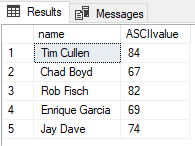
Show the List of ASCII Values of a String
-- www.mssqltips.com
-- https://www.mssqltips.com/tutorial/sql-ascii-function/
CREATE FUNCTION showASCII(@string VARCHAR(100))
returns varchar(100)
AS
BEGIN
   DECLARE @length smallint = LEN(@string)
   DECLARE @position smallint = 0
   DECLARE @codes varchar(max) = ''

   WHILE @length >= @position
   BEGIN
      SELECT @codes = @codes + CONCAT(ASCII(SUBSTRING(@string,@position,1)),',')
      SELECT @position = @position + 1
   END

   SELECT @codes = SUBSTRING(@codes,2,LEN(@codes)-2)
   RETURN @codes
END
Next, we will execute the function.
SELECT dbo.showASCII('hello world') as codes
Here is how we can use this function to get the data from a table.
SELECT FirstName, dbo.showASCII(FirstName) as codes
FROM [Person].[Person]
Script to List All Characters and ASCII values
To get a list of all of the character and ASCII values, we could use the following script. Note this script uses the CHAR function.
-- www.mssqltips.com
-- https://www.mssqltips.com/tutorial/sql-ascii-function/
DECLARE @counter INT = 0

CREATE TABLE #AsciiValues ([char] nchar(1), [value] int)

WHILE (@counter <= 255 )
BEGIN
   BEGIN TRY
      INSERT INTO #AsciiValues
      SELECT CHAR(@counter), @counter
      SET @counter = @counter + 1
   END TRY
   BEGIN CATCH;
      SET @counter = @counter + 1
      IF @counter > 255
      BEGIN
         BREAK
      END
   END CATCH
END

SELECT * FROM #AsciiValues

DROP TABLE #AsciiValues
Here are the first few rows from the query.

Additional Information
- SQL Server Char Function and Reference Guide – this includes a table of values
- SQL CHAR

Greg Robidoux has been working with databases for 35+ years with extensive hands on SQL Server experience from version 6.5 to 2025. He has authored over 250 technical articles and delivered several presentations online and at various conventions. Greg is also the President and founder of Edgewood Solutions, a technology services company delivering services and solutions for Microsoft SQL Server.

Hi John, thanks for pointing that out. I fixed the code.
-Greg
The following statement will NOT return the ASCII values from a table column: SELECT FirstName, dbo.showASCII(‘FirstName’) as codes
FROM [Person].[Person]. Instead, it will return the ASCII values for the string ‘FirstName’. (70,105,114,115,116,78,97,109,101). To retrieve the ASCII values for the column, you would need to remove the quote marks around FirstName so that it would read SELECT FirstName, dbo.showASCII(FirstName) as codes FROM [Person].[Person]