Overview
The STRING_ESCAPE returns special characters that are escaped so they can be part of the string. The function is valid in SQL Server 2016 and later.
Explanation
Syntax
STRING_ESCAPE(expression,rules)Parameters
- expression – this is a string of character with special characters to escape.
- rules – the rules applied to the expression, currently the only value supported is ‘json’.
The following characters can be escaped:
| Character | Escaped Value |
|---|---|
| “ | \” |
| \ | \\ |
| / | \/ |
| Backspace | \b |
| Form feed | \f |
| New line | /n |
| Carriage return | \r |
| Horizontal tab | \t |
Simple STRING_ESCAPE Example
The following example shows how to escape a message with special characters.
SELECT STRING_ESCAPE('/hello everybody
 How are you \','json') as msg
The following characters are escaped:
- forward slash
- carriage return
- new line
- backslash

Example with JSON data
The following uses a variable with JSON data and special characters.
declare @jsonvar VARCHAR(max)=
'[
  {
    "firstname": "Sarah",
    "lastname": "Connor",
    "skills": ["guns\", "fight   "]
  },
  {
    "firstname": "John",
    "lastname": "Connor"
    "skills": ["hacking
         \/"]
  }
]'
If we select the variable, we will see the values escaped.
SELECT STRING_ESCAPE(@jsonvar,'json')
Show Special Characters Escaped
The following example will show some characters and the escaped values.
WITH sequence(count) AS
(
 SELECT 0
 UNION ALL
 SELECT count+1 FROM sequence WHERE count < 17
)
SELECT CONCAT('CHAR(',count,')') controlchar,STRING_ESCAPE(char([count]),'JSON') escapedcharacters FROM sequence;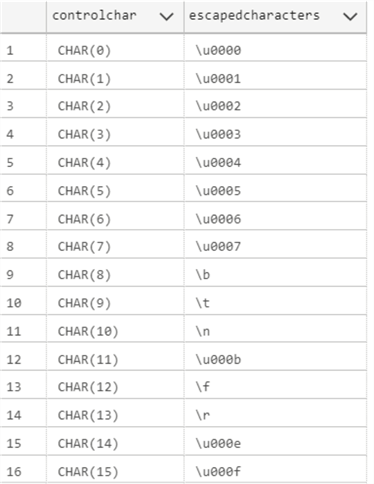
Additional Information

Daniel Calbimonte is a Microsoft Most Valuable Professional, Microsoft Certified Trainer and Microsoft Certified IT Professional for SQL Server. He is an accomplished SSIS author, teacher at IT Academies and has over 10 years of experience as a QE and developer for SQL Server related software. He has worked for the government, oil companies, web sites, magazines and universities around the world. Daniel also regularly speaks at SQL Servers conferences and blogs.
- MSSQLTips Awards: Author of the Year Contender – 2015-2018, 2022, 2023 | Champion (100+ tips) – 2018


