Problem
SQL Server offers many different functions to manipulate and transform textual data. In this article, we look at how to uses various SQL string functions along with examples.
Solution
SQL Server provides multiple built-in string functions that help with data extraction and cleaning textual data. Having an understanding of these functions will help you make your unstructured data into clean and useable information.
This article will help you in getting better understanding of SQL String Functions.
Table of contents
- Sample Dataset Generation
- Using SQL LTRIM and RTRIM
- SQL RIGHT and LEFT Example
- SQL REVERSE Function
- SQL REPLACE Use Case
- SQL CHARINDEX
- SQL SUBSTRING Examples
- Determine Length with SQL LEN Function
- Extract First Name and Last Name in T-SQL
- SQL CASE Logic Example
- Extracting Data from Composite Codes
- SQL String Functions Real World Usage
Sample Dataset Generation
Let’s create a simple table with inconsistent and unstructured data that we can use for our tests.
--MSSQLTips.com (T-SQL)
--Create Table Statement
CREATE TABLE dbo.Customer_details
(
    Cust_ID INT IDENTITY(1,1),
    Full_Name NVARCHAR(100),
    City_Code NVARCHAR(50)
);

--Insert Statement
INSERT INTO dbo.Customer_details (Full_Name, City_Code)
VALUES
('Hassan Arshad', 'PK-LHR-123'),
('Jayden , Jang', 'AU-SYD-456'),
('Sean - Ivusic', 'AE-DXB-789'),
('Dianne  Johnson', 'DE-FRA-321'),
('Alex   Brown', 'SA-RUH-654');
Using SQL LTRIM and RTRIM
Sometimes data has leading or trailing spaces. We can use the LTRIM and RTRIM functions to remove leading and trailing spaces from a particular column as shown below.
--MSSQLTips.com (T-SQL)
SELECT LTRIM(''' Sample text ''') AS LTRIM_RESULT,          -- remove leading spaces
       RTRIM(''' Sample Text ''') AS RTRIM_RESULT,          -- remove trailing spaces
       LTRIM(RTRIM(''' Sample text ''')) AS COMBINE_RESULT; -- remove leading and trailing spaces
SQL RIGHT and LEFT Example
Now let’s extract the Country Code and Code from the City_Code using RIGHT and LEFT functions.
An example value is PK-LHR-123 and we want to get PK for Country Code and 123 for Code. We can use the LEFT and RIGHT functions for this.
--MSSQLTips.com (T-SQL)
SELECT LEFT(City_Code,2) as Country_Code,
       RIGHT(City_Code,3) as Code
FROM dbo.Customer_details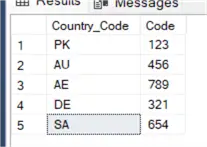
The above query will help extract the Country Code and Code from the City_Code column. The LEFT function is extracting the first 2 characters from the left and the RIGHT function is extracting the first 3 characters from the right side of the string.
SQL REVERSE Function
Now let’s reverse the string using REVERSE function.
This REVERSE function is useful when you are using substring function for data extraction. It will be used with the substring function later in this article.
--MSSQLTips.com (T-SQL)
SELECT REVERSE(City_Code)
FROM dbo.Customer_details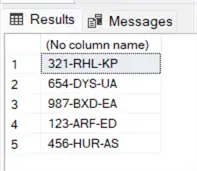
SQL REPLACE Use Case
The SQL REPLACE function will replace particular characters of a string with other characters.
Below we are using multiple replace functions to replace commas and hyphens.
--MSSQLTips.com (T-SQL)
SELECT Full_Name,
       REPLACE(REPLACE(Full_Name,',',''),'-','') AS Full_Name_Clean
FROM dbo.Customer_details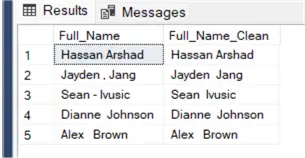
SQL CHARINDEX
SQL CHARINDEX will help you find out the index value (position) of a specified character which can later be used in many ways for example in the substring function when specifying the end point or starting value of a string.
Below we are looking for a hyphen in the City_Code column and this shows the position of the first occurence in the string.
--MSSQLTips.com (T-SQL)
SELECT City_Code,
       CHARINDEX('-',City_Code)
FROM dbo.Customer_details 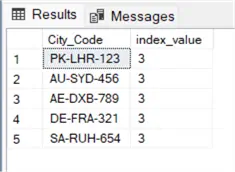
SQL SUBSTRING Examples
The SQL SUBSTRING function helps you extract a value from a string using a start position and the number of characters to return.
Now let’s see how we can extract Country Code in the example below. We are starting at position 1 of the string and returning 2 characters.
--MSSQLTips.com (T-SQL)
SELECT City_Code,
       SUBSTRING(City_Code,1,2) AS Country_Code
FROM dbo.Customer_details 
Determine Length with SQL LEN Function
Now let’s see how we can calculate the length of the string using the SQL LEN function.
--MSSQLTips.com (T-SQL)
SELECT LEN(City_Code) as length_of_code
FROM dbo.Customer_details 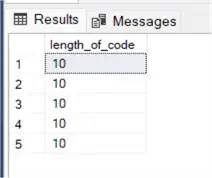
Extract First Name and Last Name in T-SQL
Now let’s see how to extract First and Last names using CHARINDEX, REVERSE, and SUBSTRING functions.
For First Name, we are using SUBSTRING to start at position 1 and then using CHARINDEX to find the first space to determine the number of characters to return.
For Last Name, we are doing basically the same but using REVERSE to read the text value in the opposite direction.
--MSSQLTips.com (T-SQL)
SELECT
    Full_Name,
    SUBSTRING(Full_Name, 1, CHARINDEX(' ', Full_Name) ) AS First_Name,
    REVERSE(SUBSTRING(REVERSE(Full_Name),1,CHARINDEX(' ',REVERSE(Full_Name)))) AS Last_Name
FROM dbo.Customer_details; 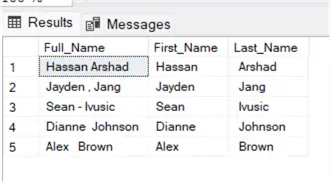
SQL CASE Logic Example
Not every record has spaces, some have commas and hyphens. We are going to use the CASE statement to dynamically find the delimiter and then extract the relevant data.
--MSSQLTips.com (T-SQL)
SELECT
    Full_Name,
    CASE
        WHEN Full_Name like'%,%' THEN REPLACE(TRIM(SUBSTRING(Full_Name, 1, CHARINDEX(',', Full_Name))),',','')
        WHEN Full_Name like'%-%' THEN REPLACE(TRIM(SUBSTRING(Full_Name, 1, CHARINDEX('-', Full_Name))),'-','')
        ELSE trim(SUBSTRING(Full_Name, 1, CHARINDEX(' ', Full_Name)))
    END AS First_Name,
    CASE
        WHEN Full_Name like'%,%' THEN REPLACE(REPLACE(TRIM(SUBSTRING(Full_Name, CHARINDEX(',', Full_Name), LEN(Full_Name))),',',''),' ','')
        WHEN Full_Name like'%-%' THEN REPLACE(REPLACE(TRIM(SUBSTRING(Full_Name, CHARINDEX('-', Full_Name), LEN(Full_Name))),'-',''),' ','')
        ELSE LTRIM(LTRIM(REVERSE(substring (REVERSE(Full_Name),1,CHARINDEX(' ',REVERSE(Full_Name))))))
    END AS Last_Name
FROM dbo.Customer_details; 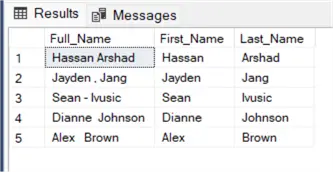
Check out these related CASE articles:
- SQL Server CASE Expression Overview
- SQL Server CASE Statement Example
- SQL CASE Statement in WHERE Clause Examples
- Using a SQL Server Case Statement for IF/Else Logic
- SQL CASE Statement in JOIN Clause
- Using the CASE expression instead of dynamic SQL in SQL Server
Extracting Data from Composite Codes
Now let’s extract country code and city code from City_Code column dynamically with this code:
--MSSQLTips.com (T-SQL)
SELECT
    City_Code,
    LEFT(City_Code, CHARINDEX('-', City_Code) - 1) AS CountryCode,
    SUBSTRING(REPLACE(City_Code,SUBSTRING(City_Code,1,CHARINDEX('-', City_Code) ),''),1,CHARINDEX('-', REPLACE(City_Code,SUBSTRING(City_Code,1,CHARINDEX('-', City_Code) ),''))-1 ) AS City_Code,
    REPLACE(REVERSE(SUBSTRING(REVERSE(City_Code),1,CHARINDEX('-',REVERSE(City_Code)))),'-','') AS Code
FROM dbo.Customer_details; 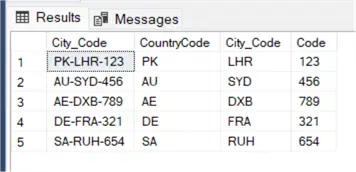
SQL String Functions Real World Usage
You can use all the techniques and method discussed above for data extraction and data cleansing in a single query as shown below. Also, showing how the TRIM function could be used as well.
--MSSQLTips.com (T-SQL)
SELECT
    Full_Name,
    CASE
        WHEN Full_Name like'%,%' THEN REPLACE(TRIM(SUBSTRING(Full_Name, 1, CHARINDEX(',', Full_Name))),',','')
        WHEN Full_Name like'%-%' THEN REPLACE(TRIM(SUBSTRING(Full_Name, 1, CHARINDEX('-', Full_Name))),'-','')
        ELSE TRIM(SUBSTRING(Full_Name, 1, CHARINDEX(' ', Full_Name)))
    END AS First_Name,
    CASE
        WHEN Full_Name like'%,%' THEN REPLACE(REPLACE(TRIM(SUBSTRING(Full_Name, CHARINDEX(',', Full_Name), LEN(Full_Name))),',',''),' ','')
        WHEN Full_Name like'%-%' THEN REPLACE(REPLACE(TRIM(SUBSTRING(Full_Name, CHARINDEX('-', Full_Name), LEN(Full_Name))),'-',''),' ','')
        ELSE LTRIM(RTRIM(REVERSE(SUBSTRING(REVERSE(Full_Name),1,CHARINDEX(' ',REVERSE(Full_Name))))))
    END AS Last_Name,
    City_Code,
    LEFT(City_Code, CHARINDEX('-', City_Code) - 1) AS CountryCode,
    SUBSTRING(REPLACE(City_Code,SUBSTRING(City_Code,1,CHARINDEX('-', City_Code) ),''),1,CHARINDEX('-', REPLACE(City_Code,SUBSTRING(City_Code,1,CHARINDEX('-', City_Code) ),''))-1 ) AS City_Code
   ,REPLACE(REVERSE(SUBSTRING(REVERSE(City_Code),1,CHARINDEX('-',REVERSE(City_Code)))),'-','') AS Code
FROM dbo.Customer_details; 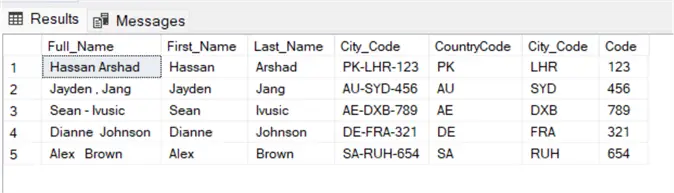
This query will help you in extracting first name, last name, country code, city code and also removes special characters.
Key Takeaways
- SQL Server offers various built-in SQL String Functions for manipulating and transforming textual data.
- Functions like LTRIM, RTRIM, LEFT, and RIGHT help clean up and extract relevant information from unstructured data.
- You can dynamically extract country and city codes using functions like CHARINDEX and SUBSTRING.
- The REVERSE and REPLACE functions are useful for modifying and reformatting strings as needed.
Next Steps
- Automate data cleansing process using SQL Server Agent by scheduling a job
- Try to implement these techniques within your ETL job in SSIS
- Practice these techniques on real datasets in order to master complicated and complex data parsing
- Check out the SQL String Functions Tutorial

Muhammad Hassan Arshad currently works as a Principal Data Engineer at Strategic Systems International. He is a data engineering professional with over 7 years of experience in data engineering, data warehousing, and database development. He has a strong track record of building scalable data pipelines, optimizing data workflows, and developing robust database solutions to support analytics and business intelligence. Hassan holds Microsoft certifications and has worked extensively with SQL Server and modern cloud data platforms, bringing deep technical expertise and a results-driven approach to every project.

