Problem
NULL is a special marker that indicates a missing or undefined value in a column. It is different from zero or an empty string. Handling NULL values is essential for accurate data analysis, data integrity, and error avoidance. This tip explores how to handle NULL values in SQL Server using the COALESCE() function using various queries and reviewing the results.
Solution
Developers should code to handle NULL values in a column to get consistent and accurate data. Before we look at handling NULL values, let’s see the impact they have on the query results if we do not handle them properly.
Create a Test Table and Data
Let’s create a table [Emps] with the sample data below. This dataset contains NULLs for the Salary and Annual Bonus columns for a few employees.
CREATE TABLE #Emps (
    EmpID INT,
    EmpName VARCHAR(50),
    Salary DECIMAL(10, 2),
    AnnualBonus DECIMAL(10, 2)
);

INSERT INTO #Emps(EmpID, EmpName, Salary, AnnualBonus)
VALUES
(1, 'Raj', 60000, 6000),
(2, 'Brijesh', NULL, 8000),
(3, 'John', 75000, NULL),
(4, 'Manoj', NULL, 4500),
(5, 'Vanshil', 51000, NULL);
Now, some calculations on this data will be done to show the impact of NULL values.
Total Salary
- Query:
- SELECT SUM(Salary) AS TotalSalary FROM Emps;
- Output:
- 186000.00
- Notes: SUM function ignores NULL
COUNT(*)
- Query:
- SELECT COUNT(*) AS TotalEmployees, COUNT(Salary) AS CountofSalary, COUNT(AnnualBonus) AS CountOfAnnualBous FROM Emps;
- Output:
- TotalEmployees = 5
- CountofSalary = 3
- CountOfAnnualBous = 3
- Notes:
- COUNT(*) includes NULL
- COUNT(Salary) ignores NULL values
- COUNT(AnnualBonus) ignores the NULL values
+ Operator
- Query:
- SELECT Salary + AnnualBonus AS TotalCompensation FROM Emps;
- Output: one row for each row in the table
- 66000.00
- NULL
- NULL
- NULL
- NULL
- Notes: The result is NULL if either Salary or AnnualBonus is NULL.
SQL Coalesce Function Overview
The COALESCE() function can handle the NULL values in the queries by returning the first non-NULL value from the supplied arguments.
Syntax:
COALESCE(expression1, expression2, expression, ...) - It starts evaluating the expressions from left to right and stops at the first non-NULL expression.
- You can use any data type, integer, string, or char with this function as input; however, all expressions in a query should have the same data type.
- It returns an error in case all of the expressions are NULL.
Let’s explore this function using practical examples.
| Query | Output | Description |
|---|---|---|
| SELECT Coalesce(null,null) | Error | This query gives an error because, in this function, at least one argument must not be NULL. |
| SELECT Coalesce(0,null) | 0 | The first non-null value is 0. |
| SELECT EmpName, Coalesce(AnnualBonus,0) FROM Emps |  | In this example, we get the value 0 for the employees where AnnualBonus was NULL. |
| SELECT EmpName, Cast(Coalesce(((AnnualBonus/Salary)*100),0) as int ) FROM Emps | 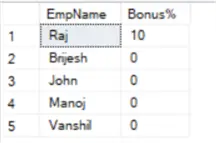 | We can also use the Coalesce() function in numeric calculations to avoid getting NULL in the output. |
| SELECT COALESCE(NULL, 1, 3, 2) | 1 | It starts traversing from left to right and stops at the first non-null value, i.e. 1. |
| SELECT COALESCE(NULL,’A’,’B’) | A | First non-null value. |
| SELECT COALESCE(NULL,NULL,20,NULL,NULL) | 20 | First non-null value. |
| SELECT COALESCE(NULL,NULL,NULL,NULL,1,’Rajendra’) | 1 | First non-null value. The SQL COALESCE function constantly evaluates the integer first, followed by a character expression, and then yields the integer as an output. |
| SELECT COALESCE (NULL,NULL,NULL,NULL,NULL,’Rajendra’,1) | Error: Conversion failed when converting the varchar value ‘Rajendra’ to data type int. | Data conversion errors are due to different data types. |
String Concatenation Operations
Suppose we have the following Persons table, each with a First_Name, Middle_Name, and Last_Name, as seen below. In the table, we can see a few columns with NULL values for Middle_Name and Last_Name.

You can use the following script to insert data into an SQL table for the above data.
CREATE TABLE Persons (
    First_Name VARCHAR(50) NOT NULL,
    Middle_Name VARCHAR(50),
    Last_Name VARCHAR(50)
);

INSERT INTO Persons (First_Name, Middle_Name, Last_Name)
VALUES
('Alice', NULL, 'Smith'),
('Bob', 'James', NULL),
('Charlie', NULL, 'Brown'),
('David', 'Lee', NULL),
('Eve', 'Marie', 'Johnson');
Let’s write the employee’s full name and see how it works with the NULL values.
SELECT First_Name + ' ' +Middle_Name + ' ' + Last_Name FullName FROM PersonsMost rows contain NULL due to NULL in the middle or last name.

Using Coalesce with String Concatenation
Let’s use the SQL Coalesce function to replace the NULL values with a space character(char(13)). This way, we can get full names despite having NULL values in the data.
SELECT First_Name + ' ' +COALESCE(Middle_Name,'')+ ' ' + COALESCE(Last_Name,'') FullName FROM Persons
Use of SQL Coalesce() Function with Pivoting
In the following example, the table [Address] contains the non-null value for the city and state. Now, we need to fetch the city names and concatenate the values with a single quote to get a string of values.
Here, we used the SQL Coalesce() function for the values assigned to a variable and then appended the quotes at the start and end of the strings.
DROP TABLE IF EXISTS Address;

CREATE TABLE Address
(
CityName VARCHAR(50),
State VARCHAR(100))

INSERT INTO Address VALUES('Gurgaon','HR'),('Mumbai','MH'),('Jaipur','RJ'),('Udaipur','RJ'),('Jodhpur','RJ')

DECLARE @val nvarchar(100);
SELECT @val = COALESCE(@val,'') +''''+CityName +''''+ ','
FROM dbo.Address WHERE state = 'RJ';

SELECT '('+substring(@val,1,len(@val)-1)+')'
Conditional Usage of SQL Coalesce Function
Look at the following SQL query; we have used the COALESCE function in conjunction with the Case statement.
- If the department is NULL for an employee, then it gets the department based on its role.
- If it is not NULL, the employee’s assigned department name is shown.
This way, we can implement conditional logic in the SQL query using the SQL Coalesce function.

Another example would be to assign a default value in case any field is NULL. For example, let’s say the hiring date for a few employees was not mentioned and is set to NULL. In this case, to avoid any query giving inconsistent data, we can assign a default value for the column with NULL.
In the example below, I consider the default date to be 2024-01-01.

Comparison Between SQL ISNULL and SQL Coalesce
SQL ISNULL() function also handles NULL values in SQL Server. What is the difference between both functions? Let’s check it out.
| Feature | ISNULL | COALESCE |
|---|---|---|
| Definition | The ISNULL function replaces the NULL with a specified value. | The SQL COALESCE function gives the first non-NULL value from a list. |
| ANSI SQL Compliance | It is specific to T-SQL and not ANSI SQL-compliant. | It is ANSI SQL-compliant. |
| Number of Arguments | It supports only two arguments as input. | It supports N (two or more arguments) as an input. |
| Data Type Handling | This function returns the first argument’s data type value. If needed, it performs implicit data type conversion. | This function returns the highest precedence data type among the arguments. |
| Example Usage | SELECT ISNULL(cost, 0); | SELECT COALESCE (Salary, Bonus, 0) |
| Performance | It’s slightly faster due to more straightforward functionality. | It is slower due to evaluating multiple expressions. |
| Use Case | Simple replacement of NULL with a default value. | It can manage multiple fallback values or complex NULL expressions. |
| Handle Multiple Columns | No, it only works with a single column. | It can handle multiple columns such as COALESCE (Email, Phone, ‘No Contact Info’). |
Next Steps
- Explore Microsoft docs on Coalesce function in SQL Server.
- You can review existing SQL Server Tutorials.
- Deciding between COALESCE and ISNULL in SQL Server
- The Many Uses of Coalesce in SQL Server
- SQL COALESCE, ISNULL, NULLIF in SQL Server, Oracle and PostgreSQL
- COALESCE SQL Function
- How to Use SQL Server Coalesce to Work with NULL Values

Hi! I am Rajendra Gupta, Database Specialist and Architect, helping organizations implement Microsoft SQL Server, Azure, Couchbase, AWS solutions fast and efficiently, fix related issues, and Performance Tuning with over 14 years of experience.
I am the author of the book “DP-300 Administering Relational Database on Microsoft Azure.” I can be reached at: Rajendra.gupta16@gmail.com for any consulting help.
- MSSQLTips Awards:
- Author of the Year – 2022 | Author Contender – 2021/2023/2024 | Champion Award (100+ tips) – 2020
You could use combination of others function including LTRIM, RTRIM, CONCAT_WS and Coalesce.
Thanks Dion, yes, if you get the spaces, you can use REPLACE to remove it.
Thank you for this. Loved it. Found one tweak on this script.
SELECT First_Name + ‘ ‘ +COALESCE(Middle_Name,”)+ ‘ ‘ + COALESCE(Last_Name,”) FullName FROM Persons
On the above ‘Alice Smith’ and ‘Charlie Brown’ end up with two spaces between their name so I added a REPLACE double spaces with single spaces as shown below.
SELECT REPLACE(First_Name + ‘ ‘ +COALESCE(Middle_Name,”) + ‘ ‘ + COALESCE(Last_Name,”),’ ‘,’ ‘) FROM Persons