Problem
We have sales order data in our data warehouse, and we need to calculate a bunch of averages. Some are quite easy to do, such as the average per quarter or per month. However, sometimes we need different time boundaries, such as per 2 weeks, or even rolling averages. How can we easily calculate this using T-SQL?
Solution
In the Microsoft Fabric Warehouse, a new T-SQL function was recently added: the DATE_BUCKET function. With this function, you can group dates into pre-defined buckets. This allows you to easily calculate aggregates that use the GROUP BY clause over these buckets, greatly simplifying the T-SQL statements for analytical use cases.
Key Takeaways
- The DATE_BUCKET function simplifies calculating averages over flexible time ranges in T-SQL.
- It allows grouping dates into predefined buckets, making aggregate calculations easier.
- You can specify date parts, bucket size, and an optional starting point for the date grouping.
- DATE_BUCKET enhances the ability to create rolling averages and more complex aggregations.
- This function is available in SQL Server 2022, Azure SQL DB and Microsoft Fabric Warehouse.
Example use of the DATE_BUCKET function
Let’s illustrate with an example.
Using the AdventureWorks2025 sample database, we can group dates of the Sales Order Header table together in buckets of 3 weeks with the following statement:
--MSSQLTips.com
SELECT DISTINCT OrderDate, DATE_BUCKET(WEEK,3,OrderDate)
FROM Sales.SalesOrderHeader
ORDER BY OrderDate;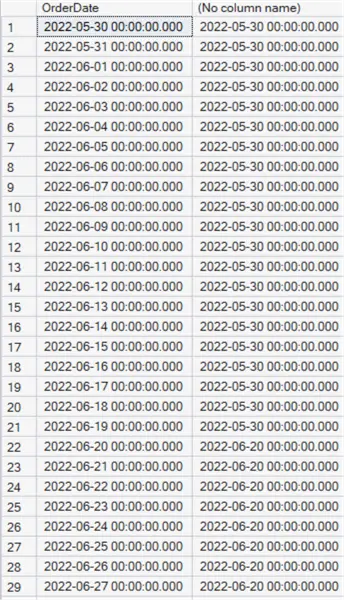
When we group on these buckets, we can calculate the 3-week average sales:
--MSSQLTips.com
SELECT
     Bucket = DATE_BUCKET(WEEK,3,OrderDate)
    ,AverageSales = AVG([TotalDue])
FROM Sales.SalesOrderHeader
GROUP BY DATE_BUCKET(WEEK, 3, OrderDate)
ORDER BY Bucket;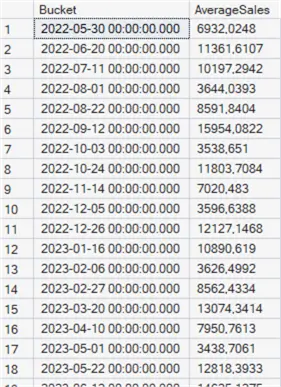
In this tip, we’ll explain exactly how this function works and showcase its usefulness with same examples. The function itself has actually been available since SQL Server 2022 (and is also available in Azure SQL DB) but has only recently been added to the Fabric Warehouse.
DATE_BUCKET Function Syntax
The function has the following syntax:
DATE_BUCKET(date part, number, date [, origin])- date part – any of the following date parts: day, week, month, quarter, year, hour, minute, second or millisecond. Unlike other date functions, nanosecond doesn’t seem to be supported but for most use cases this is probably not an issue. You can also use the abbreviations of the date part, like mi for minute or mm for month, but to avoid confusion it’s a good idea to use the full names.
- number – the width of the bucket. Combined with the date part parameter, it specifies how the bucket should be created. For example, 3 days or 5 weeks.
- date – a column or expression containing the dates or timestamps that should be bucketized. The data type can be date, datetime, datetime2, datetimeoffset, smalldatetime or time.
- origin – an optional parameter (of the same data type as the date parameter). You can specify the starting point from which the database engine should start creating the buckets. If the parameter isn’t specified, 1900-01-01 00:00:00.000 is used as the default starting point.
The function returns the starting point of the bucket. If you have multiple rows that belong to the same bucket, the same value will be returned.
Example Use
When you want to aggregate over a standard period, such as month, quarter or year, the SQL tends to be relatively simple, and you don’t actually need the DATE_BUCKET function.
Averages By Quarter
For example, if we want sales averages by quarter, we can run the following SQL:
--MSSQLTips.com
SELECT
     QuarterNbr = DATEPART(QUARTER,OrderDate)
    ,AverageSales = AVG([TotalDue])
FROM Sales.SalesOrderHeader
GROUP BY DATEPART(QUARTER,OrderDate)
ORDER BY QuarterNbr;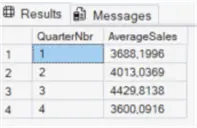
Averages Per Quarter of Year
If you want the averages per quarter of year, you need to prefix the year first:
--MSSQLTips.com
SELECT
     YearQuarter = CONCAT(YEAR(OrderDate),'Q',DATEPART(QUARTER,OrderDate))
    ,AverageSales = AVG([TotalDue])
FROM Sales.SalesOrderHeader
GROUP BY CONCAT(YEAR(OrderDate),'Q',DATEPART(QUARTER,OrderDate))
ORDER BY YearQuarter;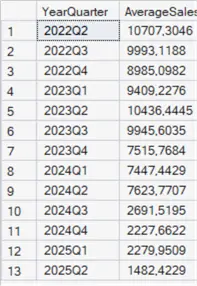
Aggregate Data Over 3 Weeks
But what if the period we want to aggregate over isn’t a single output of DATEPART, but rather a number of times a certain date part, like 15 minutes, 5 days or 2 months? Let’s reprise the example of the introduction, where we want to aggregate over 3 weeks. With DATE_BUCKET, this is a single function call:
--MSSQLTips.com
SELECT DISTINCT OrderDate, DATE_BUCKET(WEEK,3,OrderDate)
FROM Sales.SalesOrderHeader
ORDER BY OrderDate;
Doing this without DATE_BUCKET
If we don’t have this function available, we have to get a bit more creative. We can first calculate the number of weeks between a certain start date and then divide by 3 to group the weeks together. Because we use the integer division, we get groups of 3, as demonstrated in the following script:
--MSSQLTips.com
SELECT value, value / 3
FROM GENERATE_SERIES(0,12);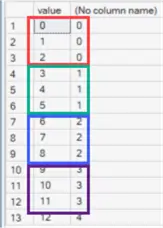
When we calculate the number of weeks between the order date and a certain start date (using DATEDIFF), we can use this logic to group our weeks into buckets of 3 weeks long:
--MSSQLTips.com
SELECT DISTINCT
     OrderDate
    ,WeeksAgo =  DATEDIFF(WEEK,'2022-05-01',OrderDate)
    ,Bucket = DATEDIFF(WEEK,'2022-05-01',OrderDate) / 3
FROM Sales.SalesOrderHeader
ORDER BY OrderDate;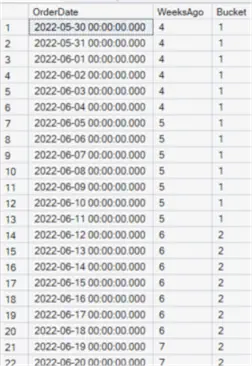
Calculate 3 Week Averages
This can be used to calculate the 3-week average sales:
--MSSQLTips.com
SELECT
     Bucket         = DATEDIFF(WEEK,'2022-05-01',OrderDate) / 3
    ,BucketStart    = MIN(OrderDate)
    ,AverageSales   = AVG([TotalDue])
FROM Sales.SalesOrderHeader
GROUP BY DATEDIFF(WEEK,'2022-05-01',OrderDate) / 3
ORDER BY Bucket;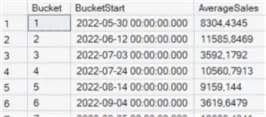
Using DATE_BUCKET to do this
Similar methods can be used to calculate aggregates over “special” periods, but DATE_BUCKET makes it easier and more elegant to do so.
--MSSQLTips.com
SELECT
     Bucket = DATE_BUCKET(WEEK,3,OrderDate)
    ,AverageSales = AVG([TotalDue])
FROM Sales.SalesOrderHeader
GROUP BY DATE_BUCKET(WEEK, 3, OrderDate)
ORDER BY Bucket;
You might have noticed the results are different between the two methods, and that’s because DATE_BUCKET has a default starting point of ‘1900-01-01’.
Specify Starting Point with DATE_BUCKET
We can specify a starting point using the optional parameter:
--MSSQLTips.com
SELECT
     Bucket = DATE_BUCKET(WEEK,3,OrderDate,CONVERT(DATETIME,'2022-05-01'))
    ,AverageSales = AVG([TotalDue])
FROM Sales.SalesOrderHeader
GROUP BY DATE_BUCKET(WEEK,3,OrderDate,CONVERT(DATETIME,'2022-05-01'))
ORDER BY Bucket;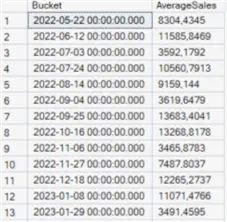
The results now match those of the query using DATE_DIFF and the integer division. Keep in mind that working with date parts like WEEK can be tricky, since the DATEFIRST setting has no impact on DATEDIFF. In other words, the first day of the week is always Sunday when using DATEDIFF or DATE_BUCKET. If you want to minimize mistakes or if you want another day is the starting point of the week, you can try to create a calendar table (or date dimension) where the periods you want to aggregate over are already precalculated.
When you specify a starting point for DATE_BUCKET, pay attention to the data type as it must match the data type of the date parameter, otherwise an error will be thrown:

Create a Rolling Average with DATE_BUCKET
As a final example, we’ll show you how you can create a rolling average with DATE_BUCKET. Instead of specifying a fixed starting point, you can also pass the result of an expression:
--MSSQLTips.com
SELECT
     Bucket = DATE_BUCKET(DAY,14,OrderDate,GETDATE())
    ,AverageSales = AVG([TotalDue])
FROM Sales.SalesOrderHeader
GROUP BY DATE_BUCKET(DAY,14,OrderDate,GETDATE())
ORDER BY Bucket;
This query now returns a two-week rolling average, starting from the current date.
Next Steps
- For more Microsoft Fabric tips, you can check out this overview.
- The DATE_BUCKET function is not only available in the Fabric Warehouse, but also in SQL Server since version 2022 or in the Azure editions of SQL Server. This might mean that you can use this function in existing code as well.
- Check out the tip SQL Server Date and Time Functions with Examples for more examples on date functions in SQL Server.

Koen Verbeeck is a seasoned business intelligence consultant with over a decade of experience with the Microsoft Data Platform. He holds several certifications, including Azure Data Engineer. He’s a prolific writer, with over 375 articles on technologies such as Microsoft Fabric, SSIS, ADF, SSAS, SSRS, MDS, Power BI, Snowflake and Azure services. He has spoken at various events such as PASS, SQLBits, dataMinds Connect and many others. He frequently delivers educational webinars on MSSQLTips.com. For his efforts, Koen has been awarded the Microsoft MVP data platform award for many years.
- MSSQLTips Awards:
- Leadership Award (200+ Tips) – 2021
- Author of the Year – 2014/2020/2022
- Author Contender – 2024/2025


