Problem
In the article Manually Update Statistics in SQL Server, I explained why we need to update statistics manually. However, we cannot update statistics manually after each insert, update, or delete because this action has a cost to the system. On the other hand, SQL Server does not automatically update statistics until the update threshold is reached. The good news is that newer versions of SQL Server introduce a feature called Memory Grant Feedback, and in this article, I will show how this feature mitigates the impact of outdated statistics in some scenarios. Please note that this does not mean there is no longer a need to set up a SQL Server Agent Job to update statistics. We still need to update them manually weekly, nightly, or even more frequently in edge cases. Upgrading to newer versions of SQL Server mitigates the impact of outdated statistics in some scenarios.
Solution
Sometimes the granted memory for a query is large and sometimes it is too low. A large granted memory limits concurrency, and when it is low, spilling to disk occurs, which is a costly operation. Memory grant feedback attempts to remember the memory needs of a prior execution (with percentile feedback, multiple past executions). Based on this historical query information, memory grant feedback adjusts the grant given to the query accordingly for subsequent executions. You can read more about Memory Grant Feedback in the Microsoft blog post. The query optimizer builds an execution plan based on statistics.
In this tip, I will set up a demo to show that outdated statistics cause incorrect memory grants, which can result in spilling to disk, although Memory Grant Feedback neutralizes its impact.
Key Takeaways
- Updating statistics manually is costly and SQL Server does not auto-update until a threshold is reached.
- The Memory Grant Feedback feature in newer SQL Server versions helps reduce issues with outdated statistics.
- A demo shows how outdated statistics can lead to incorrect memory grants and disk spilling.
- After adjusting to a higher compatibility level, Memory Grant Feedback improves memory allocation and prevents spills.
- Regularly updating statistics remains necessary despite advancements in memory grant feedback.
Set Up Test Environment
I will use SQL Server 2025 the latest SQL Server version and StackOverflow database for our examples. StackOverflow database is an open-source database from StackOverflow.com. The Memory Grant Feedback feature is not available in SQL Server 2016, so for the first test, I will set the database compatibility level to 130:
Use master
GO
Alter Database StackOverflow Set Compatibility_Level = 130
GO
The StackOverflow database includes a table for storing user’s information, with a clustered primary key on the Id column. I want to create a non-clustered index on the Reputation column for demo purposes:
Use StackOverflow
GO
Create Index IX_Reputation On dbo.Users (Reputation)
With (Data_Compression = Page)
GO
Example Query
After creating a non-clustered index on the Reputation column, I will write a query to return LastAccessDate, CreationDate, UpVotes, and DownVotes from the Users table for users whose reputation is 2, and then sort them by Location and DisplayName. To view the actual execution plan, I simply press Ctrl + M in SSMS.
Select LastAccessDate, CreationDate, UpVotes, DownVotes From dbo.Users
Where Reputation = 2
Order By Location, DisplayName
GO
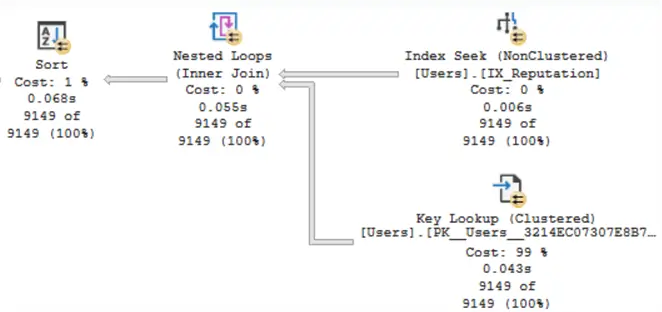
The image shows that SQL Server performed a non-clustered index seek, followed by a key lookup, to retrieve and display the results. The estimated number of rows and the actual number of rows are equal for all operators in the execution plan:
Something to note, whenever we create an index, SQL Server creates a statistics object with the same name. We can see the statistics details by running this DBCC command:
DBCC Show_statistics (Users, IX_Reputation)
GO
As shown in the image below, the EQ_ROWS column for value 2 is 9,149. This means that there are 9,149 users with a reputation of 2 in the StackOverflow database Users table.

Update Some Data and Check Again
Now I will change the reputation of 80,000 users from 1 to 2 and check the statistics again.
Update Top (80000) dbo.Users Set Reputation = 2 Where Reputation = 1
GO
DBCC Show_statistics (Users, IX_Reputation)
GO
As shown in the image below, the number of people whose reputation is 2 has not changed in the statistics, and indeed, the statistics have not been updated.

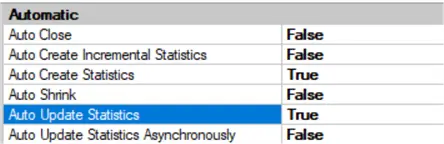
It is important to note that auto-update statistics is enabled for the database. You can read more about this feature in the article Manually Update Statistics in SQL Server.
Since the statistics did not change, SQL Server does not build a different execution plan for the query.
Clear Plan Cache and Test Again
To show this, I will clear the plan cache:
DBCC FreeProccache
GO
Now, I run the query two times and check the actual execution plan:
Select LastAccessDate, CreationDate, UpVotes, DownVotes From dbo.Users
Where Reputation = 2
Order By Location, DisplayName
GO 2
Read the execution plan from right to left and top to bottom, and compare the estimated number of rows with the actual number of rows.
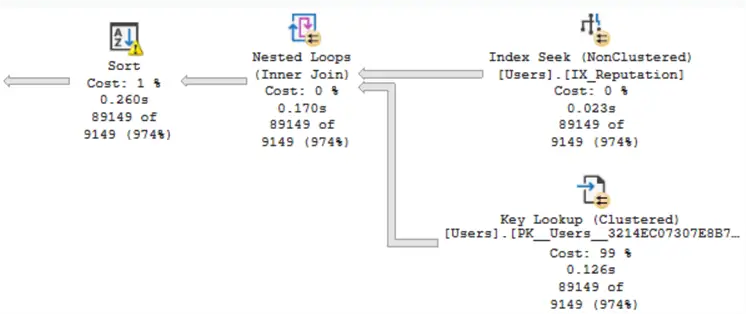
SQL Server estimates that about 9,000 rows will be returned from the Users table, but the actual number of rows is nearly 90,000. On the image above, we can see there is a warning on the Sort operator. If you hover your mouse over the Sort operator, a tooltip will appear, and SQL Server will tell you that a spill to disk occurred. The warning says that SQL Server had to write 601 pages to tempdb and read the pages from there:
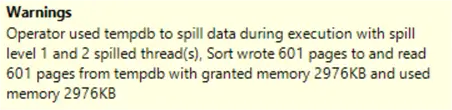
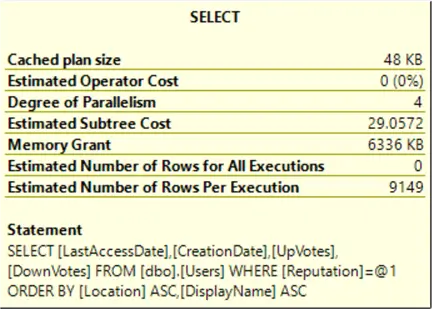
The granted memory for the query is too low-just 6 MB. This problem occurs due to the outdated statistics.
What Is the Solution?
Since I am using SQL Server 2025, I will set the database compatibility level to 170 and run the query two times:
Use master
GO
Alter Database StackOverflow Set Compatibility_Level = 170
GO
Use StackOverflow
GO

Select LastAccessDate, CreationDate, UpVotes, DownVotes From dbo.Users
Where Reputation = 2
Order By Location, DisplayName
GO 2
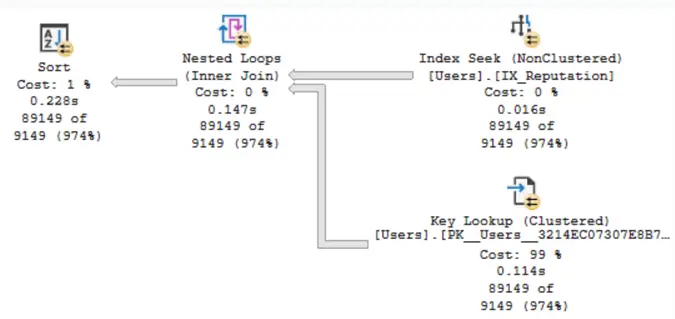
You can see in the image that the estimated number of rows is approximately 9,000 and the actual number of rows is approximately 90,000, but there is no warning on the Sort operator, and the spill to disk did not occur.
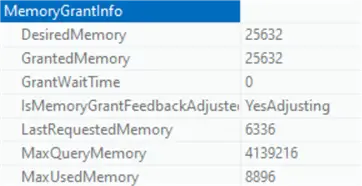
If you right-click on the Select operator in the execution plan, select Properties, and then go to the Memory Grant Info section in the window that opens, you will see that the “Granted Memory” increased to 25 MB and that “Is Memory Grant Feedback Adjusted ” is set to “YesAdjusting”.
Summary
Updated statistics are crucial for building an efficient execution plan. However, we cannot update statistics manually after each insert, update, or delete because this action has a cost to the system, and SQL Server does not update them automatically until the update threshold is reached. Newer versions of SQL Server introduce a feature called Memory Grant Feedback that reduces the impact of outdated statistics in some scenarios. However, this does not mean that there is no need to update statistics manually.
Next Steps
- SQL Server 2019 Memory Grant Feedback Example and Data Collection
- Intelligent Query Processing in Azure SQL: A Deep Dive into Adaptive Execution
- Update Statistics SQL Server

Mehdi Ghapanvari is an SQL Server database administrator with 6+ years of experience. His main area of expertise is improving database performance. He is skilled at managing high-performance servers that can handle several terabytes of data and hundreds of queries per second, ensuring their availability and reliability. To enhance the performance of the database, he has implemented various performance-tuning techniques, including query optimization and index tuning. He has also developed backup and recovery strategies to protect critical data in case of disasters. Mehdi currently manages the SQL Server databases for a large organization. Mehdi is actively seeking new opportunities to apply his expertise and contribute to impactful projects. You can reach him at SQLDBA.Mehdi@Gmail.com.
- MSSQLTips Awards: Rookie of the Year – 2023