Problem
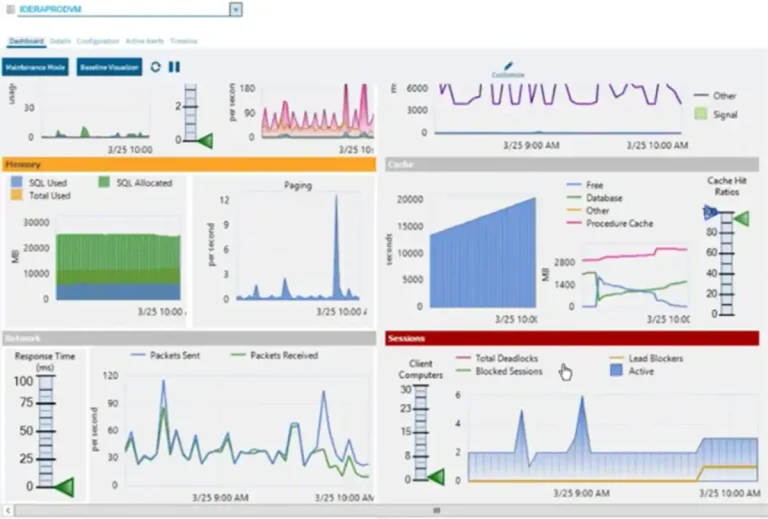
Have you ever experienced a situation where some users are getting a slow response, however, no CPU, memory, disk IO, or network issues are occurring except high ASYNC_NETWORK_IO wait type? You might think issue is in SQL Server — but in reality, it usually points to something outside the database engine. It occurs when SQL Server has results ready to send, but the client application (or the network in between) cannot consume the data fast enough. This may result-in query slowness, blocked sessions, and frustrated users.
In this tip, you will walk through what ASYNC_NETWORK_IO is, when it occurs, simulate it and share some techniques to reduce this wait stat. Let’s start.
Solution
We will use the below open-source tools and database for exploring ASYNC_NETWORK_IO wait type:
- SQLQueryStress to act as client application that passes query to SQL Server repeatedly to fetch large dataset.
- Clumsy for lag, drop and tamper with network packets to make network condition significantly worse.
- AdventureWorks2022 sample database
- DMVs for troubleshooting purposes
The combination of these tools will ultimately produce our expected ASYNC_NETWORK_IO wait type and we will use DMVs to detect them.
ASYNC_NETWORK_IO
Microsoft shipped ASYNC_NETWORK_IO with SQL Server 2000 and its name was NETWORKIO. In SQL Server 2005, this wait stat was renamed to ASYNC_NETWORK_IO. This wait type is associated with slow network IO. When an application demands a large data set from SQL Server over the network, SQL Server first prepares the data then puts in its buffer. Finally, the client application fetches it from the buffer and acknowledges SQL Server. If there is any delay or lag in data fetching, SQL Server will wait for acknowledgment and register this wait type as ASYNC_NETWORK_IO.
In simple terms, ASYNC_NETWORK_IO indicates that SQL Server has executed the query and prepared the output. However, the client applications are not pulling the results quick enough due to various reasons. When the results sit in buffer, nothing else can run until those results are picked up.
Impact of ASYNC_NETWORK_IO
An excessive amount of ASYNC_NETWORK_IO has a negative impact on your workload and may reduce overall performance as:
- Client applications fetch data slowly so overall query execution time will increase
- SQL Server holds allocated locks on resources longer which prevents other queries to acquire those resources
- System becomes locked, blocked or even deadlocking occurs
- Users become frustrated due to a sluggish system
Simulation of ASYNC_NETWORK_IO
Execute the query below in SQLQueryStress that fetches a large dataset frequently (Figure-1).
SELECT [BusinessEntityID]
      ,[PersonType]
      ,[NameStyle]
      ,[Title]
      ,[FirstName]
      ,[MiddleName]
      ,[LastName]
      ,[Suffix]
      ,[EmailPromotion]
      ,[AdditionalContactInfo]
      ,[Demographics]
      ,[rowguid]
      ,[ModifiedDate]
  FROM [AdventureWorks2022].[Person].[Person]
-- Query snippet-1
We executing the above query with 100 iterations from 40 threads.
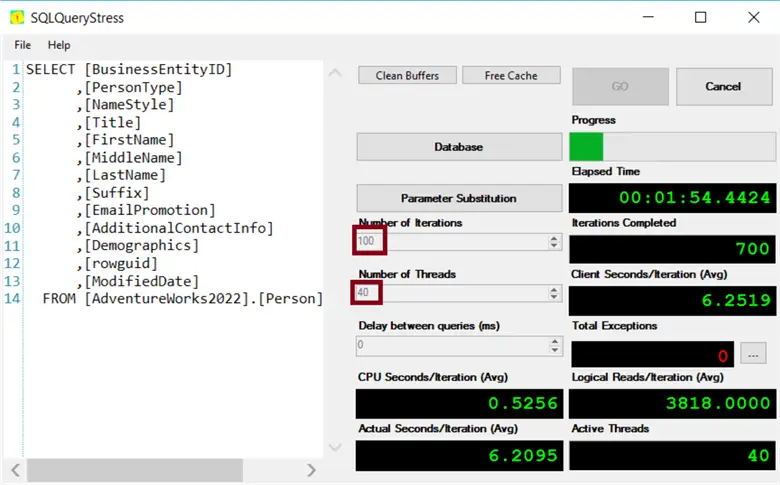
Figure – 1: Executing Query Snippet-1 using SQLQueryStress
Configure Clumsy as shown below.
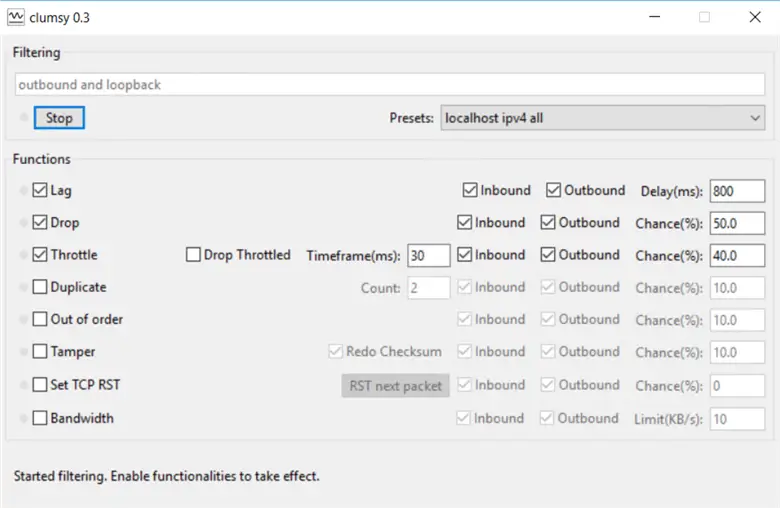
Figure – 2: Imposing network interruption using Clumsy.
Check for ASYNC_NETWORK_IO
While both tools are running, connect to SQL Server with SSMS and execute Query Snippet-2 for capturing ASYNC_NETWORK_IO wait type.
SELECT wt.session_id, wt.wait_type, wt.wait_duration_ms, wt.resource_description,
    r.command, r.database_id, DB_NAME(r.database_id) AS DbName,
    r.blocking_session_id
FROM sys.dm_os_waiting_tasks wt
JOIN sys.dm_exec_requests r ON wt.session_id = r.session_id
WHERE wt.wait_type = 'ASYNC_NETWORK_IO'
ORDER BY wt.wait_duration_ms DESC
--Query snippet-2
You should see output similar to below.
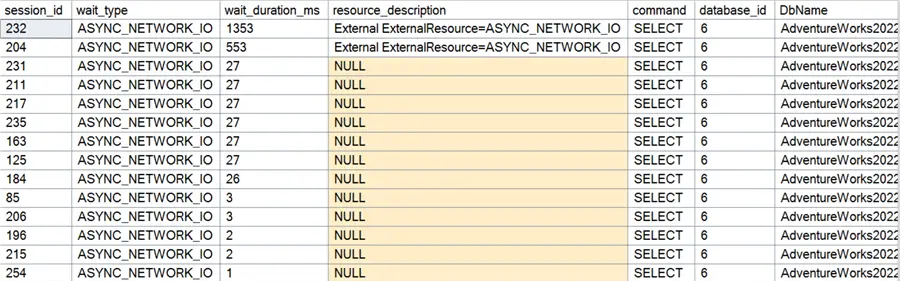
Figure – 3: ASYNC_NETWORK_IO wait type detection in SSMS
Common Causes and Resolutions
ASYNC_NETWORK_IO occurs when client-side data processing speed is slower than SQL Server prepares for them. This slowness could be for many reasons. Most of them are beyond the SQL Server environment.
Large Dataset
Transmitting a large dataset over a slow network. Possible scenarios:
- Client applications fetch huge data then process the results by applying filters, sorting, and aggregations.
- Using slow VPN connectivity.
- Applications like Microsoft Access or ORM software may request a large dataset.
- Pulling large data using ad hoc query via SSMS.
- Avoid Scalar-Valued User Defined Functions (UDF) as they often create high ASYNC_NETWORK_IO wait type.
- Avoid computed columns defined with a User Defined Functions (UDF) and a large dataset.
Resolution
- Process data in a balanced way between SQL Server and clients. Use proper TOP, WHERE clause, aggregate functions to make the result set small. On the client side, execute computations on the data, presentation and formatting which will distribute the load.
- Check network connectivity between client and SQL Server. Analyze your network performance.
- Check the actual ORM query from the application.
- Use NOLOCK hints (where applicable) in case you pull a large result sets for ad hoc purposes.
Applications Processing Data at Their Own Pace
If the application processes data slowly and does not acknowledge SQL Server data quickly then an ASYNC_NETWORK_IO wait may occur. For example, SqlDataReader from ADO.NET fetches data row by row and waits for a user input, writes to disk or writes another network IO. This could cause ASYNC_NETWORK_IO waits.
Resolution
- Adjust the application logic to fetch all the data at once, store it in application side memory then run additional processing.
Busy Application Server
An application will consume data slowly if the application server is under high load – CPU is high, memory is exhausted or slow Disk IO. In either case, ASYNC_NETWORK_IO will occur due to slow data processing.
Resolution
- Check which process is creating resource scarcity in application server. It is better to allocate dedicated server for application. In case of hardware, constraints optimize them. If it is required, optimize the application also.
Network Issues
A slow network will lead to ASYNC_NETWORK_IO wait and cause real damage to your SQL Server.
Resolution
- Analyze your network performance.
- Monitor the bandwidth between clients and your database server. Based on your requirements, use gigabit network adapters.
- Check configurations of all network equipment such as routers, switches, cables, network adapters, etc. Ensure that they have enough capacity to support your workload.
- Examine the Batch requests per second counter values.
- Batch Requests per second > 1,000 indicates a busy system.
- Batch requests per second > 3,000 and 100 Mbps bandwidth indicates network speed is the bottleneck and leads to high ASYNC_NETWORK_IO waits values.
Next Steps
Checkout these resources:
- SQL Query Stress Tool
- Get Detailed Wait Stats with SQL Server Execution Plan
- Troubleshoot slow queries that result from ASYNC_NETWORK_IO wait type
- Understanding ASYNC_NETWORK_IO Waits in SQL Server

M A A Mehedi Hasan has been working with EBS Group since 2005. He started his career as a Software Developer and he is now Chief Technology Officer (CTO) of EBS Group. In his long journey, he had the opportunity to work with various technologies like the Microsoft Data Platform, SMS/USSD/IVR based Telecom Value Added Service, and Audio/Video streaming.
As a Microsoft certified Azure Database Administrator Associate, he manages large databases, testing and deployment, performance tuning, long term capacity planning, and streamlining operational workflow. He is also a certified AWS Cloud Practitioner and his team is migrating on-prem services to AWS.
Being a member of techforumbd, a Bangladeshi tech community, he regularly speaks and organizes sessions at local and virtual PASS chapters, SQL Saturdays, and Azure conferences. He also has a course about SQL Server available on the Ghoori Learning and Ostad.app platforms.
In his free time, he loves exploring and learning as much as possible about SQL Server.