Problem
When we declare a local variable and use it in a query to filter the results, SQL Server does not perform any optimization for the query, and it causes incorrect cardinality estimation and results in an inefficient execution plan. In this article, I will show how this problem occurs and provide a simple solution to address it.
Solution
The query optimizer builds an execution plan based on statistics. It uses these statistics to estimate the number of rows that will be returned from a table. When this estimate is close to the actual number of rows returned, the query optimizer generates an efficient execution plan.
When you declare a variable inside a procedure, assign a value to it, and then use it in a query to filter results, the estimated number of rows will be wrong and can result in an incorrect memory grant. If the estimated number of rows is lower than the actual number of rows, an underestimation problem occurs, which can cause a spill to disk. This means that SQL Server has to write the data into tempdb and then read it from there, and this operation usually reduces query performance. Spill to disk is a costly operation, and you can learn more about it in Correct SQL TempDB Spills in Query Plans Caused by Outdated Statistics.
Developers declare a variable and use it in the WHERE condition of a query for various reasons, such as:
- Reading a value from somewhere like a settings table and then use it in a query to filter results.
- Using a value multiple times in a stored procedure, and this value is not passed to the procedure. For example, when they get the current time within the procedure, generate a date range based on it, and use it multiple times.
- To address the parameter sniffing issue.
Test Environment Setup
I will use SQL Server 2025 the latest SQL Server version and StackOverflow database for our examples. StackOverflow database is an open-source database from StackOverflow.com. I set the database compatibility level to 170.
/* MSSQLTips t-sql */

Use master
GO

Alter Database StackOverflow Set Compatibility_Level = 170
GO
The StackOverflow database includes a table for storing user’s information, with a clustered primary key on the Id column. I want to create a non-clustered index on the Reputation column for demo purposes:
/* MSSQLTips t-sql */

Use StackOverflow
GO

Create Index IX_Reputation On dbo.Users (Reputation)
GO
After creating a non-clustered index on the Reputation column, I will write a query to return information about Users whose reputation is 4, and then sort them by CreationDate. To view the actual execution plan, press Ctrl + M in SSMS.
/* MSSQLTips t-sql */

Select * From dbo.Users u Where u.Reputation = 4
Order By u.CreationDate
GO
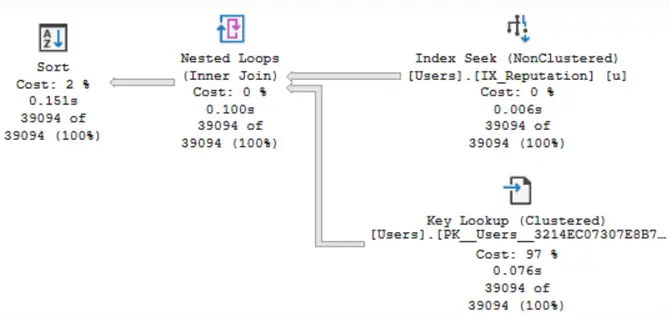
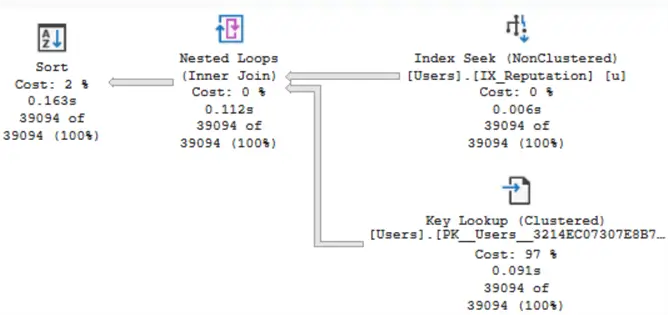
The image shows that the SQL Server performed a non-clustered index seek, followed by a key lookup, to retrieve and display the results. As shown in the image, the estimated number of rows is equal to the actual number of rows, and there is no warning on the Sort operator.
Now I declare a variable, assign 4 to it, and then use it in the WHERE condition.
/* MSSQLTips t-sql */

Declare @Reputation Int = 4;
Select * From dbo.Users u
Where u.Reputation = @Reputation
Order By u.CreationDate
GO
As shown in the image, the estimated number of rows is 439, while the actual number of rows is nearly 40,000—a huge difference:
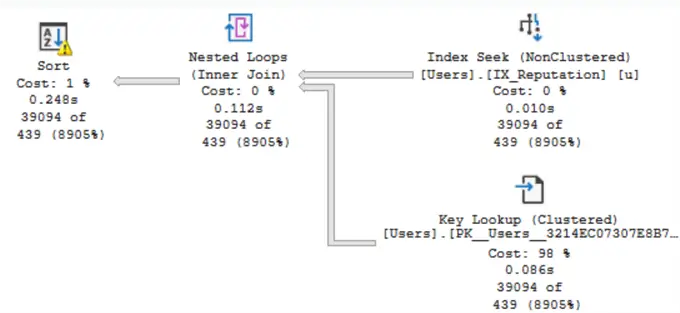
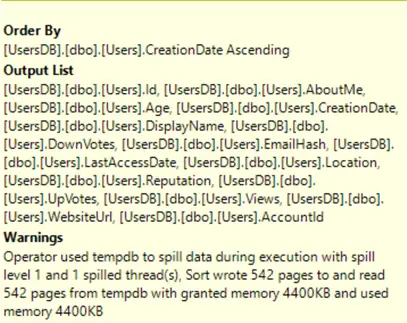
It is obvious in the image that there is a warning on the Sort operator. If you hover your mouse over the Sort operator, a tooltip will appear, and SQL Server will tell you that a spill to disk occurred. It says that SQL Server had to write 542 pages to the tempdb and read them from there:
Recommendations
RECOMPILE
The first approach to resolving this issue is to recompile the query. Therefore, I add the OPTION (RECOMPILE) to the query and run it once more.
/* MSSQLTips t-sql */

Declare @Reputation Int = 4;
Select * From dbo.Users u
Where u.Reputation = @Reputation
Order By u.CreationDate
Option (Recompile)
GO
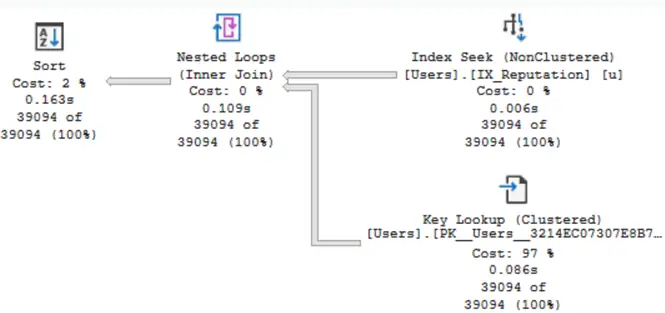
You can see in the image that the spill to disk has been removed from the actual execution plan:
Stored Procedure Wrapper
Since using OPTION (RECOMPILE) increases CPU usage for frequently executed queries (for example, 100 times per minute) I will provide an alternative solution to address this issue. I wrap the query in a stored procedure (as an inner procedure) and then call it from another stored procedure.
/* MSSQLTips t-sql */

Create Or Alter Procedure USP_FindPeopleByReputation_Inner
(@Reputation Int)
AS
Select * From dbo.Users u
Where u.Reputation = @Reputation
Order By u.CreationDate
GO

Create Or Alter Procedure USP_FindPeopleByReputation
AS
Declare @Reputation Int = 4;
Exec USP_FindPeopleByReputation_Inner @Reputation = @Reputation
GO

Exec USP_FindPeopleByReputation
The latest image shows that there is no warning on the Sort operator, and a spill to disk did not occur:
Summary
Sometimes developers declare a local variable and use it in a query to filter the records. This results in inaccurate cardinality estimation and, as shown in the example, reduces query performance. In this article, I provided two solutions to address the issue and discussed an alternative solution for cases when OPTION (RECOMPILE) increases CPU usage and becomes a bottleneck in the system.
Next Steps
- SQL Declare Variable Code Examples
- SQL Variables for T-SQL Code and Queries
- SQL Local Variables and Performance Issues
- Different Approaches to Correct SQL Server Parameter Sniffing
- SQL Parameter Sniffing Fix with a Covering Index

Mehdi Ghapanvari is an SQL Server database administrator with 6+ years of experience. His main area of expertise is improving database performance. He is skilled at managing high-performance servers that can handle several terabytes of data and hundreds of queries per second, ensuring their availability and reliability. To enhance the performance of the database, he has implemented various performance-tuning techniques, including query optimization and index tuning. He has also developed backup and recovery strategies to protect critical data in case of disasters. Mehdi currently manages the SQL Server databases for a large organization. Mehdi is actively seeking new opportunities to apply his expertise and contribute to impactful projects. You can reach him at SQLDBA.Mehdi@Gmail.com.
- MSSQLTips Awards: Rookie of the Year – 2023
- MSSQLTips Trendsetter Award: 2026


Hi Sanjay, if you can pass a value to a procedure, then definitely do it. But I came across a procedure that was being called by a web service and I didn’t have access to its source and I couldn’t pass a parameter from the web service to a procedure. So I had to use nested procedures. Thanks!
Why no suggestion for adding parameter in main procedure only?
Due to parameter sniffing? If yes then what if parameter sniffing happens in inner procedure?