Problem
Sometimes we cannot improve query performance because we don’t have control over the code. Consider a query that is generated by Entity Framework (EF) from the application and you do not have access to the source code. The main question is how you can improve SQL Server query optimization for a poorly performing query?
Solution
The short answer is indexing.
Indexing is a common solution to improve query performance and an option when you cannot improve query performance by rewriting the query. Another solution in such scenarios is to improve query performance through hardware upgrades, such as adding more RAM, CPU, or faster storage. But in this post, the focus is on indexing.
Scenario
This issue at hand is a problem I faced in production. A query in production that was generated on the application side was terribly slow.
I read the actual execution plan from right to left and top to bottom, and looked for operations where the estimated number of rows was very different from the actual number of rows. The estimated number of rows and the actual number of rows were the same for all operations. The query optimizer did not recommend a missing index.
Since the query ran in row mode and the time for each operator was displayed, I searched for an operator with a high execution time in the execution plan. I found that an Eager Index Spool operator had a very high execution time. The Eager Index Spool operator reads all rows from its child operator into an indexed worktable before returning them to its parent operator. It is a blocking operator. Missing index recommendations will not be generated for the Eager Index Spool operator.
Unfortunately, I cannot share the original query. However, I have attempted to create a similar query to demonstrate the performance issue.
Setup and Run Test
I will use SQL Server 2022 and AdventureWorks 2019 for our examples.
The following command sets the database compatibility level to 160.
Use master
GO
Alter Database AdventureWorks2019 Set Compatibility_Level = 160
GO
To display the actual execution plan, press CTRL + M in SSMS, and to view the number of logical reads, use the following command:
Use AdventureWorks2019
GO
SET STATISTICS IO ON
GO
The query below displays CustomerID, OrderDate, SalesOrderID, and the latest OrderDate for each customer from the Sales.SalesOrderHeader table. One way to write this query is using a subquery:
Select soh_0.CustomerID,
soh_0.OrderDate,
soh_0.SalesOrderID,
 (Select Top 1 soh_1.OrderDate
  From sales.SalesOrderHeader soh_1
  Where soh_0.CustomerID = soh_1.CustomerID
  Order By soh_1.OrderDate Desc) As LastDateOrderdate
From sales.SalesOrderHeader soh_0
Order by soh_0.CustomerID
GO
After the query above ran, the IO stats show SQL Server read over 280,000 pages from the buffer pool to display the result.

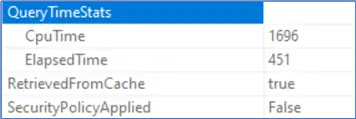
If you right-click the SELECT operator in the actual execution plan, then click Properties, and navigate to Query Time Stats, you will see the CPU time and elapsed time. The CPU time is almost four times the elapsed time. This indicates that the query was executed in parallel mode, and SQL Server used multiple logical CPU cores to run it.
There are two main solutions to improve the performance of this query:
- Query Tuning: Improving query performance by rewriting the query
- Index Tuning: Improving query performance by creating an index
Query Tuning
I rewrote the query using a window function, which I expect will reduce the number of logical reads.
Select soh_0.CustomerID,
soh_0.OrderDate,
soh_0.SalesOrderID,
Max (OrderDate) Over (Partition by CustomerID) As LastDateOrderdate
From sales.SalesOrderHeader soh_0
Order by soh_0.CustomerID
GO
After running the rewrite, the image below shows that the number of logical reads has reduced to nearly 140,000, which is a significant difference from the previous query.

The query execution time was not reduced much, but the CPU time was reduced significantly as shown below.
The elapsed time and CPU time are equal, and this means that the query ran in serial mode.
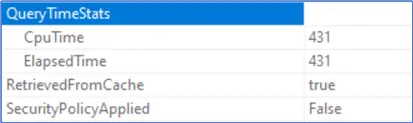
When there is high concurrency on a server, executing a query in parallel mode can reduce performance. Sometimes, reducing CPU time and logical reads on a server with high concurrency can resolve query performance issues.
Index Tuning
We reduced CPU time and logical reads by rewriting the query. However, in some scenarios, we cannot rewrite the query — and this is where indexing comes into play.
I executed the original query again so we can examine the actual query plan.
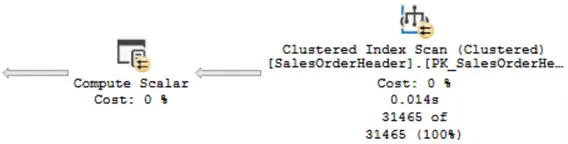
As you can see in the image below, SQL Server scanned the entire table using a Clustered Index Scan, and this operation took 14 milliseconds (0.014s).
The image below shows the time for the Eager Index Spool operator, which is nearly 300 milliseconds. After the Eager Spool operator, there are two other operators, Sort and Lazy Spool, respectively. Note that the query optimizer does not recommend a missing index.

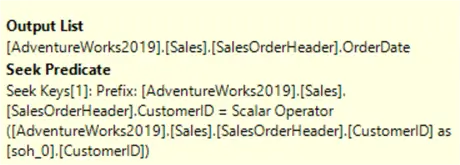
Index Spools often cover a missing index to efficiently support the underlying query. If you hover the mouse over this operator, the tooltip is displayed, and you can identify the relevant columns that can be used for the required index creation.
The key CustomerID has a Seek Predicate, and the Output List includes OrderDate.
Index Creation / Modification
Mapping them to the required index is simple. The Seek Keys represent index key columns, and the columns in the Output List are the non-key columns that we may consider adding using INCLUDE. To remove the expensive Eager Spool operator from the execution plan, creating an index as mentioned is appropriate. However, to remove the Eager Spool, Sort, and Lazy Spool operators, CustomerID and OrderDate columns should be included in the index key.
Before creating a new index, it is important to determine which indexes already exist on the table. To view indexes that are on the Sales.SalesOrderHeader, use the system stored procedure below.
Exec sys.SP_HELPINDEX N'Sales.SalesOrderHeader'
GO
The SalesOrderHeader table in the AdventureWorks2019 database has an index on the CustomerID column. I want to change this index and add the OrderDate column to the index key.
Drop Index IX_SalesOrderHeader_CustomerID On [sales].[SalesOrderHeader]
GO
Create Index IX_CustomerID_OrderDate On [sales].[SalesOrderHeader]
 (CustomerID, OrderDate)
GO
After modifying the index, I will rerun the query and review the execution plan.
Select
soh_0.CustomerID,
soh_0.OrderDate,
soh_0.SalesOrderID,
 (Select Top 1 soh_1.OrderDate
  From sales.SalesOrderHeader soh_1
  Where soh_0.CustomerID = soh_1.CustomerID
  Order By soh_1.OrderDate Desc) As LastDateOrderdate
From sales.SalesOrderHeader soh_0
Order by soh_0.CustomerID
GO
As shown in the image below, the expensive operators have been removed and now we are doing an Index Seek.

The query execution time is now 158 milliseconds which shows that the query ran nearly three times faster.

The IO stats shows a decrease in logical reads to almost 67,000 which is a huge improvement from 280,000.

Summary
To improve query performance, it is recommended to rewrite the query to use existing indexes instead of creating new indexes or modifying indexes. This is especially important in a busy system with large tables.
When rewriting the query is not possible, indexing can be a good option to improve performance.
Next Steps
Check out these resources

Mehdi Ghapanvari is an SQL Server database administrator with 6+ years of experience. His main area of expertise is improving database performance. He is skilled at managing high-performance servers that can handle several terabytes of data and hundreds of queries per second, ensuring their availability and reliability. To enhance the performance of the database, he has implemented various performance-tuning techniques, including query optimization and index tuning. He has also developed backup and recovery strategies to protect critical data in case of disasters. Mehdi currently manages the SQL Server databases for a large organization. Mehdi is actively seeking new opportunities to apply his expertise and contribute to impactful projects. You can reach him at SQLDBA.Mehdi@Gmail.com.
- MSSQLTips Awards: Rookie of the Year – 2023



I get best performances with this query
Select soh_0.CustomerID,
soh_0.OrderDate,
soh_0.SalesOrderID,
(Select max(soh_1.OrderDate)
From sales.SalesOrderHeader soh_1
Where soh_1.CustomerID =soh_0.CustomerID
) As LastDateOrderdate
From sales.SalesOrderHeader soh_0
Order by soh_0.CustomerID
Thanks for your comment.
In this article, it is assumed that the query cannot be changed.
Also, choosing between writing the query this way or using a window function for better performance depends on indexing. I’ll cover this topic in a separate article.
You broke this topic down into an easily digestible format and showed impressive results. Thanks!
Glad you liked it!
Great article! indexing improved the performance a lot.
Glad you liked it!
Thanks!
Good