Problem
In the last decade, organizations have accelerated adoption of cloud technologies like Azure, AWS and GCP solving storage and compute limitations. However, the fundamental challenges of data quality remain persistent. Often, data quality solutions are reactive with most companies adopting a ETL/ELT framework which makes data quality issues discoverable at the visualization layer through reporting tools like Tableau, Power BI and Quicksight.
A core limitation of ETL/ELT frameworks is data is processed with business logic and loaded into the data warehouse without validating data quality. That’s where a tool like AWS Glue Databrew becomes handy where data gets independently checked for data quality with sanity checks like duplicate records, null values and analytical teams are updated about issue before the customer notices.
Solution
Let’s use a scenario of an e-commerce company to implement data quality checks. The e-commerce company lists products for sale through their website and vendors submit their product listings daily with a price to be included in the website. As the company receives files from vendors, it processes them in a traditional ETL pipeline in AWS system (S3 > Glue > Redshift > Quicksight). Here, a Pricing Analyst is able to see the data quality issues only when the data is loaded into Quicksight.
In our solution, we recommend implementation of data quality mechanism with Glue Databrew, so the incoming files are checked for data quality issues before loading into the data warehouse. If there are any issues, error handling logic routes the records into a separate bucket and alerts the Pricing Analyst via Slack notifications.

Setting up the IAM role Permissions
Let’s setup an IAM (identity access management) role to work with services needed for this solution.
Sign in to the AWS Console and select the IAM service in the list of AWS Services. Go to Roles and Create a role. For the purpose of this solution, let’s name the IAM role as “vendor-data-quality-check-role”.
Go to Attach add permissions and attach the following policies: AmazonS3FullAccess, AWSGlueDataBrewFullAccessPolicy, AWSGlueServiceRole and AWSLambdaExecute.

Go to the Trust relationship section and add the below trust policies so the role can interact with lambda, glue and databrew services.
--MSSQLTips.com
{
"Version": "2012-10-17",
"Statement": [
{
"Effect": "Allow",
"Principal": {
"Service": [
"lambda.amazonaws.com",
"glue.amazonaws.com",
"databrew.amazonaws.com"
]
},
"Action": "sts:AssumeRole"
}
]
Creating the S3 Bucket
The data is populated in the raw-bucket so, let’s create a new bucket for data_quality_issues. Let’s upload the data in raw folder.
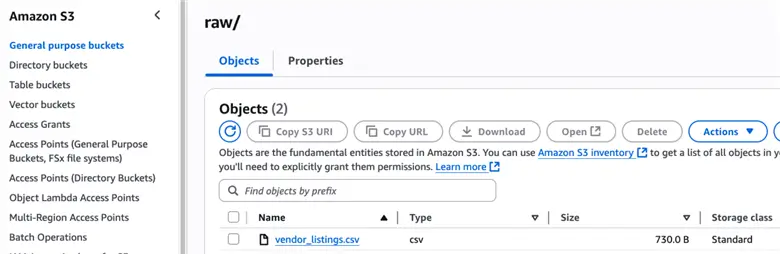
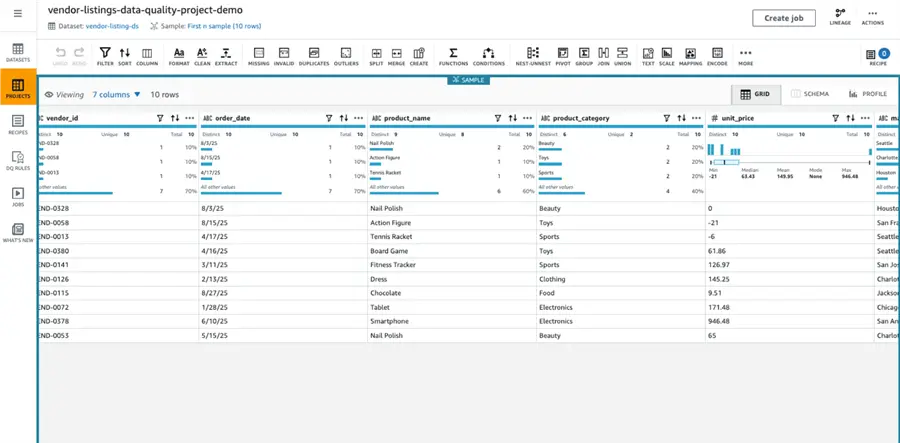
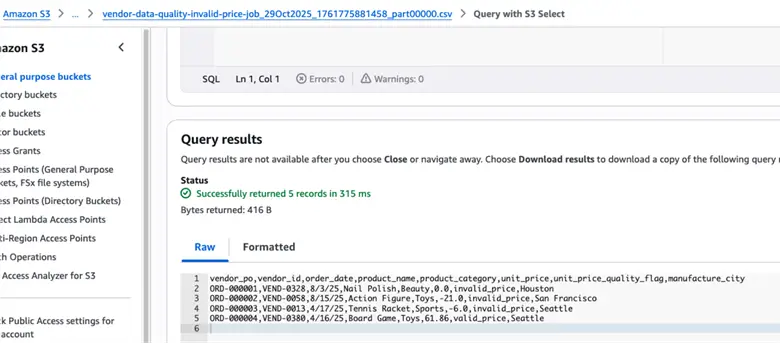
Click the CSV file, go to query option and select Query with S3 Select with keeping the configurations the same in the format, delimiter and compression sections. You can see the uploaded data has negative price values in the unit_price column.

Creating the Data Quality Project in DataBrew
DataBrew is an interactive data preparation tool that enables users to clean and normalize the data without writing any code. There are four concepts you have to be familiar with in this tool:
- Project: A project manages a collection of data related items, data, transformation and scheduled processes.
- Dataset: A dataset simply means a set of data – rows (or records) that are divided into columns and fields. In Databrew, a dataset is a read-only connection to your data.
- Recipe: A recipe is a set of instructions that you want DataBrew to act on. A recipe can contain multiple steps which involves basic data quality checks to advanced statistical functions. You can publish a recipe and maintain multiple versions of it.
- Job: DataBrew takes on the job of transforming your data by running the instructions that you set up when you made a recipe. The process of running these instructions is job.
Navigate and open the Glue DataBrew services in AWS Console.

Go to Projects and Create a project as vendor-listings-data-quality-project-demo.

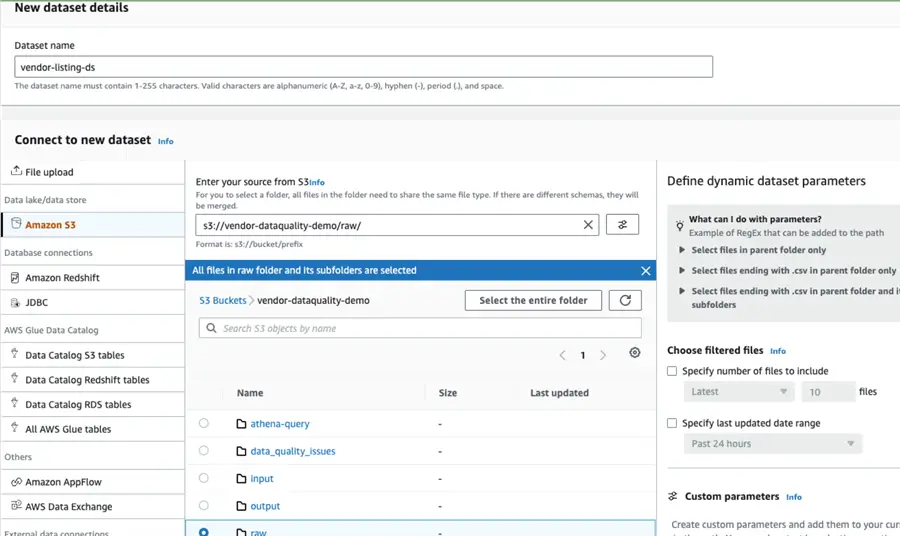
Select the input dataset from the S3 folder location.
Choose the IAM role created in the previous section and create the project.
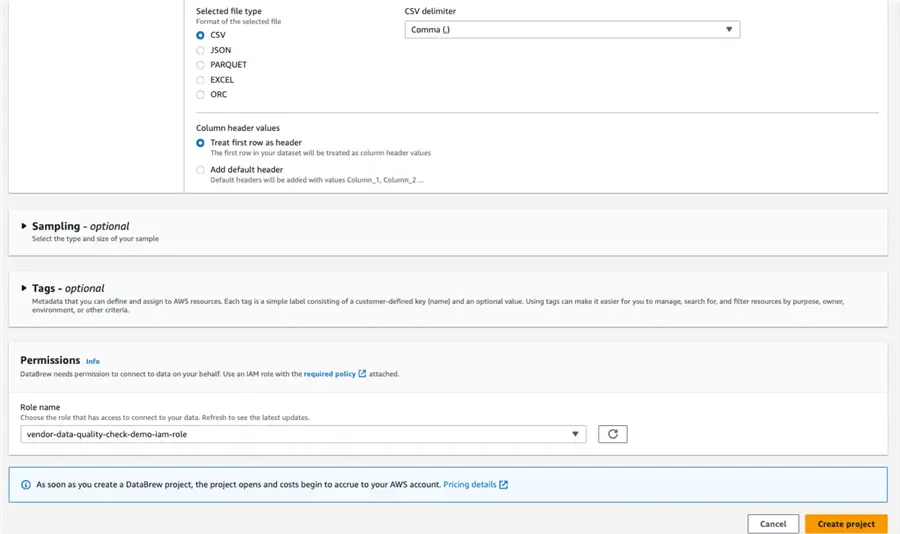
It will take up a few minutes to provision the compute.
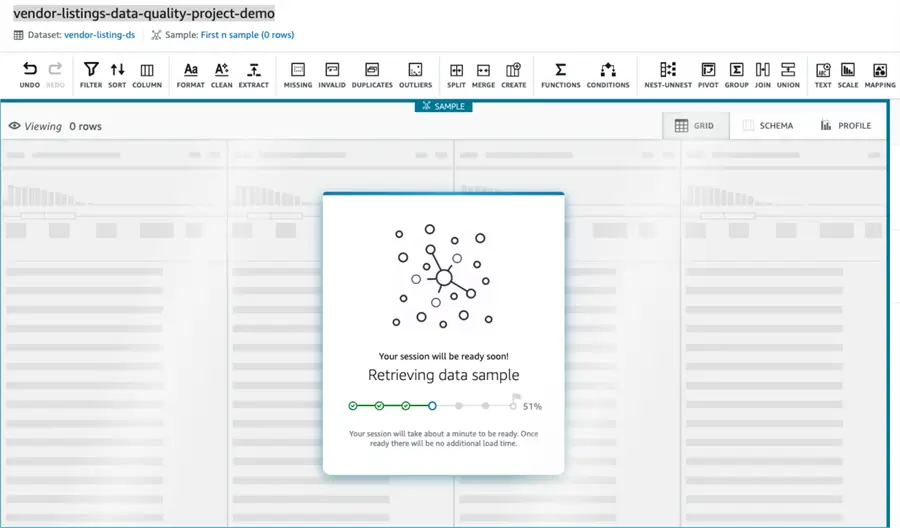
Once provisioned you can visualize the data in the designer
Configuring the Data Quality Check
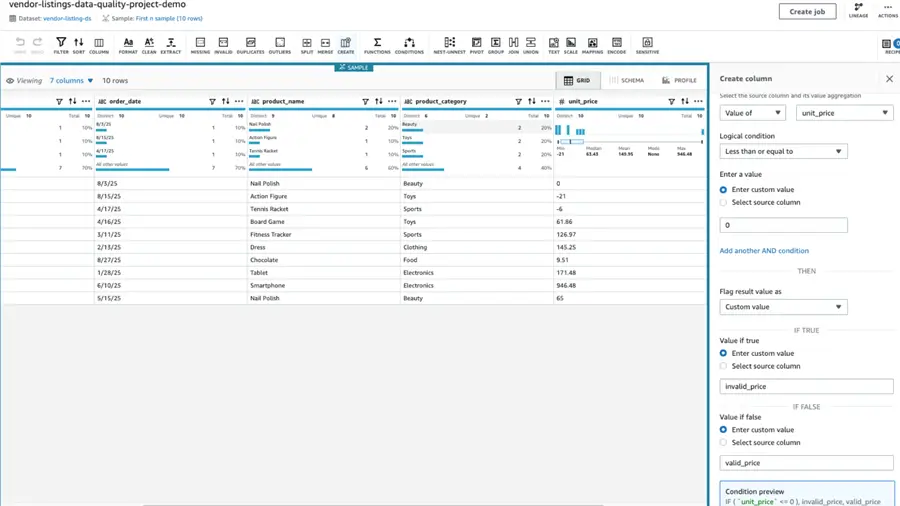
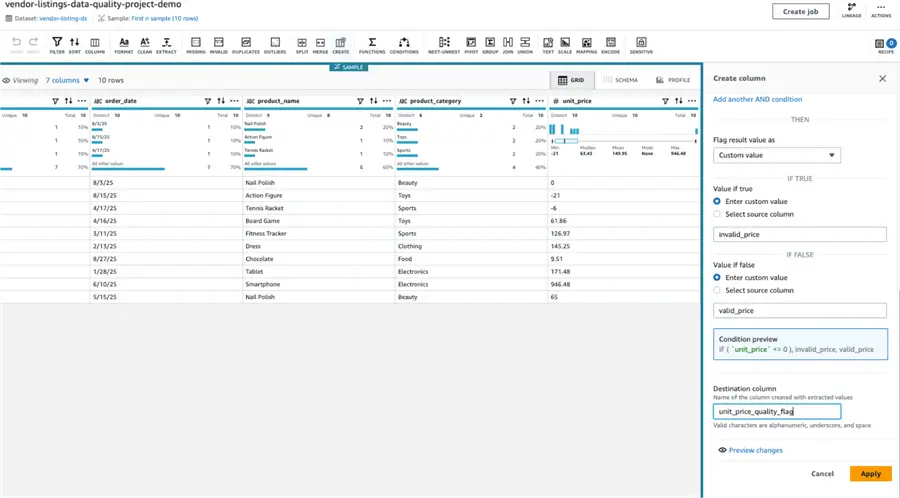
We must create the data quality check for negative unit records in the unit_price column. Go to Create column in the middle of the designer then create a column with a condition to check for unit_price less than or equal to 0. The output value as invalid_price when true and valid_price when the condition is false. Rename the destination column as unit_price_quality_flag.
Go to the Recipe section and create a step to filter records from unit_price_quality_flag column and choose the filter condition as is exactly and set the value to invalid_price.

Creating a Recipe Job
Go to the Recipe section and choose to create a Job from the Recipe. We will use the same dataset we created in the project and map the output folder to the data_quality_issues in S3 and choose the IAM role created earlier.
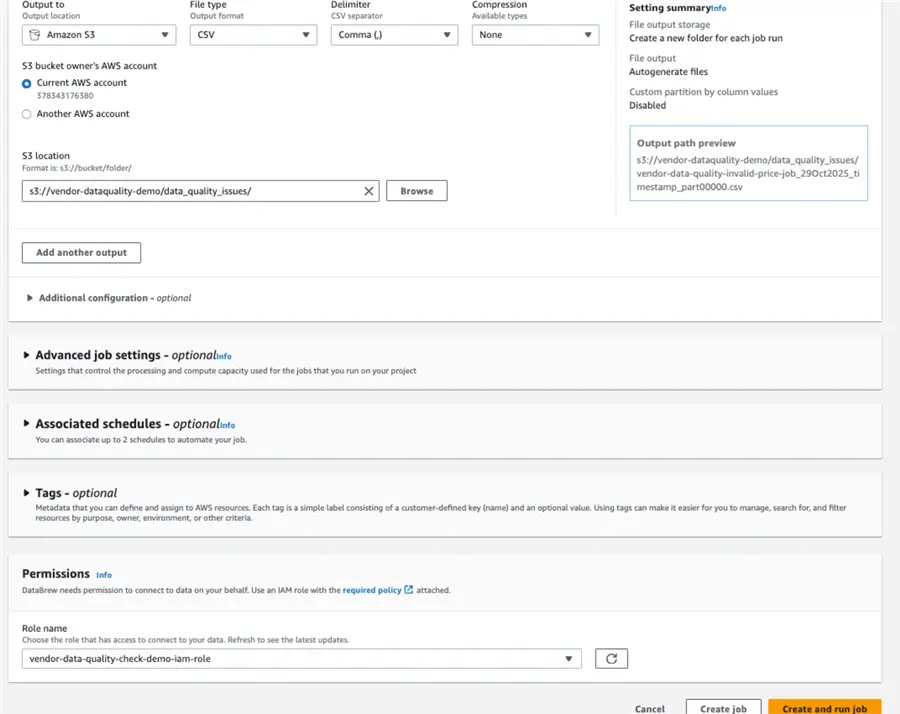
Now go the job and run the job, you will see the negative units’ records with unit_price will be moved to data-quality-issues folder in S3.
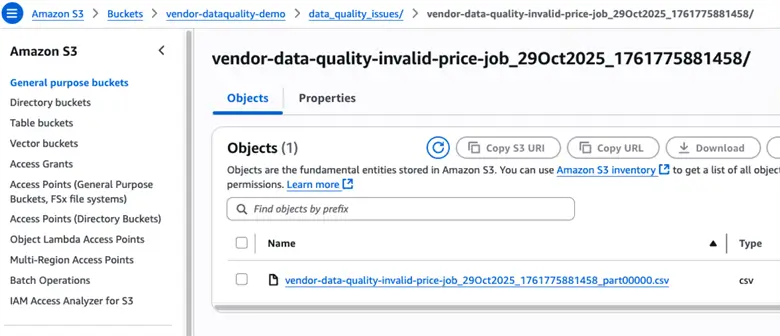
Click the CSV file and query it is using S3 select. Here you will see records with negative values.
Creating the Lambda Function
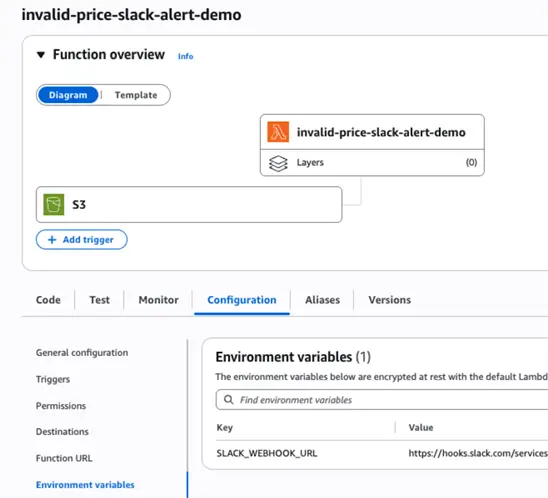
We will now create a Lambda function which gets triggered and posts a message in a Slack channel when the data_quality_issues bucket is updated with new files with negative unit_price values. Go to Lambda services in AWS and create a new function as price-alert-invoke-function, choose the IAM role we have created earlier to execute the function and paste the below code.
--MSSQLTips.com (Python)
import json
import os
import boto3
import urllib3
from datetime import datetime

def lambda_handler(event, context):
    """
    Lambda function to send Slack alerts when invalid price files are detected
    """

    # Get Slack webhook from environment variable
    SLACK_WEBHOOK_URL = os.environ.get('SLACK_WEBHOOK_URL')

    if not SLACK_WEBHOOK_URL:
        print("ERROR: SLACK_WEBHOOK_URL environment variable not set")
        return {
            'statusCode': 400,
            'body': json.dumps('Slack webhook URL not configured')
        }

    try:
        # Extract S3 event details
        for record in event['Records']:
            bucket_name = record['s3']['bucket']['name']
            object_key = record['s3']['object']['key']
            file_size = record['s3']['object']['size']

            print(f"Invalid price file detected: s3://{bucket_name}/{object_key}")

            # Check if this is an invalid price file (updated path matching)
            if ('invalid-price' in object_key or 'data_quality_issues' in object_key) and object_key.endswith('.csv'):

                # Get file details
                file_name = object_key.split('/')[-1]
                estimated_records = max(0, (file_size - 100) // 50)  # Rough estimate

                print(f"Sending Slack alert for file: {file_name}")

                # Send Slack alert
                result = send_invalid_price_alert(
                    SLACK_WEBHOOK_URL,
                    bucket_name,
                    file_name,
                    object_key,
                    estimated_records
                )

                if result:
                    print("Slack alert sent successfully")
                else:
                    print("Failed to send Slack alert")
            else:
                print(f"File path doesn't match invalid price pattern: {object_key}")

        return {
            'statusCode': 200,
            'body': json.dumps('Processing completed')
        }

    except Exception as e:
        print(f"Error: {str(e)}")
        return {
            'statusCode': 500,
            'body': json.dumps(f'Error: {str(e)}')
        }

def send_invalid_price_alert(webhook_url, bucket_name, file_name, object_key, estimated_records):
    """Send invalid price alert to Slack"""

    message = {
        "text": " INVALID PRICE DATA DETECTED",
        "attachments": [
            {
                "color": "danger",
                "title": "Data Quality Issue Alert",
                "fields": [
                    {
                        "title": "Issue Type",
                        "value": "Invalid Prices (Negative Values)",
                        "short": True
                    },
                    {
                        "title": "Estimated Records",
                        "value": str(estimated_records),
                        "short": True
                    },
                    {
                        "title": "File Name",
                        "value": f"`{file_name}`",
                        "short": False
                    },
                    {
                        "title": "S3 Location",
                        "value": f"`s3://{bucket_name}/{object_key}`",
                        "short": False
                    },
                    {
                        "title": "Detected At",
                        "value": datetime.now().strftime('%Y-%m-%d %H:%M:%S UTC'),
                        "short": True
                    }
                ],
                "footer": " Action Required: Review and correct pricing data"
            }
        ]
    }

    try:
        print(f"Sending to webhook: {webhook_url[:50]}...")  # Log partial URL for debugging

        http = urllib3.PoolManager()
        response = http.request(
            'POST', webhook_url,
            body=json.dumps(message),
            headers={'Content-Type': 'application/json'}
        )

        print(f"Slack API response status: {response.status}")
        print(f"Slack API response data: {response.data.decode('utf-8')}")

        if response.status == 200:
            return True
        else:
            print(f"Slack webhook failed with status: {response.status}")
            return False

    except Exception as e:
        print(f"Error sending Slack alert: {str(e)}")
        return False
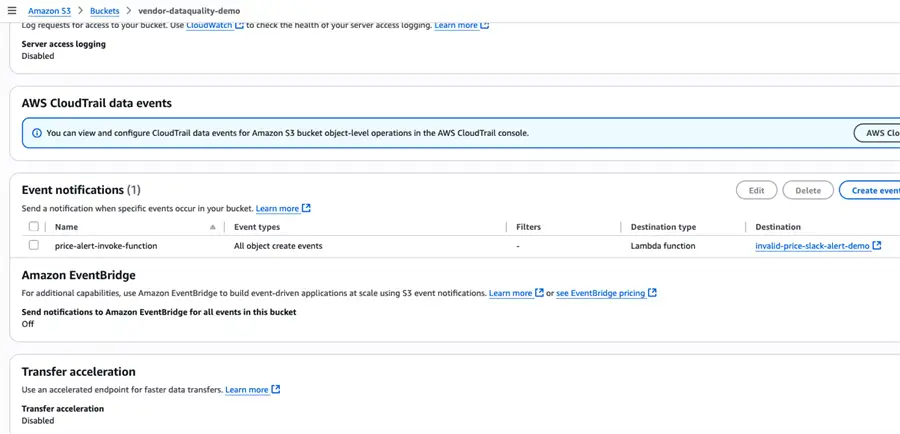
Now go to the S3-bucket properties, in the event notification section create a new event notification with all object create events checked. Map this lambda function as a destination so the function gets triggered when new files are delivered in data-quality-issues folder.
Creating a Slack Webhook URL
The last part is creating a Webhook in Slack so the response from the Lambda Function is posted in the Slack channel. Go to https://api.slack.com/apps and create a new app from scratch, give it a name like GlueDataBrewAlerts. Go to the Incoming Webhooks section and Activate the Incoming Webhooks and add a new Webhook URL. Copy the Webhook and add it in the Environment Variable section in the Lambda function.
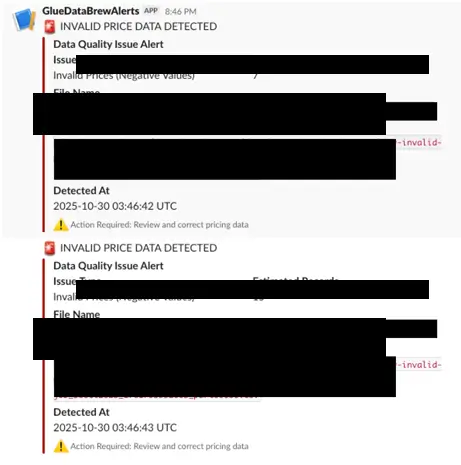
Now when the file is uploaded in S3 and the data quality job is scheduled to run, it will post the data quality issues in a separate folder. This will invoke the Lambda Function to post the below message in Slack as shown below.
Summary
In summary, we have created a proactive data quality check to ensure and prevent records with data quality issues from entering into the data warehouse. This solution provides proactive data quality checks from the source layer and could be extended to your data warehouse as well.
Common Troubleshooting and Best Practices
Implementing an event driven data quality solution does comes up with lot of challenges, here is my summary of common errors that you might run into:
In this article we are using a single IAM role. If you missed to attaching the policy for each service it may not work. Also, you have to add the Trust policies for each AWS Services else the IAM role will not show up in those services.
Be cognizant of the compute costs while scheduling the data quality job and sync it with the upload frequency of the incoming data to avoid costs.
If you’re implementing the data quality issue impacted records into a separate S3 folder or bucket ensure the bucket has S3 life cycle policies configured to handle the large volume of records.
If the Lambda Function is not executing, go to the Cloudwatch logs, troubleshoot and work backwards from the error message. The event driven architecture between S3 and Lambda has to be validated for them to work in parallel.
Next Steps
This solution can be well implemented and managed by both the data analytics and business teams. Start with configuring basic alerts for the golden datasets in the organization to check for duplicate records, null records and anomalies. Work with your business stakeholders to create a data quality incident notification channel that will post data quality incidents to your stakeholders for proactive data quality monitoring.

Junaith Haja is a senior data engineering leader with over a decade of experience transforming raw data into scalable platforms and actionable insights that drive business performance, operational excellence, and sustainability. At Amazon, he applies a “data as a product” philosophy to architect resilient data infrastructures supporting global domains such as identity verification and financial risk mitigation.
Beyond engineering execution, Junaith is an active voice in the global data and AI ecosystem. He has authored over 100+ articles in major database and AI platforms including MSSQLTips.com, AITimeJournal, AI Frontier Network, DZone. He writes a weekly LinkedIn newsletter, Signal Over Noise and his personal blog juniathhaja.com where he shares insights on data engineering, AI and leadership. He serves as a Senior Member of IEEE, a Fellow at the Institute of Analytics, and a Distinguished Fellow at the Soft Computing Research Society, reinforcing his commitment to responsible, sustainable, and impactful data practices.