Problem
Your query is slow and someone suggests setting up a nightly job to rebuild indexes and update statistics to improve performance. You set it up, and apparently, the problem is resolved, but it occurs again. In this article, I will walk through why it’s important to identify the exact root of the problem before attempting to implement a solution to solve it. Without identifying the root cause, we might implement an incorrect solution that doesn’t resolve the issue permanently.
Solution
One of the most mysterious issues that can reduce your query performance is Parameter Sniffing. It occurs with stored procedures and parameterized queries. I published a few articles about it:
- Correct SQL Server Parameter Sniffing when using TOP Clause
- Parameter Sniffing with Temporary Tables in SQL Server 2022
- Date Range SQL Server Query Performance Issues with Parameter Sniffing
- SQL Server 2025 OPPO and PSPO
What is Parameter Sniffing
SQL Server builds an execution plan for a stored procedure based on the values of the input parameters passed during its first execution. The created plan is stored in the plan cache, and SQL Server reuses it. It is possible that the stored plan is not suitable for other values passed to the stored procedure as input parameters during subsequent executions. This problem, known as Parameter Sniffing, can cause stored procedures to run quickly for some parameters and very slowly for others. It is important to understand that rebuilding indexes and updating statistics causes SQL Server to mark the plans stored in the plan cache for recompilation. I have seen many people rebuild indexes or update statistics to deal with the Parameter Sniffing issue. But this does not permanently solve the problem, and we need to choose a suitable solution.
In general, before setting up a nightly job to rebuild indexes and update statistics, ask yourself:
- Are the indexes fragmented?
- Does fragmentation matter in your system, and does it cause performance issues?
- Are the statistics outdated?
Rebuilding indexes and updating statistics have a cost for your system, and it’s even worse when they don’t fix the problem because the root cause lies elsewhere.
Set Up Test Environment
For this demonstration, I will use SQL Server 2022 and the StackOverflow database, which is an open-source database from StackOverflow.com. It has a table for storing user information, such as DisplayName, Reputation, etc., called the Users table, which has a clustered primary key on the Id column.
I start the demo by switching the database compatibility level to 160 and creating a nonclustered index on the CreationDate column.
Use master
GO

Alter Database StackOverflow Set Compatibility_Level = 160
GO
Use StackOverflow
GO

Create Index IX_CreationDate On dbo.Users (CreationDate)
GO
I want to create a stored procedure that returns information about users, like Location, DisplayName, etc., within a specific date range.
Create Procedure USP_FindPeopleByDate
(@StartDate DateTime, @EndDate DateTime)
AS
Select u.Location, u.DisplayName, u.Reputation, u.CreationDate, u.LastAccessDate
From dbo.Users u
Where u.CreationDate Between @StartDate And @EndDate
GO
To view the actual execution plan, simply press CTRL + M in SQL Server Management Services (SSMS), and to view the number of logical reads, use the following command:
SET STATISTICS IO ON
GO
Review Query Plans
First, I execute the stored procedure to display information about users who registered in July 2008.
Exec USP_FindPeopleByDate @StartDate = '2008-07-01', @EndDate = '2008-08-01'
GO
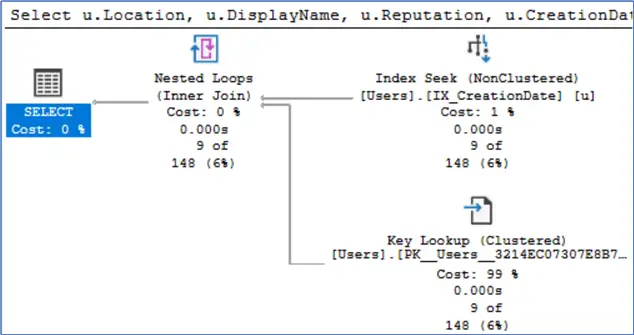
The image below displays the actual execution plan of the procedure. SQL Server executed the query using a nonclustered index seek followed by a key lookup.
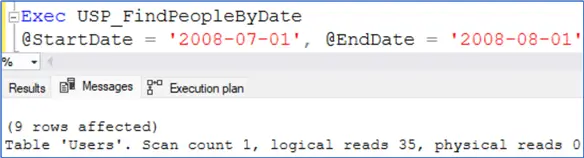
As shown in the image below, the number of logical reads is 35. That’s great.
I will now execute the stored procedure to display information on users who registered in October 2016.
Exec USP_FindPeopleByDate @StartDate = '2016-10-01', @EndDate = '2016-11-01'
GO
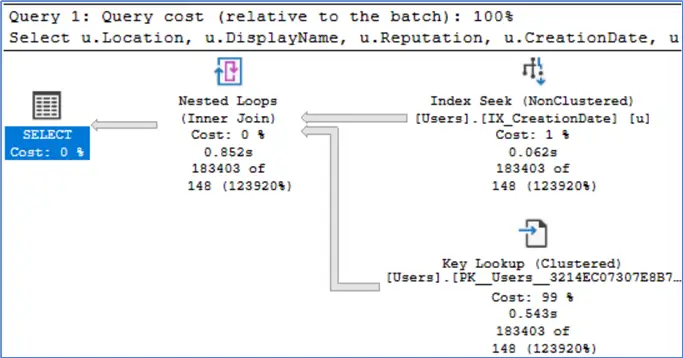
The image shows that SQL Server performed a nonclustered index seek followed by a key lookup.
Is this plan suitable for retrieving the information of users who registered in October 2016? Refer to the image displayed below.
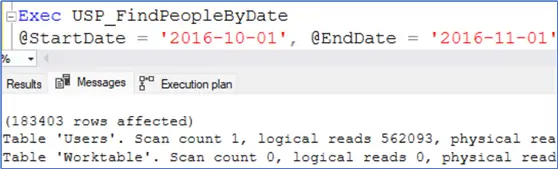
SQL Server read more than 562,000 pages to display results. This can cause poor performance, especially in high concurrency environments.
Test Index Rebuild Process
To reduce logical reads and improve performance, I want to rebuild the index without identifying the root cause of the problem.
Alter Index IX_CreationDate On dbo.Users Rebuild
GO
I will now execute the stored procedure for October 2016 once more.
Exec USP_FindPeopleByDate @StartDate = '2016-10-01', @EndDate = '2016-11-01'
GO
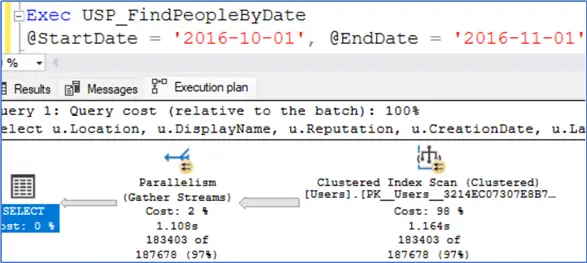
After rebuilding the index and executing the stored procedure for October 2016, SQL Server performed a clustered index scan operation instead of a nonclustered index seek and a key lookup, as shown below.
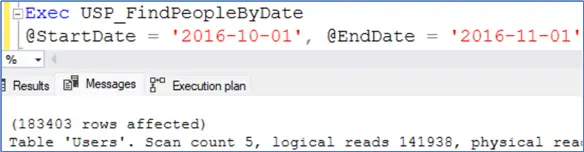
The image below shows that the number of logical reads decreased to around 142,000. It seems satisfactory.
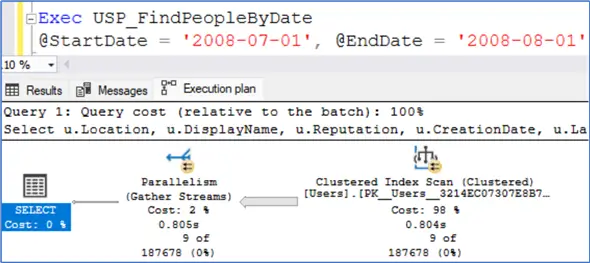
What will happen if we execute the stored procedure for July 2008? The image below shows that SQL Server scanned the entire table to retrieve only nine records. (The actual number of rows is 9)
Parameter Sniffing Issue
We are facing a Parameter Sniffing issue and rebuilding the index does not fix it.
There are a few solutions to deal with this issue, and one of them is a covering index. I drop the nonclustered index that I created earlier and create a covering index.
Drop Index IX_CreationDate On dbo.Users;
GO

Create Index IX_CreationDate_Include On dbo.Users (CreationDate)
Include (Location, DisplayName, Reputation, LastAccessDate)
GO
I rerun the test by executing the stored procedure for July 2008 and then for October 2016.
Exec USP_FindPeopleByDate @StartDate = '2008-07-01', @EndDate = '2008-08-01'
GO
The image shows that SQL Server used a nonclustered index seek.
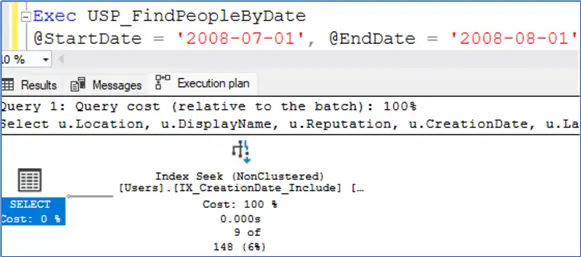
Refer to the following image:
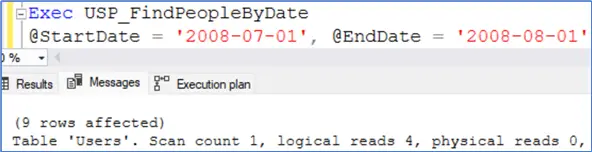
The number of logical reads is four. I will now execute the stored procedure for October 2016.
Exec USP_FindPeopleByDate @StartDate = '2016-10-01', @EndDate = '2016-11-01'
GO
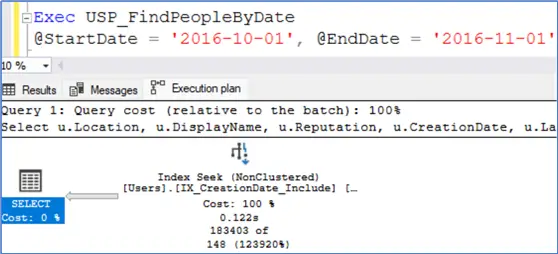
Look at the image below. SQL Server performed a nonclustered seek operation to retrieve the result.
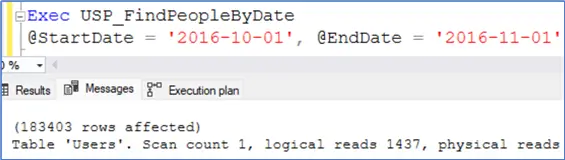
The image below shows that the number of logical reads is 1437. That’s great!
Summary
Without identifying the exact root cause of a problem, you may implement the wrong solution and not fix it. In this article, you saw that when the Parameter Sniffing issue causes a procedure to execute slowly, rebuilding indexes does not fix the problem. There are a few solutions to deal with this issue, and one of them is a covering index used in this tip.
Next Steps
- How to find compiled parameter values for SQL Server cached plans
- SQL Server Covering Index Performance
- Rebuilding index is very bad practice!
- Rebuilding SQL Server indexes using the ONLINE option

Mehdi Ghapanvari is an SQL Server database administrator with 6+ years of experience. His main area of expertise is improving database performance. He is skilled at managing high-performance servers that can handle several terabytes of data and hundreds of queries per second, ensuring their availability and reliability. To enhance the performance of the database, he has implemented various performance-tuning techniques, including query optimization and index tuning. He has also developed backup and recovery strategies to protect critical data in case of disasters. Mehdi currently manages the SQL Server databases for a large organization. Mehdi is actively seeking new opportunities to apply his expertise and contribute to impactful projects. You can reach him at SQLDBA.Mehdi@Gmail.com.
- MSSQLTips Awards: Rookie of the Year – 2023



Excellent content! My team and I were facing a similar situation. Thank you for sharing, it was very helpful.
Glad you liked it!