Problem
You constantly hear about the need to have proper indexes on SQL Server tables. Indexes help improve performance, but how do they actually work under the hood. In this article, we will take a look at examples to help you better understand what a B+ Tree is and how indexes improve performance.
Solution
Well, before you start to understand how indexes work, you need to understand an important underlying data structure called B+ Trees and how they drive indexing in databases.
Simple Index Explanation
Let’s use a book index to explain what an index is and how it is used.
If you want to find specific occurrences of a topic in a book, you can flip to the back pages to see if an index exists. If there is an index, topics in the book are sorted alphabetically with page numbers referencing where that topic is mentioned in the book. Without this index, you would need to scan every page in the book to find the occurrence of the topic.
For databases, this works basically the same way, except you can have multiple indexes to speed up database operations. In addition, the index is not flat like a book index. There are multiple levels in the index which further improves performance to find the correct occurrences in a table. This is a pretty simplistic explanation, so let’s look at some examples.
B+ trees
A B+ tree is the index structure used in the SQL Server database engine to optimize performance during data operations queries. This data structure achieves this by:
- Structured with root, intermediate and leaf levels – this hierarchy allows for fast traversing of the index.
- Only stores the row values at the leaf nodes to keep index small. For a clustered index it includes all the row data, for non-clustered indexes it just has the key with a pointer to the clustered index row.
- Keeps the root and intermediate nodes small by including only the index keys.
- The index is sorted by the index key to quickly find the search value.
- The leaf nodes are linked together which makes them behave like a sorted linked list.
- All the keys in the structure can be found at the leaf level, which makes insertions and deletions much faster and easier.
Sample Database Setup
This tutorial will use a simple database with sample data to help provide practical implementations of this topic.
To follow along with this tutorial, open SSMS and create the following database:
CREATE DATABASE Mssqltips_Btrees;
GO
USE Mssqltips_Btrees;
GO
Then, create a sample table for employees:
CREATE TABLE Employees
(
    EmployeeID INT,
    FirstName VARCHAR(50),
    Department VARCHAR(50)
);
After running the above query, populate the table with sample data that has random Employee IDs:
;WITH Numbers AS
(
    SELECT TOP (50000)
        ROW_NUMBER() OVER (ORDER BY NEWID()) AS RandomID,
        ROW_NUMBER() OVER (ORDER BY a.object_id, b.object_id, c.object_id) AS n
    FROM sys.objects a
    CROSS JOIN sys.objects b
    CROSS JOIN sys.objects c
)
INSERT INTO Employees
(
    EmployeeID,
    FirstName,
    Department
)
SELECT
    RandomID,
    CONCAT('Employee', n),
    CASE
        WHEN n % 3 = 0 THEN 'Editor'
        WHEN n % 3 = 1 THEN 'Writer'
        ELSE 'IT'
    END
FROM Numbers;
Traversing the data in your table
Now that you have your sample data and have a better understanding of how a B+ tree works. Let’s practically show how the SQL Server uses this data structure to manipulate data.
To achieve this, let’s assume we want to find the employee with the ID number 19245, which would result in a T-SQL query like this:
SELECT *
FROM Employees
WHERE EmployeeID = 19245;
Now, the question is, how does the SQL Server engine retrieve results for this query based on different table configurations?
We will discuss this with the following examples:
- Table with no indexes
- Table with 1 nonclustered index and no clustered index
- Table with 1 clustered index and no nonclustered index
- Table with 1 clustered index and 1 nonclustered index
Table with no indexes
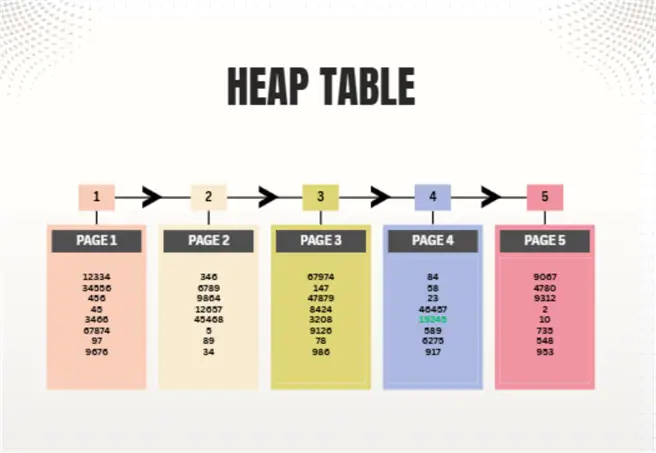
Since a table with no indexes cannot trigger a B+ tree search, it is considered to be a heap search, which means the entire table will be scanned in order to retrieve the required data.
In SSMS, with your query tab open and selected, press Ctrl + M to view the Actual Query Execution Plan that the SQL Server engine executes while running the query.
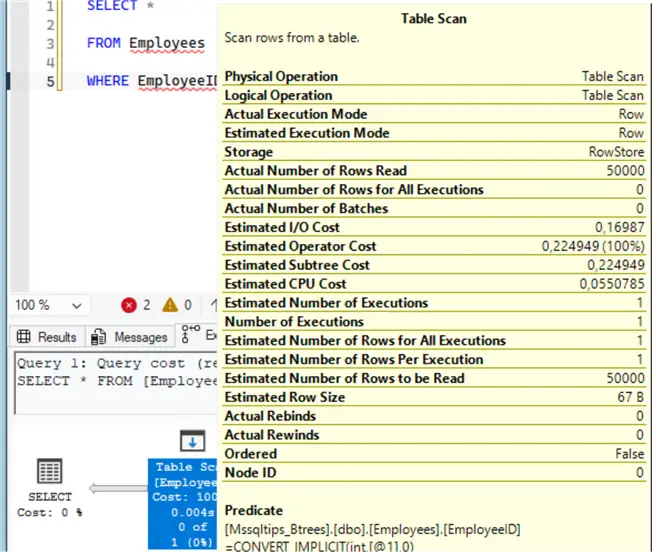
Since the table has no indexes, the SQL Server engine cannot traverse a B+ Tree structure. Instead, the SQL Server engine performs a table scan and checks rows sequentially until EmployeeID 19245 is found. Also, as you can see, the actual number of rows read is 50,000, which means that the SQL engine continues to check all the records in the table to see if there are additional occurrences.
The “Ordered” parameter has a “False” value, confirming that the data is not ordered and has no specific sequence.
Table with 1 nonclustered index no clustered index
We will use the same table and query but first create a nonclustered index.
CREATE NONCLUSTERED INDEX IX_EmployeeID
ON Employees(EmployeeID);
Then use the shortcut Ctrl + M to see the Actual Execution Plan then run the query:
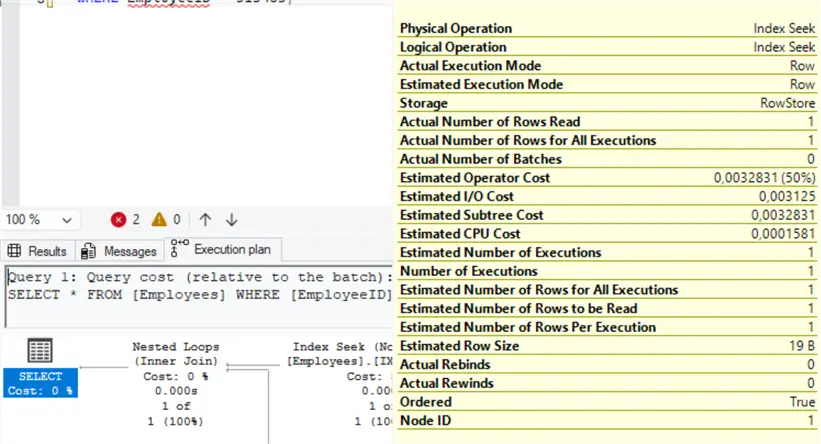
SQL Server Engine now uses the nonclustered index B+ Tree to locate EmployeeID 19245 using an Index Seek which enables SQL to find the matching row after traversing a B+ Tree and reading only 1 row as shown on the “Actual Number of Rows Read” parameter compared to the 50,000 rows read during the heap table query, which results in much fewer CPU and Operator costs.
As you can see from the image above, the leaf level contains an RID pointer to the heap row. Then after finding the RID, SQL Server performs an additional lookup into the heap table to retrieve the full row:
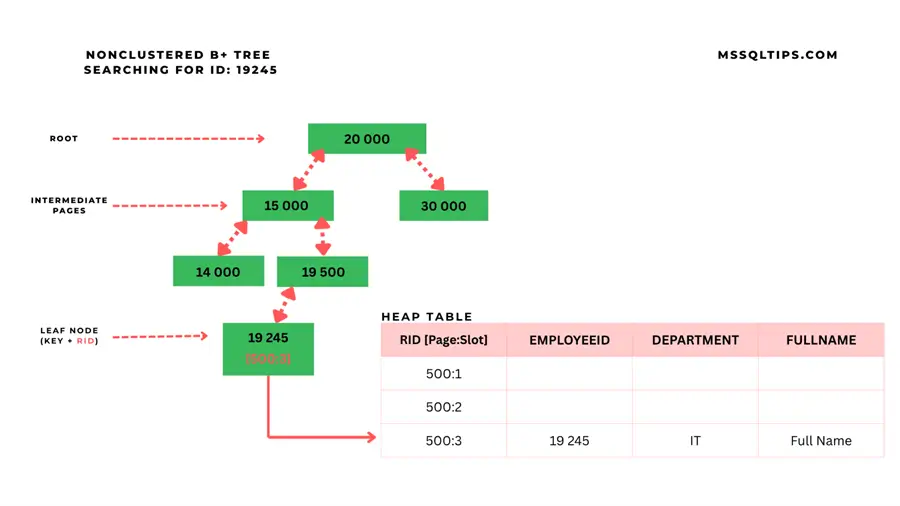
Table with Clustered Index only
To switch from non-clustered to clustered index. First, drop the nonclustered index:
DROP INDEX IX_EmployeeID
ON Employees;
Then, create the clustered index:
CREATE CLUSTERED INDEX CX_EmployeeID
ON Employees(EmployeeID);
Then use the shortcut Ctrl + M to see the Actual execution plan after running your query:
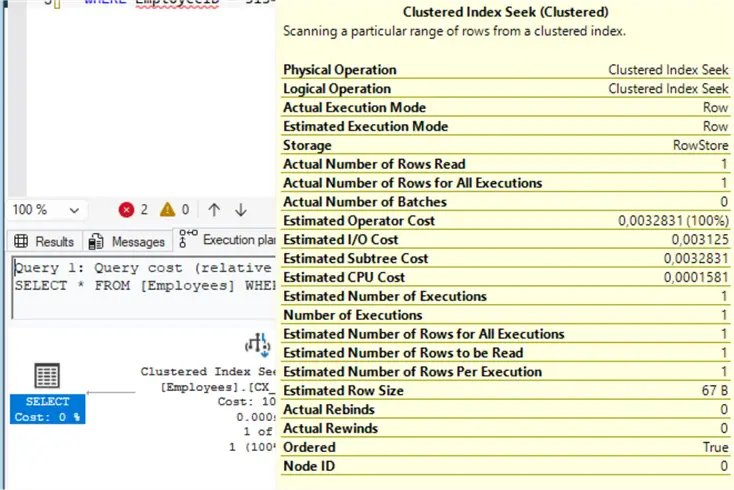
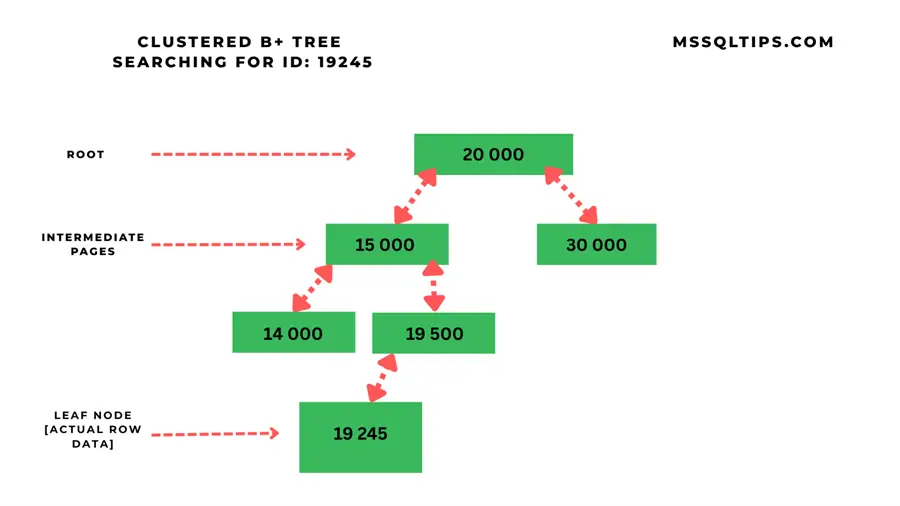
As you can see now, the clustered table takes full advantage of the B+ tree. The SQL Server Engine traverses the clustered index using the Clustered Index Seek from the root level all the way down to the leaf node which has all the actual data for the row:
Clustered and NonClustered index
Now let’s combine both the clustered and nonclustered index, since we covered clustered indexes on the previous section, create a nonclustered indexed to the table without dropping the clustered index:
CREATE NONCLUSTERED INDEX IX_FirstName
ON Employees(FirstName);
To make this section more realistic, you must use this query to see how it is traversed by the SQL Server Engine:
SELECT *
FROM Employees
WHERE FirstName = 'Employee8500';
Then use the shortcut Ctrl + M to see the Actual execution plan:
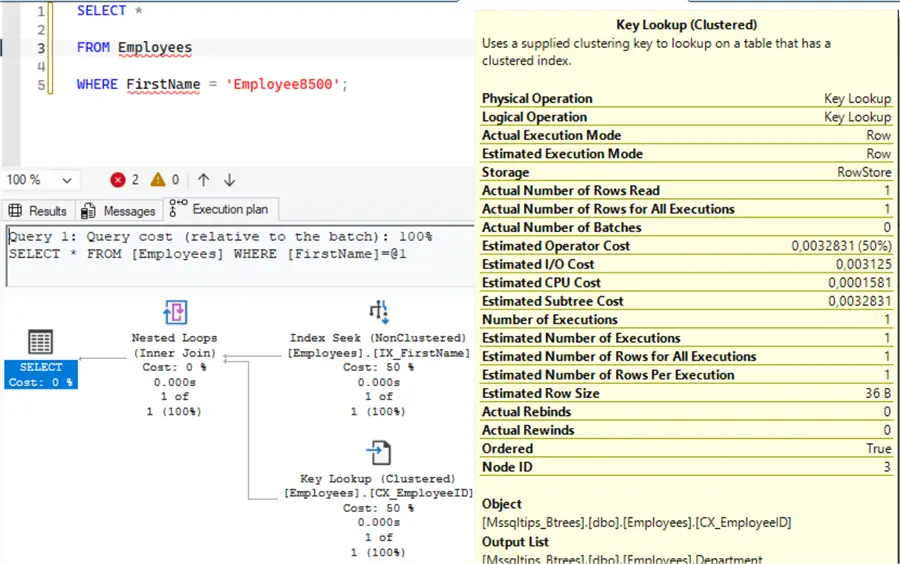
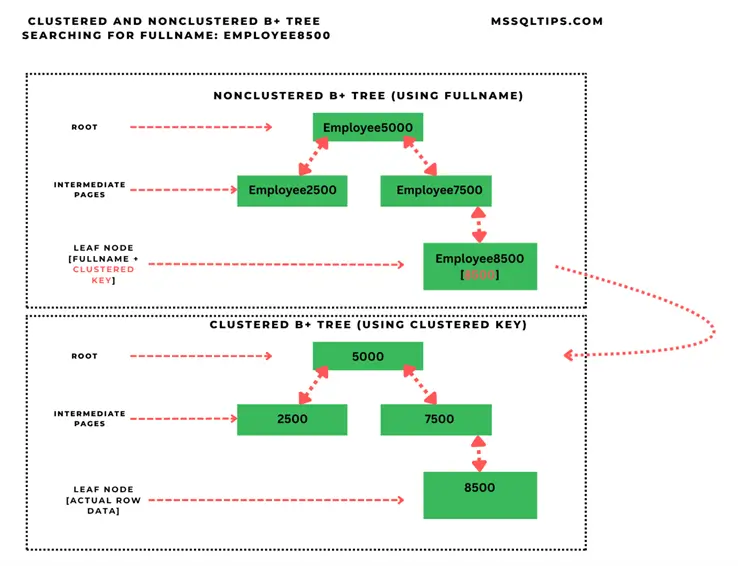
SQL Server uses an Index Seek (NonClustered) to find matching rows or pointers and uses the Key Lookup (Clustered) to find the specific data row:
Conclusion
B+ trees can be intimidating at first, but once you get through the fundamental concepts, they reveal themselves to be the true backbone for database indexing. Understanding B+ trees enables you to properly understand what happens under the hood of most SQL operations and lays a good foundation for working with database operations.
Next Steps
- Learn more about SQL Server XML Indexes
- Learn how to read graphical query execution plans
- Look at other index related articles
- Learn more about Index Scans and Table Scans
- Learn more about different Types of SQL Server Indexes

Levi Masonde is a developer passionate about analyzing large datasets and creating useful information from these data. He is proficient in Python, ReactJS, and Power Platform applications. He is responsible for creating applications and managing databases as well as a lifetime student of programming and enjoys learning new technologies and how to utilize and share what he learns.
- MSSQLTips Awards:
Trendsetter (25+ tips) – 2025 | Author of the Year Contender – 2023 | Rookie of the Year Contender – 2022