Problem
SQL queries can take a long time to run, especially on large tables if not properly indexed. Full table scans can be costly operations when all a user wants is to fetch a few rows based on multiple columns and a WHERE filter. How can we properly index our tables to support multi-column queries?
Solution
In this article, I will explain how to use a composite index to reduce the query cost for queries that filter on all or a subset of columns. A reduced query cost means a faster query.
There’s no special setup required to use composite indexes. SQL Server supports composite indexes. I will be using SQL Server 2022 running on Windows 10 along with SQL Server Management Studio (SSMS) 2022 to demonstrate the functionality.
Key Takeaways
- A composite index in SQL is a multi-column index that improves query performance by reducing query costs on large tables.
- Choose columns for a composite index based on their selectivity and the types of queries typically run.
- Use a covering composite index to include all columns needed for a query, ensuring faster access and lower costs.
- SQL Server supports both clustered and non-clustered composite indexes, with a maximum of 32 columns allowed per index.
- Creating too many indexes can lead to overhead, so balance them according to usage to maintain performance.
What is a Composite Index?
A database index is a data structure defined on one or more columns of a table. It stores pointers to data record positions within data pages. This enables fast lookup of rows from a table for specific columns, resulting in improved query performance.
A composite index is simply an index defined on more than one column. That’s why a composite index is also called a multi-column index. There’s no special SQL clause or keyword to create a composite index vis-à-vis a non-composite index. A single composite index can improve the performance of queries. Furthermore, the search conditions can make use of range and equality comparisons.
The maximum number of columns in a composite index is limited based on the database engine, which is 32 columns in SQL Server.
What columns should you choose for a Composite Index?
Choose columns for a composite index based on the type of queries we usually run, or the queries we want to optimize. A well-structured composite index speeds up query processing.
A composite index stores a sorted table of pointers. An index sorts values by the first column, then by the second column, and so on. Therefore, the order of the columns in the index definition is important. Accordingly, the most selective column should be the first column in the index definition. Most selective means that it selects the largest distinct group of data records. Note that the most selective column may not always be known, and it may be best to create multiple composite indexes and let the query optimizer choose the best one for a given data set and query. Further, we define subsequent columns based on their decreasing selectivity.
When should you use Composite Indexes?
Typically, a query can benefit from an index when it involves a subset of table data. For example, on a given table called Employee, if most of our queries are on three of its columns (name, dept, age) listed in decreasing order of selectivity, we can benefit by creating a composite index on these 3 columns. Accordingly, queries that filter by (name), by (name, dept), or by (name, dept, age) can use this composite index. Further, the search condition should include the first column of the index, name. If it doesn’t, the query won’t use the composite index. The query optimizer determines whether to use an index to improve a query’s performance.
A composite index does incur overhead when it comes to storage. Every index you create requires additional storage, so there needs be a balance of how many indexes you create so you don’t impact performance. Also, the more columns that are part of the composite index increases the storage needed.
Composite indexes are more beneficial when we mostly search for data, and don’t perform very many add/update/delete operations. This is because adding, updating, and deleting data requires updating the composite indexes as well so they stay in sync with the data in the table.
BTREE Data Structure of a Composite Index
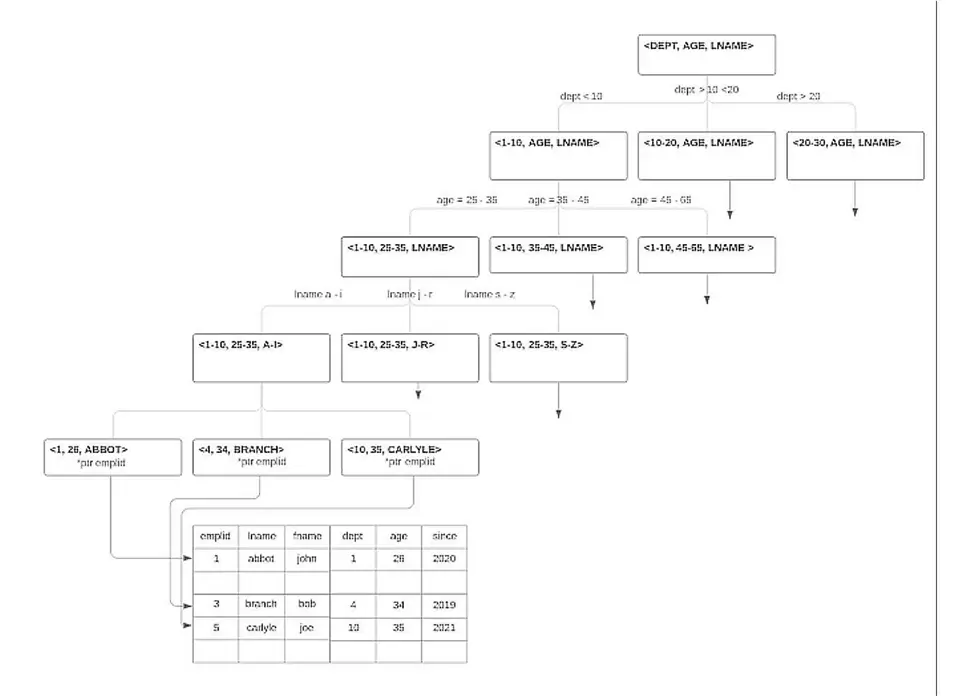
BTREE is one of the best data structures for a composite index. SQL Server uses the BTREE data structure for data storage and indexing. We can use it for conducting range and equality searches. It’s a hierarchical data structure. It’s in the shape of an inverted tree with a root node, intermediate nodes, and leaf nodes. The leaf nodes contain pointers to data records in data files.
The BTREE tree structure of an example composite index defined on 3-tuple (dept, age, name) consists of nodes at multiple levels. Note that this is only a conceptual diagram for a given choice of columns and their selectivity and doesn’t represent a real data set.
Installing AdventureWorks Sample Database
We’ll use example database table Production.ProductInventory from the AdventureWorks sample databases. We have chosen this table because it has a composite index that is a clustered index defined on it out of the box. If you do not have AdventureWorks installed, please read this tip – Install AdventureWorks Database for SQL Server 2025.
Using a Default Composite Index
The example Production.ProductInventory that we use in this article includes a composite index by default.
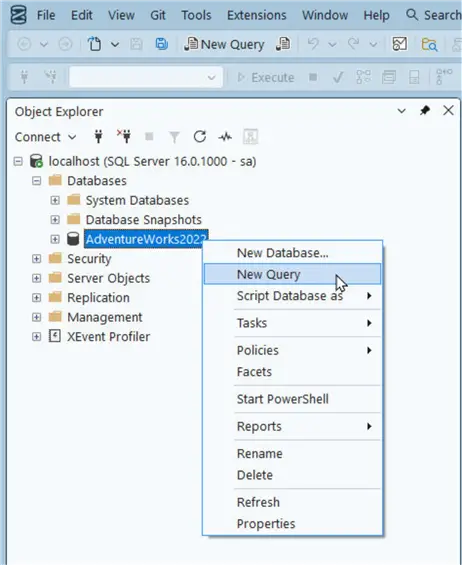
To run a query, right-click on the AdventureWorks database and select New Query.
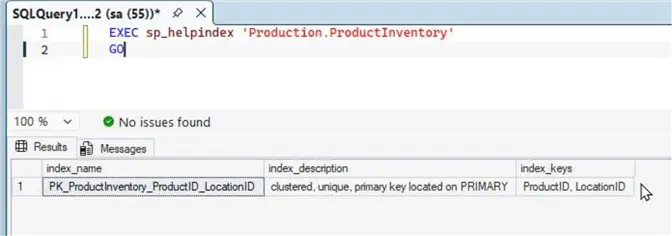
Let’s take a look at the existing indexes on this table using this command.
--MSSQLTips.com (T-SQL)
EXEC sp_helpindex 'Production.ProductInventory'
GO
The output shows there is only once index on the Production.ProductInventory table, which happens to be a Clustered index. We can tell it is a composite index because two columns are used for the index: ProductID and LocationID.
Slow Query Example
A query that doesn’t use the most selective column, ProductID, is likely to be a relatively slow query. Let’s turn on the query profile statistics, and run a query that filters only on the second index key LocationID:
--MSSQLTips.com (T-SQL)
SET STATISTICS PROFILE ON;
GO

SELECT ProductID, LocationID, Quantity
FROM Production.ProductInventory
WHERE LocationID = 6;
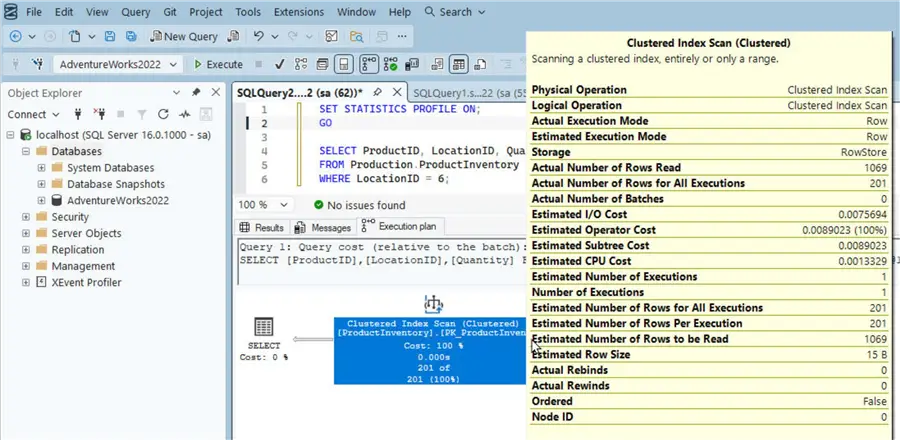
The Results tab shows it performs a Clustered Index Scan, which means that it scans each row in the table.
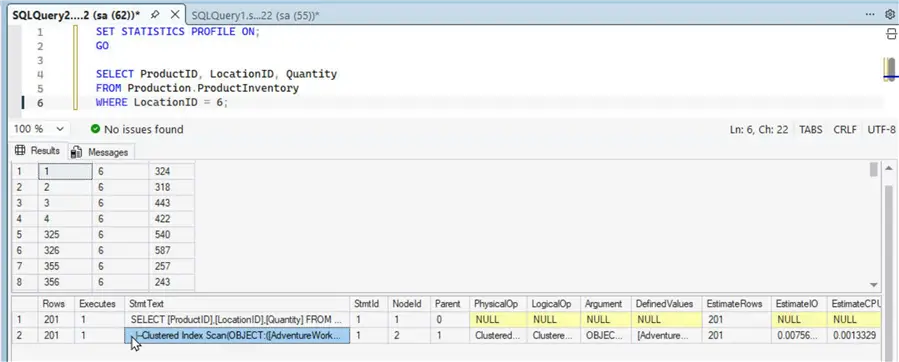
We can note the Total Subtree Cost, which is a dimensionless metric used by the Query Optimizer to estimate the “cost” of executing a specific portion of a query plan; the lower its value the faster and better a query.

Furthermore, we can include the actual execution plan in the query result by selecting the corresponding icon in the toolbar before running a query.

An Execution plan tab gets added when we run the same query again. A graphical execution plan clearly illustrates using a diagram and statistics that a clustered index scan is used. Notably, the query reads 1069 rows.
Fast Query Example
For the fast query example, let’s filter on both the index keys of the composite index: ProductID and LocationID.
--MSSQLTips.com (T-SQL)
SELECT ProductID, LocationID, Shelf, Bin, Quantity
FROM Production.ProductInventory
WHERE ProductID = 1
  AND LocationID = 6;
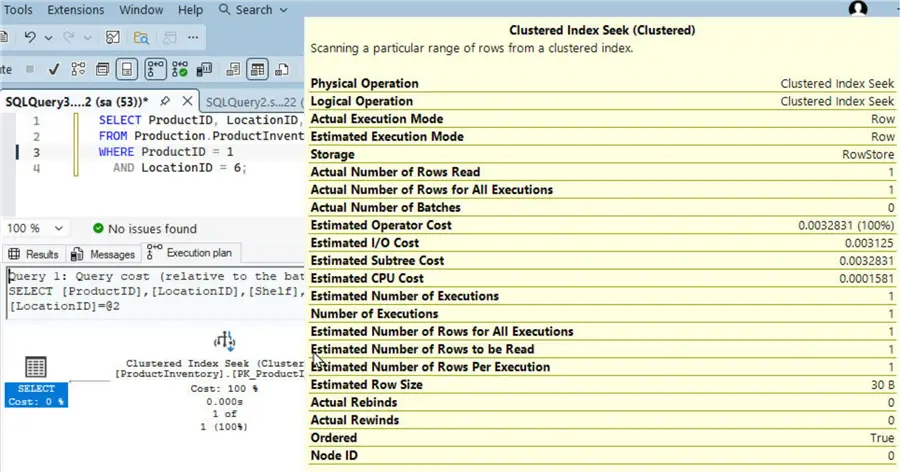
As the result shows, one row of data matches the filter conditions.

The Execution Plan indicates that a Clustered Index Seek is used this time, instead of the Clustered Index Scan used in the slow query example. A seek is almost always faster than a full table scan because it directly goes to the row/s of data to be returned by the query. The detail operation shows only 1 row of data is read.
Using a Non-Clustered Composite Index
SQL Server can have only one clustered index. Therefore, when we want to create additional indexes, they must be non-clustered indexes. In this section we demonstrate the benefit of using a three-column non-clustered composite index. We create two new composite indexes; one is a non-covering index, and the other a covering index. A covering index includes all the columns a query needs to fetch data for, and accordingly a non-covering index doesn’t. Therefore, as we demonstrate with an example query, a non-covering index incurs an extra roundtrip to fetch the data for columns that the index alone can’t fetch.
Sample Query
The sample query fetches data for the Quantity and ModifiedDate columns for rows that match the query filter conditions.
--MSSQLTips.com (T-SQL)
SET STATISTICS PROFILE ON;
GO

SELECT Quantity, ModifiedDate
FROM Production.ProductInventory
WHERE LocationID = 5
  AND Shelf = 'A'
  AND Bin = 1;
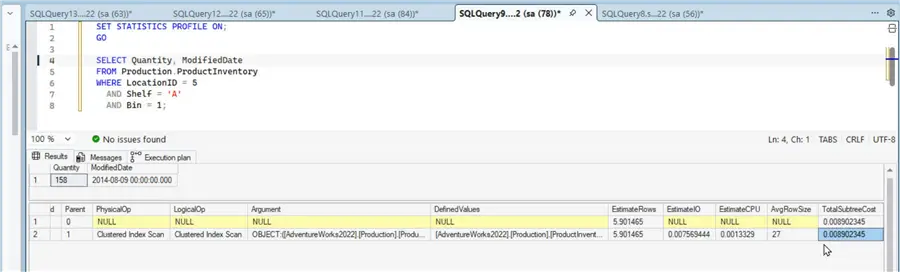
When only the default clustered index is available, this query must use a Clustered Index Scan to fetch 1 row of data. The TotalSubtreeCost is quite high for a query that fetches only one row.
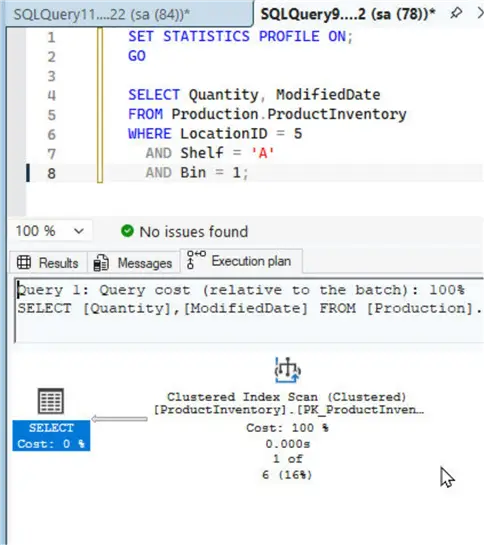
The Execution Plan illustrates that the Clustered Index Scan constitutes 100% of the query cost.
Using a Non-Covering Composite Index
Let’s create a new composite index to make the query faster, or less costly. Create a non-clustered index defined on three columns (LocationID, Shelf, and Bin). We chose these columns because the example query filters on these columns.
--MSSQLTips.com (T-SQL)
CREATE NONCLUSTERED INDEX IX_LocationID_Shelf_Bin_NonCovering
ON Production.ProductInventory (LocationID, Shelf, Bin);
The non-clustered composite index gets created when we run the CREATE NONCLUSTERED INDEX statement in the query editor.
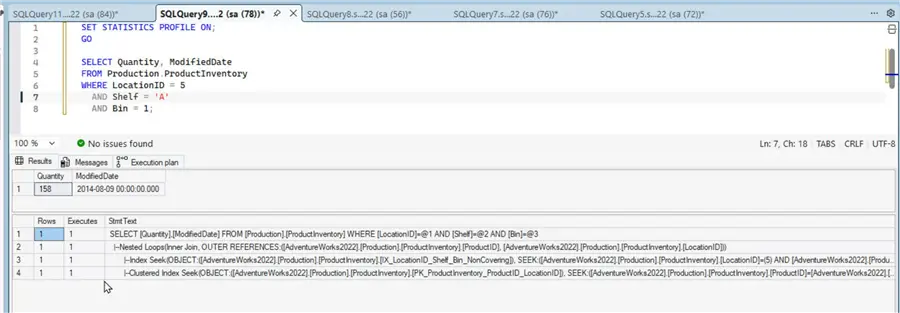
Let’s run the sample query again. This time it uses the non-clustered composite index IX_LocationID_Shelf_Bin_NonCovering to perform an Index Seek, followed by using the primary-key based default clustered composite index to perform a KeyLookup and fetch data for Quantity and ModifiedDate, as shown in the query result.
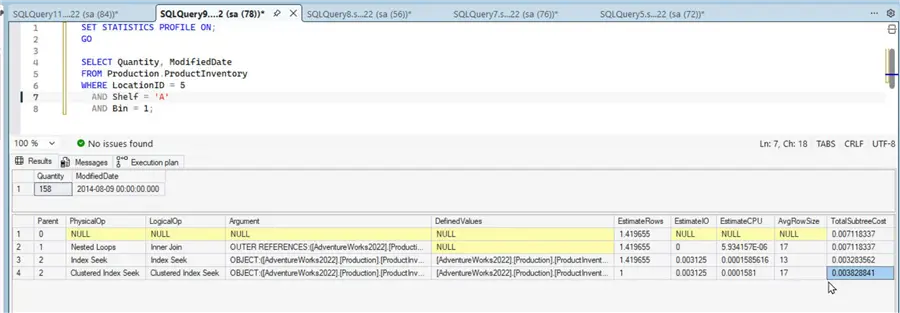
Note that the TotalSubtreeCost has dropped; however, the total cost by adding the two operations (Index Seek and Clustered Index Seek) is still quite high.
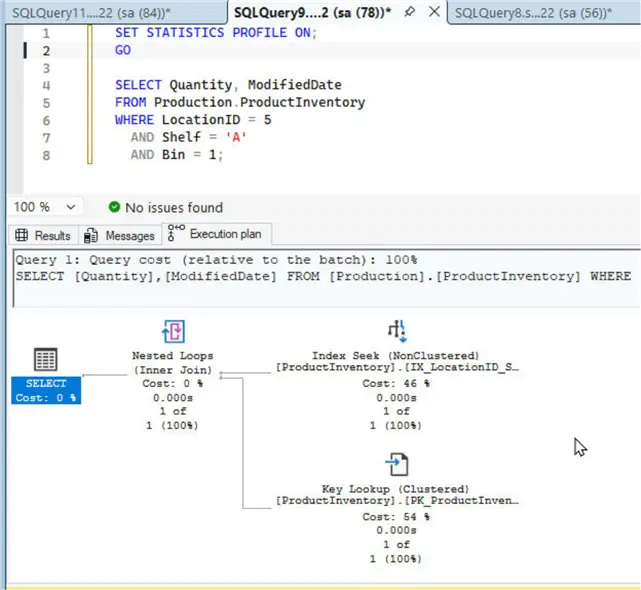
The Execution Plan indicates that the KeyLookup operation constitutes 54% of the total cost.
Using a Covering Composite Index
Let’s demonstrate by using a covering index version of the same non-clustered composite index that can make the query much faster. To make the index “covering” we cover for all columns the query fetches data for. We can use the INCLUDE clause to include the two columns, Quantity and ModifiedDate.
--MSSQLTips.com (T-SQL)
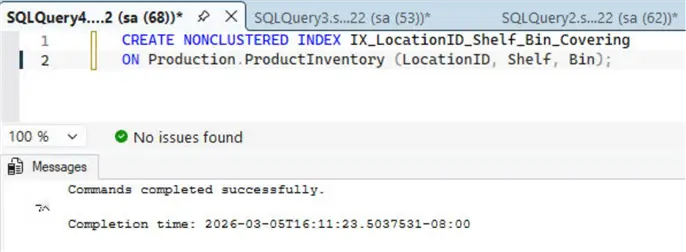
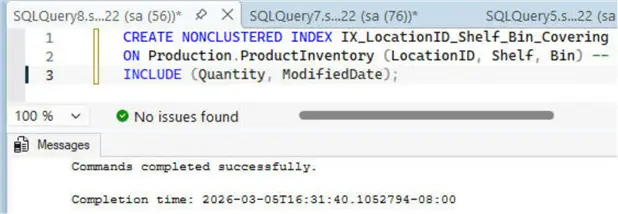
CREATE NONCLUSTERED INDEX IX_LocationID_Shelf_Bin_Covering
ON Production.ProductInventory (LocationID, Shelf, Bin)
INCLUDE (Quantity, ModifiedDate);
Run the CREATE NONCLUSTERED index statement in a query editor to create the covering index.
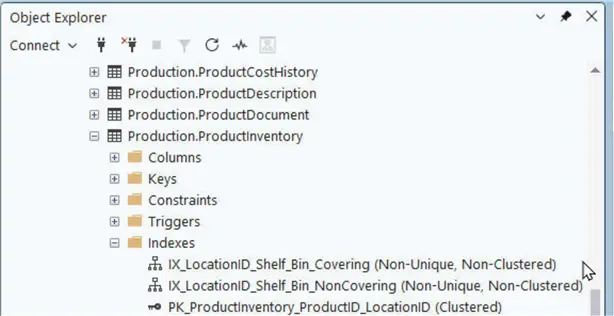
We now have three composite indexes for the query optimizer to choose from.
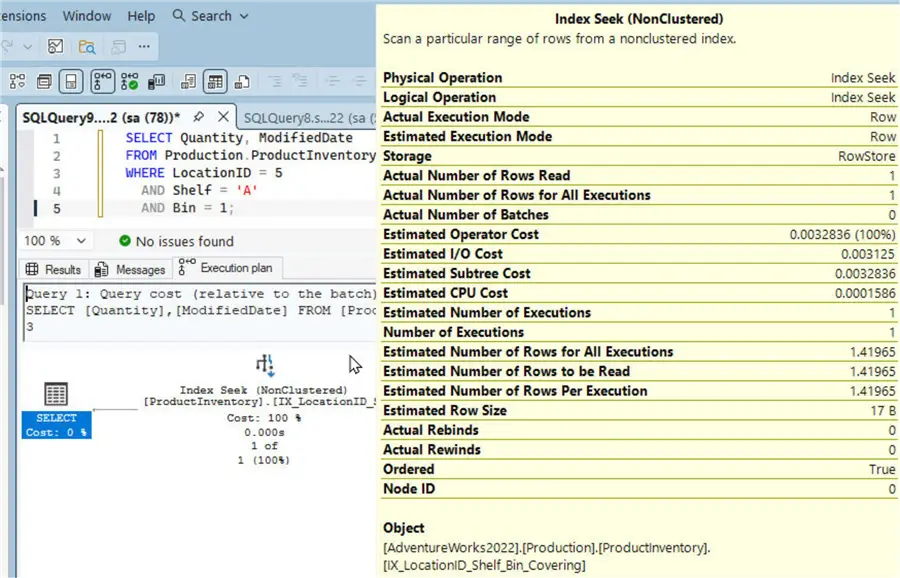
Let’s run the sample query once again. As the Execution Plan illustrates, it only needs to perform an Index Seek using the covering composite index.
Query Cost Comparison
We can compare the “cost” of the same query across three runs:
- Using only the default clustered index
- Using the non-covering composite index
- Using the covering composite index
As the comparison illustrates, the I/O, CPU, and Total Subtree costs are improved when we use a covering composite index for the sample query.
| Metric | Default Clustered Index (Scan) | Non-Covering Composite Index | Covering Composite Index |
|---|---|---|---|
| Physical Operation | Clustered Index Scan | Index Seek + Key Lookup | Index Seek |
| Estimated I/O Cost | 0.0075694 | 0.006250 (Combined) | 0.003125 |
| Estimated CPU Cost | 0.0013329 | 0.0003167 (Combined) | 0.0001585 |
| Total Subtree Cost | 0.0089023 | 0.0071183 | 0.0032835 |
Note that even though the example query filters on only three of the columns in the table, it fetches data for two of the other columns; therefore, it can fully benefit from a composite index only if it is a covering index. Once again, a covering index is one that contains all output fields required by the operation performed on that index.
Conclusion
A composite index is simply a multi-columned index; defined on two or more columns. We can benefit from creating a composite index in SQL Server when a table has many columns, and several rows of data. Furthermore, we can choose from creating a covering composite index, and a non-covering composite index. Typically, we use a covering composite index if our query involves all columns in a table. We demonstrated that we could improve query performance by creating a composite index. The query optimizer uses a composite index by itself if one is useful and is available.
Be aware as mentioned above, there needs to be a fine line between how many indexes you create. Indexes can definitely improve performance but if there are many indexes that are rarely used this does put overhead on SQL Server to have to maintain these indexes for insert, delete, and update operations.
Next Steps
- Read up on related articles:
- Improve SQL Server Query Performance for Clustered Index Seek
- Understanding SQL Server Memory-Optimized Tables Hash Indexes
- SQL Parameter Sniffing Fix with a Covering Index
- Improve Query Performance when SQL Server Ignores Nonclustered Index
- Drop Index in SQL Server Examples
- Design SQL Server Indexes for Faster Query Performance

Deepak Vohra is an Oracle Certified Data Science Professional, and an author of more than 20 books. Hobbies include philately, golf, and cricket.


Thank you! Small suggestion – as the order of the columns defined in the composite index is very important, I would have recommended that this fact be repeated in the summary as it appears that this is often overlooked?
Deepak, thank you for this detailed breakdown of Clustered Index vs Non-Covering Composite Index vs Covering Composite Index. Very helpful and great explanation!