Problem
A SQL Server Agent job can start other jobs. Writing jobs this way makes it easy to compartmentalize jobs: start a “child” job only when the “parent” reaches a certain step. Finding these steps can be challenging. There is no field or property in sysjobs or its associated tables to help find child jobs.
Imagine this situation: Job B has started, and you don’t know why. You examine Job B, and it has no schedule. What started Job B?
Solution
There are several ways to find what started the child job. If you have only a few jobs, you can open and review them. This, though, can be very time-consuming if you have many jobs with many steps.
Table of contents
Searching for one child SQL Agent job
You can search for the child job via SQL. Below is a query to search for the child job in the job steps text.
USE msdb;

DECLARE @step AS VARCHAR(50);

SET @step = 'Job B';

SELECT sysjobs.name AS JobName,
       sysjobsteps.step_id,
       sysjobsteps.step_name,
       sysjobsteps.command
FROM sysjobsteps
    INNER JOIN sysjobs
        ON sysjobsteps.job_id = sysjobs.job_id
WHERE (sysjobsteps.command LIKE +'%' + @step + '%');
Searching for all jobs that start other jobs
The standard way to start a job with T-SQL is:
EXEC msdb.dbo.sp_start_job @job_name = 'Job B';Therefore, instead of searching for Job B we can search for part of the SQL string: sp_start_job.
USE msdb;
DECLARE @step AS VARCHAR(50);

SET @step = 'sp_start_job ';
SELECT sysjobs.name AS JobName,
       sysjobsteps.step_id,
       sysjobsteps.step_name,
       sysjobsteps.command
FROM sysjobsteps
    INNER JOIN sysjobs
        ON sysjobsteps.job_id = sysjobs.job_id
WHERE (sysjobsteps.command LIKE +'%' + @step + '%');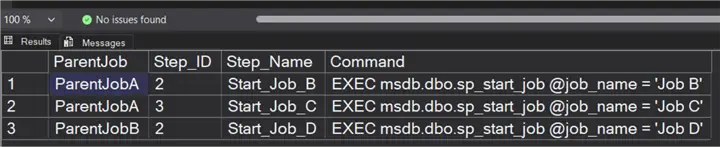
In this example, you can see that Job A starts jobs B and C.
Extended output for jobs that start other jobs
I wanted to use this information in a Power BI report and display the child job names, not the code that started the child jobs. I also wanted
- The parent and child job GUID to use in other joins to sys tables
- The time the parent job started
- Only enabled jobs
I wrote the following query:
WITH JobNames_CTE (Job_id, JobName)
AS (SELECT job_id,
           name
    FROM msdb.dbo.sysjobs),

     LastRun_CTE (Job_ID, JobLastRun)
AS (SELECT job_id,

            MAX(CAST(CAST(run_date AS CHAR(8)) + ' '
            + STUFF(STUFF(RIGHT('000000' + CAST(run_time AS VARCHAR(6)), 6), 3, 0, ':'), 6, 0, ':') AS DATETIME))
    FROM msdb.dbo.sysjobhistory
    WHERE (step_id = 0)
    GROUP BY job_id)

SELECT Parent.job_id AS Parent_ID,
       JobNames_CTE_1.Job_id AS Child_ID,
       Parent.name AS ParentJob,
       JobNames_CTE_1.JobName AS ChildJob,
       ParentSteps.step_id AS ParentStepID,
       ParentSteps.step_name AS ParentStepName,
       LastRun_CTE_1.JobLastRun AS ParentLastRun
FROM msdb.dbo.sysjobsteps AS Child
    INNER JOIN msdb.dbo.sysjobs AS Parent
        ON Parent.job_id = Child.job_id
    INNER JOIN JobNames_CTE AS JobNames_CTE_1
        ON Child.command LIKE '%' + JobNames_CTE_1.JobName + '%'
    INNER JOIN msdb.dbo.sysjobsteps AS ParentSteps
        ON ParentSteps.job_id = Parent.job_id
           AND ParentSteps.command LIKE '%' + JobNames_CTE_1.JobName + '%'
    INNER JOIN LastRun_CTE AS LastRun_CTE_1
        ON LastRun_CTE_1.Job_ID = Parent.job_id
WHERE (Child.command LIKE '%sp_start_job%')
      AND (Parent.enabled = 1)
      AND (Child.command NOT LIKE '%--msdb%')
      AND (Child.command NOT LIKE '%--Exec %')
      AND (Parent.name NOT IN ( '[misc job name to exclude]' ));
Caveats
I found that we had jobs starting with a different syntax than what I expected. I found:
- EXEC msdb.dbo.sp_start_job @job_name = ‘Job B’;
- msdb.dbo.sp_start_job @job_name = ‘Job B’
- msdb.dbo.sp_start_job @job_name = “Job B”
- etc.
The search performed best when filtered by sp_start_job, as that was always present in the SQL regardless of the full syntax used.
I could have used msdb.dbo.agent_datetime(run_date, run_time) instead of parsing the run_time string, but I was developing this for a Power BI report, and Power BI could not use agent_datetime.
The SQL to filter out commented-out steps is unreliable because a developer could have commented out the first line and then added another line in the same step that ran sp_start_job. Use that at your own risk.
We had some steps labeled “off.” Those steps are skipped in the job. That is why I have the filter ParentSteps.step_name NOT LIKE ‘%- Off -%’ in the final query.
The order by statement is only needed if you are using the query interactively. If I were using this in Power BI or another reporting tool, I would sort it there.
What about Grandchild Jobs?
Are there any child jobs that call other jobs in the above manner (grandchild jobs). The below query takes this a step further and displays grandchild jobs.
/* SQL Server Agent Job Hierarchy
 Shows Parent -> Child -> Grandchild job relationships
 A child job is a job called by another job (parent job).
 A grandchild job is a job called by a child job.

 Note: agent_datetime was not used because Power BI does not recognize this function.
*/
WITH JobNames_CTE (Job_id, JobName, JobOwner)
AS (SELECT job_id,
           name,
           SUSER_SNAME(owner_sid) AS JobOwner
    FROM msdb.dbo.sysjobs),
     LastRun_CTE (Job_ID, JobLastRun, JobOutcome)
AS (SELECT job_id,
           CAST(CAST(run_date AS CHAR(8)) + ' '
                + STUFF(STUFF(RIGHT('000000' + CAST(run_time AS VARCHAR(6)), 6), 3, 0, ':'), 6, 0, ':') AS DATETIME) AS JobLastRun,
           CASE run_status
               WHEN 0 THEN
                   'Failed'
               WHEN 1 THEN
                   'Success'
               WHEN 2 THEN
                   'Retry'
               WHEN 3 THEN
                   'Cancelled'
           END AS JobOutcome
    FROM
    (
        SELECT job_id,
               run_date,
               run_time,
               run_status,
               ROW_NUMBER() OVER (PARTITION BY job_id ORDER BY run_date DESC, run_time DESC) AS rn
        FROM msdb.dbo.sysjobhistory
        WHERE step_id = 0
    ) AS Ranked
    WHERE rn = 1)
SELECT Parent.job_id AS Parent_ID,
       Parent.name AS ParentJob,
       ParentJobNames.JobOwner AS ParentOwner,
       ParentSteps.step_id AS ParentStepID,
       ParentSteps.step_name AS ParentStepName,
       LastRun_Parent.JobLastRun AS ParentLastRun,
       LastRun_Parent.JobOutcome AS ParentRunStatus,
       ChildJobNames.Job_id AS Child_ID,
       ChildJobNames.JobName AS ChildJob,
       ChildJobNames.JobOwner AS ChildOwner,
       GrandchildJobNames.Job_id AS Grandchild_ID,
       GrandchildJobNames.JobName AS GrandchildJob,
       GrandchildJobNames.JobOwner AS GrandchildOwner,
       GrandchildSteps.step_id AS ChildStepID_CallingGrandchild,
       GrandchildSteps.step_name AS ChildStepName_CallingGrandchild
FROM msdb.dbo.sysjobsteps AS ChildSteps
    /* Get parent job and details */
    INNER JOIN msdb.dbo.sysjobs AS Parent
        ON Parent.job_id = ChildSteps.job_id
    INNER JOIN JobNames_CTE AS ParentJobNames
        ON ParentJobNames.Job_id = Parent.job_id
    /* Get child job details */
    INNER JOIN JobNames_CTE AS ChildJobNames
        ON ChildSteps.command LIKE '%' + ChildJobNames.JobName + '%'
    /* Get parent step that calls the child */
    INNER JOIN msdb.dbo.sysjobsteps AS ParentSteps
        ON ParentSteps.job_id = Parent.job_id
           AND ParentSteps.command LIKE '%' + ChildJobNames.JobName + '%'
    /* Last run */
    INNER JOIN LastRun_CTE AS LastRun_Parent
        ON LastRun_Parent.Job_ID = Parent.job_id
    /* LEFT JOIN to find grandchildren and details */
    LEFT JOIN msdb.dbo.sysjobsteps AS GrandchildSteps
        ON GrandchildSteps.job_id = ChildJobNames.Job_id
           AND GrandchildSteps.command LIKE '%sp_start_job%'
           AND GrandchildSteps.command NOT LIKE '%--msdb%'
           AND GrandchildSteps.command NOT LIKE '%--Exec %'
           AND GrandchildSteps.step_name NOT LIKE '%- Off -%'
    LEFT JOIN JobNames_CTE AS GrandchildJobNames
        ON GrandchildSteps.command LIKE '%' + GrandchildJobNames.JobName + '%'
           AND GrandchildJobNames.Job_id <> ChildJobNames.Job_id
WHERE ChildSteps.command LIKE '%sp_start_job%'
      AND Parent.enabled = 1
      AND ChildSteps.command NOT LIKE '%--msdb%'
      AND ChildSteps.command NOT LIKE '%--Exec %'
      AND Parent.name NOT IN ( '[misc job name to exclude]' )
      AND ParentSteps.step_name NOT LIKE '%- Off -%';
In this example, ParentJobA calls Child [Job B], which, in turn, calls the grandchild job [JobB2].
Would I Use the Above Query vs Normalized Output
The output of the above query is easy for humans to read and suitable for a report, but I prefer a more normalized output. The advantage of the more normalized output is that it is easy to search. Therefore, my final version is below. With this format, I can search for any SQL Server Agent job because all job names are in the Job_Name column. It is also easy to search for which SQL Server Agent job calls a particular job (child job). It may not be as easy to read as the previous output, but “easy to read” can be done in the reporting tool.
/* SQL Server Agent Job Hierarchy - Normalized to 2NF
   Each job occupies one row.
   Calling_Step_ID / Calling_Step_Name identify the step in the parent job.
   JobLevels: 1 = Parent, 2 = Child, 3 = Grandchild
*/

WITH JobNames_CTE (Job_id, JobName, JobOwner)
AS (
    SELECT job_id,
           name,
           SUSER_SNAME(owner_sid) AS JobOwner
    FROM msdb.dbo.sysjobs
),

LastRun_CTE (Job_ID, JobLastRun, JobOutcome)
AS (
    SELECT job_id,
           CAST(
               CAST(run_date AS CHAR(8)) + ' '
               + STUFF(STUFF(RIGHT('000000' + CAST(run_time AS VARCHAR(6)), 6), 3, 0, ':'), 6, 0, ':')
           AS DATETIME)                          AS JobLastRun,
           CASE run_status
               WHEN 0 THEN 'Failed'
               WHEN 1 THEN 'Success'
               WHEN 2 THEN 'Retry'
               WHEN 3 THEN 'Cancelled'
           END                                   AS JobOutcome
    FROM (
        SELECT job_id,
               run_date,
               run_time,
               run_status,
               ROW_NUMBER() OVER (
                   PARTITION BY job_id
                   ORDER BY run_date DESC, run_time DESC
               ) AS rn
        FROM msdb.dbo.sysjobhistory
        WHERE step_id = 0
    ) AS Ranked
    WHERE rn = 1
),

Hierarchy_CTE
AS (
    SELECT
        Parent.job_id                                   AS Parent_ID,
        Parent.name                                     AS ParentJob,
        ParentJobNames.JobOwner                         AS ParentOwner,
        ParentSteps.step_id                             AS ParentStepID,
        ParentSteps.step_name                           AS ParentStepName,
        LastRun_Parent.JobLastRun                       AS ParentLastRun,
        LastRun_Parent.JobOutcome                       AS ParentRunStatus,
        ChildJobNames.Job_id                            AS Child_ID,
        ChildJobNames.JobName                           AS ChildJob,
        ChildJobNames.JobOwner                          AS ChildOwner,
        GrandchildJobNames.Job_id                       AS Grandchild_ID,
        GrandchildJobNames.JobName                      AS GrandchildJob,
        GrandchildJobNames.JobOwner                     AS GrandchildOwner,
        GrandchildSteps.step_id                         AS ChildStepID_CallingGrandchild,
        GrandchildSteps.step_name                       AS ChildStepName_CallingGrandchild
    FROM msdb.dbo.sysjobsteps AS ChildSteps
        INNER JOIN msdb.dbo.sysjobs AS Parent
            ON Parent.job_id = ChildSteps.job_id
        INNER JOIN JobNames_CTE AS ParentJobNames
            ON ParentJobNames.Job_id = Parent.job_id
        INNER JOIN JobNames_CTE AS ChildJobNames
            ON ChildSteps.command LIKE '%' + ChildJobNames.JobName + '%'
        INNER JOIN msdb.dbo.sysjobsteps AS ParentSteps
            ON ParentSteps.job_id = Parent.job_id
           AND ParentSteps.command LIKE '%' + ChildJobNames.JobName + '%'
        INNER JOIN LastRun_CTE AS LastRun_Parent
            ON LastRun_Parent.Job_ID = Parent.job_id
        LEFT JOIN msdb.dbo.sysjobsteps AS GrandchildSteps
            ON GrandchildSteps.job_id = ChildJobNames.Job_id
           AND GrandchildSteps.command     LIKE '%sp_start_job%'
           AND GrandchildSteps.command NOT LIKE '%--msdb%'
           AND GrandchildSteps.command NOT LIKE '%--Exec %'
           AND GrandchildSteps.step_name NOT LIKE '%- Off -%'
        LEFT JOIN JobNames_CTE AS GrandchildJobNames
            ON GrandchildSteps.command LIKE '%' + GrandchildJobNames.JobName + '%'
           AND GrandchildJobNames.Job_id <> ChildJobNames.Job_id
    WHERE ChildSteps.command LIKE '%sp_start_job%'
      AND Parent.enabled = 1
      AND ChildSteps.command NOT LIKE '%--msdb%'
      AND ChildSteps.command NOT LIKE '%--Exec %'
      AND Parent.name NOT IN ('[misc job name to exclude]')
      AND ParentSteps.step_name NOT LIKE '%- Off -%'
),

Normalized_CTE
AS (
    /* Level 1 – Parents */
    SELECT DISTINCT
        1                   AS JobLevel,
        'Parent'            AS JobLevel_Desc,
        h.Parent_ID         AS Job_ID,
        h.ParentJob         AS JobName,
        h.ParentOwner       AS JobOwner,
        NULL                AS Parent_Job_ID,
        NULL                AS Calling_Step_ID,
        NULL                AS Calling_Step_Name,
        h.ParentLastRun     AS LastRun,
        h.ParentRunStatus   AS RunStatus
    FROM Hierarchy_CTE AS h
    UNION ALL
    /* Level 2 – Children */
    SELECT DISTINCT
        2,
        'Child',
        h.Child_ID,
        h.ChildJob,
        h.ChildOwner,
        h.Parent_ID,
        h.ParentStepID,
        h.ParentStepName,
        lr.JobLastRun,
        lr.JobOutcome
    FROM Hierarchy_CTE AS h
        LEFT JOIN LastRun_CTE AS lr ON lr.Job_ID = h.Child_ID
    UNION ALL
    /* Level 3 – Grandchildren */
    SELECT DISTINCT
        3,
        'Grandchild',
        h.Grandchild_ID,
        h.GrandchildJob,
        h.GrandchildOwner,
        h.Child_ID,
        h.ChildStepID_CallingGrandchild,
        h.ChildStepName_CallingGrandchild,
        lr.JobLastRun,
        lr.JobOutcome
    FROM Hierarchy_CTE AS h
        LEFT JOIN LastRun_CTE AS lr ON lr.Job_ID = h.Grandchild_ID
    WHERE h.Grandchild_ID IS NOT NULL
)

SELECT
    JobLevel,
    JobLevel_Desc,
    Job_ID,
    JobName,
    JobOwner,
    Parent_Job_ID,
    Calling_Step_ID,
    Calling_Step_Name,
    LastRun,
    RunStatus
FROM Normalized_CTE
ORDER BY
    JobLevel,
    JobName;
All SQL Server Agent jobs that call other jobs or are called by other jobs, and the steps that call those jobs.
Key Takeaways
- SQL Server Agent jobs can trigger other jobs, but identifying what started a child job can be challenging.
- You can use SQL queries to find child jobs, either by checking job steps or searching for the ‘sp_start_job’ command.
- For reporting, create queries that return parent and child job details, including GUIDs and start times, while filtering out unnecessary or skipped steps.
- Be aware of syntax variations in job starting commands; using ‘sp_start_job’ provides more consistent results.
- You can also query for grandchild jobs, indicating which jobs call other jobs in a hierarchy.
Next Steps
- Check out all of the SQL Server Agent Jobs tips.

David Plaut, BSN, MS, is a Financial Informatics Systems Architect in the Casemix Information Management Department at the Johns Hopkins Health System. He designed and built an SQL based data warehouse of patient financial information in 1994 when the only alternative was mainframe reports. Along with a dedicated, talented staff, David maintains and expands this data warehouse, which serves over a thousand users across five hospitals.

