Problem
SQL Server 2025 adds the double pipe (||) operator for string concatenation. What is the double pipe (||) operator, and how different is it from the existing plus (+) and CONCAT function for concatenation? Let’s check it out in this article.
Solution
The || (double pipe) operator is an ANSI SQL Standard for string concatenation in most relational databases, such as Oracle, PostgreSQL, SQLite, DB2, SAP HANA, MySQL, MariaDB, Snowflake, and Teradata. SQL Server 2025 added this operator for concatenating strings, columns, or characters.
There are now three methods for concatenating strings in SQL Server:
- Plus (+) operator
- CONCAT function
- Double pipe (||) operator
Let’s explore use cases of the double pipe operator and compare it with the other two methods.
Double pipe operator (||) overview
The syntax of the double pipe operator is:
expression1 || expression2 || expression3 || etc.The expression can be any data type except XML or JSON.
The expression data type for each element can be the same or different and SQL Server will implicitly convert the data type.
Examples Using ||
Let’s explore the double pipe (||) operator examples for string concatenation.
In the first example, the double pipe (||) operator concatenates the input expressions, yielding the result “SQL Server 2025”.
SELECT 'SQL Server' || ' ' + '2025' AS Result;
In the following example, we want to concatenate multiple strings.
SELECT 'Save' || 'Paper' || 'Save' || 'Trees' || 'Save' || 'World'We did not add space characters to the string during concatenation. As a result, the output shows the concatenated string without any spacing.

Let’s fix it in two ways: add space after each word, or concatenate space as a separate operation.
SELECT 'Save ' || 'Paper ' || 'Save ' || 'Trees ' || 'Save ' || 'World' AS R1

SELECT 'Save' || ' ' || 'Paper' || ' '|| 'Save'|| ' ' || 'Trees'|| ' ' || 'Save'|| ' ' || 'World' AS R2
Additionally, we can concatenate any special character, such as – or @, during concatenation as well.
SELECT 'Save' || '– -' || 'Paper' || '– -'|| 'Save'|| '– -' || 'Trees'|| '– -' || 'Save'|| '– -' || 'World' AS R3
Concatenate strings using table columns
Let’s use the double pipe operator against a column and a table.
For this, I will use the AdventureWorks2025 sample database provided by Microsoft. If required, you can download it from the AdventureWorks sample databases.
SELECT top 10 [FirstName] || ' ' || [MiddleName] || [LastName] as FullName from [Person].[Person]
In the above example, we see the full Name appearing as NULL for many persons.
Concatenation with NULL Values
Let’s look at the individual column values for tracking this.
SELECT top 10 [FirstName], [MiddleName] , [LastName],  [FirstName] || ' ' || [MiddleName] || [LastName] as FullName
FROM [Person].[Person]
As we can see, many entries in the table do not have a middle name, and the middle name column is set to NULL. The resulting concatenation string using double pipe is also NULL. It means that if any of the values in the double pipe operator is NULL, the result will also be NULL.

Let’s try to concatenate the same values using plus (+) and the CONCAT function.
SELECT TOP 10
    FirstName,
    MiddleName,
    LastName,
    -- ANSI SQL concatenation (SQL Server 2025+)
    FirstName || ' ' || MiddleName || ' ' || LastName AS FullName_Pipe,
    -- Traditional T-SQL + operator
    FirstName + ' ' + MiddleName + ' ' + LastName AS FullName_Plus,
    -- CONCAT function (NULL-safe)
    CONCAT(FirstName, ' ', MiddleName, ' ', LastName) AS FullName_Concat
FROM Person.Person;
It shows the following differences between double pipe (||), plus(+), and the CONCAT function.
- The concat function handles the NULL values; it ignores the NULL value and gives the full name.
- Plus(+) operator and double pipe consider the NULL values, and due to this, the result is also NULL if any of the available values are NULL.
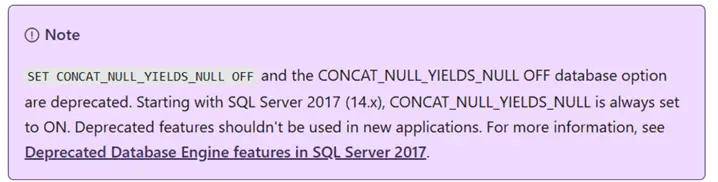
The thing that is considered here is that the double pipe(||) operator does not consider the CONCAT_NULL_YIELDS_NULL option and behaves as per the ANSI SQL standard. The CONCAT_NULL_YIELDS_NULL controls whether concatenation results are treated as null or empty string values.
Using SET CONCAT_NULL_YIELDS_NULL OFF
Let’s try running the above SQL with the SET CONCAT_NULL_YIELDS_NULL OFF.
SET CONCAT_NULL_YIELDS_NULL OFF;
SELECT TOP 10
    FirstName,
    MiddleName,
    LastName,

    -- ANSI SQL concatenation (SQL Server 2025+)
    FirstName || ' ' || MiddleName || ' ' || LastName AS FullName_Pipe,

    -- Traditional T-SQL + operator
    FirstName + ' ' + MiddleName + ' ' + LastName AS FullName_Plus,

    -- CONCAT function (NULL-safe)
    CONCAT(FirstName, ' ', MiddleName, ' ', LastName) AS FullName_Concat
FROM Person.Person;
Note the difference in the output below. The plus(+) operator, like the CONCAT function, also ignores NULL values, but the double pipe operator still returns NULL as the final output. It always works in the same way as ANSI SQL.

You can go to SSMS > Options > Query Execution > SQL Server > Advanced and validate that the default property is set to ON.

Note: According to MS documentation, you should avoid using the SET CONCAT_NULL_YIELDS_NULL OFF as it is deprecated. It still works in SQL Server 2025 but might be removed in future versions.
Using double pipe (||) operator with different data types
Let’s look at the following code that concatenates two varchar data types.
DECLARE @x Varchar(10), @y Varchar(10);
SET @x = 'Hello ';
SET @y = 'World';
SELECT @x || @y
Concat Varchar and Int Data Types
In another example, let’s concatenate a string (varchar) and an integer data type.
In the code below, I am using SQL_VARIANT_PROPERTY, which returns the base data type of the SQL_VARIANT value.
DECLARE @x VARCHAR(100) = 'Hello',
        @y INT = 100;

SELECT
    @x || @y AS ConcatenatedResult,
    SQL_VARIANT_PROPERTY(
        CAST(@x || @y AS sql_variant),
        'BaseType'
    ) AS OutputDataType;
SQL Server implicitly converted the data type to varchar. Therefore, the concatenation works, and the resulting data type is varchar.

Concat Varchar, Int and Date Data Types
Similarly, the following example concatenates VARCHAR, INT, and DATE data types using implicit conversion.
DECLARE @x VARCHAR(100) = 'Hello',
        @y INT = 100,
        @z date='01-01-2026'

SELECT
    @x || ' ' || @y || ' ' || @z AS ConcatenatedResult,
    SQL_VARIANT_PROPERTY(
        CAST(@x || @y AS sql_variant),
        'BaseType'
    ) AS OutputDataType;
Concatenate Two Integers with ||
Now, let’s try to concatenate two integers. It will fail because we cannot concatenate two integers.
DECLARE @x INT = 55,
        @y INT = 100

SELECT
    @x || @y AS ConcatenatedResult,
    SQL_VARIANT_PROPERTY(
        CAST(@x || @y AS sql_variant),
        'BaseType'
    ) AS OutputDataType;
Convert Data Type First
The solution here is to convert a value to a VARCHAR data type, which allows concatenating a string with an integer.
DECLARE @x INT = 55,
        @y INT = 100;
SELECT
    @x || ' ' || CONVERT(VARCHAR(10), @y) AS ConcatenatedResult,
    SQL_VARIANT_PROPERTY(
        CAST(@x || CONVERT(VARCHAR(10), @y) AS sql_variant),
        'BaseType'
    ) AS OutputDataType;
||= (Compound assignment)
The Compound Assignment (||=) operator helps concatenate multiple strings or expressions (in a step by step manner). You might be familiar with the += operator; the compound assignment works in the same way.
Let’s understand it with an example.
Here, we know all the expressions or values that we need to concatenate.
DECLARE @msg VARCHAR(100);

SELECT @msg =
       'Maintenance job ' ||
       'completed successfully ' ||
       'on server ' ||
       'DB01';

SELECT @msg as [Output];
However, let’s consider a case that handles conditional concatenation. Here, we have a variable log initialized to an empty string, and we need to append to it based on the other variable. Here, we have used the compound assignment operator.
DECLARE @log VARCHAR(200) = '';
DECLARE @errors INT, @warnings INT, @duration INT

SET @errors = 100
SET @duration = 120

IF @errors > 0
    SELECT @log ||= 'Errors detected. ';
IF @warnings > 0
    SELECT @log ||= 'Warnings detected. ';
IF @duration > 60
    SELECT @log ||= 'Job took longer than expected. ';

SELECT @log;
It is still possible to write the above query using the double pipe operator as shown below.
DECLARE @log VARCHAR(200) = '';
DECLARE @errors INT, @warnings INT, @duration INT

SET @errors = 100
SET @duration = 120
IF @errors > 0
    SELECT @log = @log || 'Errors detected. ';
IF @warnings > 0
    SELECT @log = @log || 'Warnings detected. ';
IF @duration > 60
    SELECT @log = @log || 'Job took longer than expected. ';
SELECT @log;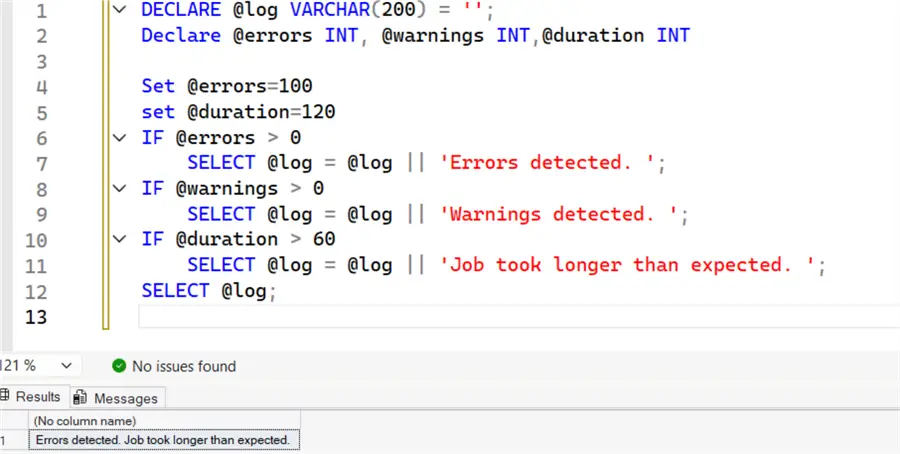
With the compound assignment, we can write cleaner, easier-to-understand code.
- Without Compound Operator:
log = @log || - With Compound Operator:
@log ||=
Another case of compound operators is in building dynamic SQL. Here, we are adding a WHERE clause based on the condition and using a compound operator to build the T-SQL statement.
DECLARE @sql NVARCHAR(MAX) = '';
DECLARE @FirstNameSearch INT = 1;
SELECT @sql ||= 'SELECT * ';
SELECT @sql ||= 'FROM Person.Person ';
IF(@FirstNameSearch=0)
   SELECT @sql ||= 'WHERE FirstName = ''Mark''';
ELSE
   SELECT @sql ||= 'WHERE LastName = ''Mark''';
PRINT(@sql);
Here is another example.

Benefits of Double Pipe Operator in SQL Server
- It is the ANSI-standard string concatenation operator that has the same syntax and behavior across database systems such as Oracle, DB2, Snowflake, etc.
- It provides consistent behavior with modern SQL Server rules (CONCAT_NULL_YIELDS_NULL is always ON)
- The plus (+) operator is used for arithmetic addition as well as concatenation. Therefore, it might be unclear whether we are performing addition or concatenation. The double pipe operator is only for string concatenation.
Note: The double pipe operator (||) does not replace the CONCAT or CONCAT_WS functions. You should use the function or operator based on your code requirements.
Next Steps
- Explore the SQL CONCAT function in SQL Server.
- You can review other string functions.
- If you are looking for an ANSI SQL Standard T-SQL statement, start using the double pipe operator for string concatenations.
- Start exploring SQL Server 2025 with these other tips.

Hi! I am Rajendra Gupta, Database Specialist and Architect, helping organizations implement Microsoft SQL Server, Azure, Couchbase, AWS solutions fast and efficiently, fix related issues, and Performance Tuning with over 14 years of experience.
I am the author of the book “DP-300 Administering Relational Database on Microsoft Azure.” I can be reached at: Rajendra.gupta16@gmail.com for any consulting help.
- MSSQLTips Awards:
- Author of the Year – 2022 | Author Contender – 2021/2023/2024 | Champion Award (100+ tips) – 2020


