Overview
The SPACE function is used to add a specific number of spaces into a string. It is a best practice to use this function instead of a writing a bunch of spaces because it is easier to read the number of spaces being added.
Explanation
Syntax
SPACE(NumberOfRepetitions)Parameters
- NumberOfRepetitions – this is an integer value with the number of times that the space will be repeated. If a negative value, the value returned by the function is NULL.
Simple SPACE Example
The following example will concatenate the word “Hello” with 5 spaces and then word “world”.
SELECT CONCAT('Hello',SPACE(5),'world') as msg
LTRIM with SPACE Functions Together
In the following example, we are adding 3 spaces and then using LTRIM function to remove the spaces.
SELECT LTRIM(CONCAT(SPACE(3),'Hello')) as msg
Using SPACE Function with Table Columns
The next example is concatenating FirstName, a space and then the LastName.
SELECT CONCAT(Firstname,SPACE(1),LastName) as fullname
FROM Person.Person
Concatenating NULL values with SPACE Function
The next example will concatenate NULL values with SPACE(1). The result is one space.
SELECT CONCAT(NULL,SPACE(1),NULL) as msg
Using DATALENGTH and LEN with SPACE Function
The next examples shows that DATALENGTH counts spaces.
SELECT DATALENGTH(SPACE(2)) as NumberCharacters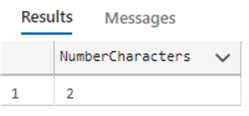
The following example shows that LEN does not count spaces as characters.
SELECT LEN(SPACE(2)) as NumberCharacters
Counting Number of Spaces
Finally, we will compare a string named @string with 5 spaces with the @comparestring which is @string without spaces and then we will calculate the datalength of both variables.
DECLARE @string varchar(50) = CONCAT('count',SPACE(5),'spaces')

-- remove spaces
DECLARE @comparestring varchar(50) = REPLACE(@string,' ','')

SSELECT DATALENGTH(@string) - DATALENGTH(@comparestring) as numberOfSpaces 
Additional Information

Daniel Calbimonte is a Microsoft Most Valuable Professional, Microsoft Certified Trainer and Microsoft Certified IT Professional for SQL Server. He is an accomplished SSIS author, teacher at IT Academies and has over 10 years of experience as a QE and developer for SQL Server related software. He has worked for the government, oil companies, web sites, magazines and universities around the world. Daniel also regularly speaks at SQL Servers conferences and blogs.
- MSSQLTips Awards: Author of the Year Contender – 2015-2018, 2022, 2023 | Champion (100+ tips) – 2018


