Problem
Microsoft provides T-SQL developers with three functions (rand, newid, and crypt_gen_random) for generating random numbers. Each of these functions is effective at returning random values, but feature sets associated with each function make them best suited to different use cases. This tip’s Solution section presents an overview of common use cases for random numbers in SQL Server along with references to learn more about random numbers in SQL Server. The first substantive provides a short comparative overview of the three functions. The remaining tip sections present and describe T-SQL examples for evaluating the randomness of values returned by SQL Server pseudorandom number generators.
Solution
The three T-SQL functions for generating random numbers aim to return a sequence of values so that the current value cannot be predicted from the preceding value(s) in a series. The functions implement different pseudorandom generator algorithms. The algorithms employ different means of imitating physically random processes, such as successive throws of a fair die. The functions for the algorithms offer a more convenient way to enumerate a random series other than recording results from physical processes that return random values.
The T-SQL random number functions each attempt to return values with a uniform probability distribution. For example, if the collection of numbers for an application was 1, 2, 3, 4, 5, 6, the count of each of these six values should occur about equally often.
Sometimes, a SQL Server application may need to generate identifier values for a set of objects, such as for the rows in a table on a server or the rows in tables on multiple servers. Using a random value as an identifier, instead of any other type of column value, ensures the identifiers are not correlated with the values in any other column from the table.
Another classic type of application requiring random values is for cryptographic keys that enable the encryption and decryption of values in a table. Examples of values that may require encryption include employee credit card numbers and passwords. Encryption protects data even after an attacker extracts it from a data source. Decryption ensures that only those with an appropriate key can restore encrypted data to its unencrypted form.
Digital signatures offer a means of ensuring that some text values in SQL Server have not been tampered with by an attacker and guarantees the authenticity of the signer. As with encryption and decryption, applying a digital signature to a text value requires cryptographic random values for keys that apply a digital signature to a text field value in a table.
Below is a list of articles for references about the use of random numbers in SQL Server. You may find the content in these references supplements to this tip.
- Generating Uniform, Normal, or Lognormal Random Numbers in SQL Server
- Generating Random Numbers in SQL Server Without Collisions
- SQL Server Function to Generate Random Numbers
- Generating Uniform, Normal, or Lognormal Random Numbers in SQL Server
- RAND (Transact-SQL) – SQL `
- NEWID (Transact-SQL) – SQL Server
- CRYPT_GEN_RANDOM (Transact-SQL) – SQL Server – Microsoft Learn
Comparative Overview of SQL Server Random Number Functions
The internet and two AI applications (Microsoft Copilot and Google Gemini) offer comparative information on the three native SQL Server random number generators. If you conduct your own original search, you may arrive at slightly different comparative points based on the varying and sometimes conflicting summaries in alternate sources. In my opinion, the best comparative overview of native SQL Server random number generators is available from Microsoft Copilot. Because of the excellence and conciseness of the Microsoft Copilot reply to the prompt (“compare rand, newid, and crypt_gen_random as random number generators”), this section closely follows the points included in its answer to the prompt.
rand function:
- Returns a floating-point value between 0 and 1,
- Generally fast and efficient,
- Does not guarantee a unique return value to the same query (unless seeded differently), and
- Best for these use cases: simulations, generating random sample data, and basic randomization tasks.
newid function:
- Returns a uniqueidentifier data type value whose bits are usually displayed as xxxxxxxx-xxxx-xxxx-xxxx-xxxxxxxxxxxx, where each x is a hexadecimal character (0-9 and A-F),
- Slightly slower performance than the rand function due to the complexity of returning a GUID,
- Returns highly unique output across space and time making it suitable for generating unique identifiers in many different contexts, and
- Best for these use cases: generating unique identifiers for records, ensuring database-wide uniqueness, and creating unique keys.
crypt_gen_random function:
- Returns a cryptographically strong varbinary value for a developer-defined length in bytes,
- Slower performance than the rand function due to cryptographic computations required for a return value,
- Returns highly unique output due to the cryptographic strength of the returned value, and
- Best for these use cases: generating cryptographically secure random values passwords, keys, and other security-related random data.
Generate and Store Random Values with SQL Server Random Number Generator Functions
The following script shows how to generate and store random values with each of the three SQL Server random generator functions.
- Random values are stored in the RandomTests table. This table has four columns.
- ID column: Tracks successive rows of random values.
- RandValue column: Stores values returned by the rand function.
- NewIdValue column: Stores values returned by the newid function.
- CryptGenRandomValue column: Stores values returned by the crypt_gen_random function.
- An insert into statement inside a while loop invokes the three random generator functions 10,000 times to populate the rows of the RandomTests table.
- The final line in the script displays the populated rows of the RandomTests table.
use DataScience
go

drop table if exists RandomTests;

create table RandomTests (
    ID INT IDENTITY(1,1) PRIMARY KEY,
    RandValue FLOAT,
    NewIdValue UNIQUEIDENTIFIER,
    CryptGenRandomValue VARBINARY(8)); -- Adjust the size as needed


-- Populate the Table with each of the native SQL Server random functions
declare @i int = 1;
while @i <= 10000 -- Adjust the number of rows as needed
begin
    insert into RandomTests (RandValue, NewIdValue, CryptGenRandomValue)
    values (RAND(), NEWID(), CRYPT_GEN_RANDOM(8));
    SET @i = @i + 1;
end;

-- optionally display RandomTests
select * from RandomTests
The following pair of screenshots display the first and last 10 rows, respectively, from the preceding script. There are 10,000 rows in the result set because the @i local variable, which tracks the current row number, is initialized to 1 and the while loop terminates after the value of @i reaches 10,000.
The numbers in the RandValue column appear in floating-point format. Therefore, you can process rand function return values with arithmetic operators.
The entries in the NewIdValue column appear in uniqueidentifier data type format.
The CryptGenRandomValue column entries have a varbinary data type comprised of hexadecimal digits (the 0x prefix signifies this).


Computing the Distribution Counts for Random Data by Different Random Functions
If the rand, newid, and crypt_gen_random functions are valid, their column values should each be uniformly distributed. One way to examine the column values is to divide them into a set of buckets. If the buckets are of equal size, then the count of column values within each bucket should be about the same within the bounds of random variation.
The following script transforms each column value in the RandValue, NewIdValue, CryptGenRandomValue columns of the RandomTests table to buckets that are numbered 0 through 9. Then, the count of rows by bucket is computed for each column.
- rand function: the column values are multiplied by 10 and then rounded with floor function to values of 0 through 9.
- newid function: the column values are converted to positive numbers with a checksum function embedded within an abs function. These two functions convert the underlying bit sequences in the NewIdValue column to positive hash values. The % 10 operation takes the modulo 10 of the positive hash values and converts them to bucket values of 0 through 9.
- CryptGenRandomValue function: the column values are converted to bucket values of 0 through 9 with the same processing used for the NewIdValue column values.
-- RAND()
select floor(RandValue * 10) AS Bucket, count(*) Count
from RandomTests
group by floor(RandValue * 10)
order by Bucket;

-- NEWID() (converts NewIdValue column values to one of 10 buckets)
select abs(checksum(NewIdValue)) % 10 AS Bucket, count(*) AS Count
from RandomTests
group by abs(checksum(NewIdValue)) % 10
order by Bucket;

-- CRYPT_GEN_RANDOM() (converts CryptGenRandomValue column values to one of 10 buckets)
select abs(checksum(CryptGenRandomValue)) % 10 AS Bucket, count(*) AS Count
from RandomTests
group by ABS(CHECKSUM(CryptGenRandomValue)) % 10
order by Bucket;
The following screenshot displays successively the bucket counts for RandValue, NewIdValue, and CryptGenRandomValue column values from the RandomTests table.
- The top result set is for the RandValue column.
- The middle result set is for the NewIdValue column.
- The bottom result set is for the CryptGenRandomValue column.
As you can see, the count for each bucket in all three columns is around 1,000. This outcome is expected for uniformly distributed random values. See the “Generating Uniform, Normal, or Lognormal Random Numbers in SQL Server” tip for an example of a more statistically rigorous way to assess whether random values are uniformly distributed.

Preparing Random Data for Evaluating Sequential Randomness
Besides being uniformly distributed, the values returned by the three random number generator functions should also satisfy another requirement – sequential randomness. If the current number in a sequence of numbers has a positive or negative correlation with the immediately preceding number, then the sequence is not random because you can predict within the limits of the magnitude and direction of correlation coefficient the current number based on the immediately preceding number. This kind of deviation from randomness is frequently referred to as a first-order serial correlation.
This section illustrates how to manipulate and transform a sequence of numbers to test for first-order correlations within number sequences. The next section reveals an approach for computing and interpreting serial correlation coefficients of the current number in a series with the immediately preceding number in a series.
One especially significant issue in preparing numbers from the newid and crypt_gen_random functions for serial correlations is representing uniqueidentifier and varbinary data type values returned by these functions as decimal or bigint values, which are commonly used for computing serial correlations. Because uniqueidentifier values are based on 16 bytes and bigint data type values are based on just 8 bytes, the magnitude uniqueidentifier values can exceed the maximum magnitude of bigint data type values. A decimal (38,0) data type value with a length of 17 bytes can accommodate uniqueidentifier values with lengths of 16 bytes as well as, of course, varbinary(8) data type values.
The following script is designed to illustrate how to populate a table (LaggedRandomNumbers) with current as well as lagged values from a number series. It also transforms uniqueidentifier and 8-byte varbinary values from the RandomTests table referenced in the prior two sections for use in an expression for computing serial correlations.
The script includes detailed comments explaining the code. The overall description of the script discusses higher-level issues that complement the more detailed remarks within comments in the script.
- There are no built-in functions for transforming a uniqueidentifier value to a numeric value with a decimal(38,0) data type. The approach used in the following script is to convert the uniqueidentifier values returned by the newid function to a string with hexadecimal characters for the uniqueidentifier value’s underlying bits in each of two 16-byte fields. Then, the converted 16-byte fields are converted to numeric values and used to populate a decimal(38,0) data type. The @scale_factor_for_NewIdValue local variable is used to further transform the decimal(38,0) to avoid overflows when computing the serial correlations in the next section.
- The transformation steps for the varbinary values returned by the crypt_gen_random function apply some of the steps for the transformation of uniqueidentifier data type values returned by the newid function. However, the transformation for varbinary values in this tip is simpler because the varbinary values depend on just 8 bytes instead of 16 bytes to represent their values. While varbinary values can be based on up to 8,000 bytes, this tip limits them to 8 bytes for the sake of simplicity.
- After the output from the newid and crypt_gen_random functions are transformed to numeric values, you can then compute the lagged values for the number series from each of the three functions using the SQL Server built-in lag function.
-- this set of code is to create random numbers in SQL Server, show how to
-- transform random values returned as bitstreams to decimal values
-- additionally, lagged values are generated for transformed random values
-- needed to avoid arithmetic overflow for the computation of serial correlations
-- for random numbers generated by the newid function
declare @scale_factor_for_NewIdValue decimal(38,0) = 10000000

-- create and populate a fresh version of the LaggedRandomNumbers tables
drop table if exists LaggedRandomNumbers;

-- Create a table to store lagged random numbers
CREATE TABLE LaggedRandomNumbers (
    ID int PRIMARY KEY,
    RandValue float,
    LaggedRandValue float,
   NewIdValue dec(38,0),
   LaggedNewIdValue dec(38,0),
   CryptGenRandomValue dec(38,0),
   LaggedCryptGenRandomValue dec(38,0)
);

-- Insert original random data along with freshly computed lagged values
-- for original random data
-- base NewIDValue and CryptGenRandom values on
-- abs(checksum) function for their underlying bit strings
-- then transform abs(checksum) functions values for NewId and Crypt_gen_random values
-- to cast as float for the serial correlation computation
INSERT INTO LaggedRandomNumbers (
   ID, RandValue, LaggedRandValue,
   NewIdValue, LaggedNewIdValue,
   CryptGenRandomValue, LaggedCryptGenRandomValue)

-- Random values without intermediate transformations
select ID, RandValue, LaggedRandValue,
      NewIDValue_as_decimal/@scale_factor_for_NewIdValue,
      LaggedNewIDValue_as_decimal/@scale_factor_for_NewIdValue,
      CryptGenRandomValue_as_decimal, LaggedCryptGenRandomValue_as_decimal
from
(
-- Random values with intermediate transformations
select ID,
    RandValue, lag(RandValue, 1) over (order by ID) LaggedRandValue,
   NewIdValue,
   convert(char(36), NewIdValue) NewIdValueString,
   convert(DECIMAL(38,0), CAST(convert(VARBINARY(16),
      substring(convert(char(36), NewIdValue), 1, 8) +
      substring(convert(char(36), NewIdValue), 10, 4) +
      substring(convert(char(36), NewIdValue), 15, 4), 2) AS BIGINT))
      * CAST(POWER(CAST(10 AS DECIMAL(38,0)), 18) AS DECIMAL(38,0)) +
   convert(DECIMAL(38,0), CAST(convert(VARBINARY(16),
      substring(convert(char(36), NewIdValue), 20, 4) +
      substring(convert(char(36), NewIdValue), 25, 12), 2) AS BIGINT)) [NewIdValue_as_decimal],
   lag(convert(DECIMAL(38,0), CAST(convert(VARBINARY(16),
      substring(convert(char(36), NewIdValue), 1, 8) +
      substring(convert(char(36), NewIdValue), 10, 4) +
      substring(convert(char(36), NewIdValue), 15, 4), 2) AS BIGINT))
      * CAST(POWER(CAST(10 AS DECIMAL(38,0)), 18) AS DECIMAL(38,0)) +
   convert(DECIMAL(38,0), CAST(convert(VARBINARY(16),
      substring(convert(char(36), NewIdValue), 20, 4) +
      substring(convert(char(36), NewIdValue), 25, 12), 2) AS BIGINT)))
   over (order by ID) LaggedNewIdValue_as_decimal,
   CryptGenRandomValue,
   convert(decimal(20, 0), convert(bigint, CryptGenRandomValue)) CryptGenRandomValue_as_decimal,
   lag(convert(decimal(20, 0), convert(bigint, CryptGenRandomValue)),1) over (order by ID)
   LaggedCryptGenRandomValue_as_decimal
from RandomTests
)b4trans;

-- display contents of
select * from dbo.LaggedRandomNumbers
The following three screenshots display excerpts from the result set for the preceding script. Each screenshot displays the first 10 rows for a pair of columns.
- The first image is for the RandValue and LaggedRandValue columns in the LaggedRandomNumbers table. These two columns are for the computation in the next section of the serial correlation of rand function return values.
- The second image is for the NewIdValue and LaggedNewIdValue columns in the LaggedRandomNumbers table. These two columns are for the computation in the next section of the serial correlation of newid function return values.
- The third image is for the CryptGenRandomValue and LaggedCryptGenRandomValue columns in the LaggedRandomNumbers table. These two columns are for the computation in the next section of the serial correlation of crypt_gen_random function return values.


Computing First-order Serial Correlations
First-order serial correlation values offer a means of evaluating the independence of the current value from the preceding value in a number sequence. When the serial correlation between the current random number value and the lagged random number is not significantly different than zero, then the property of independence cannot be rejected. Otherwise, the number sequence is confirmed to be not truly sequentially random.
This section demonstrates how to compute the first-order serial correlations between current and lagged values for each of the three SQL Server random functions. The expression for computing first-order serial correlations depends on values that are numeric, such as the SQL Server float or decimal data type values. This is not an issue for the rand function, which returns random values in a float data type. However, both the newid and crypt_gen_random functions return random values in a bit stream, which select statements to display as a sequence of hexadecimal characters. The previous section demonstrates how to resolve this issue so the hexadecimal numbers with characters of 0 through 9 followed by A through F appear as decimal numbers with characters of 0 through 9.
The following script excerpt displays the code for computing first-order correlations for the random number series returned by the rand, newid, and crypt_gen_random functions. The three screenshots at the end of the preceding section show excerpts for the code in this section.
- There are three sections to the script. One section is for each of the three pseudorandom number generator functions. The purpose of each section is to compute the serial correlation for the numbers returned by each random number function. The first section is for return values from the rand function. The second section is for return values from the newid function. The third section is for the return values from the crypt_gen_random function.
- The structure of each section is the same, except for the columns referenced from the LaggedRandomNumbers table as well as for the serial correlation alias in the final select statements.
- Each section starts with the averages CTE to compute averages for all random values and lagged random values in the LaggedRandomNumbers table. A second CTE, named IntermediateResults, collects column values from the LaggedRandomNumbers table along with selected computed values.
- The third part of each structure computes and displays the serial correlations value based on inputs from the IntermediateResults CTE. These serial correlation values permit you to assess the independence of current row values from the preceding row values.
------------------------------------------------------------------------------

-- Serial Correlations for RandValue, NewIdValue, and CryptGenRandomValue

-- Calculate averages using CTE
with averages as (
    select
        avg(RandValue) AvgRandValue,
        avg(LaggedRandValue) AvgLaggedRandValue,
        avg(NewIdValue) AvgNewIdValue,
        avg(LaggedNewIdValue) AvgLaggedNewIdValue,
        avg(CryptGenRandomValue) AvgCryptGenRandomValue,
        avg(LaggedCryptGenRandomValue) AvgLaggedCryptGenRandomValue

    from LaggedRandomNumbers
),
IntermediateResults as (
    select
        RandValue,
        LaggedRandValue,
        RandValue - (select AvgRandValue FROM Averages) DiffRand,
        LaggedRandValue - (select AvgLaggedRandValue FROM Averages) DiffLaggedRand,
        NewIdValue,
        LaggedNewIdValue,
        NewIdValue - (select AvgNewIdValue FROM Averages) DiffNewId,
        LaggedNewIdValue - (select AvgLaggedNewIdValue FROM Averages) DiffLaggedNewId,
        CryptGenRandomValue,
        LaggedCryptGenRandomValue,
        CryptGenRandomValue - (select AvgCryptGenRandomValue FROM Averages) DiffCryptGenRandomValue,
        LaggedCryptGenRandomValue - (select AvgLaggedCryptGenRandomValue FROM Averages) DiffLaggedCryptGenRandomValue
    from LaggedRandomNumbers
)

-- Calculate the correlation coefficient
select
    SUM(DiffRand * DiffLaggedRand) /
    (SQRT(SUM(POWER(DiffRand, 2))) * SQRT(SUM(POWER(DiffLaggedRand, 2)))) RandCorrelationCoefficient
from IntermediateResults;

---------------------------------------------------------------------------------------------------

-- this set of code is for NewId function random numbers

-- Calculate averages using CTE
with averages as (
    select
        avg(RandValue) AvgRandValue,
        avg(LaggedRandValue) AvgLaggedRandValue,
        avg(NewIdValue) AvgNewIdValue,
        avg(LaggedNewIdValue) AvgLaggedNewIdValue,
        avg(CryptGenRandomValue) AvgCryptGenRandomValue,
        avg(LaggedCryptGenRandomValue) AvgLaggedCryptGenRandomValue
    from LaggedRandomNumbers
),
IntermediateResults as (
    select
        RandValue,
        LaggedRandValue,
        RandValue - (select AvgRandValue FROM Averages) DiffRand,
        LaggedRandValue - (select AvgLaggedRandValue FROM Averages) DiffLaggedRand,
        NewIdValue,
        LaggedNewIdValue,
        NewIdValue - (select AvgNewIdValue FROM Averages) DiffNewId,
        LaggedNewIdValue - (select AvgLaggedNewIdValue FROM Averages) DiffLaggedNewId,
        CryptGenRandomValue,
        LaggedCryptGenRandomValue,
        CryptGenRandomValue - (select AvgCryptGenRandomValue FROM Averages) DiffCryptGenRandomValue,
        LaggedCryptGenRandomValue - (select AvgLaggedCryptGenRandomValue FROM Averages) DiffLaggedCryptGenRandomValue
    from LaggedRandomNumbers
)

-- Calculate the correlation coefficient
select
SUM(cast(DiffNewid as float) * cast(DiffLaggedNewid as float))
/(SQRT(SUM(POWER(cast(DiffNewid as float), 2))) * SQRT(SUM(POWER(cast(DiffLaggedNewId as float), 2)))) NewidCorrelationCoefficient
from IntermediateResults;

---------------------------------------------------------------------------------------------------

-- random numbers and lagged random numbers for serial correlations

-- Calculate averages using CTE
with averages as (
    select
        avg(RandValue) AvgRandValue,
        avg(LaggedRandValue) AvgLaggedRandValue,
      avg(NewIdValue) AvgNewIdValue,
      avg(LaggedNewIdValue) AvgLaggedNewIdValue,
      avg(CryptGenRandomValue) AvgCryptGenRandomValue,
      avg(LaggedCryptGenRandomValue) AvgLaggedCryptGenRandomValue
    from LaggedRandomNumbers
),
IntermediateResults as (
    select
        RandValue,
        LaggedRandValue,
        RandValue - (select AvgRandValue FROM Averages) DiffRand,
        LaggedRandValue - (select AvgLaggedRandValue FROM Averages) DiffLaggedRand,
        NewIdValue,
        LaggedNewIdValue,
        NewIdValue - (select AvgNewIdValue FROM Averages) DiffNewId,
        LaggedNewIdValue - (select AvgLaggedNewIdValue FROM Averages) DiffLaggedNewId,
        CryptGenRandomValue,
        LaggedCryptGenRandomValue,
        CryptGenRandomValue - (select AvgCryptGenRandomValue FROM Averages) DiffCryptGenRandomValue,
        LaggedCryptGenRandomValue - (select AvgLaggedCryptGenRandomValue FROM Averages) DiffLaggedCryptGenRandomValue
    from LaggedRandomNumbers
)

-- Calculate the correlation coefficient
select
SUM(cast(DiffCryptGenRandomValue as float) * cast(DiffLaggedCryptGenRandomValue as float))
/(SQRT(SUM(POWER(cast(DiffCryptGenRandomValue as float), 2)))
 * SQRT(SUM(POWER(cast(DiffLaggedCryptGenRandomValue as float), 2)))) CryptGenRandomCorrelationCoefficient
from IntermediateResults;
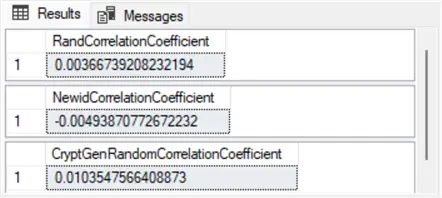
Here are the output values from the preceding script segment. As you can see, all the serial correlations are nearly zero. Therefore, these values are consistent with the sequential randomness of the values across all three native SQL Server random number functions. However, these results are only for a single run of the scripts in this tip.
Results with Multiple Tests
Another way to test the sequential randomness is to assess the serial correlations across successive runs of the scripts in this tip. After running the scripts four times, we also used a statistical test to determine if the statistical test could detect any correlation of the current row to the preceding row at the .05 level for any of four separate samples of random numbers for each of the three native SQL Server random number functions.
For each of the four samples, the largest absolute value of the serial correlation (r) across the three functions was assessed for its statistical difference from 0. When the absolute value of r is greater than or equal to 2 divided by the square root of n, then the serial correlation is significant at the .05 level. Row 16 in columns B through E in the Excel worksheet excerpt below showed that the largest absolute value serial correlation from each of the four random number sets was never statistically different from zero at the .05 level.

Next Steps
SQL Server random number functions have many useful applications. This tip highlights three application types that require valid random numbers. The tip sections on checking for uniformly distributed random values and sequentially random values demonstrate that the three built-in SQL Server random number functions do return valid random values. Nevertheless, special application requirements may dictate the use of one random number function over another. Random values created with the rand function are returned quickly and are easy to use. Random values from the newid and crypt_gen_random target more demanding kinds of applications.
Use the code samples in this tip to generate random values that meet the needs of your applications. Also, be sure to study the code samples on converting bit streams to decimal values if you need numerical values instead of bit streams from newid or crypt_gen_random function return values.

Rick Dobson is a SQL Server professional with decades of T-SQL experience that includes authoring books, running a national seminar practice, working for businesses on finance and healthcare development projects, and serving as a regular contributor to MSSQLTips.com. He has been a practicing Python developer for more than the past half decade – with a special emphasis for data visualization and ETL tasks with JSON and CSV files. His most recent professional passions include financial time series data and analyses, AI models, and statistics. If you are interested in growing your skills in any of these areas especially as they relate to financial securities, consider visiting his blog at https://securitytradinganalytics.blogspot.com/2023/12/.
- MSSQLTips Awards: Leadership (200+ tips) – 2025 | Author of the Year Contender – 2017-2024


