Problem
Writing effective and precise SQL queries is a basic competency for database administrators and developers. The shift from general SQL concepts to T-SQL mastery is difficult for many students and even seasoned professionals. This article is a part of the “X in one hour” series that I am writing for MSSQLTips. It aims to bridge the gap by providing a concise and hands-on guide to T-SQL fundamentals.
Solution
Microsoft’s SQL extension for SQL Server is called Transact-SQL, or T-SQL. It is an effective language for relational database management and querying. We’ll walk you through the fundamental ideas of T-SQL development in this tip, covering the basics from simple SELECT statements to subqueries and joins.
The AdventureWorks2017 database was used to illustrate each. All screenshots are taken from the SQL Server Management Studio tool.
SQL was initially named SEQUEL meaning structured English query language. It is a descriptive programming language where developers write a query that describe the output they need from the data. To learn SQL, you should read the query as if it is a simple English query. Basically, the data retrieval query contains at least a SELECT and a FROM clause. The first is to specify the required column(s) and the second is to specify the source table(s).
Basic SQL Queries
To begin, let’s retrieve all country names from the AdventureWorks2017 database:
--MSSQLTips.com (SQL)
SELECT Name
FROM Person.CountryRegion;
This query lists the names of all countries stored in the CountryRegion table.
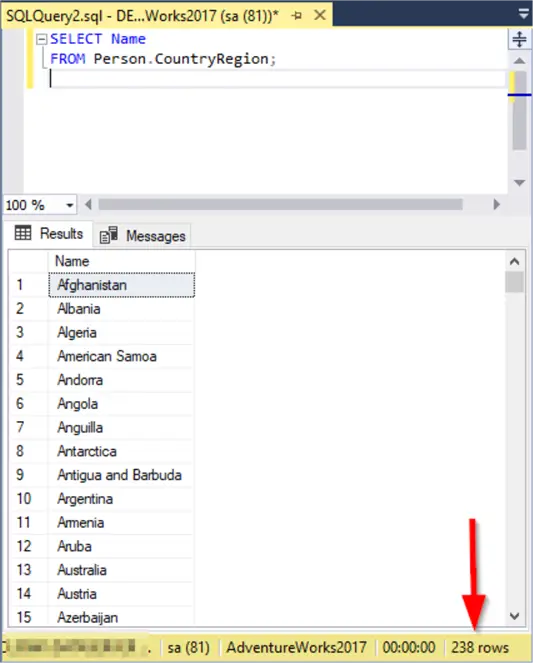
As shown in the screenshot above 238 rows were returned.
To check if the result contains duplicate values we can eliminate the duplicate country names using DISTINCT.
--MSSQLTips.com (SQL)
SELECT DISTINCT Name
FROM Person.CountryRegion;
The DISTINCT keyword ensures that the result contains only unique country names.
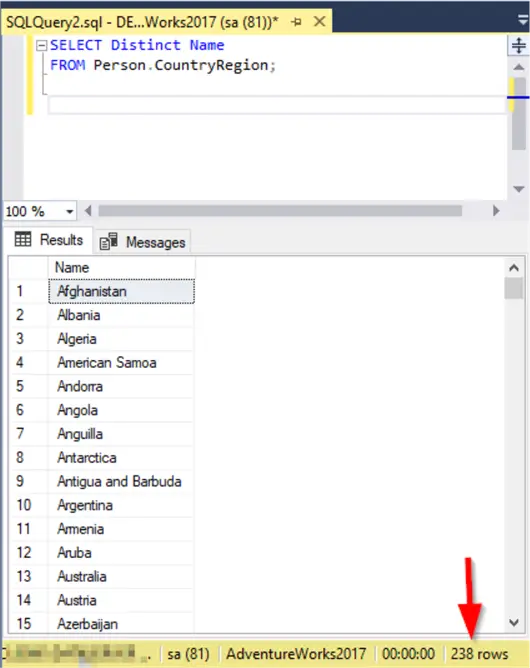
Since both queries returned the same number of rows, we are ensured that there are no duplicate values returned in the original query.
Filtering Results
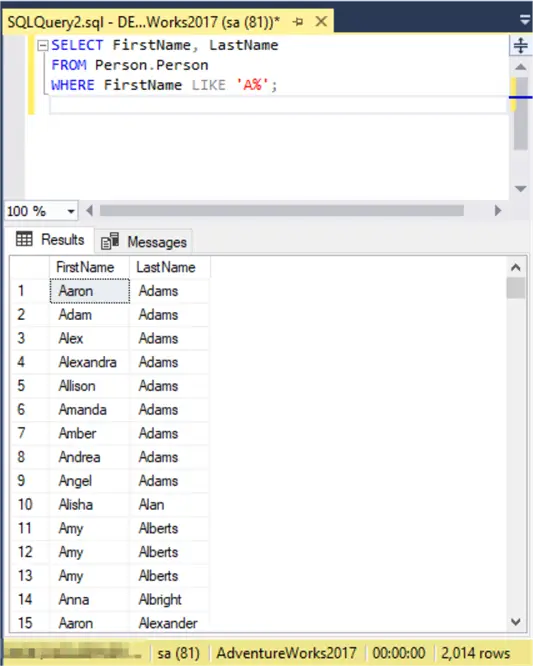
The WHERE clause allows you to apply conditions that filter unwanted rows. For instance, to find customers with names starting with “A”:
--MSSQLTips.com (SQL)
SELECT FirstName, LastName
FROM Person.Person
WHERE FirstName LIKE 'A%';
This returns customers whose first names start with the letter ‘A’.
To exclude rows with NULL values in a specific column we can do this:
--MSSQLTips.com (SQL)
SELECT *
FROM Person.Person
WHERE MiddleName IS NOT NULL;
This is useful when filtering incomplete records.
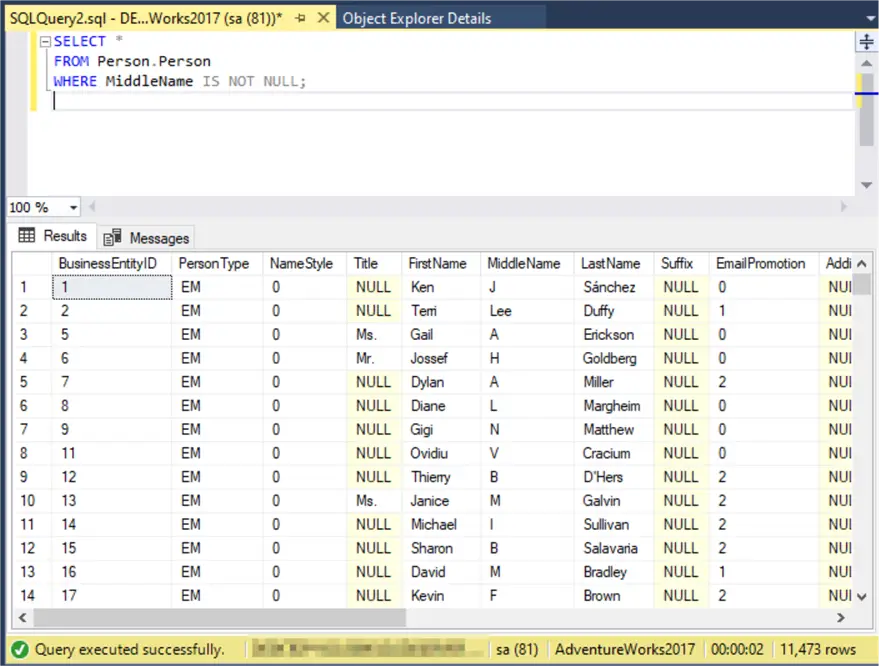
The wildcard * in the SELECT clause means that the output should contain all available columns.
Sorting and Limiting Results
You can organize query results with ORDER BY and restrict the number of rows with TOP.
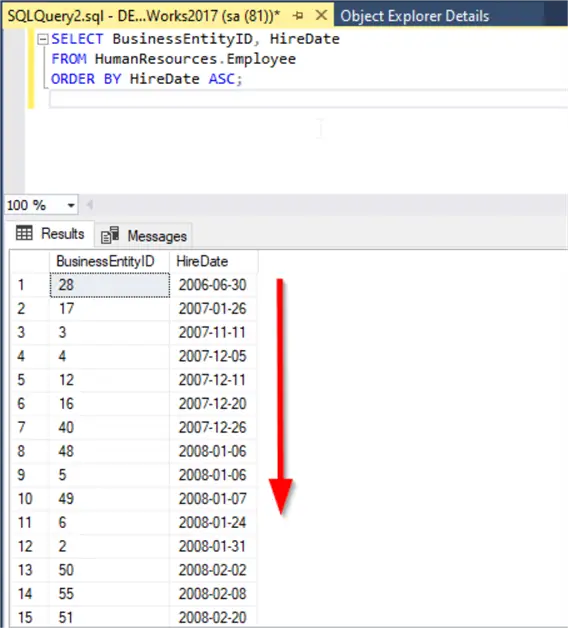
For instance, if you’d like to list employees by the date they were hired:
--MSSQLTips.com (SQL)
SELECT BusinessEntityID, HireDate
FROM HumanResources.Employee
ORDER BY HireDate ASC;
This query arranges employees starting from the earliest hire date.
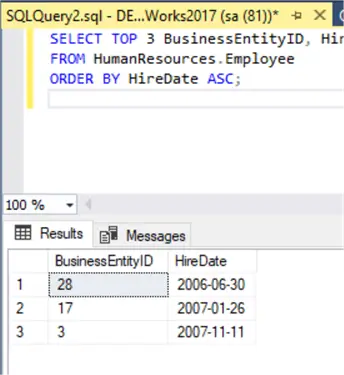
If you only need the first three entries from that sorted list, you can add TOP 3:
--MSSQLTips.com (SQL)
SELECT TOP 3 BusinessEntityID, HireDate
FROM HumanResources.Employee
ORDER BY HireDate ASC;
This way, you’ll see only the three longest-serving employees.
Joining Tables
Very often, the data you need is spread across different tables. A JOIN lets you connect them through a common column.
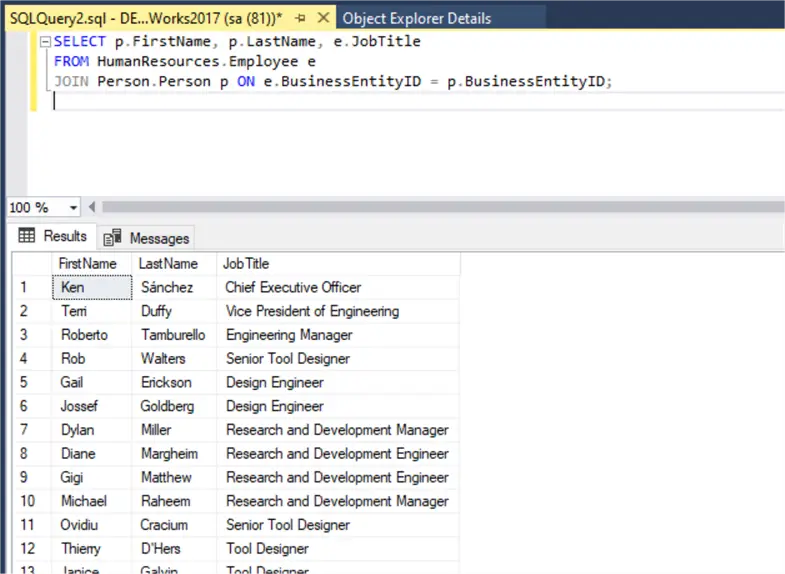
For example, to display employee names together with their job titles:
--MSSQLTips.com (SQL)
SELECT p.FirstName, p.LastName, e.JobTitle
FROM HumanResources.Employee e
INNER JOIN Person.Person p ON e.BusinessEntityID = p.BusinessEntityID;
This produces a list of employees with their corresponding job titles.
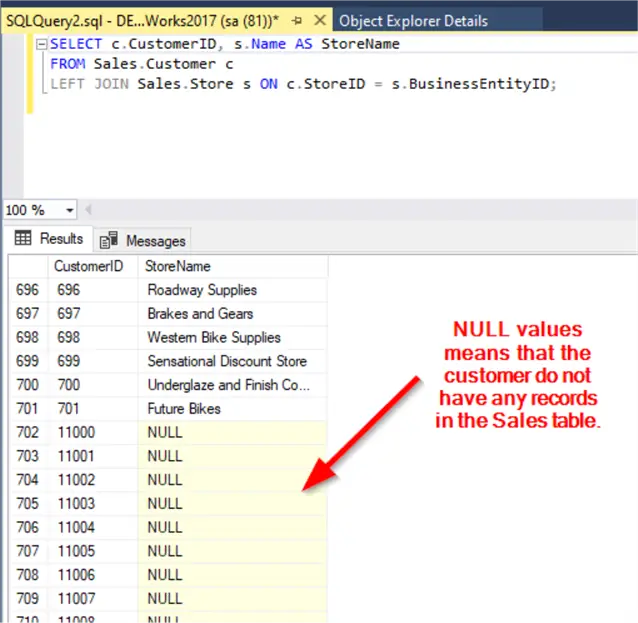
If you want to include all customers regardless of whether they’re linked to a store, you can use a LEFT JOIN:
--MSSQLTips.com (SQL)
SELECT c.CustomerID, s.Name AS StoreName
FROM Sales.Customer c
LEFT JOIN Sales.Store s ON c.StoreID = s.BusinessEntityID;
That way, customers without a store will still appear, but will show NULL in the StoreName column..
Aggregations and Grouping
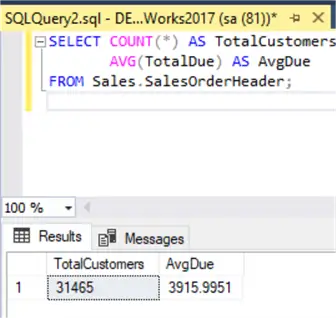
SQL also allows you to summarize data using aggregate functions. For example:
--MSSQLTips.com (SQL)
SELECT COUNT(*) AS TotalCustomers,
       AVG(TotalDue) AS AvgDue
FROM Sales.SalesOrderHeader;
This query returns the total number of rows along with the average order value.
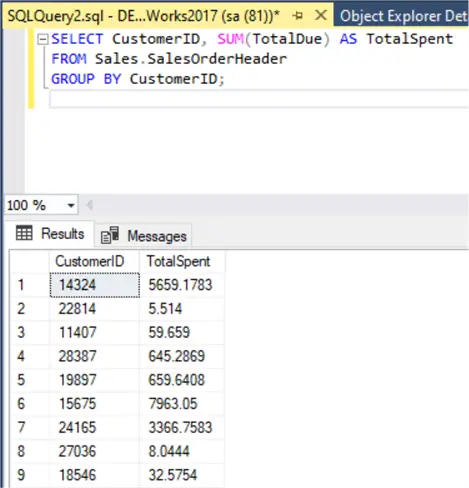
To see how much each customer has spent:
--MSSQLTips.com (SQL)
SELECT CustomerID, SUM(TotalDue) AS TotalSpent
FROM Sales.SalesOrderHeader
GROUP BY CustomerID;
Each row represents a customer and the total amount they’ve spent.
If you’d like to find customers who have placed more than five orders, you can extend your query with a HAVING clause:
--MSSQLTips.com (SQL)
SELECT CustomerID, COUNT(SalesOrderID) AS OrderCount
FROM Sales.SalesOrderHeader
GROUP BY CustomerID
HAVING COUNT(SalesOrderID) > 5;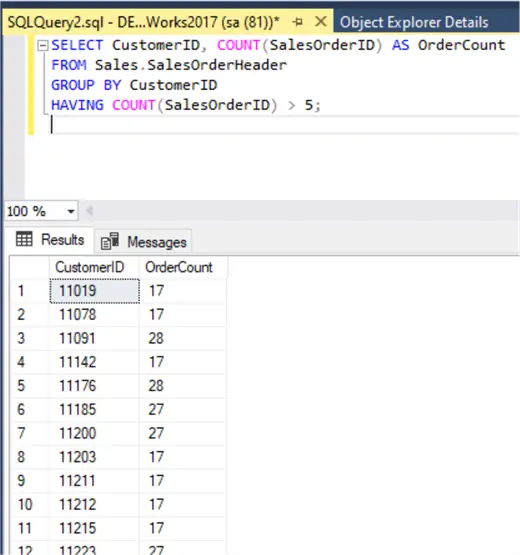
Here, GROUP BY groups the orders by customer, while HAVING filters those groups to keep only the ones with more than five orders.
Subqueries for Complex Conditions
Sometimes a single query isn’t enough, and you need one query to feed into another. These are called subqueries.
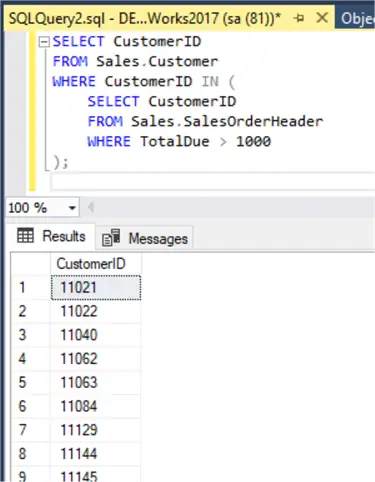
Suppose you want to identify customers who placed at least one large order (say, above 1000):
--MSSQLTips.com (SQL)
SELECT CustomerID
FROM Sales.Customer
WHERE CustomerID IN (
    SELECT CustomerID
    FROM Sales.SalesOrderHeader
    WHERE TotalDue > 1000
);
The inner query collects all customers with an order over 1000, and the outer query checks which of those IDs exist in the customer table.
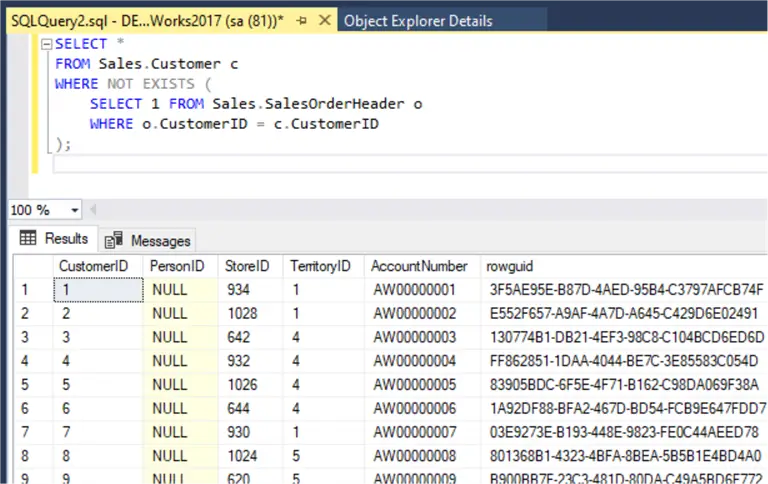
Now, what if you want the opposite. You need to retrieve the customers who never placed an order? That’s where NOT EXISTS is useful:
--MSSQLTips.com (SQL)
SELECT *
FROM Sales.Customer c
WHERE NOT EXISTS (
    SELECT 1 FROM Sales.SalesOrderHeader o
    WHERE o.CustomerID = c.CustomerID
);
This query returns every customer that doesn’t appear in the SalesOrderHeader table.
Set Operations
T-SQL also gives you tools to compare results between queries. These are UNION, INTERSECT, and EXCEPT.
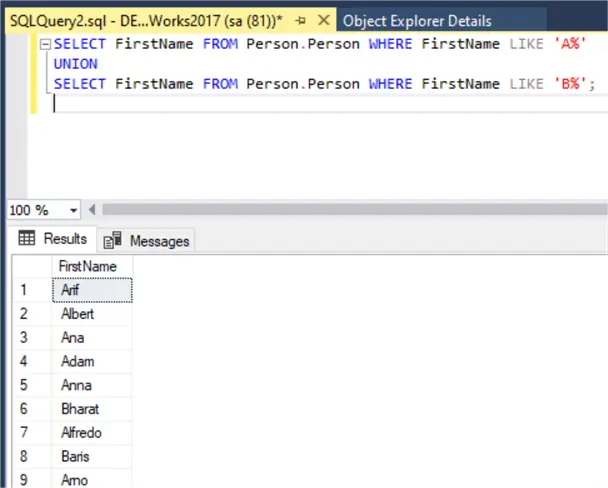
For instance, to gather all first names that begin with either “A” or “B”:
--MSSQLTips.com (SQL)
SELECT FirstName FROM Person.Person WHERE FirstName LIKE 'A%'
UNION
SELECT FirstName FROM Person.Person WHERE FirstName LIKE 'B%';
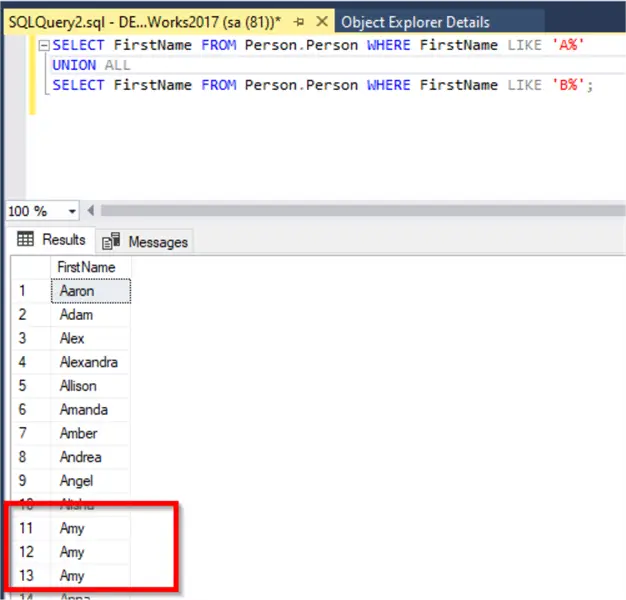
UNION combines the two result sets and removes any duplicates. If duplicates are needed, you’d use UNION ALL instead.
To keep duplicates we can use UNION ALL instead of UNION.
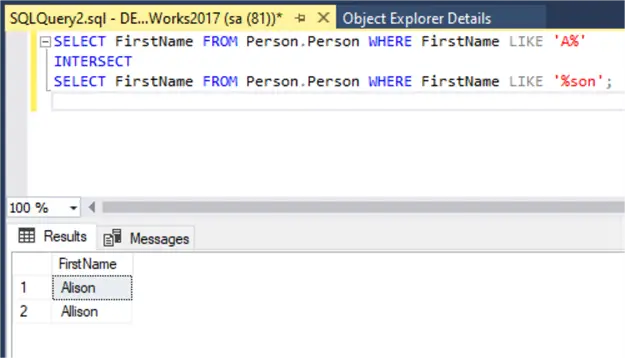
To find names that start with A and end with ‘son’:
--MSSQLTips.com (SQL)
SELECT FirstName FROM Person.Person WHERE FirstName LIKE 'A%'
INTERSECT
SELECT FirstName FROM Person.Person WHERE FirstName LIKE '%son';
INTERSECT returns names that appear in both result sets.
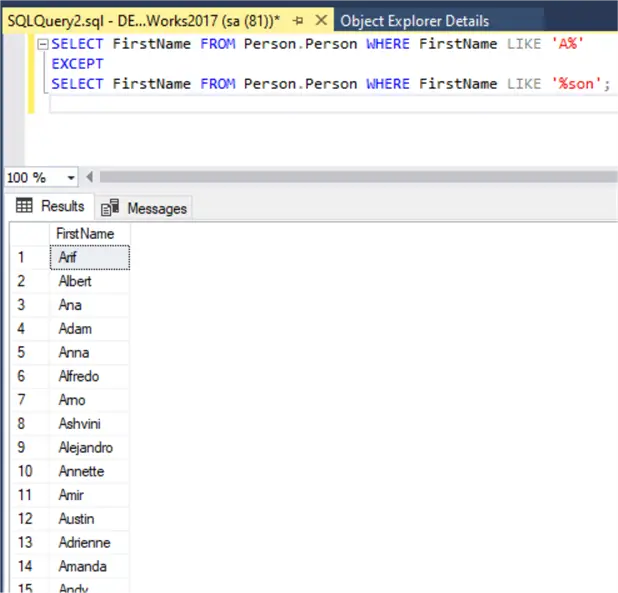
To exclude overlapping names use EXCEPT:
--MSSQLTips.com (SQL)
SELECT FirstName FROM Person.Person WHERE FirstName LIKE 'A%'
EXCEPT
SELECT FirstName FROM Person.Person WHERE FirstName LIKE '%son';
EXCEPT returns names that meet the first condition but not the second.
Inserting and Updating Data
T-SQL allows inserting values directly or selecting from another table.
--MSSQLTips.com (SQL)
INSERT INTO HumanResources.Department (Name, GroupName)
VALUES ('Test Department', 'Test Group');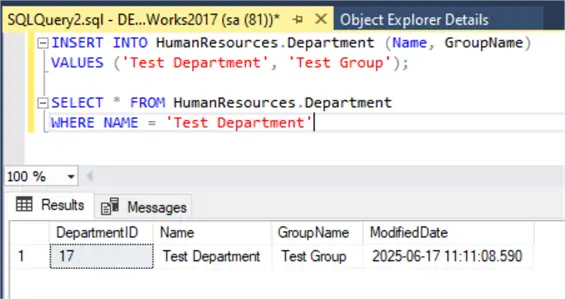
Create a subset of customers from the US:
--MSSQLTips.com (SQL)
SELECT * INTO dbo.USCustomers
FROM Sales.Customer c
INNER JOIN Person.Address a ON c.CustomerID = a.AddressID
WHERE a.StateProvinceID IN (SELECT StateProvinceID FROM Person.StateProvince WHERE CountryRegionCode = 'US');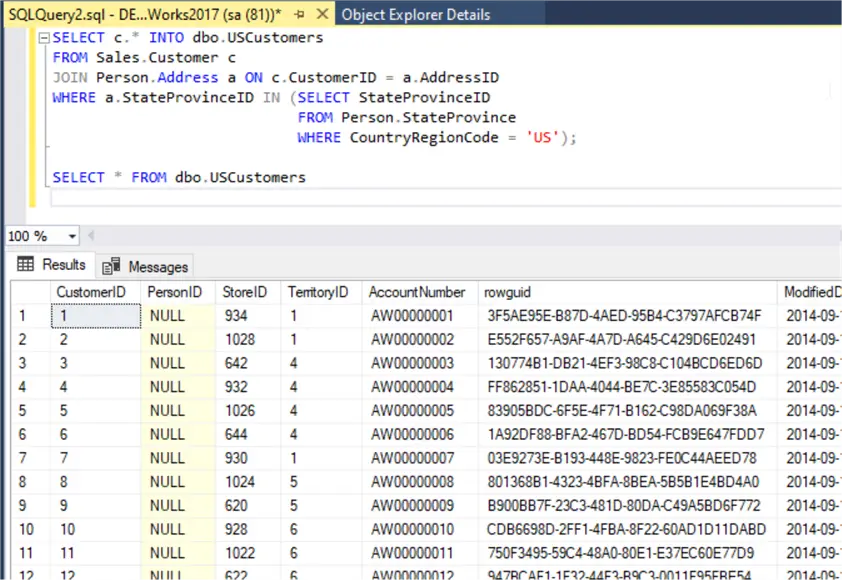
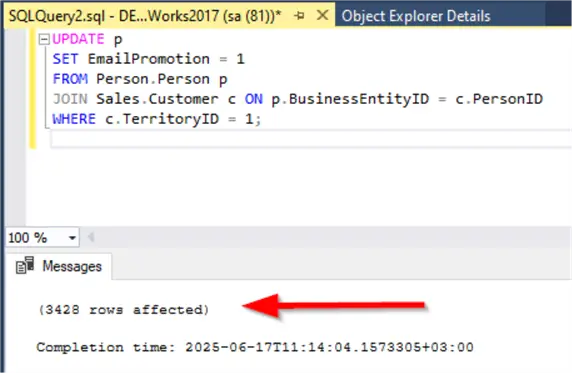
To update values using a join:
--MSSQLTips.com (SQL)
UPDATE p
SET EmailPromotion = 1
FROM Person.Person p
INNER JOIN Sales.Customer c ON p.BusinessEntityID = c.PersonID
WHERE c.TerritoryID = 1;
The screenshot below shows that 3428 records were updated.
Deleting Unrelated Data
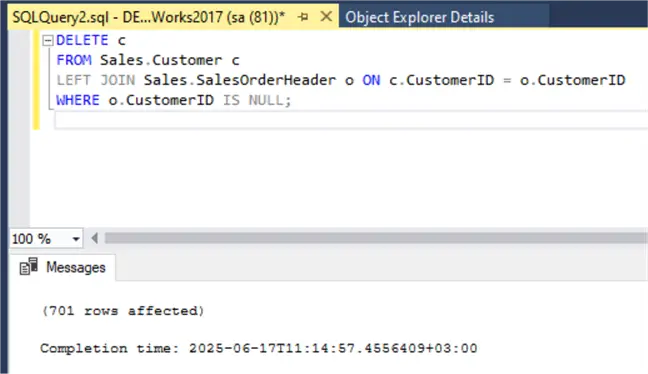
You can use joins to identify and remove irrelevant records. For example, to delete customers with no orders:
--MSSQLTips.com (SQL)
DELETE c
FROM Sales.Customer c
LEFT JOIN Sales.SalesOrderHeader o ON c.CustomerID = o.CustomerID
WHERE o.CustomerID IS NULL;
The screenshot below shows that 701 records were deleted.
Key Takeaways
- Writing effective T-SQL queries is essential for database administrators and developers, but many struggle to master it.
- This article covers T-SQL fundamentals, from basic SELECT statements to joins, using the AdventureWorks2017 database for practical examples.
- You can filter results with the WHERE clause and sort them using ORDER BY, while also limiting results with TOP.
- Learn to join tables to retrieve spread-out data, use aggregate functions for summarizing, and apply subqueries for complex conditions.
- T-SQL also allows inserting, updating, and deleting data, making it a robust language for managing SQL Server databases.
Frequently Asked Questions
The simplest way is to install the AdventureWorks sample database on your local SQL Server or a test server. You do not need to know the whole database before starting. Begin with a few tables. The relationships will become clearer as you use the data. We have a separate walkthrough in AdventureWorks Database Installation Steps.
No. I would avoid that. Even basic SQL statements should be tested somewhere safe. A sample database gives you space to learn without changing real data or affecting users.
I always recommend writing the SELECT version I always start by running the SELECT command with the same WHERE clause to check the result. Once the rows look correct I will then move to the UPDATE/DELETE statement. You may want to check for more examples on writing theses commands here.
Before changing data make sure you are connected to the right server and database. It sounds simple, but it is an easy mistake to make. Then check the table name. Check the column names. Check the filter condition. For UPDATE and DELETE statements the WHERE clause needs extra attention because a small mistake can affect more rows than planned.
Not always. SELECT * is useful when you are checking a table for the first time. For saved scripts and application queries I would list the columns you need. It makes the query easier to read and avoids surprises if new columns are added later.
A query can be correct and still perform badly. SQL Server may need to read a lot of data. It may also need to sort rows or work without a useful index. So when a query is slow the issue is not always the syntax. At that point it is worth checking how SQL Server is running the query. A good place to start is SQL Server Execution Plan Overview.
Start with the type of value you plan to store. Do not store everything as text just because it feels easier at first. That usually creates more work later when you need to filter data and also make sorting and calculations harder. This SQL Server Data Types reference is useful to keep nearby.
Once the basic SQL statements are clear I would move to features that help you organize and reuse code. Views are useful when you keep reusing the same SELECT query. Stored procedures are useful when the same logic needs to run with different input values. This related tip covers those topics together: SQL Stored Procedures Views and Functions Examples.
A stored procedure makes sense when you have the same task to run more than once. It is also useful when the query needs input values. Instead of rewriting the SQL each time you save the logic once and call it when needed. For the basics see this SQL Server Stored Procedure Tutorial.
Think of NULL as missing or unknown data. It is not the same as zero or a blank string. In reports NULL values can make the output harder to read. When it makes sense ISNULL or COALESCE can show a replacement value. More examples in SQL COALESCE Function Examples.
Do not wait until the script becomes difficult to read. Use consistent formatting from the beginning. For more ideas see Standardize SQL Server T-SQL Code Formatting.
Next Steps
T-SQL is a robust language for managing SQL Server databases. This tutorial covered the fundamentals in under an hour with practical, real-world examples using AdventureWorks2017. To deepen your learning, we recommend exploring the following articles on MSSQLTips.com:
- Check the SQL Quick Reference Guide.
- SQL Server 101 tutorial: a 10 tips series that helps you getting started with SQL Server
- Introduction to Subqueries in SQL Server.
- Learn more about DDL commands in SQL Server with Examples.
- Learn more about SQL Server Join Types Examples.

Hadi Fadlallah is an SQL Server professional with more than 10 years of experience. His main expertise is in data integration. He’s one of Stackoverflow.com’s top ETL and SQL Server Integration Services contributors. Also, he is a university lecturer and writes scientific and technical articles on several blogs. On the academic level, he holds a Ph.D. degree in data science focusing on context-aware big data quality and two master’s degrees in computer science and business computing.
- MSSQLTips Awards: Trendsetter (25+ tips) – 2025 | Author of the Year Contender – 2023 | Rookie of the Year – 2022


Superb, thank you :-)