Problem
Kanban is a Japanese term that means billboard and refers to a visual management system created by Toyota´s lean manufacturing system, which shows the status of work in progress, helping teams to identify and work on bottlenecks. How can we create a Kanban like tool in SQL Server without using external tools?
Solution
Implementing a Kanban tool using SQL Server can be beneficial to centralize, control, and secure data to stay in compliance with internal policies. This allows for workflow logic, managing many users, making analytics and reporting easy, and creating the ability to integrate with other existing systems.
Before getting started let’s look at some of the terms used in this article.
Terms and definitions
Following are some terms that will be helpful to know for this article.
- Bottleneck – A workflow stage where work piles up due to limited capacity.
- Card name – It is the main title of the work item that should describe what is in a short and clear sentence.
- Card tag – It is a small label or classification applied to a card used to group, categorize, or highlight characteristics of the work. Use only if necessary to highlight something not covered by priority, status, Swimlanes, or service class. For example: to identify the work type, area, context, team, technology used, and others.
- Column – A vertical section on the board representing a workflow state
- Cycle time – The total time a work item spends from when it starts to when it is completed. It is a team execution perspective of time.
- Cumulative Flow Diagram (CFD) – A chart showing how work enters, progresses, and exits the system over time.
- Flow – Smooth and continuous movement of work items through the system.
- Kanban board – A visual board that represents the workflow and tracks work items as they move through stages.
- Kanban Cadences – Regular meetings or sessions.
- Lead time – Time from the request of a work item until it is delivered. It is a customer perspective of time.
- Links – It is a logical connection between two work items that shows how one task depends on, relates to, or affects another. Introducing links gives structure without harming flow allowing large tasks to be broken into smaller ones, showing tasks that must be done before others, tasks related but independent, and tasks that follow a sequence. Types of links:
- Parent: it is a hierarchical relationship that represents a larger piece of work (epic, feature, or project) and typically are not pulled across the board like tasks and it is not considered completed until all required child items are done.
- Child: it is a hierarchical relationship that represents the smaller tasks or steps needed to complete the parent work item.
- Relative: it is a contextual relationship with non-hierarchical and no dependency relationship between two work items, that represents these are associated in some meaningful way.
- Predecessor: it is a dependency relationship that represents the work item that must be completed first before another item can begin or progress.
- Successor: it is a dependency relationship that represents the work item that depends on a predecessor and cannot start or finish until that earlier task is completed.
- Linked examples:
- Parent-Child: a Medical Report is a parent card that can have children cards like gather lab results, review doctor notes, and so on.
- Predecessor-Successor: a doctor approval task is a predecessor of the successor task of prepare prescription, which should be born blocked until the doctor approves it.
- Relative: to schedule cardiology consultation is related to send patient records to the cardiologic clinic.
- Policies – Explicit rules that define how work flows.
- Priorities – Priorities represent the level of urgency or importance of a task. In simple terms: How important is it?
- Pull System – Work is pulled into the next stage when capacity is available, rather than pushed.
- Service Class – A categorization defining how to treat work items. In simple terms is how the work should flow based on policies and risk. Services class are like:
- Expedite: to handle immediately.
- Fixed date: must be done before a deadline.
- Standard: normal flow.
- Intangible: low visibility but a long-term benefit.
- Statuses – The status represents the stage of the progress of a task is currently in within the workflow, in simple terms: Where is it?
- Backlog: All ideas, requests, and tasks that may be worked on in the future. Not yet analyzed or prioritized.
- Ready: Tasks that are fully understood, clarified, and approved to start. No blockers or unanswered questions. Work TO DO!
- In Progress: Work currently being executed. Includes analysis, implementation, investigation, and development.
- Review: Completed work waiting for verification, testing, or approval before being considered done.
- Done: Work that is finished, validated, and requires no more activity. Ready for delivery or already delivered.
- Archived: Old or completed tasks stored for historical reference. Not part of active workflow.
- Blocked: Work that cannot progress due to an external dependency, missing information, issue, or waiting state.
- Swimlane – A horizontal row on the Kanban board used to group related work items, like by team, by work type, by priority, and so on.
- Throughput – How many items the team complete in a period.
- Work in progress (WIP) limit – A limit on how many items can be in progress at once, in a column or Swimlane.
- Work item or card – A unit of work represented on the Kanban board.
Database Table Structure
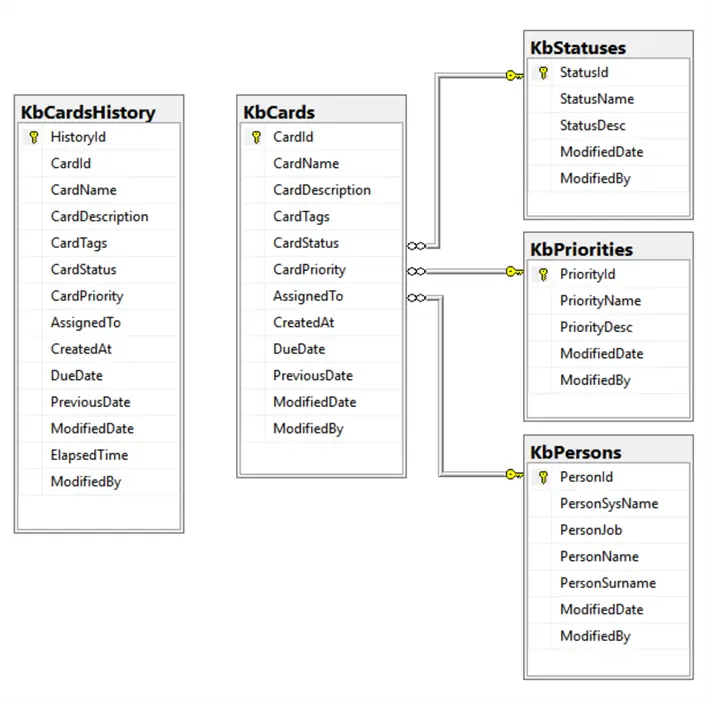
The below diagram shows a simplified Kanban database structure:
SQL Code
Following are several SQL scripts to build tables, stored procedures, and functions for this article.
Table Persons
-- MSSQLTips (TSQL)

CREATE TABLE [dbo].[KbPersons](
    [PersonId] [int] IDENTITY(0,1) NOT NULL,
    [PersonSysName] [nvarchar](20) NOT NULL,
    [PersonJob] [nvarchar](50) NULL,
    [PersonName] [nvarchar](50) NULL,
    [PersonSurname] [nvarchar](50) NULL,
    [ModifiedDate] [datetime2](3) NULL DEFAULT (getdate()),
    [ModifiedBy] [int] NULL,
 CONSTRAINT [PK_KbPersons] PRIMARY KEY CLUSTERED
(
    [PersonId] ASC
)WITH (PAD_INDEX = OFF, STATISTICS_NORECOMPUTE = OFF, IGNORE_DUP_KEY = OFF, ALLOW_ROW_LOCKS = ON, ALLOW_PAGE_LOCKS = ON, OPTIMIZE_FOR_SEQUENTIAL_KEY = OFF) ON [PRIMARY]
) ON [PRIMARY]
GO

INSERT INTO  [dbo].[KbPersons]
            ([PersonSysName]
            ,[PersonJob]
            ,[PersonName]
            ,[PersonSurname]
            ,[ModifiedBy])
    VALUES     ('none',NULL, NULL, NULL,0)
            ,('AlbertaH','x','Alberta','Hunter',0)
            ,('WillianS','y','Willian','Shakespeare',0)
            ,('AretaF','z','Areta','Franklin',0)
GO
Priorities Table
-- MSSQLTips (TSQL)

CREATE TABLE [dbo].[KbPriorities](
    [PriorityId] [char](2) NOT NULL,
    [PriorityName] [nvarchar](50) NOT NULL,
    [PriorityDesc] [nvarchar](500) NULL,
    [ModifiedDate] [datetime2](3) NULL DEFAULT (getdate()),
    [ModifiedBy] [int] NULL DEFAULT ((0)),
 CONSTRAINT [PK_KanbanPriorities] PRIMARY KEY CLUSTERED
(
    [PriorityId] ASC
)WITH (PAD_INDEX = OFF, STATISTICS_NORECOMPUTE = OFF, IGNORE_DUP_KEY = OFF, ALLOW_ROW_LOCKS = ON, ALLOW_PAGE_LOCKS = ON, OPTIMIZE_FOR_SEQUENTIAL_KEY = OFF) ON [PRIMARY]
) ON [PRIMARY]
GO

INSERT INTO  [dbo].[KbPriorities]
            ([PriorityId]
            ,[PriorityName]
            ,[PriorityDesc])
    VALUES   ('P1','Emergency','Outage, security breach, or major business impact. Requires immediate action')
            ,('P2','Critical','Blocking workflow, customer impact, or a deadline')
            ,('P3','High','Important enhancement or fix, but not blocking')
            ,('P4','Standard','Standard work item / routine task')
            ,('P5','Low','Backlog items with low urgency')
            ,('P6','Very Low','Optional improvements, ideas, future tasks')
            ,('P7','On Hold','Task exists but cannot move until prerequisites are met');
GO
Table Statuses
-- MSSQLTips (TSQL)

CREATE TABLE [dbo].[KbStatuses](
    [StatusId] [char](2) NOT NULL,
    [StatusName] [nvarchar](50) NOT NULL,
    [StatusDesc] [nvarchar](500) NULL,
    [ModifiedDate] [datetime2](3) NULL DEFAULT (getdate()),
    [ModifiedBy] [int] NULL DEFAULT (0),
 CONSTRAINT [PK_KanbanStatusList] PRIMARY KEY CLUSTERED
(
    [StatusId] ASC
)WITH (PAD_INDEX = OFF, STATISTICS_NORECOMPUTE = OFF, IGNORE_DUP_KEY = OFF, ALLOW_ROW_LOCKS = ON, ALLOW_PAGE_LOCKS = ON, OPTIMIZE_FOR_SEQUENTIAL_KEY = OFF) ON [PRIMARY]
) ON [PRIMARY]
GO

INSERT INTO  [dbo].[KbStatuses]
            ([StatusId]
            ,[StatusName]
            ,[StatusDesc])
    VALUES   ('S1','Backlog','Ideas, future tasks, not ready to work yet')
            ,('S2','Ready','Prepared and approved tasks ready to start')
            ,('S3','In Progress','Actively being worked on')
            ,('S4','Review','QA, validation, code review, awaiting verification or approval')
            ,('S5','Done','Fully completed, approved, validated, and accepted')
            ,('S6','Archived','Old completed tasks stored for reference')
            ,('S7','Blocked','Pending issues avoiding the work to continue');
GO
Cards Table
-- MSSQLTips (TSQL)

CREATE TABLE [dbo].[KbCards](
    [CardId] [int] IDENTITY(1,1) NOT NULL,
    [CardName] [nvarchar](80) NOT NULL,
    [CardDescription] [nvarchar](1200) NULL,
    [CardTags] [nvarchar](500) NULL,
    [CardStatus] [char](2) NOT NULL,
    [CardPriority] [char](2) NULL,
    [AssignedTo] [int] NULL,
    [CreatedAt] [datetime2](3) NULL DEFAULT (getdate()),
    [DueDate] [date] NULL,
    [PreviousDate] [datetime2](3) NULL,
    [ModifiedDate] [datetime2](3) NULL DEFAULT (getdate()),
    [ModifiedBy] [int] NULL,
 CONSTRAINT [PK__Cards] PRIMARY KEY CLUSTERED
(
    [CardId] ASC
)WITH (PAD_INDEX = OFF, STATISTICS_NORECOMPUTE = OFF, IGNORE_DUP_KEY = OFF, ALLOW_ROW_LOCKS = ON, ALLOW_PAGE_LOCKS = ON, OPTIMIZE_FOR_SEQUENTIAL_KEY = OFF) ON [PRIMARY]
) ON [PRIMARY]
GO

ALTER TABLE [dbo].[KbCards]  WITH CHECK ADD  CONSTRAINT [FK_KbCards_KbPersons] FOREIGN KEY([AssignedTo])
REFERENCES [dbo].[KbPersons] ([PersonId])
GO

ALTER TABLE [dbo].[KbCards] CHECK CONSTRAINT [FK_KbCards_KbPersons]
GO

ALTER TABLE [dbo].[KbCards]  WITH CHECK ADD  CONSTRAINT [FK_KbCards_KbPriorityList] FOREIGN KEY([CardPriority])
REFERENCES [dbo].[KbPriorities] ([PriorityId])
GO

ALTER TABLE [dbo].[KbCards] CHECK CONSTRAINT [FK_KbCards_KbPriorityList]
GO

ALTER TABLE [dbo].[KbCards]  WITH CHECK ADD  CONSTRAINT [FK_KbCards_KbStatuses] FOREIGN KEY([CardStatus])
REFERENCES [dbo].[KbStatuses] ([StatusId])
GO

ALTER TABLE [dbo].[KbCards] CHECK CONSTRAINT [FK_KbCards_KbStatuses]
GO
Table Card History
-- MSSQLTips (TSQL)

CREATE TABLE [dbo].[KbCardsHistory](
    [HistoryId] [int] IDENTITY(1,1) NOT NULL,
    [CardId] [int] NOT NULL,
    [CardName] [nvarchar](80) NOT NULL,
    [CardDescription] [nvarchar](1200) NULL,
    [CardTags] [nvarchar](500) NULL,
    [CardStatus] [char](2) NULL,
    [CardPriority] [char](2) NULL,
    [AssignedTo] [int] NULL,
    [CreatedAt] [datetime2](3) NULL,
    [DueDate] [date] NULL,
    [PreviousDate] [datetime2](3) NULL,
    [ModifiedDate] [datetime2](3) NULL,
    [ElapsedTime]  AS ([dbo].[ufnDatetimeDiffDHM]([PreviousDate],[ModifiedDate])),
    [ModifiedBy] [int] NULL,
 CONSTRAINT [PK__CardsHistory] PRIMARY KEY CLUSTERED
(
    [HistoryId] ASC
)WITH (PAD_INDEX = OFF, STATISTICS_NORECOMPUTE = OFF, IGNORE_DUP_KEY = OFF, ALLOW_ROW_LOCKS = ON, ALLOW_PAGE_LOCKS = ON, OPTIMIZE_FOR_SEQUENTIAL_KEY = OFF) ON [PRIMARY]
) ON [PRIMARY]
GO
Trigger Kanban Card History
-- =============================================
-- Author:        SCP
-- Create date:   20251116
-- Description:   History for Kanban Card
-- =============================================
CREATE OR ALTER TRIGGER [dbo].[trgKanbanCardHistory]
   ON  [dbo].[KbCards]
   AFTER INSERT,DELETE,UPDATE
AS
BEGIN
    SET NOCOUNT ON;

    IF EXISTS (SELECT 1 FROM inserted) BEGIN
        INSERT INTO         [dbo].[KbCardsHistory]
                        ([CardId]
                        ,[CardName]
                        ,[CardDescription]
                        ,[CardStatus]
                        ,[CardPriority]
                        ,[AssignedTo]
                        ,[CreatedAt]
                        ,[DueDate]
                        ,[PreviousDate]
                        ,[ModifiedDate]
                        ,[ModifiedBy])
            SELECT       [CardId]
                        ,[CardName]
                        ,[CardDescription]
                        ,[CardStatus]
                        ,[CardPriority]
                        ,[AssignedTo]
                        ,[CreatedAt]
                        ,[DueDate]
                        ,[PreviousDate]
                        ,[ModifiedDate]
                        ,[ModifiedBy]
                FROM     inserted;
    END ELSE IF NOT EXISTS (SELECT 1 FROM inserted) AND
                    EXISTS (SELECT 1 FROM deleted) BEGIN
        INSERT INTO         [dbo].[KbCardsHistory]
                        ([CardId]
                        ,[CardName]
                        ,[CardDescription]
                        ,[CardStatus]
                        ,[CardPriority]
                        ,[AssignedTo]
                        ,[CreatedAt]
                        ,[DueDate]
                        ,[PreviousDate]
                        ,[ModifiedDate]
                        ,[ModifiedBy])
            SELECT      -[CardId]
                        ,[CardName]
                        ,[CardDescription]
                        ,[CardStatus]
                        ,[CardPriority]
                        ,[AssignedTo]
                        ,[CreatedAt]
                        ,[DueDate]
                        ,[PreviousDate]
                        ,GETDATE()
                        ,[ModifiedBy]
                FROM     deleted;
    END
END
GO

ALTER TABLE [dbo].[KbCards] ENABLE TRIGGER [trgKanbanCardHistory]
GO
User-defined Function Date Difference
-- MSSQLTips (TSQL)

-- =============================================
-- Author:        Sebastião Pereira - MSSQLTips
-- Create date:   20251117
-- Description:   Return diff in Days-Hours-Min
-- =============================================
CREATE OR ALTER FUNCTION [dbo].[ufnDatetimeDiffDHM]
        (@D1 datetime2(0)
        ,@D2 datetime2(0))
RETURNS nvarchar(50)
WITH EXECUTE AS CALLER
AS
BEGIN
    DECLARE @DHM nvarchar(50) =
        (SELECT CONCAT(
                FLOOR(secDiff / 86400), 'd ',
                FLOOR((secDiff % 86400) / 3600), 'h ',
                FLOOR((secDiff % 3600) / 60), 'm',
                FLOOR(secDiff % 3600) % 60, 's') AS TimeDiff
            FROM (SELECT DATEDIFF(SECOND, @D1,@D2) AS secDiff) t);

    RETURN @DHM;
END
GO
View Kanban Card
CREATE OR ALTER VIEW [dbo].[vKbCards]
AS
SELECT dbo.KbCards.CardId, dbo.KbCards.CardName, dbo.KbCards.CardDescription, dbo.KbCards.CardTags, dbo.KbCards.CardStatus, dbo.KbStatuses.StatusName, dbo.KbCards.CardPriority, dbo.KbPriorities.PriorityName,
    dbo.KbCards.AssignedTo, dbo.KbPersons.PersonSysName, dbo.KbCards.CreatedAt, dbo.KbCards.DueDate, dbo.KbCards.PreviousDate, dbo.KbCards.ModifiedDate, dbo.ufnDatetimeDiffDHM(dbo.KbCards.PreviousDate,
    dbo.KbCards.ModifiedDate) AS ElapsedTime, dbo.KbCards.ModifiedBy
FROM dbo.KbCards LEFT OUTER JOIN
    dbo.KbPriorities ON dbo.KbCards.CardPriority = dbo.KbPriorities.PriorityId LEFT OUTER JOIN
    dbo.KbStatuses ON dbo.KbCards.CardStatus = dbo.KbStatuses.StatusId LEFT OUTER JOIN
    dbo.KbPersons ON dbo.KbCards.AssignedTo = dbo.KbPersons.PersonId
GO
View Kanban Card History
-- MSSQLTips (TSQL)

CREATE OR ALTER VIEW [dbo].[vKbCardsHistory]
AS
SELECT dbo.KbCardsHistory.HistoryId, dbo.KbCardsHistory.CardId, dbo.KbCardsHistory.CardName, dbo.KbCardsHistory.CardDescription, dbo.KbCardsHistory.CardTags, dbo.KbCardsHistory.CardStatus,
    dbo.KbStatuses.StatusName, dbo.KbCardsHistory.CardPriority, dbo.KbPriorities.PriorityName, dbo.KbCardsHistory.AssignedTo, dbo.KbPersons.PersonSysName, dbo.KbCardsHistory.CreatedAt,
    dbo.KbCardsHistory.DueDate, dbo.KbCardsHistory.PreviousDate, dbo.KbCardsHistory.ModifiedDate, dbo.ufnDatetimeDiffDHM(dbo.KbCardsHistory.PreviousDate, dbo.KbCardsHistory.ModifiedDate) AS ElapsedTime,
    dbo.KbCardsHistory.ModifiedBy
FROM dbo.KbCardsHistory LEFT OUTER JOIN
    dbo.KbPriorities ON dbo.KbCardsHistory.CardPriority = dbo.KbPriorities.PriorityId LEFT OUTER JOIN
    dbo.KbStatuses ON dbo.KbCardsHistory.CardStatus = dbo.KbStatuses.StatusId LEFT OUTER JOIN
    dbo.KbPersons ON dbo.KbCardsHistory.AssignedTo = dbo.KbPersons.PersonId
GO
Stored Procedure Kanban Board
To show the Kanban board but the ideal is to have a report view page to do this.
-- =============================================
-- Author:      SCP - MSSQLTips
-- Create date: 20251116
-- Description: Kanban Card
-- =============================================
CREATE OR ALTER   PROCEDURE [dbo].[uspKbCardBoard]
AS
BEGIN
    SET NOCOUNT ON;
    BEGIN TRY

        DECLARE              @KanbanBoard
            TABLE           ([CardId] int
                            ,[CardOrderId] int
                            ,[Swimlane] nvarchar(50)
                            ,[Backlog] nvarchar(1200)
                            ,[Ready] nvarchar(1200)
                            ,[In Progress] nvarchar(1200)
                            ,[Review] nvarchar(1200)
                            ,[Done] nvarchar(1200)
                            ,[Archived] nvarchar(1200)
                            ,[Blocked] nvarchar(1200));

        INSERT INTO          @KanbanBoard
                            ([CardId]
                            ,[CardOrderId]
                            ,[Swimlane]
                            ,[Backlog]
                            ,[Ready]
                            ,[In Progress]
                            ,[Review]
                            ,[Done]
                            ,[Archived]
                            ,[Blocked])
            SELECT           [CardId]
                            ,0
                            ,STRING_AGG(CASE WHEN [CardPriority] = 'P1'
                                             THEN 'CRITICAL'
                                             ELSE 'STANDARD'
                             END,'')
                            ,CASE WHEN [CardStatus] = 'S1' THEN CONCAT(UPPER([CardName]),' (',[CardId],')') END
                            ,CASE WHEN [CardStatus] = 'S2' THEN CONCAT(UPPER([CardName]),' (',[CardId],')') END
                            ,CASE WHEN [CardStatus] = 'S3' THEN CONCAT(UPPER([CardName]),' (',[CardId],')') END
                            ,CASE WHEN [CardStatus] = 'S4' THEN CONCAT(UPPER([CardName]),' (',[CardId],')') END
                            ,CASE WHEN [CardStatus] = 'S5' THEN CONCAT(UPPER([CardName]),' (',[CardId],')') END
                            ,CASE WHEN [CardStatus] = 'S6' THEN CONCAT(UPPER([CardName]),' (',[CardId],')') END
                            ,CASE WHEN [CardStatus] = 'S7' THEN CONCAT(UPPER([CardName]),' (',[CardId],')') END
                  FROM       [dbo].[vKbCards]
                  GROUP BY   [CardId]
                            ,[CardName]
                            ,[CardStatus]

            UNION ALL

            SELECT           [CardId]
                            ,1
                            ,STRING_AGG(CASE WHEN [CardPriority] = 'P1'
                                             THEN 'CRITICAL'
                                             ELSE 'STANDARD'
                             END,'')
                            ,STRING_AGG(CASE WHEN [CardStatus] = 'S1' THEN N'    Description: ' + [CardDescription] END,'')
                            ,STRING_AGG(CASE WHEN [CardStatus] = 'S2' THEN N'    Description: ' + [CardDescription] END,'')
                            ,STRING_AGG(CASE WHEN [CardStatus] = 'S3' THEN N'    Description: ' + [CardDescription] END,'')
                            ,STRING_AGG(CASE WHEN [CardStatus] = 'S4' THEN N'    Description: ' + [CardDescription] END,'')
                            ,STRING_AGG(CASE WHEN [CardStatus] = 'S5' THEN N'    Description: ' + [CardDescription] END,'')
                            ,STRING_AGG(CASE WHEN [CardStatus] = 'S6' THEN N'    Description: ' + [CardDescription] END,'')
                            ,STRING_AGG(CASE WHEN [CardStatus] = 'S7' THEN N'    Description: ' + [CardDescription] END,'')
                  FROM       [dbo].[vKbCards]
                  GROUP BY   [CardId]

            UNION ALL

            SELECT           [CardId]
                            ,2
                            ,STRING_AGG(CASE WHEN [CardPriority] = 'P1'
                                             THEN 'CRITICAL'
                                             ELSE 'STANDARD'
                             END,'')
                            ,STRING_AGG(CASE WHEN [CardStatus] = 'S1' THEN N'    Tags: ' + [CardTags] END,'')
                            ,STRING_AGG(CASE WHEN [CardStatus] = 'S2' THEN N'    Tags: ' + [CardTags] END,'')
                            ,STRING_AGG(CASE WHEN [CardStatus] = 'S3' THEN N'    Tags: ' + [CardTags] END,'')
                            ,STRING_AGG(CASE WHEN [CardStatus] = 'S4' THEN N'    Tags: ' + [CardTags] END,'')
                            ,STRING_AGG(CASE WHEN [CardStatus] = 'S5' THEN N'    Tags: ' + [CardTags] END,'')
                            ,STRING_AGG(CASE WHEN [CardStatus] = 'S6' THEN N'    Tags: ' + [CardTags] END,'')
                            ,STRING_AGG(CASE WHEN [CardStatus] = 'S7' THEN N'    Tags: ' + [CardTags] END,'')
                  FROM       [dbo].[vKbCards]
                  GROUP BY   [CardId]

            UNION ALL

            SELECT           [CardId]
                            ,3
                            ,STRING_AGG(CASE WHEN [CardPriority] = 'P1'
                                             THEN 'CRITICAL'
                                             ELSE 'STANDARD'
                             END,'')
                            ,STRING_AGG(CASE WHEN [CardStatus] = 'S1' THEN N'    Assigned to: ' + [PersonSysName] END,'')
                            ,STRING_AGG(CASE WHEN [CardStatus] = 'S2' THEN N'    Assigned to: ' + [PersonSysName] END,'')
                            ,STRING_AGG(CASE WHEN [CardStatus] = 'S3' THEN N'    Assigned to: ' + [PersonSysName] END,'')
                            ,STRING_AGG(CASE WHEN [CardStatus] = 'S4' THEN N'    Assigned to: ' + [PersonSysName] END,'')
                            ,STRING_AGG(CASE WHEN [CardStatus] = 'S5' THEN N'    Assigned to: ' + [PersonSysName] END,'')
                            ,STRING_AGG(CASE WHEN [CardStatus] = 'S6' THEN N'    Assigned to: ' + [PersonSysName] END,'')
                            ,STRING_AGG(CASE WHEN [CardStatus] = 'S7' THEN N'    Assigned to: ' + [PersonSysName] END,'')
                  FROM       [dbo].[vKbCards]
                  GROUP BY   [CardId]

            UNION ALL

            SELECT           [CardId]
                            ,3
                            ,STRING_AGG(CASE WHEN [CardPriority] = 'P1'
                                             THEN 'CRITICAL'
                                             ELSE 'STANDARD'
                             END,'')
                            ,STRING_AGG(CASE WHEN [CardStatus] = 'S1' THEN N'    Priority: ' + COALESCE([PriorityName],'to be classified') END,'')
                            ,STRING_AGG(CASE WHEN [CardStatus] = 'S2' THEN N'    Priority: ' + COALESCE([PriorityName],'to be classified') END,'')
                            ,STRING_AGG(CASE WHEN [CardStatus] = 'S3' THEN N'    Priority: ' + COALESCE([PriorityName],'to be classified') END,'')
                            ,STRING_AGG(CASE WHEN [CardStatus] = 'S4' THEN N'    Priority: ' + COALESCE([PriorityName],'to be classified') END,'')
                            ,STRING_AGG(CASE WHEN [CardStatus] = 'S5' THEN N'    Priority: ' + COALESCE([PriorityName],'to be classified') END,'')
                            ,STRING_AGG(CASE WHEN [CardStatus] = 'S6' THEN N'    Priority: ' + COALESCE([PriorityName],'to be classified') END,'')
                            ,STRING_AGG(CASE WHEN [CardStatus] = 'S7' THEN N'    Priority: ' + COALESCE([PriorityName],'to be classified') END,'')
                  FROM       [dbo].[vKbCards]
                  GROUP BY   [CardId]

            UNION ALL

            SELECT           [CardId]
                            ,4
                            ,STRING_AGG(CASE WHEN [CardPriority] = 'P1'
                                             THEN 'CRITICAL'
                                             ELSE 'STANDARD'
                             END,'')
                            ,CASE WHEN [CardStatus] = 'S1' THEN CONCAT(N'    Time since creation: ',[dbo].[ufnDatetimeDiffDHM] ([CreatedAt],GETDATE())) END
                            ,CASE WHEN [CardStatus] = 'S2' THEN CONCAT(N'    Time since creation: ',[dbo].[ufnDatetimeDiffDHM] ([CreatedAt],GETDATE())) END
                            ,CASE WHEN [CardStatus] = 'S3' THEN CONCAT(N'    Time since creation: ',[dbo].[ufnDatetimeDiffDHM] ([CreatedAt],GETDATE())) END
                            ,CASE WHEN [CardStatus] = 'S4' THEN CONCAT(N'    Time since creation: ',[dbo].[ufnDatetimeDiffDHM] ([CreatedAt],GETDATE())) END
                            ,CASE WHEN [CardStatus] = 'S5' THEN CONCAT(N'    Time since creation: ',[dbo].[ufnDatetimeDiffDHM] ([CreatedAt],GETDATE())) END
                            ,CASE WHEN [CardStatus] = 'S6' THEN CONCAT(N'    Time since creation: ',[dbo].[ufnDatetimeDiffDHM] ([CreatedAt],GETDATE())) END
                            ,CASE WHEN [CardStatus] = 'S7' THEN CONCAT(N'    Time since creation: ',[dbo].[ufnDatetimeDiffDHM] ([CreatedAt],GETDATE())) END
                  FROM       [dbo].[vKbCards]
                  GROUP BY   [CardId]
                            ,[CardStatus]
                            ,[CreatedAt]

            UNION ALL

            SELECT           [CardId]
                            ,5
                            ,STRING_AGG(CASE WHEN [CardPriority] = 'P1'
                                             THEN 'CRITICAL'
                                             ELSE 'STANDARD'
                             END,'')
                            ,CASE WHEN [CardStatus] = 'S1' THEN CONCAT(N'    Time previous: ',[dbo].[ufnDatetimeDiffDHM] ([PreviousDate],[ModifiedDate])) END
                            ,CASE WHEN [CardStatus] = 'S2' THEN CONCAT(N'    Time previous: ',[dbo].[ufnDatetimeDiffDHM] ([PreviousDate],[ModifiedDate])) END
                            ,CASE WHEN [CardStatus] = 'S3' THEN CONCAT(N'    Time previous: ',[dbo].[ufnDatetimeDiffDHM] ([PreviousDate],[ModifiedDate])) END
                            ,CASE WHEN [CardStatus] = 'S4' THEN CONCAT(N'    Time previous: ',[dbo].[ufnDatetimeDiffDHM] ([PreviousDate],[ModifiedDate])) END
                            ,CASE WHEN [CardStatus] = 'S5' THEN CONCAT(N'    Time previous: ',[dbo].[ufnDatetimeDiffDHM] ([PreviousDate],[ModifiedDate])) END
                            ,CASE WHEN [CardStatus] = 'S6' THEN CONCAT(N'    Time previous: ',[dbo].[ufnDatetimeDiffDHM] ([PreviousDate],[ModifiedDate])) END
                            ,CASE WHEN [CardStatus] = 'S7' THEN CONCAT(N'    Time previous: ',[dbo].[ufnDatetimeDiffDHM] ([PreviousDate],[ModifiedDate])) END
                  FROM       [dbo].[vKbCards]
                  GROUP BY   [CardId]
                            ,[CardStatus]
                            ,[PreviousDate]
                            ,[ModifiedDate];

        SELECT       [Swimlane]
                    ,[Backlog]
                    ,[Ready]
                    ,[In Progress]
                    ,[Review]
                    ,[Done]
                    ,[Archived]
                    ,[Blocked]
            FROM     @KanbanBoard
            ORDER BY [CardId]
                    ,[CardOrderId];


    END TRY
    BEGIN CATCH
        IF @@TRANCOUNT > 0 BEGIN
            ROLLBACK TRANSACTION;
        END

        PRINT    'Error: ' + CONVERT(varchar(50), ERROR_NUMBER()) +
                ', Severity: ' + CONVERT(varchar(5), ERROR_SEVERITY()) +
                ', State: ' + CONVERT(varchar(5), ERROR_STATE()) +
                ', Procedure: ' + ISNULL(ERROR_PROCEDURE(), '-') +
                ', Line: ' + CONVERT(varchar(5), ERROR_LINE());

        PRINT ERROR_MESSAGE();
    END CATCH;
END
GO
Stored Procedure Kanban Card
I adopt the method to use “0” for Card Id to insert a new one and the Card Id integer to delete or update the respective record.
-- =============================================
-- Author:      SCP - MSSQLTips
-- Create date: 20251116
-- Description: Kanban Card
-- =============================================
CREATE OR ALTER PROCEDURE [dbo].[uspKbCard]
                (@CardId int
                ,@CardName nvarchar(80)
                ,@CardDescription nvarchar(MAX)
                ,@CardTags nvarchar(500)
                ,@CardStatus char(2)
                ,@CardPriority char(2)
                ,@AssignedTo int
                ,@DueDate date
                ,@ModifiedBy int)
AS
BEGIN
    SET NOCOUNT ON;
    BEGIN TRY
        BEGIN TRANSACTION;

            DECLARE @ModifiedDate datetime2(3) = GETDATE();

            IF @AssignedTo IS NULL
                SET @AssignedTo = 0;

            -- UPDATE
            IF @CardId > 0 BEGIN
                UPDATE         [dbo].[KbCards]
                    SET      [CardName] = @CardName
                            ,[CardDescription] = @CardDescription
                            ,[CardTags] = @CardTags
                            ,[CardStatus] = @CardStatus
                            ,[CardPriority] = @CardPriority
                            ,[AssignedTo] = @AssignedTo
                            ,[DueDate] = @DueDate
                            ,[PreviousDate] = [ModifiedDate]
                            ,[ModifiedDate] = @ModifiedDate
                            ,[ModifiedBy] = @ModifiedBy
                    WHERE     [CardId] = @CardId;
            END

            -- INSERT
            IF @CardId = 0 BEGIN
                INSERT INTO  [dbo].[KbCards]
                            ([CardName]
                            ,[CardDescription]
                            ,[CardTags]
                            ,[CardStatus]
                            ,[CardPriority]
                            ,[AssignedTo]
                            ,[DueDate]
                            ,[PreviousDate]
                            ,[ModifiedDate]
                            ,[ModifiedBy])
                    VALUES  (@CardName
                            ,@CardDescription
                            ,@CardTags
                            ,@CardStatus
                            ,@CardPriority
                            ,@AssignedTo
                            ,@DueDate
                            ,@ModifiedDate
                            ,@ModifiedDate
                            ,@ModifiedBy);

                SET @CardId = SCOPE_IDENTITY();
            END

            -- DELETE
            IF @CardId < 0 BEGIN
                DELETE FROM     [dbo].[KbCards]
                    WHERE     [CardId] = ABS(@CardId);
            END

        COMMIT TRANSACTION;

        EXECUTE [dbo].[uspKbCardBoard];

        RETURN @CardId;
    END TRY
    BEGIN CATCH
        IF @@TRANCOUNT > 0 BEGIN
            ROLLBACK TRANSACTION;
        END

        PRINT    'Error: ' + CONVERT(varchar(50), ERROR_NUMBER()) +
                ', Severity: ' + CONVERT(varchar(5), ERROR_SEVERITY()) +
                ', State: ' + CONVERT(varchar(5), ERROR_STATE()) +
                ', Procedure: ' + ISNULL(ERROR_PROCEDURE(), '-') +
                ', Line: ' + CONVERT(varchar(5), ERROR_LINE());

        PRINT ERROR_MESSAGE();
    END CATCH;
END
GO
Example
Assuming you have a frontend to handle logins and data entry, the following shows how things will work at the backend to take a task through the different phases.
Our example is related to ‘Users Cannot Send External Emails’.
Create Task
The following sets the values and then we execute the stored procedure. Using CardId = 0 creates a new card.
-- MSSQLTips (TSQL)

DECLARE  @CardId int = 0
        ,@CardName nvarchar(80) = 'Users Cannot Send External Emails'
        ,@CardDescription nvarchar(max) = 'Ticket created by Helpdesk after multiple user reports'
        ,@CardTags nvarchar(500) = '#incident #email #outage #user-impact #reported'
        ,@CardStatus char(2) = 'S1'
        ,@CardPriority char(2) = NULL
        ,@AssignedTo int = NULL
        ,@DueDate date = NULL
        ,@ModifiedBy int = 1

EXECUTE [dbo].[uspKbCard] @CardId,@CardName,@CardDescription,@CardTags,@CardStatus,@CardPriority,@AssignedTo,@DueDate,@ModifiedBy;
GO
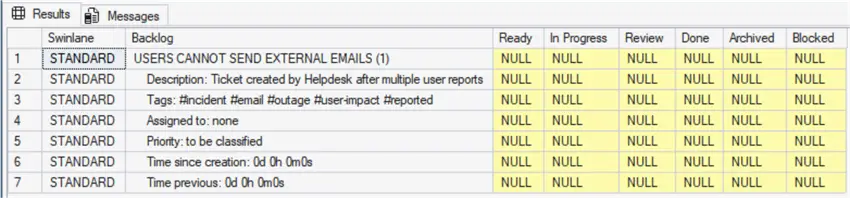
Resulting in the task being created and marked as “Backlog”. Note: the number between the parenthesis (1) is the Card ID.
Assign Task
The task has enough information to be assigned and to receive a priority. We set the values and execute the stored procedure.
-- MSSQLTips (TSQL)

DECLARE  @CardId int = 1
        ,@CardName nvarchar(80) = 'Users Cannot Send External Emails'
        ,@CardDescription nvarchar(max) = 'Triage team confirms the issue is real'
        ,@CardTags nvarchar(500) = '#triage #validated #critical #ops'
        ,@CardStatus char(2) = 'S2'
        ,@CardPriority char(2) = 'P2'
        ,@AssignedTo int = 3
        ,@DueDate date = NULL
        ,@ModifiedBy int = 1;

EXECUTE [dbo].[uspKbCard] @CardId,@CardName,@CardDescription,@CardTags,@CardStatus,@CardPriority,@AssignedTo,@DueDate,@ModifiedBy;
GO
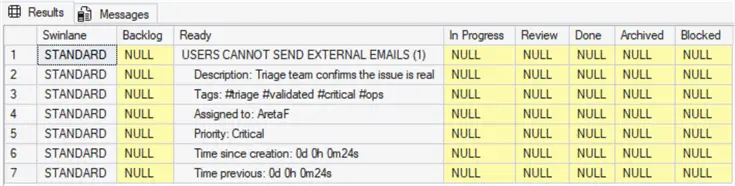
Resulting in the task is being moved from “Backlog” to “Ready”.
Start Task
The team start investigation about transport logs and mail flow so the task is updated.
-- MSSQLTips (TSQL)

DECLARE  @CardId int = 1
        ,@CardName nvarchar(80) = 'Users Cannot Send External Emails'
        ,@CardDescription nvarchar(max) = 'Starts investigating transport logs and mail flow'
        ,@CardTags nvarchar(500) = '#assigned #service-desk'
        ,@CardStatus char(2) = 'S3'
        ,@CardPriority char(2) = 'P2'
        ,@AssignedTo int = 1
        ,@DueDate date = NULL
        ,@ModifiedBy int = 1;

EXECUTE [dbo].[uspKbCard] @CardId,@CardName,@CardDescription,@CardTags,@CardStatus,@CardPriority,@AssignedTo,@DueDate,@ModifiedBy;
GO
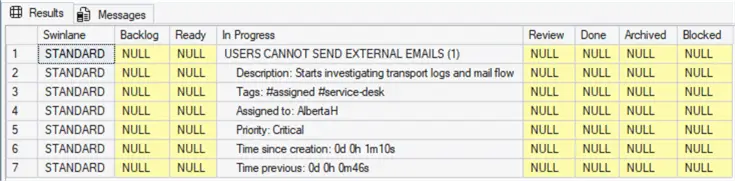
Resulting in the task moving from “Ready” to “In Progress”.
Task Needs Additional Approval
It was observed error IDs related to mail transport rule, but the task cannot continue because it is necessary to have admin approval. This is a blocking step until it is resolved.
-- MSSQLTips (TSQL)

DECLARE  @CardId int = 1
        ,@CardName nvarchar(80) = 'Users Cannot Send External Emails'
        ,@CardDescription nvarchar(max) = 'Due to notices error IDs related to mail transport rule, it is necessary admin approval'
        ,@CardTags nvarchar(500) = '#blocked #waiting-approval #admin #permission'
        ,@CardStatus char(2) = 'S7'
        ,@CardPriority char(2) = 'P2'
        ,@AssignedTo int = 1
        ,@DueDate date = NULL
        ,@ModifiedBy int = 1;

EXECUTE [dbo].[uspKbCard] @CardId,@CardName,@CardDescription,@CardTags,@CardStatus,@CardPriority,@AssignedTo,@DueDate,@ModifiedBy;
GO
Resulting in the task moving from “In Progress” to “Blocked”.

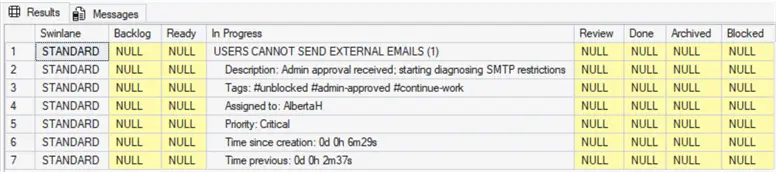
Task approved and back to In Progress
Once admin approval is received; now it is possible to continue diagnosing SMTP restrictions.
-- MSSQLTips (TSQL)

DECLARE  @CardId int = 1
        ,@CardName nvarchar(80) = 'Users Cannot Send External Emails'
        ,@CardDescription nvarchar(max) = 'Admin approval received; starting diagnosing SMTP restrictions'
        ,@CardTags nvarchar(500) = '#unblocked #admin-approved #continue-work'
        ,@CardStatus char(2) = 'S3'
        ,@CardPriority char(2) = 'P2'
        ,@AssignedTo int = 1
        ,@DueDate date = NULL
        ,@ModifiedBy int = 1;

EXECUTE [dbo].[uspKbCard] @CardId,@CardName,@CardDescription,@CardTags,@CardStatus,@CardPriority,@AssignedTo,@DueDate,@ModifiedBy;
GO
Resulting in the task moving from “Blocked” to “Ready”.
Task Complete and Ready for Review
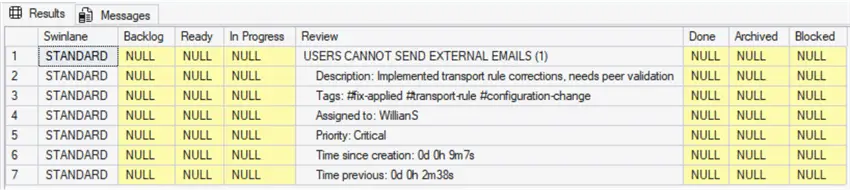
A fix is implemented, the transport rule was corrected, but now needs peer validation.
-- MSSQLTips (TSQL)

DECLARE  @CardId int = 1
        ,@CardName nvarchar(80) = 'Users Cannot Send External Emails'
        ,@CardDescription nvarchar(max) = 'Implemented transport rule corrections, needs peer validation'
        ,@CardTags nvarchar(500) = '#fix-applied #transport-rule #configuration-change'
        ,@CardStatus char(2) = 'S4'
        ,@CardPriority char(2) = 'P2'
        ,@AssignedTo int = 2
        ,@DueDate date = NULL
        ,@ModifiedBy int = 1;

EXECUTE [dbo].[uspKbCard] @CardId,@CardName,@CardDescription,@CardTags,@CardStatus,@CardPriority,@AssignedTo,@DueDate,@ModifiedBy;
GO
Resulting in the task moving from “Ready” to “Review”.
Task Reviewed and Validated
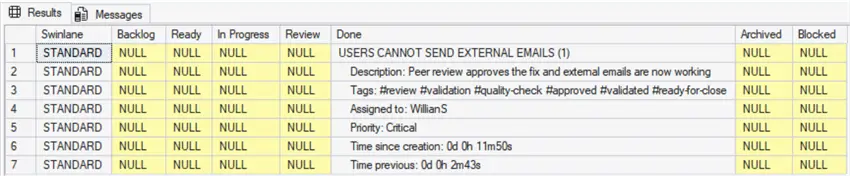
Peer review validation is complete and task can be marked done.
-- MSSQLTips (TSQL)

DECLARE  @CardId int = 1
        ,@CardName nvarchar(80) = 'Users Cannot Send External Emails'
        ,@CardDescription nvarchar(max) = 'Peer review approves the fix and external emails are now working'
        ,@CardTags nvarchar(500) = '#review #validation #quality-check #approved #validated #ready-for-close'
        ,@CardStatus char(2) = 'S5'
        ,@CardPriority char(2) = 'P2'
        ,@AssignedTo int = 2
        ,@DueDate date = NULL
        ,@ModifiedBy int = 1;

EXECUTE [dbo].[uspKbCard] @CardId,@CardName,@CardDescription,@CardTags,@CardStatus,@CardPriority,@AssignedTo,@DueDate,@ModifiedBy;
GO
Resulting in the task moving from “Review” to “Done”.
Task Archiving
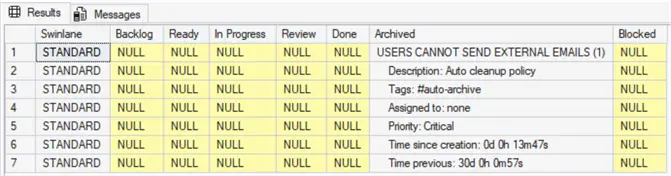
We could also create an auto-cleanup policy to archive resolved incidents after 30 days. This could be a scheduled task.
-- MSSQLTips (TSQL)

DECLARE  @CardId int = 1
        ,@CardName nvarchar(80) = 'Users Cannot Send External Emails'
        ,@CardDescription nvarchar(max) = 'Auto cleanup policy'
        ,@CardTags nvarchar(500) = '#auto-archive'
        ,@CardStatus char(2) = 'S6'
        ,@CardPriority char(2) = 'P2'
        ,@AssignedTo int = 0
        ,@DueDate date = NULL
        ,@ModifiedBy int = 1;

EXECUTE [dbo].[uspKbCard] @CardId,@CardName,@CardDescription,@CardTags,@CardStatus,@CardPriority,@AssignedTo,@DueDate,@ModifiedBy;
GO
Resulting in the task moving from “Done” to “Archived”.
History of Project Stages
If you want to follow all the modifications for the Cards, just access the history table running this query.
-- MSSQLTips (TSQL)

SELECT       [HistoryId]
            ,[CardId]
            ,[CardName]
            ,[CardDescription]
            ,[CardTags]
            ,[CardStatus]
            ,[CardPriority]
            ,[AssignedTo]
            ,[CreatedAt]
            ,[DueDate]
            ,[PreviousDate]
            ,[ModifiedDate]
            ,[ElapsedTime]
            ,[ModifiedBy]
    FROM     [dbo].[KbCardsHistory]
    WHERE    [CardId] = 1;
GO
Resulting in

Cleanup
If you need to clean up your testing data and start new run this query.
-- MSSQLTips (TSQL)

TRUNCATE TABLE [MsSqlTips].[dbo].[KbCardsHistory];
DELETE FROM [MsSqlTips].[dbo].[KbCards];
DBCC CHECKIDENT ('KbCards', RESEED, 0);
GO
Key Takeaways
- Kanban is a visual management system that helps identify and resolve workflow bottlenecks.
- Implementing a kanban tool in SQL Server centralizes data and improves workflow management without external tools.
- The article defines key terms like bottleneck, card, and cycle time, which are essential for understanding the kanban process.
- It includes SQL code to create tables and stored procedures necessary for building a kanban system.
- An example illustrates how tasks transition through different stages from backlog to archived in a kanban workflow.
Next Steps
- Additional Reading – WIKIPEDIA – Kanban

Sebastião Pereira has over 40 years of experience in database development including T-SQL, algorithm design, machine learning and bringing innovative mathematical formulas to SQL Server. He started his career at a transnational fast-moving consumer goods (FMCG) company as an employee then later transitioning into a consultant role. He eventually founded his own company to develop software solutions for the healthcare industry. Sebastião is a respected award-winning author on MSSQLTips.com extending SQL Server capabilities beyond traditional workloads.
- MSSQLTips Awards
- Author of the Year – 2025
- Trendsetter (25+ tips) – 2025
- Rookie of the Year – 2024



Thanks So much
Dear Mr. Pereira,
thank you so much for your Kanban SQL contribution. It has helped me immensely in my work and with my hobby.
Like yourself, I too have a number of years of experience and I am always impressed with people
who really, really understand problems originating in the real world. You shine.
Kindest wishes
Peter D.
Wales, UK.