Problem
SQL Server has many different data types and it is not always a given as which data type to use, so this outline gives you a quick overview of the different data types you can use in SQL Server.
Solution
Following are commonly used data types organized by category with a brief description, range of values, storage size, and an example.
Exact Numerics SQL Server Data Types
Int Data Type
- Int is used to store a whole number and is the primary integer data type
- Range of values: -2,147,483,648 to 2,147,483,647
- Storage size: 4 Bytes
-- declare an int variable, assign it a value, and increment it
DECLARE @MyInt int = 0
SET @MyInt += 1
SELECT @MyInt AS [MyInt]

BigInt Data Type
- Bigint is used to store a whole number that is outside of the range of an int
- Range of values: -9,223,372,036,854,775,808 to 9,223,372,036,854,775,807
- Storage size: 8 Bytes
-- make the variable a bigint
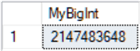
DECLARE @MyBigInt bigint = 2147483648
SELECT @MyBigInt AS [MyBigInt]
Smallint Data Type
- Smallint takes less space than an INT and can be used when a whole number is guaranteed to be between -32,768 to 32,767
- Range of values: -32,768 to 32,767
- Storage size: 2 Bytes
-- smallint example
DECLARE @MySmallInt smallint = 32000
SELECT @MySmallInt AS [MySmallInt]

Tinyint Data Type
- Tinyint can be used when a whole number is guaranteed to be between 0 and 255, i.e. number of years of a mortgage
- Range of values: 0 to 255
- Storage size: 1 Byte
-- tinyint example of length of a mortgage in years
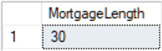
DECLARE @MortgageLength tinyint = 30
SELECT @MortgageLength AS [MortgageLength]
Bit Data Type
- Bit can be used to represent a Boolean value such as a switch is either on or off, a process is done or it isn’t, etc.
- Range of values: 0 or 1, or a NULL
- Storage size = 1 Byte per every 8-bit column in a table
-- BIT example as an on / off value of a light switch
DECLARE @LightSwitch bit = 0

IF @LightSwitch = 1 PRINT 'LightSwitch is On'
ELSE PRINT 'LightSwitch is Off'

SET @LightSwitch = 1 -- turn on
IF @LightSwitch = 1 PRINT 'LightSwitch is On'
ELSE PRINT 'LightSwitch is Off'

Decimal Data Type
- Decimal is a fixed precision and scale type
- Range of values: 10^38 +1 to 10^38
- Storage size:
- Precision 1-9 5 Bytes
- Precision 10-19 9 Bytes
- Precision 20-28 13 Bytes
- Precision 29-38 17 Bytes
- Functionally the same as numeric
/*
decimal (p,s)
p = precision = maximum total number of digits to be stored including both sides of decimal point - must 1 thru 38 - default = is 18
s = scale = number of digits to the right of the decimal point - default = 0
*/

DECLARE @MyDecimal decimal(8,4) = 123.1 -- 8 total digits with 4 to the right of the decimal
SELECT @MyDecimal AS MyDecimal

Numeric Data Type
- Numeric is a fixed precision and scale type
- Range of values: 10^38 +1 to 10^38
- Storage size:
- Precision 1-9 5 Bytes
- Precision 10-19 9 Bytes
- Precision 20-28 13 Bytes
- Precision 29-38 17 Bytes
- Functionally the same as decimal
/*
numeric (p,s)
p = precision = maximum total number of digits to be stored including both sides of decimal point - must 1 thru 38 - default = is 18
s = scale = number of digits to the right of the decimal point - default = 0
*/

DECLARE @MyNumeric numeric(8,4) = 123.1 -- 8 total digits with 4 to the right of the decimal
SELECT @MyNumeric AS MyNumeric

Money Data Type
- Money represents a monetary value
- Range of values: -922,337,203,685,477.5808 to 922,337,203,685,477.5807
- Storage size: 8 Bytes
/*
numeric (p,s)
p = precision = maximum total number of digits to be stored including both sides of decimal point - must 1 thru 38 - default = is 18
s = scale = number of digits to the right of the decimal point - default = 0
*/

--declare variable and set to $1.99
DECLARE @MyMoney money = 1.99
SELECT @MyMoney AS MyMoney

Smallmoney Data Type
- Smallmoney represents a monetary value
- Range of values: – 214,748.3648 to 214,748.3647
- Storage size: 4 Bytes
--declare variable and set to $1.99
DECLARE @MySmallMoney smallmoney = 1.99
SELECT @MySmallMoney AS MySmallMoney

Approximate Numerics SQL Server Data Types
Float Data Type
- Float is an approximate number data type used to store a floating-point number
- float (n) – n is the number of bits that are used to store the mantissa in scientific notation
- Range of values: – 1.79E+308 to -2.23E-308, 0 and 2.23E-308 to 1.79E+308
- Storage size: 4 Bytes if n = 1-9 and 8 Bytes if n = 25-53 – default = 53
-- float
DECLARE @MyFLoat float = 0.1111111111111111111111111111111111111  -- 15 digit precision output
SELECT @MyFLoat AS MyFloat

Real Data Type
- Real is an approximate number data type equivalent to a float(24) used to store a floating-point number
- Range of values: – 3.40E + 38 to -1.18E – 38, 0 and 1.18E – 38 to 3.40E + 38
- Storage size: 4 Bytes
-- real
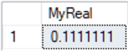
DECLARE @MyReal real = 0.1111111111111111111111111111111111111  -- 7 digit precision output
SELECT @MyReal AS MyReal
Date and Time SQL Server Data Types
Date Data Type
- Defines a date in the format yyyy-mm-dd
- Range of values: 0001-01-01 through 9999-12-31
- Storage size: 3 Bytes
-- declare variable and set to Jan 1 2020
DECLARE @MyDate date = '2020-01-01'
SELECT @MyDate

Time Data Type
- Defines a time
- Range of values: 00:00:00.0000000 through 23:59:59.9999999
- Storage size: 5 Bytes
-- declare time variable and set to current time
DECLARE @MyTime time = GETDATE()
SELECT @MyTime AS MyTime

Datetime Data Type
- Define a date and time
- Range of values: 0001-01-01 through 9999-12-31 – 00:00:00.0000000 through 23:59:59.9999999
- Storage size: 8 Bytes
-- declare datetime variable and set to current time
DECLARE @MyDateTime datetime = GETDATE()
SELECT @MyDateTime AS MyDatetime

Datetime2 Data Type
- Define a date and time with higher precision than datetime
- DECLARE @VarName(n) where n is a value from 1 to 7 defining precision with default of 7
- Range of values: 1753-01-01 through 9999-12-31 – 00:00:00.0000000 through 23:59:59.9999999
- Storage size:
- precision < 3 6 Bytes
- precision = 3 or 4 7 Bytes
- precision > 4 8 Bytes
-- declare datetime2 variable and set to current time
DECLARE @MyDatetime2 datetime2(7) = GETDATE()
SELECT @MyDatetime2 AS MyDatetime2

Smalldatetime Data Type
- Define a date and time without fractional seconds
- Range of values: 1900-01-01 through 2079-06-06 – 00:00:00 through 23:59:59
- Storage size: 4 Bytes
-- declare smalltime variable and set to current time
DECLARE @MySmalldatetime smalldatetime = GETDATE()
SELECT @MySmalldatetime AS MySmalldatetime

Datetimeoffset Data Type
- Defines a date and time with time zone awareness
- DECLARE @VarName datetimeoffset(n) where n is a value from 1 to 7 defining precision with default of 7
- Range of values: 0001-01-01 through 9999-12-31 – 00:00:00 through 23:59:59.9999999 – -14:00 through +14:00
- Storage size: 10 Bytes
-- compare times in 2 timezones
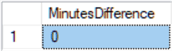
DECLARE @Edt datetimeoffset = CAST('2020-01-01 08:00:00.000 -00:00' AS datetimeoffset)
DECLARE @Pdt datetimeoffset = CAST('2020-01-01 05:00:00.000 -03:00' AS datetimeoffset)
SELECT DATEDIFF(minute, @Edt, @Pdt) as MinutesDifference
Character Strings SQL Server Data Types
Char Data Type
- Char is fixed size string used to store characters
- Char(n | max) – where n is the fixed length of the string in Byte pairs from 1 through 8,000 and max is 8,000
- Storage size: n
-- char
DECLARE @MyChar char(20) = 'abcdefgh' -- 20 bytes used
SELECT @MyChar AS MyChar

Varchar Data Type
- Varchar is a variable size string used to store characters
- Varchar(n | max) – where n is the fixed length of the string in Byte pairs from 1 through 8,000 and max is 8,000
- Storage size: up to n or max
-- char
DECLARE @MyChar char(20) = 'abcdefgh' -- 20 bytes used
SELECT @MyChar AS MyChar

Text Data Type
- Test is a variable length string up to 2,147,483,647 Bytes
- Invalid for local variable
- Storage size: to 2,147,483,647 Bytes
-- create a table with 1 field of type text
CREATE TABLE dbo.MyTable(MyText text NULL)
--insert value
INSERT dbo.MyTable VALUES('abcdefgh')
SELECT MyText
FROM dbo.MyTable

Unicode Character Strings SQL Server Data Types
Nchar Data Type
- Nchar is fixed size string
- Use to store string of fixed length characters
- Nchar(n | max) – where n is the fixed length of the string in Byte pairs from 1 through 4,000 and max is 4,000
- Storage size: n or max
-- nchar
DECLARE @MyNchar char(10) = 'abcdefgh' -- 20 bytes used
SELECT @MyNchar AS MyNchar

Nvarchar Data Type
- Nvarchar is a variable size string
- Can store text in multiple languages
- Nvarchar(n | max) – where n is the fixed length of the string in Byte pairs from 1 through 4,000 and max is 4,000
- Storage size: up to n or max
-- nvarchar
DECLARE @MyNvarchar char(10) = 'abcdefgh' -- 8 bytes used
SELECT @MyNvarchar AS MyNvarchar

Binary Strings SQL Server Data Types
Binary Data Type
- Binary is a fixed length data type
- Can be used to store any kind of binary data of fixed length like files, etc.
- Binary(n) – where n is from 1 to 8,000
- Storage size: n
-- binary
DECLARE @MyBinary binary(2) = 100
SELECT CAST(@MyBinary AS int) AS MyBinary

Varbinary Data Type
- Varbinary is a variable length data type that can be used to store any kind of binary data of varied length like files, etc.
- Varbinary(n | max) – where n is from 1 to 8,000 and max is 8,000
- Storage size: n
-- varbinary
DECLARE @MyVarbinary varbinary(2) = 100
SELECT CAST(@MyVarbinary AS int) AS MyVarbinary

Next Steps
Following are some links with further info on data types:

Joe Gavin is from Greater Boston and has worked in technology as a Field Service Engineer for an automotive dealer computer system vendor, a Technical Consultant and Operations Analyst with Sybase and SQL Server based database applications in financial services and now works as a SQL Server Database Administrator.
- MSSQLTips Awards:
- Achiever Award (75+ Tips) – 2024 | Author of the Year – 2021 | Author Contender – 2024 |
- Rookie Contender – 2018

