Problem
Large Language Models (LLM) can be useful to work with SQL Server, as they allow you to perform data analysis, obtain insights, summarize and synthesize large amounts of information, conduct statistical calculations, and assist with repetitive tasks. If internal policies prohibit connecting to external LLMs, how can it be locally integrated with SQL Server?
Solution
Two types of LLMs exist:
- External LLMs (Cloud-based): These models are hosted by third-party providers and are accessed via APIs.
- Internal LLMs (Self-hosted): These models run locally on your own infrastructure, providing better control and privacy.
For this article, I decided to use an internal LLM called OLLAMA to have full control over data with no API costs and the ability to work offline. The processing time will depend on the computer configuration where it’s installed. Search for Ollama models at this Library, and it refers to a framework for running and interacting with LLMs.
Installing Ollama
From the OLLAMA website, choose your version to download. Execute it and click Install to install in the default location (C drive).
However, follow this step if you want to install in another location. For example, I will install in F:\Ollama. I will open a terminal as admin and run:
.\OllamaSetup.exe /DIR=F:\Ollama Add a Windows Environment Variable in System variables. Create a new item called OLLAMA_MODELS with the value F:\Ollama\Models.

Open a terminal in your Destination folder and install the models that you want to use. For example, one or more like:
.\ollama pull <NAME_OF_THE_MODEL>If you want faster responses, use a smaller model. I will pull out the tinyllama model using the opened terminal:
cd "F:\Ollama"
.\ollama pull tinyllama
Now the tinyllama model is ready to be used, like below:
cd "F:\Ollama"
.\ollama run tinyllama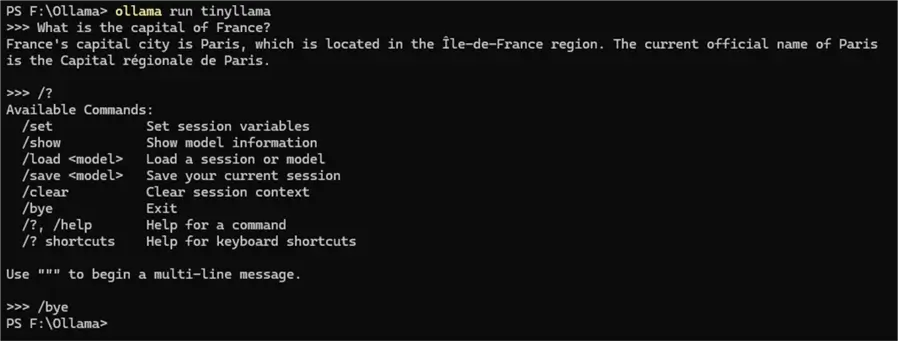
If you need to initiate the Ollama server, type the following in a terminal window:
taskkill /F /IM ollama.exe
Stop-Service -Name "ollama"
Start-Process "ollama" -ArgumentList "serve" -WindowStyle Hidden

ollama start
ollama list
Using Ollama with SQL Server
Gain Time: Avoid Loading the Model Each Runtime (Optional)
It takes time to load the model, and one way to not load at each request is to keep it alive. Use the following command in a SSMS query window:
DECLARE @cmd nvarchar(4000) =
    'powershell -Command "& {'
    + ' Invoke-RestMethod -Uri ''http://localhost:11434/api/generate'' -Method Post '
    + ' -Body ''{\"model\": \"tinyllama\", \"prompt\": \"\", \"options\": {\"keep_alive\": 3600}}'' '
    + ' -ContentType ''application/json'' '
    + ' }"';

-- Convert to varchar for xp_cmdshell
DECLARE @cmd_varchar varchar(8000);
SET @cmd_varchar = CAST(@cmd AS varchar(8000));

EXEC xp_cmdshell @cmd_varchar;
Use Stored Procedure to Access the External Ollama Running at the Local Machine
Let’s create a stored procedure to build questions for Ollama and use a PowerShell command to do it. Certify that the Ollama is running using this stored procedure.
-- =============================================
-- Author:        SCP - MSSQLTips
-- Create date:   20250321
-- Description:   Ollama answering questions
-- =============================================
CREATE OR ALTER PROCEDURE [dbo].[uspOllamaAnswer]
                (@Question nvarchar(500)
                ,@Model nvarchar(10)
                ,@Temp nvarchar(10)
                ,@Top nvarchar(10)
                ,@Seed nvarchar(10))
AS
BEGIN
    DECLARE @Answer varchar(MAX) = '';

    IF @Model IS NULL OR @Model = ''
        SET @Model = 'Mistral';

    -- From 0 more factual to 1 more creative
    IF @Temp IS NULL OR @Temp = ''
        SET @Temp = 0.7;

    -- Nucleus sampling 0.9 restrict to most likely words
    -- 1 (default) all possible words
    IF @Top IS NULL OR @Top = ''
        SET @Top = 0.9;

    -- Ensure repeatable responses
    IF @Seed IS NULL OR @Seed = ''
        SET @Seed = 42;

    DECLARE @cmd NVARCHAR(4000) =
    'powershell -Command "(Invoke-RestMethod -Uri ''http://localhost:11434/api/generate'' -Method Post -Body ''{\"model\": \"#model#\", \"prompt\": \"#Question#\", \"options\": {\"temperature\": #Temp#, \"top_p\": #Top#, \"seed\": #Seed#}}'' -ContentType ''application/json'')"';

    SET @cmd = REPLACE(@cmd,'#Question#',@Question);
    SET @cmd = REPLACE(@cmd,'#Model#',@Model);
    SET @cmd = REPLACE(@cmd,'#Temp#',@Temp);
    SET @cmd = REPLACE(@cmd,'#Top#',@Top);
    SET @cmd = REPLACE(@cmd,'#Seed#',@Seed);

    DECLARE @Response TABLE (OutputText NVARCHAR(MAX));

    INSERT INTO @Response EXEC xp_cmdshell @cmd;

    DELETE FROM @Response WHERE OutputText NOT LIKE '%"done":false%' OR OutputText IS NULL;

    SELECT         @Answer +=
                (SELECT         valor
                    FROM     OPENJSON(REPLACE(OutputText,CHAR(39),'´'))
                    WITH    (valor nvarchar(250) '$.response'))
        FROM     @Response;

    SELECT @Question Question, @Answer Answer;
END
GO
There are more parameters. I included only the three below.
Explanation:
- Temperature: Controls randomness, varying from 0 to 1, where zero means more deterministic, factual responses and 1 means more creative, diverse responses.
- top_p: Controls nucleus sampling, probability mass of token selection, where 1 selects from all possible words (default) and 0.9 restricts to most likely words.
- seed: Ensures repeatable responses, using the same number for consistent results.
Examples
Asking a Simple Question
DECLARE @Question nvarchar(500) = 'What is the capital of Germany'
EXECUTE [dbo].[uspOllamaAnswer] @Question,'tinyllama',0.1,0.9,2;
GO
The response using the model tinyllama in my case:
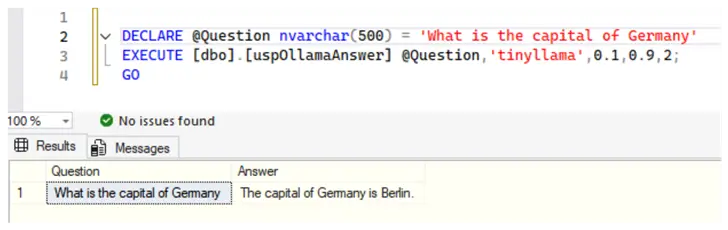
The response for the same question, changing only the model to mistral:
Response:
The capital of Germany is Berlin. It became the capital again in 1999, after being divided into East Berlin and West Berlin during the Cold War period. Prior to that, Bonn served as the capital from 1949 to 1990.
The response for the same question, changing only the model to phi4:
Response:
The capital of Germany is Berlin. It serves as the political, cultural, and economic center of the country. Berlin has a rich history and is known for its vibrant arts scene, historical landmarks such as the Brandenburg Gate and the Berlin Wall remnants, and numerous museums like the Pergamon Museum and the Berliner Dom.
Sentiment Analysis
You can use an expression like the one below:
DECLARE @Question nvarchar(MAX) = 'Analyze the sentiment as positive or neutral or negative: "{text}"';You only need to replace {text} with the text to be analyzed, which could be done by retrieving it from a table column. Also, you can save the result in another column.
Negative Sentiment
DECLARE @Question nvarchar(MAX) = 'Analyze the sentiment as positive or neutral or negative: "What a pity, it is raining and the picnic is gone!"';
EXECUTE [dbo].[uspOllamaAnswer] @Question,'mistral',0.1,0.9,2;
GO
Response:
Negative
Positive Sentiment
DECLARE @Question nvarchar(MAX) = 'Analyze the sentiment as positive or neutral or negative: "I will travel next week as soon as beginning my vacation!"';
EXECUTE [dbo].[uspOllamaAnswer] @Question,'mistral',0.1,0.9,2;
GO
Response:
The sentiment in this statement is Positive. The user express excitement about an upcoming trip, indicating a positive outlook.
Neutral Sentiment
DECLARE @Question nvarchar(MAX) = 'Analyze the sentiment as positive or neutral or negative: "I will have lunch now"';
EXECUTE [dbo].[uspOllamaAnswer] @Question,'mistral',0.1,0.9,2;
GO
Response:
Neutral. The statement is factual and does not express any particular emotion or opinion.
Asking for an Explanation
DECLARE @Question nvarchar(MAX) = 'Explain how this SQL query works in simple terms: "SELECT TOP (1000) [Item] FROM [MsSqlTips].[dbo].[SampleComments]"';
EXECUTE [dbo].[uspOllamaAnswer] @Question,'phi4',0.1,0.9,2;
GO
Response:
This SQL query is designed to retrieve data from a database. Let´s break it down step by step:
- **SELECT**: This part of the query specifies what you want to get from the database. In this case, `[Item]` indicates that you´re interested in retrieving data from the column named “Item.”
- **TOP (1000)**: The `TOP` keyword is used to limit the number of rows returned by the query. Here, it´s set to 1000, meaning the query will return only the first 1,000 rows based on the order they are stored in the database or how they are retrieved.
- **[Item]**: This specifies the column from which you want to retrieve data. It´s enclosed in square brackets because “Item” might be a reserved word or contain special characters, but here it seems more like a convention for clarity.
- **FROM**: This keyword indicates where to get the data from. In this query, it points to a specific table within the database.
- **[MsSqlTips].[dbo].[SampleComments]**: This part specifies the exact location of the table you´re querying:
- `[MsSqlTips]` is the name of the database.
- `[dbo]` stands for “database owner” and is a default schema in SQL Server, which organizes tables and other objects.
- `[SampleComments]` is the name of the table from which you want to retrieve data.
In summary, this query retrieves up to 1,000 rows of data from the “Item” column in the “SampleComments” table within the “MsSqlTips” database.
Next Steps
- Try different parameters and models to meet your needs.
- Play with the parameters. Also, add more ones in the stored procedure to obtain the optimal values for your needs.
- Obtain more information for the following websites:

Sebastião Pereira has over 40 years of experience in database development including T-SQL, algorithm design, machine learning and bringing innovative mathematical formulas to SQL Server. He started his career at a transnational fast-moving consumer goods (FMCG) company as an employee then later transitioning into a consultant role. He eventually founded his own company to develop software solutions for the healthcare industry. Sebastião is a respected award-winning author on MSSQLTips.com extending SQL Server capabilities beyond traditional workloads.
- MSSQLTips Awards
- Author of the Year – 2025
- Trendsetter (25+ tips) – 2025
- Rookie of the Year – 2024



I am having the following error in SQLServer 15.0.2000.5 when trying to create the stored procedure:
Msg 102, Level 15, State 1, Procedure uspOllamaAnswer, Line 50 [Batch Start Line 0]
Incorrect syntax near ‘$.response’.
Any ideas as to why?
Dear Dave, my first guess is to check the compatibility level, once OPENJSON function is available only under compatibility level 130 or higher. If it is the case, you can change the compatibility level of a database with the following command: ALTER DATABASE DatabaseName SET COMPATIBILITY_LEVEL = 130
See this article: https://learn.microsoft.com/en-us/sql/t-sql/functions/openjson-transact-sql?view=sql-server-ver17
I hope it helps!
Nice article, what about asking question about your database like show me top 5 customer who bought color blue product
any example much appreciated.