Problem
I need to count the number of times a certain string occurs in text. However, the format of this string can change. For example, there are multiple ways of writing the same telephone number, and they’re all valid formats. Is this possible in T-SQL? Let’s look at how the REGEXP_COUNT function can be helpful.
Solution
SQL Server 2025 is currently released in public preview (at the time of writing, SQL Server 2025 CTP 2.1 is available), and one noticeable enhancement to the T-SQL query language is the support of regular expressions (regex). The tip, The New REGEXP_LIKE Function in SQL Server 2025, introduces the REGEXP_LIKE function, which is similar to the native T-SQL LIKE, but more powerful. In this tip, the function REGEXP_COUNT is used to demonstrate how we can count occurrences of a certain pattern in text.
Note: This tip is written using SQL Server 2025 CTP 2.0. There’s no difference between CTP 2.0 and 2.1 when it comes to regex support. If you want to try out SQL Server 2025 as well, you can use the following tips to get started:
- How to Configure a SQL Server 2025 Demo Environment in Azure
- How to Install the AdventureWorks Sample Databases for SQL Server 2025
If you want to try out the regex support but don’t have SQL Server 2025, the same T-SQL functionality is also available in Azure SQL DB, Azure SQL Managed Instance, and Fabric SQL DB.
As with all preview features, functionality and/or behavior might change when the final product is released.
How to Count the Occurrences of a String
Counting the occurrences of a certain string in text is a common problem, and it is straightforward to solve when the string itself is fixed. For example, let’s suppose we want to know the number of times the word “database” occurs in the following text:
“SQL (Structured Query Language) is a standardized programming language used to manage and manipulate relational databases. It allows users to perform operations such as querying data, creating tables, updating records, and managing database structures. SQL itself is not a database or a server; it is the language used to interact with databases.
SQL Server, on the other hand, is a Relational Database Management System (RDBMS) developed by Microsoft. It is a software application that uses SQL as its primary query language to store, retrieve, and manage data in relational databases. SQL Server provides tools and features for database management, such as data storage, transaction processing, and security.”
(This above text was generated by Bing AI when searching for “what is sql server.”)
Find the Number of Occurrences
We can find the number of occurrences of a certain word by calculating the difference between the full length of the text and the same text but with the word removed and then dividing that difference by the length of the search word. An easy example: “MSSQLTips.com” and we want the number of times “M” appears (with case-insensitive behavior).
[ “MSSQLTips.com” (13) – “SSQLTips.co” (11)] / [“M” (1)] = 2In T-SQL, this becomes:
--MSSQLTips.com
DECLARE @mytext VARCHAR(4000) = '...text to be searched...';
DECLARE @searchword VARCHAR(100) = 'database';

SELECT NumberOfOccurrences =
        (LEN(@mytext) /* full length */
      -  LEN(REPLACE(@mytext,@searchword,'')) /* full length with search word removed */
        ) / LEN(@searchword); /* divide by the length of the search word*/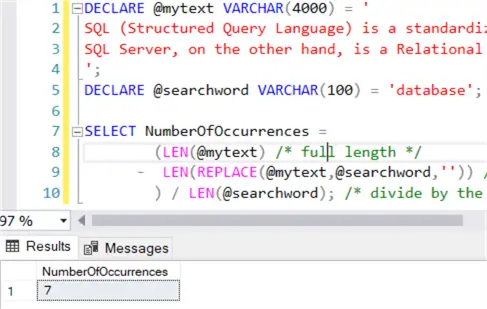
It appears the word “database” appears 7 times in the text.
Searching for Other Values
But what if the search phrase isn’t fixed? What if you’re looking for a pattern, such as zip codes, telephone numbers, email addresses, or social security numbers? There are thousands or millions of possible values for each of them, and often there are multiple ways of formatting the same text, and they’re all valid. To illustrate, in Belgium, these are some examples of valid mobile phone number formats:
- +32472123456
- 0472 12 34 56
- 0472/123 456
- (+32) 472 12 34 56
Regex can deal with these kinds of problems. Instead of specifying an exact string, you specify a format. The new T-SQL function REGEXP_COUNT can count the number of times a specified regex pattern is found in an expression. Its syntax is as follows:
--MSSQLTips.com
REGEXP_COUNT(string_expression, regular expression [, start [,flags]])
The optional start parameter gives you a starting point of the search, which is basically a way to skip x characters of the expression. The optional flag parameters are explained in the tip, The New REGEXP_LIKE Function in SQL Server 2025.
Find Number of US Zip Codes
Suppose we want to find the number of US zip codes that appear in restaurant reviews. There are different formats possible for a US zip code, such as the five digit zip code and ZIP+4. I asked ChatGPT to create 100 random restaurant reviews, and some of them had to include zip codes and the format can vary as well.
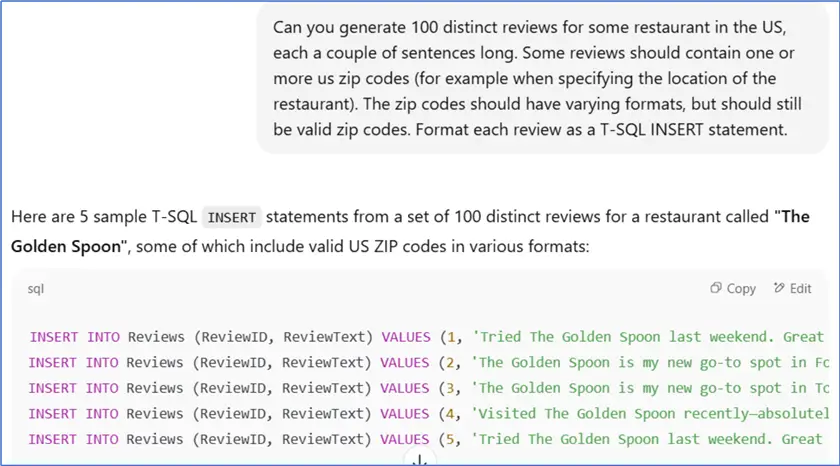
You can download the .sql file with the 100 INSERT statements here.
According to StackOverflow, this regex expression can be used to detect zip codes: ^\d{5}(?:[-\s]\d{4})?$ However, the characters ^ and $ designate the start and end of the string, and with them included, we get no matches at all. If we remove them, we do get correct matches. With the following T-SQL script, we can find how many times a zip code is mentioned in each review:
--MSSQLTips.com
SELECT ReviewID, NumberOfZipCodes = REGEXP_COUNT(ReviewText, '\d{5}([-]|\s*)?(\d{4})?')
FROM dbo.Reviews;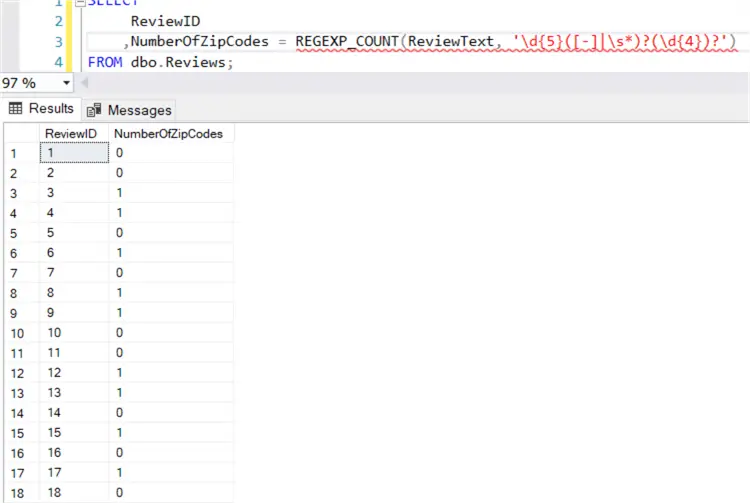
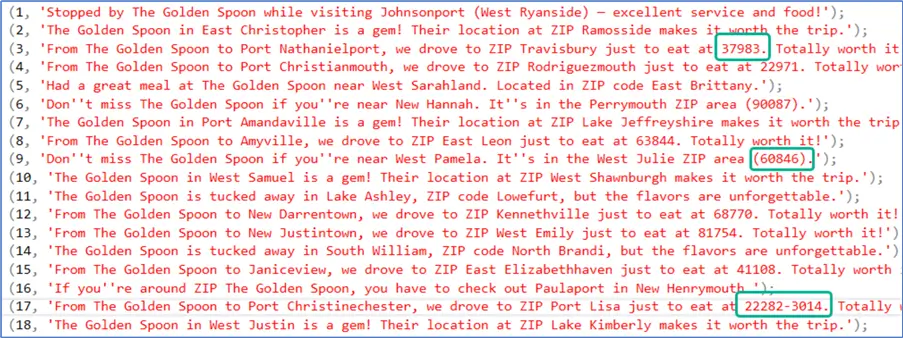
When looking at the actual reviews, we can see different formats were successfully detected:
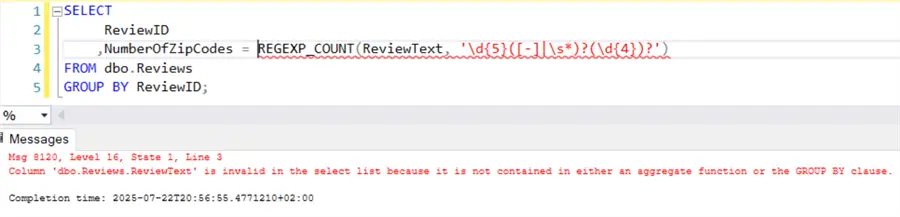
Keep in mind that even though REGEX_COUNT looks like an aggregate function (like the COUNT function), it isn’t one. The function cannot be used alongside a GROUP BY clause:
Next Steps
- You can find an overview of all new regex functions in SQL Server 2025 in the tip New SQL Regex Functions in SQL Server 2025 and SSMS.
- The tips Install SQL Server 2025 Demo Environment in Azure and How to Install the AdventureWorks Sample Databases for SQL Server 2025 explain how you can start experimenting with SQL Server 2025.
- You can find all SQL Server 2025 related tips in this overview.

Koen Verbeeck is a seasoned business intelligence consultant with over a decade of experience with the Microsoft Data Platform. He holds several certifications, including Azure Data Engineer. He’s a prolific writer, with over 375 articles on technologies such as Microsoft Fabric, SSIS, ADF, SSAS, SSRS, MDS, Power BI, Snowflake and Azure services. He has spoken at various events such as PASS, SQLBits, dataMinds Connect and many others. He frequently delivers educational webinars on MSSQLTips.com. For his efforts, Koen has been awarded the Microsoft MVP data platform award for many years.
- MSSQLTips Awards:
- Leadership Award (200+ Tips) – 2021
- Author of the Year – 2014/2020/2022
- Author Contender – 2024/2025