Problem
I have blocks of text stored inside a SQL Server table. From this text, I need to extract strings that match a specific pattern. I tried using CHARINDEX and PATINDEX, but the pattern is too complicated. Learn how this can be done with the REGEXP_INSTR function.
Solution
SQL Server 2025 introduces support for regular expressions (regex) in T-SQL.
We’ve already discussed some functionality in the following tips:
- New SQL Regex Functions in SQL Server 2025 and SSMS
- The New REGEXP_LIKE Function in SQL Server 2025
- Counting Occurrences in Text Using the New Function REGEXP COUNT in SQL Server 2025
In this tip, we’ll dive into the new REGEXP_INSTR function and show you how you can use it to locate strings in a text based on a regex expression. If you want to try the regex functionality yourself, install the latest SQL Server 2025 preview, or use an Azure SQL DB or Fabric SQL DB. As with all preview features, functionality and/or behavior might change when the final product is released.
REGEXP_INSTR Function Syntax
The new REGEXP_INSTR function allows us to search text for a substring that matches a certain regex expression. The syntax is as follows:
--MSSQLTips.com
REGEXP_INSTR(string_expression, regular expression [, start [, occurrence [, return option [, flags [, group ]]]]])
This function has two mandatory parameters:
- String expression – The text in which you want to search.
- Regular expression – The pattern you want to match.
It also has many optional parameters:
- Start – This is the starting point of the search. This allows you to skip a number of characters in the text. It starts counting from 1, which means the first character is 1. If start is bigger than the length of the string, 0 is returned. The default is 1.
- Occurrence – If there are multiple matches in the string for the regex, it specifies which occurrence you want the function to return. The default is 1.
- Return option – If 0 is specified, the position of the first character of the match is returned. If 1 is specified, the end of the match is returned. The default is 0. If another value other than 0 or 1 is passed, the function returns an error.
- Flags – These are the same options as explained in the tip, The New REGEXP_LIKE Function in SQL Server 2025 (in the section “The Optional Flag Parameter”).
- Group – This parameter is used to specify which capture group (subexpression) to use. Groups in regex are out of scope for this tip. The default is 0, which means the entire regex is used.
The REGEXP_INSTR function is similar to CHARINDEX and PATINDEX. While CHARINDEX searches for an exact match of the search string, PATINDEX also allows you to specify a pattern (as you would also do when using LIKE). However, the pattern functionality of PATINDEX is not as powerful and flexible as regular expressions.
Extract Text using REGEXP_INSTR
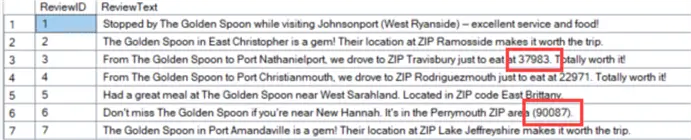
To demonstrate how REGEXP_INSTR works, we’re going to use the sample data containing restaurant reviews that was created in the tip Counting Occurrences in Text Using the New Function REGEXP COUNT in SQL Server 2025. These reviews can contain one or more zip codes, and the format of a zip code can vary, making it a good candidate for a regex expression.
Prepare Data for Testing
To make the text a bit longer, we’re going to concatenate different reviews together, increasing the chance of having multiple zip codes (in different formats) in one single string. Using the modulo operator, we’re going to divide the reviews into 10 groups:
--MSSQLTips.com
SELECT
     grp = ReviewID % 10
    ,ReviewText
FROM dbo.Reviews;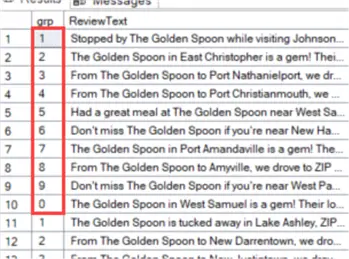
Reviews from the same group are then concatenated using STRING_AGG:
--MSSQLTips.com
WITH cte_src AS
(
    SELECT
         grp = ReviewID % 10
        ,ReviewText
    FROM dbo.Reviews
)
, cte_longreviews AS
(
    SELECT
         grp
        ,ReviewText_Long = STRING_AGG(ReviewText,' ')
    FROM cte_src
    GROUP BY grp
)
SELECT * FROM cte_longreviews;
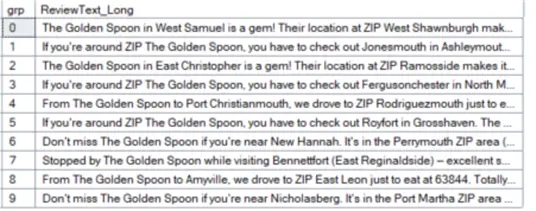
This gives us 10 long strings containing different reviews:
Count Number of Occurrences with REGEXP_COUNT
Using REGEXP_COUNT, we can count the number of times a zip code is mentioned (see the tip Counting Occurrences in Text Using the New Function REGEXP COUNT in SQL Server 2025 for more info).
--MSSQLTips.com
DECLARE @zipcode_regex VARCHAR(50) = '\d{5}([-]|\s*)?(\d{4})?';
SELECT
     grp
    ,ReviewText_Long
    ,cnt = REGEXP_COUNT(ReviewText_Long, @zipcode_regex)
FROM cte_longreviews; -- use the cte from the previous SQL sample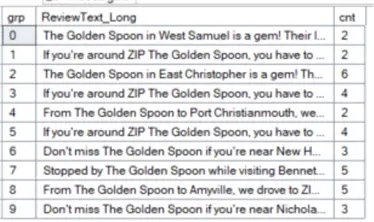
We now know how many times we need to use REGEXP_INSTR to extract a zip code from the text. For example, for group 3, we need to extract four zip codes. Since SQL is a set-based language, we will not use a WHILE loop or a cursor to do this. Rather, we’ll use a tally table (as explained in the tip TSQL Tips and Tricks) to mimic the iteration of a loop. This tally table is created using the GENERATE_SERIES function.
--MSSQLTips.com
SELECT iterator = [value] FROM GENERATE_SERIES(1,100);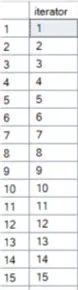
Use REGEXP_INSTR to Extract Data
We can then use this tally table, in combination with REGEXP_INSTR, to find the start and end position for each zip code match:
--MSSQLTips.com
SELECT
     c.grp
    ,c.ReviewText_Long
    ,zip_start  = REGEXP_INSTR(c.ReviewText_Long,@zipcode_regex,1,iterator,0)
    ,zip_end    = REGEXP_INSTR(c.ReviewText_Long,@zipcode_regex,1,iterator,1)
FROM cte_cnt    c
JOIN cte_tally  t ON t.iterator <= c.cnt;
/* use the common table expressions from the previous samples to execute this statement
   and don’t forget the variable declaration */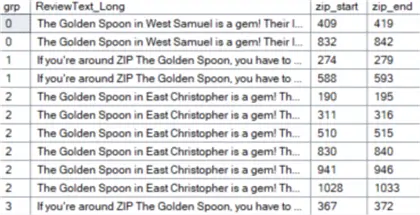
Use REGEXP_INSTR with SUBSTRING to Extract Data
Now that we know the start and end positions for every zip code, we can extract them using SUBSTRING. The full script now becomes:
--MSSQLTips.com
DECLARE @zipcode_regex VARCHAR(50) = '\d{5}([-]|\s*)?(\d{4})?';
WITH cte_src AS
(
    SELECT
         grp = ReviewID % 10
        ,ReviewText
    FROM dbo.Reviews
)
, cte_longreviews AS
(
    SELECT
         grp
        ,ReviewText_Long = STRING_AGG(ReviewText,' ')
    FROM cte_src
   GROUP BY grp
)
, cte_cnt AS
(
    SELECT
         grp
        ,ReviewText_Long
        ,cnt = REGEXP_COUNT(ReviewText_Long, @zipcode_regex)
    FROM cte_longreviews
)
, cte_tally AS
(
    SELECT iterator = [value] FROM GENERATE_SERIES(1,100)
)
, cte_positions AS
(
    SELECT
         c.grp
        ,c.ReviewText_Long
        ,zip_start  = REGEXP_INSTR(c.ReviewText_Long,@zipcode_regex,1,iterator,0)
        ,zip_end    = REGEXP_INSTR(c.ReviewText_Long,@zipcode_regex,1,iterator,1)
    FROM cte_cnt    c
    JOIN cte_tally  t ON t.iterator <= c.cnt
)
SELECT
         grp
        ,ReviewText_Long
        ,zip_start
        ,zip_end
        ,extracted_zip = SUBSTRING(ReviewText_Long,zip_start,zip_end - zip_start)
FROM cte_positions;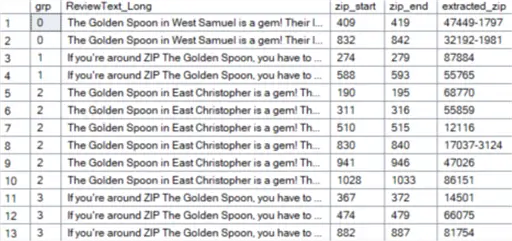
As you can see, all the zip codes were extracted, even if they were in different formats or surrounded by brackets.
Next Steps
- Learn more about STRING_AGG in the tip SQL Server STRING_AGG and STRING_SPLIT functions. Also, SQL SUBSTRING Function Use and Examples explains how to use the SUBSTRING function.
- The tips Install SQL Server 2025 Demo Environment in Azure and Install AdventureWorks Database for SQL Server 2025 explain how you can start experimenting with SQL Server 2025.
- You can find all SQL Server 2025-related tips in this overview.

Koen Verbeeck is a seasoned business intelligence consultant with over a decade of experience with the Microsoft Data Platform. He holds several certifications, including Azure Data Engineer. He’s a prolific writer, with over 375 articles on technologies such as Microsoft Fabric, SSIS, ADF, SSAS, SSRS, MDS, Power BI, Snowflake and Azure services. He has spoken at various events such as PASS, SQLBits, dataMinds Connect and many others. He frequently delivers educational webinars on MSSQLTips.com. For his efforts, Koen has been awarded the Microsoft MVP data platform award for many years.
- MSSQLTips Awards:
- Leadership Award (200+ Tips) – 2021
- Author of the Year – 2014/2020/2022
- Author Contender – 2024/2025