Problem
Fuzzy string matching is defined as a method for finding approximate matches between strings, checking their similarity, and calculating their difference. This can be used to identify character corruption due to spelling errors, transposed characters, missing characters, or abbreviations. This method uses algorithms to detect similar sounding strings. Microsoft is introducing fuzzy string matching in SQL Server 2025. Is it possible to have similar features in previous versions of SQL Server?
Solution
Let’s see how to build Fuzzy String Matching functions using T-SQL.
Fuzzy String-Matching Functions
- EDIT_DISTANCE: This function tells how many changes need to be completed to turn one word into another one, by adding, deleting, or swapping letters. Lower is better, and lower than 2 indicates a probable small typo or abbreviation.
- EDIT_DISTANCE_SIMILARITY: This function provides a score from 0 to 100, showing how alike two words are, where 0 is for totally different and 100 is the same. High is better, greater than 90 indicates probably a typo, and 70 to 89 indicates similarity but with noticeable differences.
- JARO_WINKLER_DISTANCE: This function is similar to EDIT_DISTANCE, but also supplies whether the two words start the same. Lower is better.
- JARO_WINKLER_SIMILARITY: This function is like the previous one, but it gives a score between 0 and 1, where 1 means a perfect match. High is better, greater than 0.9 indicates a very strong match, between 0.80 and 0.89 indicates possibly a variation or typo, and between 0.70 and 0.79 indicates that it might be related but not guaranteed.
Damerau–Levenshtein Distance
In information theory and computer science, the Damerau–Levenshtein distance is a string metric for measuring the edit distance between two sequences. Informally, the Damerau–Levenshtein distance between two words is the minimum number of operations required to change one word into the other. These operations consist of insertions, deletions, or substitutions of a single character, or transposition of two adjacent characters.
Jaro–Winkler Similarity
In computer science and statistics, the Jaro–Winkler similarity is a string metric measuring an edit distance between two sequences. It is a variant of the Jaro Distance metric. It is very useful for comparing short strings such as names.
SQL Solution for Fuzzy String Matching
I am going to use a user defined table type:
-- MSSQLTips (TSQL)
CREATE TYPE [dbo].[uttMtxIndexed] AS TABLE(
    [lin] [smallint] NULL,
    [col] [smallint] NULL,
    [val] [float] NULL
)
GO
Let´s create two user defined functions, one for the Damerau-Levenshtein algorithm and another for the Jaro-Winkler distance algorithm.
Damerau-Levenshtein Algorithm with T-SQL
Below is for the Damerau-Levenshtein algorithm:
-- =============================================
-- Author:        SCP - MSSQLTips
-- Create date:   20250307
-- Description:   Damerau-Levenshtein algorithm
-- =============================================
CREATE OR ALTER FUNCTION [dbo].[ufnFuzzyDamerauLevenshtein]
                (@Word1 nvarchar(120)
                ,@Word2 nvarchar(120))
RETURNS int
AS
BEGIN
    DECLARE  @L1 int = LEN(@Word1)
            ,@L2 int = LEN(@Word2)
            ,@d AS dbo.uttMtxIndexed
            ,@i int
            ,@j int
            ,@cost int
            ,@del int
            ,@ins int
            ,@subs int
            ,@min int;

    SET @i = 0;
    WHILE @i <= @L1 BEGIN
        SET @j = 0;
        WHILE @j <= @L2 BEGIN
            INSERT INTO @d
                VALUES (@i,@j,0);

            SET @j += 1;
        END

        SET @i += 1;
    END

    UPDATE         @d
        SET         val = lin
        WHERE     col = 0;

    UPDATE         @d
        SET         val = col
        WHERE     lin = 0;

    SET @i = 1;
    WHILE @i <= @L1 BEGIN
        SET @j = 1;
        WHILE @j <= @L2 BEGIN
            IF SUBSTRING(@Word1,@i,1) = SUBSTRING(@Word2,@j,1)
                SET @cost = 0;
            ELSE
                SET @cost = 1;

            SET @del = (SELECT         val
                            FROM     @d
                            WHERE     lin = @i - 1 AND
                                     col = @j) + 1;

            SET @ins = (SELECT         val
                            FROM     @d
                            WHERE     lin = @i AND
                                     col = @j - 1) + 1;

            SET @subs = (SELECT         val
                            FROM     @d
                            WHERE     lin = @i - 1 AND
                                     col = @j - 1) + @cost;

            IF @del < @ins
                SET @min = @del
            ELSE
                SET @min = @ins;

            IF @min > @subs
                SET @min = @subs;

            UPDATE         @d
                SET         val = @min
                WHERE     lin = @i AND
                         col = @j;

            IF  @i > 1 AND
                @j > 1 AND
                SUBSTRING(@Word1,@i,1) = SUBSTRING(@Word2,@j - 1,1) AND
                SUBSTRING(@Word1,@i - 1,1) = SUBSTRING(@Word2,@j,1) BEGIN

                DECLARE @Val int =
                    (SELECT         val
                        FROM     @d
                        WHERE     lin = @i - 2 AND
                                 col = @j - 2) + 1;

                IF @min > @Val
                    SET @min = @Val;

                UPDATE         @d
                    SET         val = @min
                    WHERE     lin = @i AND
                             col = @j;
            END

            SET @j += 1;
        END

        SET @i += 1;
    END

    DECLARE @Distance int =
        (SELECT         val
            FROM     @d
            WHERE     lin = @L1 AND
                     col = @L2);

    RETURN @Distance;
END
GO
Jaro-Winkler Distance Algorithm with T-SQL
Below is for the Jaro-Winkler distance algorithm:
-- =============================================
-- Author:        SCP - MSSQLTips
-- Create date:   20250307
-- Description:   Jaro-Winkler distance algorithm
-- =============================================
CREATE OR ALTER FUNCTION [dbo].[ufnFuzzyJaroWinkler]
                (@Word1 nvarchar(120)
                ,@Word2 nvarchar(120))
RETURNS decimal(12,6)
AS
BEGIN
    IF @Word1 IS NULL OR @Word2 IS NULL
        RETURN -1;

    DECLARE  @L1 int = LEN(@Word1)
            ,@L2 int = LEN(@Word2)
            ,@matches int = 0
            ,@Transp int = 0
            ,@PrefixLen int = 0
            ,@PrefixMax int = 4
            ,@i int
            ,@j int
            ,@W1Matched nvarchar(100)
            ,@W2Matched nvarchar(100)
            ,@Jaro decimal(12,6)
            ,@JaroWinkler decimal(12,6)
            ,@Scaling decimal(12,6) = 0.1;

    IF @L1 = 0 AND @L2 = 0
        RETURN 1;

    IF @L1 = 0 OR @L2 = 0
        RETURN 0;

    DECLARE @matchWindow int = (GREATEST(@L1,@L2) / 2) - 1;

    -- similar function for GREATEST:
    -- DECLARE @matchWindow int = 0.5 * (@L1 + @L2 + ABS(@L1 - @L2));

    -- similar function for LEAST:
    -- DECLARE @matchWindow int = 0.5 * (@L1 + @L2 - ABS(@L1 - @L2));

    SET @W1Matched = REPLICATE(' ',@L1);
    SET @W2Matched = REPLICATE(' ',@L2);

    SET @i = 1;
    WHILE @i <= @L1 BEGIN
        SET @j = GREATEST(1,@i - @matchWindow);
        WHILE @j <= LEAST(@L2,@i + @matchWindow) BEGIN
            IF SUBSTRING(@Word2,@j,1) = SUBSTRING(@Word1,@i,1) AND
               SUBSTRING(@W2Matched,@j,1) = ' ' BEGIN
                SET @W1Matched = STUFF(@W1Matched,@i,1,SUBSTRING(@Word1,@i,1));
                SET @W2Matched = STUFF(@W2Matched,@j,1,SUBSTRING(@Word2,@j,1));
                SET @matches += 1;
                BREAK
            END

            SET @j += 1;
        END

        SET @i += 1;
    END

    IF @matches = 0
        RETURN 0;

    SET @j = 1;
    SET @Transp = 0;
    SET @i = 1;
    WHILE @i <= @L1 BEGIN
        IF SUBSTRING(@W1Matched,@i,1) <> ' ' BEGIN
            WHILE SUBSTRING(@W2Matched,@j,1) = ' '
                SET @j += 1;

            IF SUBSTRING(@W1Matched,@i,1) <> SUBSTRING(@W2Matched,@j,1)
                SET @Transp += 1;

            SET @j += 1;
        END

        SET @i += 1;
    END

    SET @Transp /= 2;

    SET @Jaro =  (1.0 / 3.0) *
                ((@matches * 1.0 / @L1) +
                 (@matches * 1.0 / @L2) +
                ((@matches - @Transp) * 1.0 / @matches));

    SET @PrefixLen = 0;
    WHILE @PrefixLen < @PrefixMax AND
          @PrefixLen < @L1 AND
          @PrefixLen < @L2 AND
          SUBSTRING(@Word1,@PrefixLen + 1,1) = SUBSTRING(@Word2,@PrefixLen + 1,1) BEGIN
        SET @PrefixLen += 1;
    END

    SET @JaroWinkler = @Jaro + (@PrefixLen * @Scaling * (1 - @Jaro));

    RETURN @JaroWinkler
END
GO
Table Value Function to Compare Words
Here is a table value function to compare two words:
-- =============================================
-- Author:        SCP - MSSQLTips
-- Create date:   20250624
-- Description:   Fuzzy match words
-- =============================================
CREATE OR ALTER   FUNCTION     [dbo].[tvfFuzzyWords]
                (@Word1 nvarchar(250)
                ,@Word2 nvarchar(250))
RETURNS             @Solut
    TABLE        (Word1 nvarchar(250)
                ,Word2 nvarchar(250)
                ,EditDistance int
                ,EditDistanceSimilarity decimal(12,4)
                ,JaroWinklerSimilarity decimal(12,4)
                ,JaroWinklerDistance AS (1 - JaroWinklerSimilarity)
                ,Word1Len AS (LEN(Word1))
                ,Word2Len AS (LEN(Word2)))
WITH EXECUTE AS CALLER
AS
BEGIN

    INSERT INTO     @Solut
                (Word1
                ,Word2
                ,EditDistance
                ,JaroWinklerSimilarity
                ,EditDistanceSimilarity)
        VALUES    (@Word1
                ,@Word2
                ,[dbo].[ufnFuzzyDamerauLevenshtein] (@Word1,@Word2)
                ,[dbo].[ufnFuzzyJaroWinkler] (@Word1,@Word2)
                ,(1.0 - [dbo].[ufnFuzzyDamerauLevenshtein] (@Word1,@Word2) * 1.0 / GREATEST(LEN(@Word1),LEN(@Word2))) * 100);

    RETURN;
END
GO
Examples Using Fuzzy String Matching
Below we build a table and add some data for testing.
DECLARE      @WordPairs
    TABLE   (WordID int IDENTITY(1,1) PRIMARY KEY
            ,WordUK nvarchar(50)
            ,WordUS nvarchar(50)
            ,WordLenUK AS LEN(WordUK)
            ,WordLenUS AS LEN(WordUS)
            ,EditDistance int
            ,EditDistanceSimilarity decimal(12,4)
            ,JaroWinklerSimilarity decimal(12,4)
            ,JaroWinklerDistance AS (1 - JaroWinklerSimilarity));

INSERT INTO  @WordPairs
            (WordUK, WordUS)
    VALUES  ('Colour', 'Color'),
            ('Flavour', 'Flavor'),
            ('Centre', 'Center'),
            ('Theatre', 'Theater'),
            ('Organise', 'Organize'),
            ('Analyse', 'Analyze'),
            ('Catalogue', 'Catalog'),
            ('Programme', 'Program'),
            ('Metre', 'Meter'),
            ('Honour', 'Honor'),
            ('Neighbour', 'Neighbor'),
            ('Travelling', 'Traveling'),
            ('Grey', 'Gray'),
            ('Defence', 'Defense'),
            ('Practise', 'Practice'), -- Verb form in UK
            ('Practice', 'Practice'), -- Noun form in both
            ('Aluminium', 'Aluminum'),
            ('Cheque', 'Check'); -- Bank cheque vs. check

UPDATE       @WordPairs
    SET      [EditDistance] = [dbo].[ufnFuzzyDamerauLevenshtein] (WordUK,WordUS);

UPDATE       @WordPairs
    SET      [EditDistanceSimilarity] = (1.0 - [EditDistance] * 1.0 / GREATEST([WordLenUK],[WordLenUS])) * 100
            ,[JaroWinklerSimilarity] = [dbo].[ufnFuzzyJaroWinkler] ([WordUK],[WordUS]);

SELECT       *
    FROM     @WordPairs
    ORDER BY 2,3;
When executed, the results are:
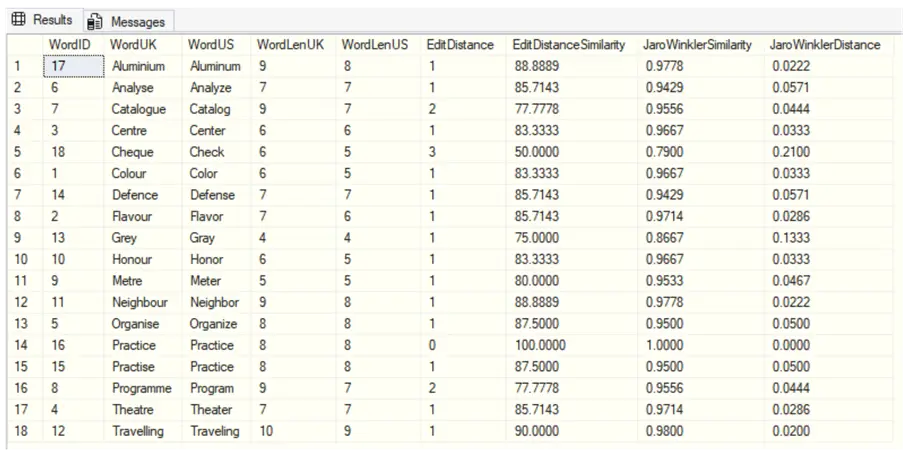
Fuzzy String Matching to Find Missing Characters
-- MsSqlTips (TSQL)
SELECT * FROM [dbo].[tvfFuzzyWords] ('Sun','Saturn');
GO
Results:

This shows that to convert SUN into SATURN, we need to add 3 letters (A, T, and R) and 50% is similar.
-- MsSqlTips (TSQL)
SELECT * FROM [dbo].[tvfFuzzyWords] ('envronment','environment');
GO
Results:

Just one insertion is needed, the letter “i”, 10 out of 11 characters match (90.9), and 0.9788 means that most letters are in the right place.
Fuzzy String Matching to Find Abbreviations
-- MsSqlTips (TSQL)
SELECT * FROM [dbo].[tvfFuzzyWords] ('dept','department');
GO
Results:

Six characters need to be added, which is a big change, and 40% is similar. The Jaro-Winkler similarity of 0.86 is high and shows the strings match at the beginning, so in some way, they are related.
Fuzzy String Matching to Find Transposed Characters
-- MsSqlTips (TSQL)
SELECT * FROM [dbo].[tvfFuzzyWords] ('adn','and');
GO
Results:

Only one change is needed: swap “d” and “n”. Two out of 3 characters are fine (66.6) and show it as a small mistake, and Jaro-Winkler shows that maybe not that similar.
Fuzzy String Matching to Find Spelling Errors
-- MsSqlTips (TSQL)
SELECT * FROM [dbo].[tvfFuzzyWords] ('recieve','receive');
GO
Results:

Only one change is needed: swap “I” and “e”. Six out of 7 letters are fine (85.7). Jaro-Winkler is high when the words start out the same and are mostly identical.
Key Takeaways
- Fuzzy string matching helps identify approximate matches and correct errors like typos and transpositions.
- SQL Server 2025 introduces fuzzy string matching, but similar functions can be implemented in previous versions using T-SQL.
- Key functions include EDIT_DISTANCE, EDIT_DISTANCE_SIMILARITY, JARO_WINKLER_DISTANCE, and JARO_WINKLER_SIMILARITY.
- The article provides examples to demonstrate fuzzy string matching applications for identifying missing characters and spelling errors.
- Next steps include exploring additional resources about fuzzy string matching, Damerau–Levenshtein distance, and Jaro–Winkler distance.
Next Steps
There are a lot of examples of applications of these features on the Internet including:
- MICROSOFT – What is fuzzy string matching?
- WIKIPEDIA – Damerau–Levenshtein distance
- WIKIPEDIA – Jaro–Winkler distance
- SQL LIKE Statement for String Pattern Matching

Sebastião Pereira has over 40 years of experience in database development including T-SQL, algorithm design, machine learning and bringing innovative mathematical formulas to SQL Server. He started his career at a transnational fast-moving consumer goods (FMCG) company as an employee then later transitioning into a consultant role. He eventually founded his own company to develop software solutions for the healthcare industry. Sebastião is a respected award-winning author on MSSQLTips.com extending SQL Server capabilities beyond traditional workloads.
- MSSQLTips Awards
- Author of the Year – 2025
- Trendsetter (25+ tips) – 2025
- Rookie of the Year – 2024



Thanks for putting in the effort to share these tips. However, SQL Server isn’t really the right tool for handling IF…Else logic.
Hello JC, the standard pattern matching is fastest for substring matches but used for a simple pattern matching and the fuzzy matching is to handle inconsistencies, which has without doubt a lower performance, but in this case it is a good practice to use optimization strategies for large amount of data, as an example we can use a hybrid approach using a combination of both methods. The response time will be greater but it depends of the case of the application.
I agree, wildcard assumes the characters are in the same sequence as the search string, whereas fuzzy can help find matches by measuring similarity even if some characters are missing or swapped.
All of these are CPU intensive. Most cannot take advantage of b-tree indexes, resulting in full table scans, except for the trailing wildcard(search%) which can.
How fast or slow it is compared to a standard like %search% operator? 100x?
Spicking about duaration, i’ve tread to biled Jareo-Wincklera algorythm implemented in CLR Fuction and i recived result of scaning 100 thusents row in time of 40ms, row whos a varchar(80) type column in index