Problem
Where I work, we have hundreds of mission-critical databases. We use Ola Hallengren’s SQL Server backup solution, but, out of necessity, have wrapped it with several enhancements to help us accomplish goals around retention, SQL Server backup frequency, and recovery point objectives. I touched on some of this last year when I talked about automating some of our restore testing, in It’s a recovery strategy, not a backup strategy. Today, we do a lot more than that, and we have to be more flexible about it.
Solution
Let me back up for a second. We use availability groups (AG) across pairs of servers, with every AG sharing a common third replica I’ll call our “global secondary.”
Here’s a simplified visual overview of the architecture:
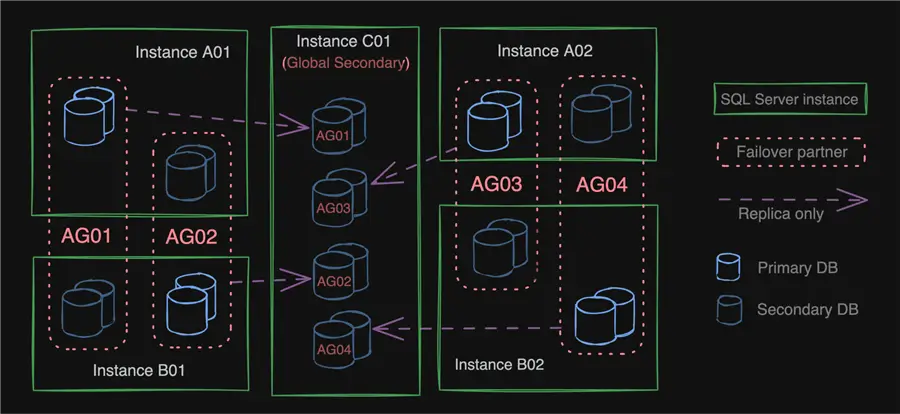
We have Ola Hallengren’s procedures installed in msdb on all nodes, but we run all backups remotely from the global secondary (using linked servers to each AG listener). By default, we run full and differential backups on the primary and log backups on the global secondary.
Global Secondary Configuration Table
The global secondary has a configuration table that helps determine when to run a full versus differential SQL Server backup, which we distribute across the days of the week. We don’t want to run full backups every night, and we don’t want to run all full backups on the same night, so we use a round robin scheme. Some AGs run full backups on Mondays, some on Tuesdays, and so on. The AGs table dictates which day of the week a given AG should perform full backups:
CREATE TABLE ag.AGs
(
  AGName          sysname,
  FullBackupDay   tinyint NOT NULL,
  /* … other columns …, */
  CONSTRAINT      PK_AGs
                  PRIMARY KEY (AGName),
  CONSTRAINT      CK_FullBackupDay
                  CHECK (FullBackupDay BETWEEN 1 AND 7)
);
Central SQL Server Backup Procedure Calls
We have a single, central procedure we use to wrap calls to Ola Hallengren’s dbo.BackupDatabase procedure so that we’re not replicating that logic all over the place. We also use this procedure to direct backups to one of two drives, which we rotate between, and to build the list of databases to pass to the procedure based on another table we use to maintain information about our databases and which AG they belong to:
CREATE TABLE ag.Databases
(
  DatabaseName    sysname,
  AGName          sysname,
  /* … other columns …, */
  CONSTRAINT      PK_ag_Databases
                  PRIMARY KEY (DatabaseName),
  CONSTRAINT      FK_DB_AGName
                  FOREIGN KEY (AGName)
                  REFERENCES ag.AGs(AGName)
);
(Yes, we could use the AG catalog views for this, but they’re kind of slow, and we don’t want to have to constantly reach out to, say, a dozen replicas to obtain information that is static. Also, we store a lot more metadata about each database than what’s in the AG catalog views and sys.databases; I’m only showing what’s relevant here.)
The procedure that is used to call Ola Hallengren’s dbo.BackupDatabase for a given AG looks like this:
CREATE OR ALTER PROCEDURE dbre.CentralBackup
  @AGName       sysname,
  @log          bit = 1,
  @debug        bit = 0
AS
BEGIN
  SET NOCOUNT ON;
  DECLARE @DatabaseList nvarchar(max)  = N'',
          @BackupType   varchar(10)    = 'LOG',
          @TargetOla    nvarchar(1000) = QUOTENAME(@AGName)
                                       + N'.msdb.dbo.DatabaseBackup';
  SELECT @DatabaseList = STRING_AGG(DatabaseName, N',')
    FROM ag.Databases
   WHERE AGName = @AGName;
  IF @log = 0
  BEGIN
    SELECT @BackupType = CASE FullBackupDay
                         WHEN (DATEPART(WEEKDAY, d) + @@DATEFIRST) % 7 THEN 'FULL'
                         ELSE 'DIFF' END
      FROM ag.AGs
     WHERE AGName = @AGName;
  END
  DECLARE @Execute char(1)   = CASE @debug WHEN 1 THEN 'N' ELSE 'Y' END,
          @ts      char(16)  = CONVERT(char(8), getdate(), 112) + '.'
                             + REPLACE(CONVERT(varchar(12), getdate(), 114),':',''),
          @path varchar(500) = CASE DATEDIFF(WEEK, 0, getdate()) % 2
                               WHEN 0 THEN '\\fileshare1\backups\'
                                      ELSE '\\fileshare2\backups\' END;
  DECLARE @FileName nvarchar(4000) = N'{DatabaseName}.{BackupType}.'
                                   + @ts + N'.{FileExtension}',
          @dir      nvarchar(4000) = N'{AvailabilityGroupName}\';
  IF @debug = 1
  BEGIN
    RAISERROR(N'Would have run %s on %s:', 0, 1, @BackupType, @AGName);
  END
  EXEC @TargetOla
       @Databases  = @DatabaseList,
       @Directory  = @path,
       @AvailabilityGroupDirectoryStructure = @dir,
       @AvailabilityGroupFileName           = @FileName,
       @BackupType = @BackupType,
       @OverrideBackupPreference = 'Y',
       @Compress   = 'Y',
       /* … other params we set in our env … */
       @Execute = @Execute;
END
Example Server Configuration
Let’s say we have the four AGs outlined above, with each running full backups on a different weekday, and each AG containing two databases:
| AGName | FullBackupDay | DatabaseName |
|---|---|---|
| AG01 | 2 (Monday) | DB0101 |
| DB0102 | ||
| AG02 | 3 (Tuesday) | DB0201 |
| DB0202 | ||
| AG03 | 4 (Wednesday) | DB0301 |
| DB0302 | ||
| AG04 | 5 (Thursday) | DB0401 |
| DB0402 |
If we ran the procedure above for AG01 on Monday, with the debug flag, we’d get this output:
…
Server: A01
Parameters: @Databases = 'DB0101,DB0102', @Directory = '\\fileshare1\backups\', @BackupType = 'FULL', …
…
BACKUP DATABASE [DB0101] TO DISK = N'\\fileshare1\backups\AG01\DB0101.FULL.2025…' …
BACKUP DATABASE [DB0102] TO DISK = N'\\fileshare1\backups\AG01\DB0102.FULL.2025…' …
And if we ran it for AG02 on Monday, we’d get this (quite similar) output:
…
Server: A02
Parameters: @Databases = 'DB0201,DB0202', @Directory = '\\fileshare1\backups\', @BackupType = 'DIFF', …
…
BACKUP DATABASE [DB0201] TO DISK = N'\\fileshare1\backups\AG02\DB0201.FULL.2025…'
  WITH … DIFFERENTIAL
BACKUP DATABASE [DB0202] TO DISK = N'\\fileshare1\backups\AG02\DB0202.FULL.2025…'
  WITH … DIFFERENTIAL
Once we created that procedure, we created several jobs, one per AG, and we run them nightly. We no longer have to think about when to run full or differential backups for any given database; we just trust that the system is going to alternate through the cycle based on the configuration we’ve provided.
Central SQL Server Backup Catalog
Of course, running different backups and backup types from different servers on different days can complicate post-backup processes. For example, if we want to test restores, run separate DBCC checks, or need to restore a copy to a point in time for data recovery purposes, we need to construct a restore statement from full, differential, and log backups that could have all been taken from different servers, particularly if there have been failovers. And since we automate some of these tasks, it’s not like we can rely on manually generating them from the restore dialog in Management Studio.
So, we created a central catalog where we push all SQL Server backup information from all servers:
CREATE TABLE dbre.BackupCatalog
(
  SourceServer       sysname,
  DatabaseName       sysname,
  BackupType         char(1),
  BackupStart        datetime,
  BackupFinish       datetime,
  BackupSetId        int,
  MediaSetId         int,
  PhysicalDeviceName nvarchar(2048),
  BackupSizeInBytes  bigint,
  MovedToColdStorage datetime,
  INDEX CIX_BackupCatalog
        CLUSTERED(DatabaseName, BackupType, BackupFinish)
);
To populate this, we run the following procedure for each server (not AG) at the same frequency as log backups:
CREATE OR ALTER PROCEDURE dbre.Backup_PopulateCatalog
  @ServerName sysname
AS
BEGIN
  SET NOCOUNT ON;
  DECLARE @sql nvarchar(max) = N'
    INSERT dbre.BackupCatalog
    (
      SourceServer,
      DatabaseName,
      BackupType,
      BackupStart,
      BackupFinish,
      BackupSetId,
      MediaSetId,
      PhysicalDeviceName,
      BackupSizeInBytes
    )
    SELECT @ServerName,
           bs.database_name,
           bs.type,
           bs.backup_start_date,
           bs.backup_finish_date,
           bs.backup_set_id,
           bs.media_set_id,
           bs.is_copy_only,
           mf.physical_device_name,
           b.backup_size
      FROM '      + QUOTENAME(@ServerName) + '.msdb.dbo.backupset AS bs
     INNER JOIN ' + QUOTENAME(@ServerName) + '.msdb.dbo.backupmediafamily AS mf
        ON bs.media_set_id = mf.media_set_id
     WHERE bs.backup_finish_date > COALESCE(
           (SELECT MAX(BackupFinish)
              FROM dbre.BackupCatalog
             WHERE SourceServer = @ServerName), ''20200101'');';
  EXEC sys.sp_executesql @sql, N'@ServerName sysname', @ServerName;
END
(The reason we need to use the server name instead of AG name is that we may later need to match on backup_set_id, which is a per-instance sequence.)
Enforce Retention Policies
We can use this catalog to enforce our retention policies. We can have PowerShell delete (or move to cold storage) files we’ll no longer need nearline, since we don’t always want to delete them, and they aren’t always based on date alone (the only way the undocumented and unsupported xp_delete_file can work). This gives us flexibility, too. We might implement very specific retention policies for different databases, for example.
Let’s say our retention policies are currently as follows:
- Keep full backups for the previous four weeks (after that, cold storage).
- Keep differential backups for the previous three weeks (after that, delete).
- Keep log backups for the previous two weeks (after that, delete).
Create Restore Commands
With these rules in place, we should be able to restore any database to any point in time in the past two weeks, or roughly:
- Any “whole day” in the past three weeks.
- Any “whole week” in the past four weeks.
- Any “whole week” before that, with additional steps required to pull from cold storage.
The last two weeks scenario is our primary use case, as we typically want to recover data from a delete or other operation that happened yesterday or before the weekend.
Along with building the right restore command with the right set of backup files, we need to build the right WITH MOVE commands. We get these from the local metadata if we can trust that data and log files haven’t changed since the last backup. Otherwise, we can perform more elaborate checks against RESTORE FILELISTONLY. We also need to ensure the backup files still exist, since our PowerShell could have gone rogue, or we may have freed up space manually in an emergency.
Create Restore Command Stored Procedure
The procedure is a little complicated:
CREATE OR ALTER PROCEDURE dbre.Backup_CreateRestoreCommand
  @SourceDatabaseName sysname,
  @NewFolder          sysname,
  @StopAt             smalldatetime
AS
BEGIN
  SET NOCOUNT ON;
  /* if no @StopAt, best effort to be current */
  SET @StopAt = COALESCE(@StopAt, getdate());

  DECLARE @ts varchar(15) = CONVERT(char(8), @StopAt, 112) + '.'
                          + REPLACE(CONVERT(varchar(12), @StopAt, 114),':','');

  /* create a unique target database name to protect from oops */
  DECLARE @RestoredDatabaseName sysname = QUOTENAME(@SourceDatabaseName + N'.' + @ts),
          @MoveClauses          nvarchar(max) = N'';

  /* Build WITH MOVE assuming structure hasn't changed: */
  SELECT @MoveClauses = STRING_AGG(CONVERT(nvarchar(max),
         N'MOVE ''' + name + N''' TO ''' + @NewFolder + @RestoredDatabaseName
         + N'.' + @ts
         + CASE WHEN [type_desc] = N'LOG' THEN N'.ldf'''
           ELSE N'.mdf''' END), N','+char(13) +char(10))
    FROM sys.master_files
   WHERE database_id = DB_ID(@SourceDatabaseName);
  ;WITH FullBase AS
  (
    /* get the last full before @StopAt */
    SELECT TOP (1) BackupFinish
      FROM dbre.BackupCatalog
     WHERE DatabaseName = @SourceDatabaseName
       AND BackupType   = 'D'
       AND BackupFinish < @StopAt
     ORDER BY BackupFinish DESC
  ),
  DiffBase AS
  (
    /* get the last diff after full but before @StopAt */
    SELECT TOP (1) BackupFinish
      FROM dbre.BackupCatalog
     WHERE DatabaseName = @SourceDatabaseName AND BackupType = 'I'
       AND BackupFinish > (SELECT BackupFinish FROM FullBase)
       AND BackupFinish < @StopAt
     ORDER BY BackupFinish DESC
  ),
  BaseTime AS
  (
    /* calculate max full or diff time */
    SELECT base_time = MAX(BackupFinish)
      FROM
      (
        SELECT BackupFinish FROM FullBase
         UNION ALL
        SELECT BackupFinish FROM DiffBase
      ) AS x
  ),
  NextFullOrDiff AS
  (
    /* since we are conservative with logs, make sure we don't grab
       logs *beyond* the _next_ full or diff */
    SELECT cutoff_time = COALESCE
    (
      (SELECT MIN(BackupFinish)
         FROM dbre.BackupCatalog
        WHERE BackupType IN ('I', 'D')
          AND DatabaseName = @SourceDatabaseName
          AND BackupFinish > (SELECT base_time FROM BaseTime)
       ),
       DATEADD(HOUR, 1, getdate()))
  ),
  LogChain AS
  (
    /* get all the log files from full or diff to one hour past @StopAt */
    SELECT PhysicalDeviceName,
           BackupFinish,
           rn = ROW_NUMBER() OVER (ORDER BY BackupFinish DESC)
      FROM dbre.BackupCatalog c
     WHERE c.DatabaseName = @SourceDatabaseName
       AND c.BackupType = 'L'
       AND c.BackupFinish > (SELECT base_time FROM BaseTime)
       /* let's be conservative, in case log backups were behind */
       AND c.BackupFinish <= DATEADD(HOUR, 1, @StopAt)
       AND c.BackupFinish < (SELECT cutoff_time FROM NextFullOrDiff)
  ),
  FilesToCheck AS
  (
    /* get all the individual files we need to check */
    SELECT PhysicalDeviceName
      FROM dbre.BackupCatalog
     WHERE DatabaseName = @SourceDatabaseName
       AND
       (
         (BackupType = 'D'
          AND BackupFinish IN (SELECT BackupFinish FROM FullBase))
         OR
         (BackupType = 'I'
          AND BackupFinish IN (SELECT BackupFinish FROM DiffBase))
         OR
         (BackupType = 'L'
          AND BackupFinish IN (SELECT BackupFinish FROM LogChain))
       )
  )
  SELECT RestoreCommand, rn
    INTO #process
    FROM
    (
      SELECT RestoreCommand = PhysicalDeviceName, rn = -1 FROM FilesToCheck
      UNION ALL
      SELECT RestoreCommand, rn
      FROM
      (
        SELECT RestoreCommand = N'RESTORE DATABASE ' + @RestoredDatabaseName
             + N' FROM ' + STRING_AGG(CONVERT(nvarchar(max),
               N'DISK = ''' + PhysicalDeviceName + ''''),
               N', ' + char(13) + char(10)) +
               N' WITH MOVE, NORECOVERY;', rn = 2000000
          FROM dbre.BackupCatalog
         WHERE DatabaseName = @SourceDatabaseName
           AND BackupType = 'D'
           AND BackupFinish = (SELECT BackupFinish FROM FullBase)
        UNION ALL
        SELECT RestoreCommand = N'RESTORE DATABASE ' + @RestoredDatabaseName
             + N' FROM ' +STRING_AGG(CONVERT(nvarchar(max),
               N'DISK = ''' + PhysicalDeviceName + ''''),
               N', ' + char(13) + char(10)) +
               N' WITH MOVE, NORECOVERY;', rn = 1000000
          FROM dbre.BackupCatalog
         WHERE DatabaseName = @SourceDatabaseName
           AND BackupType = 'I'
           AND BackupFinish = (SELECT BackupFinish FROM DiffBase)
        UNION ALL
        SELECT RestoreCommand = N'RESTORE LOG ' + @RestoredDatabaseName
             + N' FROM ''' + PhysicalDeviceName + N''' WITH '
             + CASE WHEN rn = 1 THEN N' STOPAT = '''
               + CONVERT(char(19), @StopAt, 127) + N''', RECOVERY;'
               ELSE N' NORECOVERY;' END, rn
          FROM LogChain
      ) AS CommandChain
    ) AS CommandSet
   ORDER BY rn DESC;
   /* make sure all files exist, otherwise bail */
   DECLARE @BadFile nvarchar(2048);
   SELECT TOP (1) @BadFile = RestoreCommand
     FROM #process AS p
    CROSS APPLY sys.dm_os_file_exists(RestoreCommand) AS fe
    WHERE p.rn = -1
      AND fe.file_exists = 0;
  IF @BadFile IS NOT NULL
  BEGIN
    RAISERROR(N'Not all files exist; first failure: %s.', 11, 1, @BadFile);
    RETURN;
  END
  SELECT RestoreCommand
    FROM #process
   WHERE rn > 0
   ORDER BY rn DESC;
END
Calling the Stored Procedure
But the call is simple:
EXEC dbre.Backup_GenerateRestoreCommand
     @SourceDatabaseName = N'DB0101',
     @NewFolder          = N'D:\Data\RestoreTesting',
     @StopAt             = '2025-06-15T08:30:00';
This will produce the following (which I can manually copy and paste to test or run on my own on any server, or it can be consumed by Powershell to execute as part of automated testing):
RESTORE DATABASE [DB0101.20250615.083000]
   FROM DISK = '….FULL.bak'
   WITH MOVE …, NORECOVERY;
RESTORE DATABASE [DB0101.20250615.083000]
   FROM DISK = '….DIFF.bak'
   WITH NORECOVERY;
RESTORE LOG [DB0101.20250615.083000] …
   WITH NORECOVERY;
RESTORE LOG [DB0101.20250615.083000] …
   WITH STOPAT = N'2025-06-15T08:30:00.000', RECOVERY;
Caveats
Some caveats we’ll ignore for now include whether the log backups on an async secondary are caught up to primary to make the STOPAT value realistic, and how accurate STOPAT is even in the simplest, best-case scenario. This is why I played it conservative and just restored an extra hour’s worth of log backups after STOPAT. I’ve also left out what to do if data or log files have changed after the last full backup, or if you have to determine if the destination has enough space based on the max cumulative file size across all backups. I’ve also assumed all your servers use UTC, as they should; if you observe DST and your backup sequence crosses a time change, or if you have servers in different time zones, that could be trouble. I’ll leave these as an exercise for the reader or, perhaps, for a future tip.
Using PowerShell
Now why would we do all this when we could build this restore command using Restore-DbaDatabase? Yes, of course, an easier way to get a similar resulting RESTORE command would be as follows:
$server = Connect-DbaInstance -ServerInstance "localhost"
    -TrustServerCertificate

Restore-DbaDatabase -DatabaseName "DB0101"
    -Path "\\fileshare1\backups\","\\fileshare2\backups\"
    -RestoredDatabaseNamePrefix "test-"
    -DestinationFileSuffix ".test"
    -DestinationDataDirectory "D:\Data\RestoreTesting\"
    -RestoreTime "2025-06-15T08:30:00.000"
    -SqlInstance $server
    -OutScriptOnly
This will produce:
RESTORE DATABASE [test-DB0101] FROM DISK = '….FULL.bak'
  WITH MOVE …, NORECOVERY;
RESTORE DATABASE [test-DB0101] FROM DISK = '….DIFF.bak'
  WITH MOVE …, NORECOVERY;
RESTORE LOG [test-DB0101] … WITH MOVE …, NORECOVERY;
RESTORE LOG [test-DB0101] … WITH MOVE …, STOPAT = N'2025-06-15T08:30:00.000'
The nice thing about this is it handles file changes by specifying WITH MOVE on every RESTORE command – an adjustment that could be made to our script if it became necessary. And there is no concern that any files are missing from the log chain, so we don’t have to validate that each file exists, and we’ll know up front if the log chain is broken. However, the reason these things are possible is because it interrogates every file individually, and that can take a long time – we can have hundreds of thousands of log files across hundreds of databases if we don’t manually narrow down -Path up front.
Additionally, I would love the ability to have an option called -RestoredDatabaseNameSuffix instead of only having the Prefix option, but that complaint is pretty minor.
There are some questions it can’t answer, though.
In my next tip, I will show how the central catalog answers them:
- What are the point-in-time restore points currently possible for a given database?
- What files can be moved or deleted while still adhering to our retention policies?
Next Steps
- Analyze your environment and the tools at your disposal and ask yourself if you’d be prepared to perform a point-in-time restore of any database.
- Review the following tips and other resources:

Aaron Bertrand (@AaronBertrand) is a passionate technologist with industry experience dating back to Classic ASP and SQL Server 6.5. He also blogs at sqlblog.org.
- MSSQLTips Awards: Author of the Year – 2016, 2023 | Leadership (200+ tips) – 2022


I enjoyed reading this! It’s a clever solution, and I appreciate the detailed explanations you provided. Thanks Aaron!
Great article. I used to manage an environment that had several thousand databases on it. Each DB was pretty small (this was for hosting a 3rd party app). I would schedule a full backup every hour, but only for 1/24 of our databases. I would use the modulo function and the database_id to determine which database to back up on any given hour (database_id % 24)