Problem
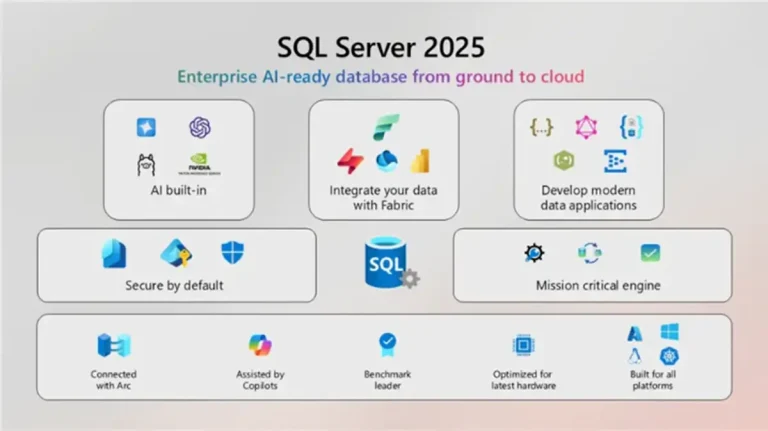
Microsoft is introducing vector search capabilities in SQL Server 2025 to solve the challenge of making relational data systems AI-native. In this article, we look at how to use vector search and understand the concepts and terminology.
Solution
With its recent launch, SQL Server 2025 has many new features, including vector capabilities. This allows vector operations inside SQL, semantic similarity search beyond exact matches, contextual relevance in search, and recommendations based on Artificial Intelligence (AI).
The vector data type addresses the work for these technical and business challenges:
- Semantic search
- Natural language processor (NLP) integration
- Recommendations using Machine Learning (ML) systems
- Image or multimedia similarity search
- Fraud and anomaly detection
- Personalized search and user experience
- Identifying related data
- Industry Examples
- eCommerce – Recommend similar products
- Legal – Find similar clauses or revise a contract
- Healthcare – Suggest diagnosis based on similar patient
- Finance – Identify fraud based on behaviors
Vector Search Terms and Definitions
Embeddings
Embeddings are number lists (vectors) that capture the key traits of something like a word, item, or concept. Think of them like digital fingerprints that help machines understand and compare things. They’re usually created by deep learning models and are super useful because they can show how similar two things are, even if they’re not exactly the same.
Embeddings are useful because:
- Similarity measurement: Computers can easily calculate the mathematical distance between numerical vectors.
- Semantic understanding: To capture the underlying meaning or context of items.
- Dimensionality reduction: Converting complex, high-dimensional data into denser and fixed-size of numerical representations, easier for algorithms to process.
- Efficiency: similarity searches become fast mathematical operations on vectors.
Exact Search
Also known as k-NN search, which is short for k-Nearest Neighbors, exact search is about finding items that are most similar to something else. You take one vector, like a point in space, to measure how far it is from all the others, sort them by distance, and pick the closest ones.
Vector
Vectors are an ordered array of numbers that can represent information about some data expressed by magnitude and direction.
Vector Data Type
The vector data type is designed to hold vectors to be efficient for finding similar items or running machine learning tasks. It’s built to handle those kinds of operations quickly and smoothly. It supports at least one to 1998 dimensions, is exposed as varchar(MAX), can be handled by clients as a JSON array, and is supported in SSMS version 21.
The Vector data type in SQL Server 2025 has several limitations: it doesn’t support constraints, indexing, mathematical operations, or conversions beyond text/JSON, and can’t be used in features like memory-optimized tables, Always Encrypted, or ledger verification. It’s mainly intended for similarity search, not general-purpose data manipulation. Review the complete list of limitations: Vector Limitations.
Vector Distance
To figure out how close two vectors are, you use a special function that calculates the distance between them. It’s like using a ruler for numbers; these functions help measure how similar or different two vectors are.
Vector Functions
These functions work with vectors stored in binary format, letting applications save and manipulate them inside the SQL Database Engine.
Vector Search
This is the process of analyzing numerous vectors to find the ones that are most similar to a specific one you’re interested in.
Vectorization
The process to convert text, images, or other information into numbers so the algorithms can understand and work with the data.
Working with Vectors
Data Entry
Two options are available to enter vector data: typing as arrays of floats or casting a JSON array to a vector data type.
-- MSSQLTips.com (TSQL)

DECLARE @v1 VECTOR(3) = '[1.0, -0.2, 30]';
-- or
DECLARE @v1 VECTOR(3) = JSON_ARRAY(1.0, -0.2, 30);
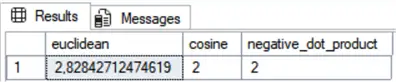
Vector Distance Function
To determine how far apart two vectors are, we can use a distance metric, a method or formula to measure the difference between them.
TSQL syntax: VECTOR_DISTANCE (distance_metric, vector1, vector2) where distance_metric can be:
- Cosine: Measures the cosine of the angle between two vectors. It is a measure of orientation, not magnitude. It is calculated by the dot product of the vectors divided by the product of their lengths.
- Euclidean: Obtained by the square root of the sum of (Ai-Bi) squared.
- Dot: Negative dot product is calculated by the negative result of the sum of (Ai * Bi).
-- MSSQLTips.com (TSQL)

DECLARE @A VECTOR(2) = '[1,1]';
DECLARE @B VECTOR(2) = '[-1,-1]';

SELECT   VECTOR_DISTANCE('euclidean', @A, @B) AS euclidean
        ,VECTOR_DISTANCE('cosine', @A, @B) AS cosine
        ,VECTOR_DISTANCE('dot', @A, @B) AS negative_dot_product;
Result:
Vector Normalize Function
Basically, it measures or adjusts the size of the vector based on a certain rule, called a norm type. Give it a vector, and it either tells how long it is or it shrinks it down to a length of 1, normalizing it.
TSQL syntax: VECTOR_NORM (vector, norm_type) or VECTOR_NORMALIZE (vector, norm_type) where norm_type can be:
- norm1: The sum of the absolute values of the vector components. It is also called the Manhattan norm.
- norm2: The Euclidean Norm, which is the square root of the sum of the squares of the vector components.
- norminf: The infinity norm, which is the maximum of the absolute values of the vector components.
-- MSSQLTips.com (TSQL)

DECLARE @A VECTOR(3) = '[1, 2, 3]';

SELECT   VECTOR_NORM(@A, 'norm2') AS norm2
        ,VECTOR_NORM(@A, 'norm1') AS norm1
        ,VECTOR_NORM(@A, 'norminf') AS norminf
        ,VECTOR_NORMALIZE(@A, 'norm1') AS VectorNormalized;
Result:

Vector Property Function
This function returns specific properties of a given vector.
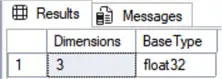
TSQL syntax: VECTORPROPERTY(vector, property) where property can be:
- Dimensions: Returns the vector’s dimensions count as an integer value with dimension count.
- BaseType: Returns the vector’s base type as a sysname with the name of the data type.
-- MSSQLTips.com (TSQL)

DECLARE @v AS VECTOR(3) = '[1,2,3]';

SELECT   VECTORPROPERTY(@v, 'Dimensions')
        ,VECTORPROPERTY(@v, 'BaseType');
Results:
Vector Search Function
It finds the vectors that are closest to a given one by using an approximate search algorithm. This means it doesn’t check every single one, only enough to get a fast and pretty accurate result using the chosen distance metric.
Example of Using the Vector Function
Embedding is a way to describe what an object is to a computer so that it can understand its characteristics and also compare it to other items. Normally, in real-world scenarios, the embeddings are much larger (128, 512, … dimensions), because of the nuanced features to capture an object, which are generated by machine learning models.
Forgive me for oversimplify the embeddings in this example, but it will make it easier to explain.
-- MSSQLTips.com (TSQL)

DECLARE      @Products
    TABLE   (ProductId int
            ,ProductName nvarchar(120)
            ,Embedding vector(3));

-- Embeddings values for: shirt-ness, color aspect, and casual wear
INSERT INTO  @Products
    VALUES   (101,'Blue T-Shirt',        '[0.10, 0.50, 0.90]')
            ,(102,'Red T-Shirt',         '[0.20, 0.40, 0.80]')
            ,(103,'Green Polo Shirt',    '[0.30, 0.60, 0.70]')
            ,(104,'Blue Jeans',          '[0.80, 0.10, 0.20]')
            ,(105,'Denim Jacket',        '[0.70, 0.20, 0.30]')
            ,(106,'Striped Blue T-Shirt','[0.15, 0.55, 0.92]');

DECLARE @queryProductEmbedding VECTOR(3);

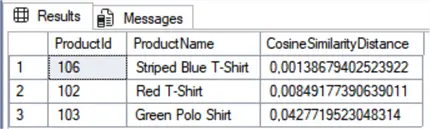
--- Comparing which ones are similar to the Blue T-Shirt (101) =========
SELECT       @queryProductEmbedding = Embedding
    FROM     @Products
    WHERE    ProductId = 101;

SELECT TOP 3 p.ProductId
            ,p.ProductName
            ,VECTOR_DISTANCE('cosine', @queryProductEmbedding, p.Embedding) AS CosineSimilarityDistance
    FROM     @Products AS p
    WHERE    p.ProductId <> 101
    ORDER BY CosineSimilarityDistance ASC;
Results:
Explanation:
- Smaller results in the cosine similarity distance mean they are more similar.
- Suppose that the number in the embedding vector represents:
- First dimension: The shirt-ness, where lower values are more shirt-like.
- Second dimension: Could represent the color aspect.
- Third dimension: Could represent the casual wear. A blue t-shirt is quite casual, so it is getting a high value.
Next Steps
In large datasets, it is a good practice to store only the key and the embedding column in a table, and in another one, the same key and its reference data.
There are some known issues that you can follow up on in the link below about the vector data type.
- WIKIPEDIA – Vector
- WIKIPEDIA – Cosine similarity
- MICROSOFT – Vector data type
- Read more SQL Server 2005 articles

Sebastião Pereira has over 40 years of experience in database development including T-SQL, algorithm design, machine learning and bringing innovative mathematical formulas to SQL Server. He started his career at a transnational fast-moving consumer goods (FMCG) company as an employee then later transitioning into a consultant role. He eventually founded his own company to develop software solutions for the healthcare industry. Sebastião is a respected award-winning author on MSSQLTips.com extending SQL Server capabilities beyond traditional workloads.
- MSSQLTips Awards
- Author of the Year – 2025
- Trendsetter (25+ tips) – 2025
- Rookie of the Year – 2024