Problem
My organization typically moves production data to other environments. There are a variety of use cases:
- Software testing with the amount and frequency of production data.
- Performing analytics on said data.
- Delivering production-like data, but not real data to a third party for their application development usage in a test environment and user training.
We do not want to move production data around in order to meet data privacy regulations like GDPR, HIPAA, PCI DSS, etc. Instead, we want to deliver “production-like” data to non-production environments for these use cases for proper data security. Sometimes, we work with multiple systems integrated with each other, and in those cases, we need the data to match up. In other instances, we need the sensitive data, such as personally identifiable information (PII), to be altered (data anonymization) so it’s no longer sensitive (i.e. original values without reverse engineer capabilities), but there’s no requirement for it to be consistent across systems.
Solution
We know that using production data anywhere other than production significantly increases the risk of that data being lost in a data breach, especially if said data is handed over to third parties. Even if your organization has production-level controls (access controls, auditing, etc.) on those other environments, the more locations data is present, the more places your organization must monitor the sensitive information. It’s increasingly difficult to secure real-time data as it propagates to more locations.
The major RDBMS platforms provide either encryption at rest solutions or dynamic masking, which obfuscates the data but keeps the original sensitive data and is accessible to anyone with high enough privileges. Neither of those data privacy solutions works for the scenarios given in the problem statement. Thankfully, there are third-party solutions out there that do address this concern. One that can handle all the use cases is DataVeil.
Key Takeaways
- Organizations need to deliver ‘production-like’ data for testing and development without violating data privacy regulations.
- DataVeil offers robust data masking solutions by modifying the original sensitive data to enhance security.
- It supports multiple databases and provides both deterministic and non-deterministic masking options for flexibility.
- Users can preview changes before executing data masking, minimizing the risk of errors during the process.
- DataVeil simplifies integration and use, making it an efficient tool for data masking and management in various environments.
Multiple Database Platform Support
The first question I ask about a third-party product is, “What platforms do you support?”
DataVeil supports Microsoft SQL Server, PostgreSQL, Oracle, MySQL and Azure SQL.
Data Masking Using DataVeil
Here are the types of data masking:
- The underlying data is not modified. The platform or software returns dummy data based on a pattern whereas the original sensitive data still exists in the database. Therefore, users with high enough privileges can still see the original sensitive data. This is dynamic data masking that is natively available in SQL Server.
- The underlying data is modified. The original sensitive data is overwritten (i.e. data obfuscation) and no longer present for that particular set of data. This is static data masking.
DataVeil performs the second data masking technique. Therefore, if the data is lost after DataVeil performs the data masking process, whichever columns were masked by DataVeil no longer have the original data.
Deterministic vs. Non-Deterministic Replacement
DataVeil introduces a term for data masking that some may not be familiar with: determinism. Quite simply, determinism is whether the replacement can be repeated. If you select deterministic behavior at the project or column level, replacements can be consistently repeated.

How does DataVeil get repeatable results? Note the Seed value. The Fixed value is one set and stored in an encrypted manner within the project itself. DataVeil will feed the seed into its algorithm to generate the new values. If the seed is maintained, DataVeil will produce the same values each time. This allows for the same values even if you have databases for different projects. Of course, you can have multiple databases within a single project, so there’s enormous flexibility to operate how you need to.
If I enter a Seed value, my concern is how it is stored. DataVeil stores the Seed in the project file, which is in XML format. But it doesn’t store it in plain text. Instead, it encrypts using the project’s key. For instance, for my AdventureWorks project, here’s the XML portion of the determinism setting for the FirstName column:
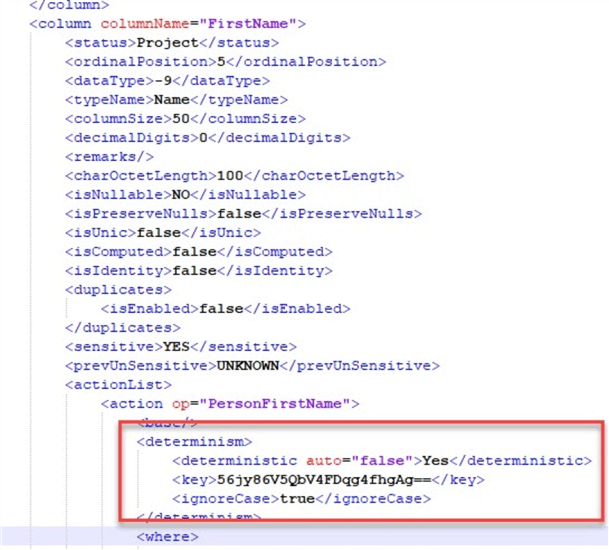
The Seed I entered was human-readable (on purpose to search the file quickly). This is not the case in the XML file, it has been encrypted.
DataVeil can also perform non-deterministic masking meaning that the masked values will vary randomly. This guarantees that the masked values no longer have any statistical relationship to the original data which enhances the anonymization aspect of the masked data. Deterministic and non-deterministic masking can be used together within a single masking project so that only those columns that need to be consistently repeatable can be masked deterministically and the rest can be non-deterministic.
Performing Discovery
Now that we’ve discussed how DataVeil does data masking, let’s talk about setting it up. I will skip how to connect to a database because DataVeil does it like most other applications. DataVeil can detect a particular type of protected data. In this case, let’s search for U.S. Social Security Numbers.
DataVeil provides easy queries to scan through the database for more common patterns. In this case, I’ve expanded National Identifier and double-clicked on Social Security Number US. DataVeil has pulled it into the Query portion.

After clicking Search, DataVeil crawls the database looking for patterns and names, and eventually comes back with a suggestion.

In HumanResources.Employee, DataVeil found the NationalIDNumber column. Looking at the Data Browser, it’s a correct match. With the column identified, I can add it to the project to ensure the data is masked.
Here is where DataVeil does something I like: I can choose to preserve part of the data to identify a match between unmasked and masked. This is helpful, especially with end users who insist they need to know how the data masks between environments.

I’ve intentionally highlighted the interface to add a discovered sensitive column. But DataVeil provides more information, such as the degree of confidence it thinks it has a match. This is useful information, especially if you are unfamiliar with the database to be masked. The built-in search patterns go beyond simple pattern matching and apply additional filters such as verifying check digits on credit card numbers to reduce false positives. If you have a specific search criteria that isn’t covered by the many built-in patterns then you can also define your own custom regular-expression based patterns and the default masks to be applied. These screens and how to use them are included in a well-documented User Guide.
Adding Masking Manually
What if DataVeil’s Discovery missed something? Or if you already know what the columns are? In that case, you can add those columns manually. For instance, I know that in AdventureWorks2019, the Person.Person table has first and last names, which are typically considered sensitive. Using the database view, I can go to that table and set up the columns for masking:

Selecting each column, I will right-click and add them to the project. I haven’t set the masking rules yet, but now DataVeil knows I want to do something with them:

I can add a mask by right-clicking on the column in the database view. DataVeil has a “dictionary” of acceptable values where I see Last (Family) Name as an option. Let’s select it.
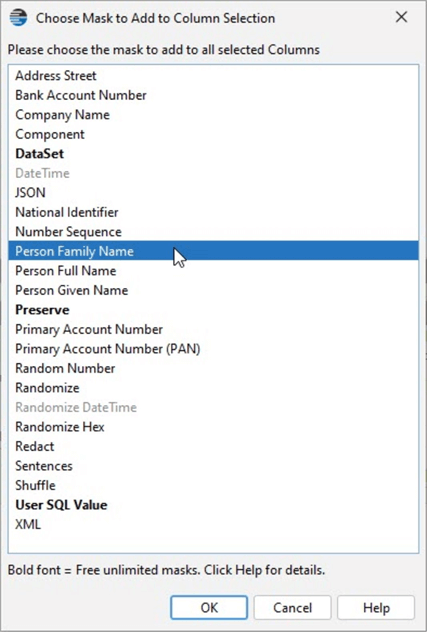
Once selected, there are some options. DataVeil includes a dictionary of 88,000 family names but can stick to the 10,000 most popular. I’ll leave that as my option, set Determinism, and set my mask for this column.

Editing or Viewing an Existing Mask
What if I want to see every mask? I can see which ones have been set by clicking the Masks Summary tab. There’s a scope option where I’ve selected the entire project. Now I can view the masking across both tables:

I can always right-click on one of the masks set up and view or make adjustments:
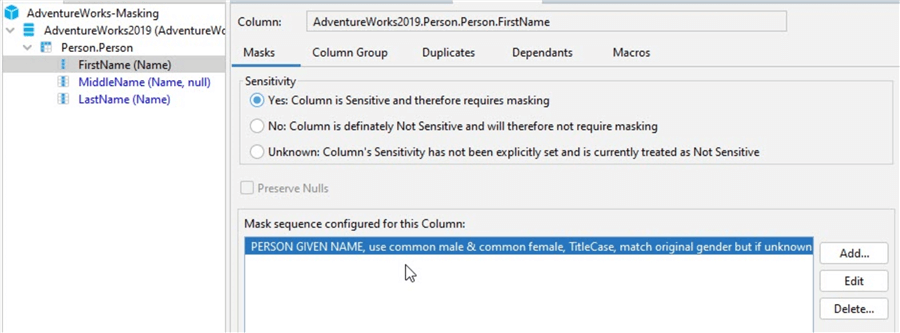
For example, if I’m not happy with the mask configuration for the FirstName (Name) column, this is where I can change it.
Datasets
What if DataVeil doesn’t have a dataset you need for your sensitive data? The good news is that you can import datasets and set up rules for using them. You can write custom SQL to manipulate the data as you need to, within certain restrictions. However, you won’t have to in most cases because the options are included in the GUI.
Previewing Before You Commit
Unsure about your masks? DataVeil allows you to preview changes before it executes. Again, there are some options to choose from. DataVeil offers a quick preview run to free you from viewing all changes on a very large database (VLDB).

Note the warning: Don’t run this on the production database, and don’t run it on a database in use by others. This is true for the preview, not just for the actual run itself.
Once it is run and we take care of any errors, the following result will appear:

Here’s an interesting thing. Some of you may notice that two of the rows were not masked. These are the rows with values that begin with ‘9’. Why is that? Well, it’s because DataVeil will automatically preserve any data it knows to be invalid and therefore not sensitive. For example, since this is an SSN mask DataVeil knows that no valid SSN can begin with a ‘9’. Therefore, since it’s not a valid SSN it cannot be sensitive and so it is preserved. This is very useful because instead of overwriting and sanitizing absolutely everything, DataVeil preserves such problematic data that the development team may actually be looking for.
Executing the Actual Data Masking Run
After reviewing the preview, I’m satisfied with the sample results. It’s time to commit to the data masking. But not so fast!

I can’t click through and potentially change the wrong database without first having to stop and click the checkbox to proceed and then clicking OK. Note: Everything I need to know about what’s being written is provided. This is great. I am the type that likes to check things twice, especially when overwriting or destroying data. DataVeil provides that final check.
Once I click the check box and OK, Data Veil makes the changes. Since I’ve left the View samples options checked, I see a similar interface from the preview run, but this time with the actual changed values:

DataVeil can also be run from the command-line so it can be scripted to run as a masking task as part of a user’s bigger process of automation.
Installation and Footprint
When you download DataVeil, it is a .zip file. Extract the .zip file and copy it to your preferred location. Historically, “xcopy deployable” solutions were standard, only needing to move a folder to a system. That’s DataVeil. It runs on Java but includes the JDK it relies on. Ensure you have a valid license file, your project file, and the project key that was set to run it from wherever you access the database platform.
Some solutions store the previous value (or a masked version of the previous value) and the new value in a database or some other structure. Remember that DataVeil doesn’t need such a structure because it uses an algorithm dependent on the seed value if you want repeatability. That keeps it lightweight and portable.
Also, I previously indicated that the project file is an XML document, meaning it can be stored in source control. Because of this, your source control system should be able to easily identify changes between file versions. Additionally, since any important values (the project key, seed values, passwords to connect to the database, etc.) are encrypted, there are no concerns about exposing such secrets by putting the project file into your source repository.
Summary
DataVeil hits all the requirements most organizations have for masking data. It changes the data at rest. Using a deterministic method, it can repeat how it changes test data so that you can replace the confidential information across databases. Discovery covers many sensitive data scenarios, but you can build your own dataset and replacement rules if one isn’t available. Finally, it has appropriate checks to warn against replacing data in the wrong place.
From a functionality perspective, the interface is intuitive. A User Guide is available online and easily accessible if you need additional help. I hate searching for a vendor’s docs, especially if I get stuck somewhere. That’s not a problem with DataVeil. Overall, it’s a great tool that gets you up and running quickly.
I like that it’s portable and self-contained: no fighting DLL hell or the Java equivalent. I don’t need a large footprint on a server to use the tool. Its use of seeds for deterministic changes eliminates the need for such a setup. And I love that I can save the project file into source control to perform a differences comparison between two versions; the file is in XML format, and the secrets contained within are encrypted.
Final Thoughts
In summary, DataVeil is a well-built data masking tool providing realistic data values, the needed functionality with appropriate flexibility with consistent releases introducing new masking functionality and consistently achieving high performance even with large data sets. It’s easy to get up and running and there’s no painful learning curve for streamlined software development. DataVeil does as much as possible automatically in the background for time savings including auto management of constraints, triggers, indexes, versioned tables, etc. DataVeil has also simplified the masking process as much as possible for significant time savings. This is one to take a serious look at if you need to mask data.
Next Steps
- Watch the tutorial videos on how to use DataVeil.
- Review the DataVeil User Guide.
- Register and download DataVeil.
- Extract the files, download the demo license, and start using DataVeil!
MSSQLTips.com Product Spotlight sponsored by DataVeil.

Brian Kelley is an author, columnist, Certified Information Systems Auditor (CISA), and former Microsoft Data Platform (SQL Server) MVP (2009-2016) focusing primarily on SQL Server and Windows security. Brian currently serves as a data architect as well as an independent infrastructure/security architect concentrating on Active Directory, SQL Server, and Windows Server. He has served in a myriad of other positions including senior database administrator, data warehouse architect, web developer, incident response team lead, and project manager. Brian has spoken at 24 Hours of PASS, IT/Dev Connections, SQLConnections, the Techno Security and Forensics Investigation Conference, the IT GRC Forum, SyntaxCon, and at various SQL Saturdays, Code Camps, and user groups.
- MSSQLTips Awards: Author of the Year Contender – 2015, 2017 | Champion (100+ tips) – 2014