Problem
Organizations are struggling to best position SQL Server within their emerging Enterprise Data Lakehouse strategy. This tip offers insights and architectural patterns to consider when identifying high-performance, cost-effective ways for a modern SQL Server data architecture without keeping important data components in silos.
Solution
SQL Server is no longer just a traditional Relational Database and must be envisioned as a versatile data platform.

To do this, SQL Server must be positioned as a critical component within a broader, modern data architecture using three functionalities (System of Record, High Performance Provisioning Layer, and Data Mart), illustrated below.

SQL Server and Enterprise Data Lakehouse Bi-directional Integration Design Patterns and Technologies
To unlock the power of integration between SQL Server and Enterprise Data Lakehouse, transforming them from disparate entities into a unified data ecosystem, we must understand the different data exchange patterns that are feasible and compatible. The following sections provide key design patterns and enabling technologies for bi-directional integration between SQL Server and the Data Lakehouse, adaptable for any enterprise.
Let’s deep dive into architectural choices for handling outbound (SQL Server to Enterprise Data Lakehouse) and inbound (Enterprise Data Lakehouse to SQL Server) data flows, ensuring SQL Server continues to deliver enterprise strategic value.
SQL Server to Enterprise Data Lakehouse (Outbound Data Flows)
There are three top recommended design patterns to integrate the data from SQL Server to Enterprise Data Lakehouse:
- Change Data Capture (CDC) for Near Real-Time Ingestion Integration
- Bulk Data Movement For Batch Ingestion Integration
- Direct API Integration
In the following sub-sections, we will detail each of these outbound integration design patterns.
Change Data Capture (CDC) for Near Real-Time Ingestion Integration
Below are details of the key components for this integration:
- SQL Server Environment
- SQL Server Database: The source database.
- CDC / Log Reader: This component (native SQL Server CDC, Debezium, other log-based tool) captures committed changes (inserts, updates, deletes).
- Messaging Infrastructure
- Message Broker / Event Stream (e.g., Kafka, Azure Event Hubs): Receives change events. It decouples the source from the consumers, provides buffering, and enables multiple consumers.
- Enterprise Data Lakehouse
- Stream Processing Engine (e.g., Spark Streaming, Apache Flink): Consumes events from the broker, performs necessary transformations, and writes the data.
- Data Lakehouse Storage: The underlying storage (e.g., S3, Azure Data Lake Storage Gen2, Google Cloud Storage) where the data resides.
- Optimized File Format: Data written in columnar formats (Parquet, Delta, Iceberg, etc.).

Bulk Data Movement for Batch Ingestion Integration
Below are details of the key components for this integration:
- SQL Server Environment
- SQL Server Database: The source for bulk data extraction.
- Data Integration Layer
- Data Integration / ETL Orchestrator(e.g., Airflow, ADF, NiFi, SSIS): Manages the batch processes. It extracts data from SQL Server database, performs business transformations (ETL), and orchestrates data loads within the Enterprise Data Lakehouse (ELT).
- Enterprise Data Lakehouse
- Data Lakehouse Storage: The underlying storage (e.g., S3, ADLS Gen2, GCS) where the data resides.
- Raw/Staging Data: Data is written in as-is format, no transformations are applied.
- Data Processing Engine (e.g., Spark, Presto/Trino): Used for data computation to handle all kinds of business transformations.
- Optimized File Format: Data written in columnar formats (Parquet, Delta, Iceberg, etc.).

Direct API Integration
Below are details of the key components for this integration:
- SQL Server Environment
- SQL Server Engine: The core engine (especially newer versions) provides multiple integration capabilities.
- T-SQL Commands: Use COPY INTO command to directly interact with external Data Lakehouse storage or REST endpoints.
- Database Code (CLR, Python/Scala): Custom code running within SQL Server can interact with external systems. This path requires careful consideration for security and performance.
- Enterprise Data Lakehouse
- Lakehouse Ingestion API: Invoke APIs that can be called directly from SQL Server (e.g., using sp_invoke_external_rest_endpoint) to ingest data directly into Data Lakehouse Storage.
- Data Lakehouse Storage: The underlying storage (e.g., S3, ADLS Gen2, GCS) where the data resides.
- Optimized File Format: Data written in columnar formats (Parquet, Delta, Iceberg, etc.).

Enterprise Data Lakehouse to SQL Server (Inbound Data Flows)
There are three top recommended design patterns to integrate the data from Enterprise Data Lakehouse to SQL Server:
- Query Federation Integration
- Using PolyBase
- Using External Tables
- Using Spark Connectors
- Data Materialization Integration
- Application-level Integration
In the following sections, we will detail each of these inbound integration design patterns.
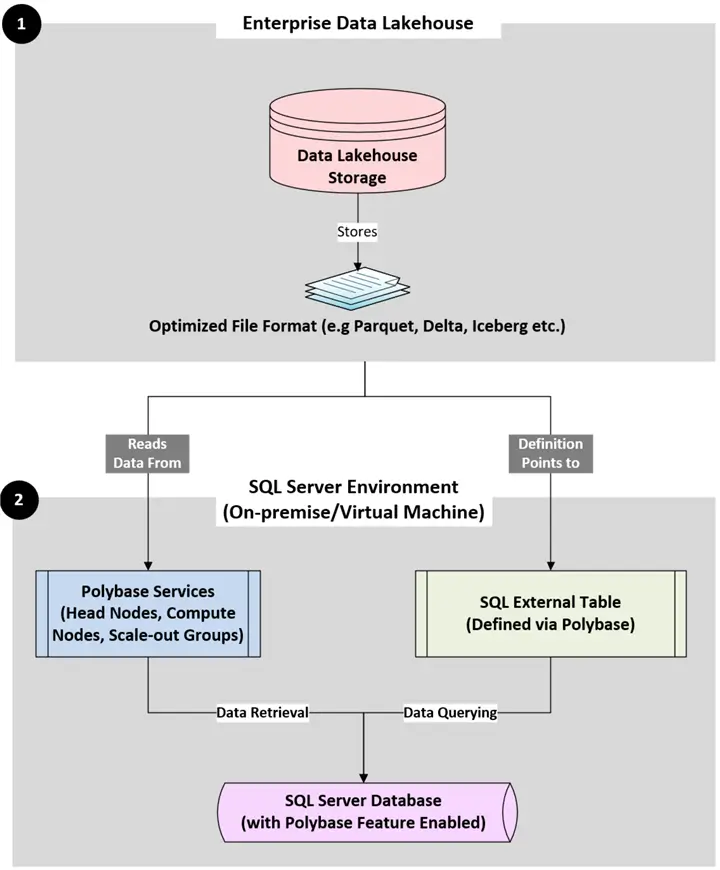
Query Federation Integration – Using PolyBase (SQL Server On-Prem/VMs)
Below are the details of the key components for this integration:
- Enterprise Data Lakehouse
- Data Lakehouse Storage: The underlying storage (e.g., S3, ADLS Gen2, GCS) where the data resides.
- Optimized File Format: Data written in columnar formats (Parquet, Delta, Iceberg, etc.). Parquet is common, delimited text is also supported directly by PolyBase. Delta Lake requires an ODBC bridge for older PolyBase versions, but it works well with SQL Server 2022+.
- SQL Server Environment
- PolyBase Services: Retrieves the data from Data Lakehouse Storage using engine components – Head node which performs query optimization, Compute nodes for distributed reads from external sources for scale-out groups.
- SQL External Table: A T-SQL object defined within SQL Server environment that points to the data definitions in the Data Lakehouse Storage. It is like a local table in the SQL Server environment.
- SQL Server Database (with PolyBase Feature): PolyBase is installed and configured in the target SQL Server Database which is used for data retrieval and data querying purposes.
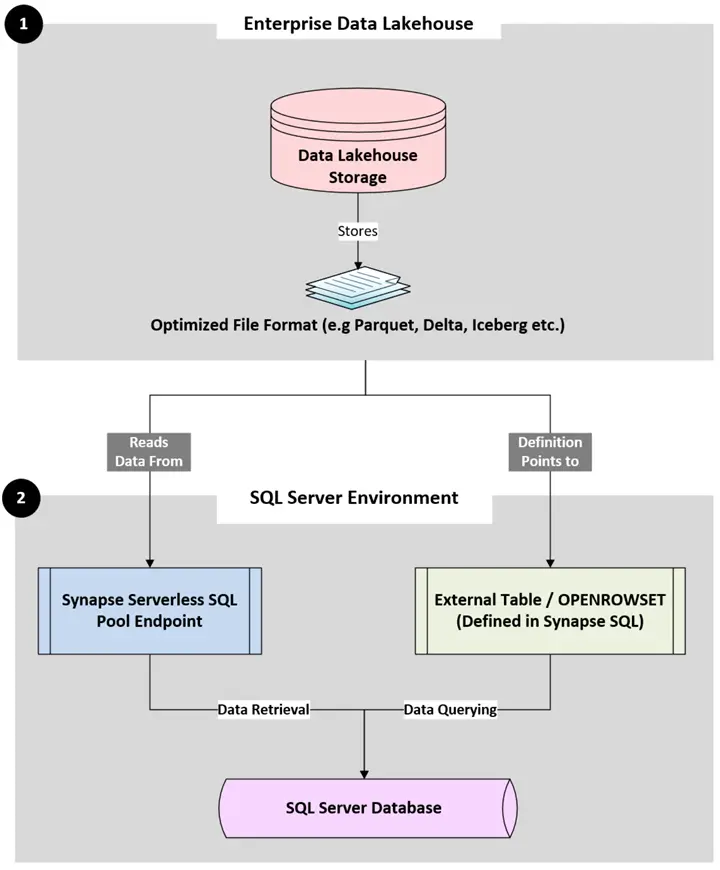
Query Federation Integration – Using External Tables (Synapse Serverless SQL Pools)
Below are details of the involved key components for this integration:
- Enterprise Data Lakehouse
- Data Lakehouse Storage: The underlying storage (e.g., S3, ADLS Gen2, GCS ) where the data resides.
- Optimized File Format: Data written in columnar formats (Parquet, Delta, Iceberg, etc.).
- SQL Server Environment
- Synapse Serverless SQL Pool Endpoint: A pay-per-query T-SQL endpoint that can directly query data in ADLS Gen2 and acts as the “SQL Engine” for this type of federation design pattern.
- External Table / OPENROWSET: Data definitions of objects present in the Data Lakehouse Storage can be referenced using External Tables or OPENROWSET, which is defined within Synapse SQL.
- SQL Server Database: The target database used for data retrieval and data querying purposes.
Using Spark Connectors
Below are details of the key components for this integration:
- Enterprise Data Lakehouse
- Data Lakehouse Storage: The underlying storage (e.g., S3, ADLS Gen2, GCS) where the data resides.
- Optimized File Format: Data written in columnar formats (Parquet, Delta, Iceberg, etc.).
- Spark Environment
- Apache Spark Cluster/Service: The computation engine (e.g., Databricks, Synapse Spark, EMR, self-managed Spark) where the services are invoked on the cluster.
- PySpark Application/Script: Code written in Python using Spark (PySpark) to query and retrieve the data from the Data Lakehouse Storage objects.
- SQL Server Environment
- T-SQL Call to External Script: A stored procedure like sp_execute_external_script is used to invoke the PySpark script. The script is passed parameters (like filter conditions) from T-SQL.
- SQL Server Database: The target database used for data retrieval and data querying purposes. It must have external script execution enabled (e.g., for Python or Scala).

Data Materialization Integration
Below are details of the key components for this integration:
- Enterprise Data Lakehouse
- Data Lakehouse Storage: The underlying storage (e.g., S3, ADLS Gen2, GCS) where the data resides.
- Optimized File Format: Data written in columnar formats (Parquet, Delta, Iceberg, etc.).
- Data Integration Layer
- Data Integration / ETL Orchestrator (e.g., ADF, SSIS, custom Spark scripts using Airflow): This component manages the process of extracting data from the Data Lakehouse Storage (using the processing engine or directly from the Data Lakehouse Storage files) and directly writing into SQL Server database.
- SQL Server Environment
- SQL Server Database: The target database used for storing the data extracted from Data Lakehouse Storage.

Application-Level Integration
Below are details of the key components for this integration:
- Enterprise Data Lakehouse
- Data Lakehouse Storage: The underlying storage (e.g., S3, ADLS Gen2, GCS) where the data resides.
- Optimized File Format: Data written in columnar formats (Parquet, Delta, Iceberg, etc.).
- Lakehouse REST APIs: Custom or Platform-provided REST APIs that allows the accessibility of Data Lakehouse Storage data.
- Query Engine Endpoints: Spark SQL Endpoints (e.g., Databricks SQL, Spark Thrift Server) can be used to connect to Application Tier using JDBC/ODBC connections and invoke Spark SQLs to query the Data Lakehouse Storage data. Presto/Trino Endpoints can be used to establish connection with Application Tier using JDBC/ODBC connections (out-of-the-box connectors).
- Azure Synapse Links For SQL (only applicable when Enterprise Data Lakehouse is Azure based): Synapse Link continuously populates a representation of SQL Server data within the Azure Synapse Data Lakehouse environment.
- Application Tier
- Lakehouse Connectors/SDKs (Software Development Kits): This is a logical grouping representing the different ways the application tier can talk to the Data Lakehouse Storage objects:
- Connecting to query engine endpoints.
- Using SDKs for direct file reads (Parquet, Delta).
- Making HTTP calls to Lakehouse REST APIs.
- Application Business Logic / Service Layer: Combining, joining, transforming, and correlating data retrieved from multiple sources by implementing business rules and workflows. (using Python (Flask, Django), .NET (ASP.NET Core), Java (Spring Boot), Node/React.js, etc.)
- SQL Server Connectors: Standard database connectors (ODBC, JDBC, ADO.NET), Object-Relational Mappers (ORMs like Entity Framework) to load the data retrieved from Application Tier to SQL Server Database.
- Lakehouse Connectors/SDKs (Software Development Kits): This is a logical grouping representing the different ways the application tier can talk to the Data Lakehouse Storage objects:
- SQL Server Environment
- SQL Server Database: The target database used for storing the data extracted from Data Lakehouse Storage. SQL Server Database data can be replicated on a near-real time basis by using Azure Synapse Link for SQL (only applicable when Enterprise Data Lakehouse is Azure based).

Cost-Effective Ways to Integrate SQL Server
Evaluate Trade-offs Before Choosing Integration Patterns for SQL Server and Enterprise Data Lakehouse
- Integrating SQL Server with an Enterprise Data Lakehouse requires a thorough analysis of the trade-offs, especially around performance, scalability, and cost.
- Technical Architects need to evaluate network impacts as Network is critical. Impact of network latency and bandwidth between SQL Server (especially on-premises) and cloud-based Enterprise Data Lakehouse storage/compute has to be properly assessed, especially when using Spark connectors that might involve more data movement or different protocols than SQL Server PolyBase.
- The core decision principle mostly circles around compute pushdown versus data movement. Analyzing when it is more efficient to push query processing down to compute engines like Spark/Synapse versus pulling data into SQL Server for processing is a key decision.
- Choosing appropriate storage tiers and data file formats in the Enterprise Data Lakehouse storage containers is equally important to balance out cost and query performance for data accessed by SQL Server.
- Strategies for tracking and allocating costs associated with data movement, federated queries, and storage across the SQL Server and Enterprise Data Lakehouse components ensure the integrated solution is not only powerful but also economically sustainable and performant at scale.
Build Unified Data Governance Across Data Ecosystems
- Bridging SQL Server with the Enterprise Data Lakehouse goes beyond mere data flow; it requires a unified strategy for data governance, security, and metadata.
- Tools like Microsoft Purview, Unity Catalog, or OvalEdge become essential for creating an at-a-glance view scanning and classifying data across both systems, tracing data lineage, and establishing a common data catalog along with descriptive business glossary.
- This unified metadata layer strengthens effective security and privacy integration, ensuring consistent authentication and authorization models, and end-to-end data encryption, which has to be compliant with the latest privacy laws.
- Data quality and access management strategies are also important to maintain data integrity, consistency, and accessibility across these interconnected systems, enabling a trustworthy and well-governed data ecosystems.
Some Future Trends & Strategic Considerations
- Looking ahead, the integration between SQL Server systems and Enterprise Data Lakehouses will only deepen and become more intelligent.
- Architects should anticipate trends like increasingly seamless virtualized Data Lakehouse access directly from SQL engines, minimizing data movement even further.
- The expanding role of AI/ML in optimizing data arrangements, query routing, and automated governance across SQL Server systems and Enterprise Data Lakehouses will also be transformative.
- By designing flexible, well-governed integrations today, organizations position themselves to readily leverage these advancements, ensuring their architecture effectively supports future business initiatives, right from real-time analytics and sophisticated AI/ML model training on combined datasets to truly democratized data access across the enterprise.
Next Steps
- Check out these additional resources:

Dippu Kumar Singh is a strategic Data & Analytics leader and thought leader in emerging solutions, including Computer Vision and Generative AI/LLMs. I drive significant North American pre-sales pursuits and analytics offering development, applying deep expertise in cloud platforms (Azure, AWS, GCP), Big Data frameworks (Spark, MLOps), and end-to-end data architecture. I possess extensive experience in designing and implementing comprehensive Data & Analytics solutions – from ingestion and ETL to advanced analytics and presentation – across manufacturing, public sector, and F5 domains. My technical expertise is underscored by certifications like Azure Solution Architect, Databricks Engineer Expert, and Palantir Expert. Furthermore, I am a key global member of AI Ethics & Compliance Assessment team, and I consistently translate cutting-edge technologies into tangible business values for C-level executives and cross-functional teams.