Problem
We are in the process of building star schemas for our data warehouse. In a couple of fact tables, we also need to track time. This means users need to be able to analyze data according to the hour or by certain time periods (morning, afternoon, etc.). Is there a script to create a time dimension table for SQL Server?
Solution
In any data warehouse, the date dimension (sometimes also called date or calendar table) is one of the most important dimensions. Practically any analysis includes time, such as month-to-date or year-to-date sales, year-over-year growth, and so on. Plenty of scripts are available online that assist with creating a date dimension (e.g., Create an Extended Date Dimension for a SQL Server Data Warehouse, Creating a date dimension or calendar table in SQL Server, and Creating a Date Dimension Table in Power BI). However, the time dimension, which stores the time of day, is less common. Maybe it’s because many data warehouses store data at the date level, and not below that granularity. But many use cases might benefit from more granular analysis. For example, are there more sales in the afternoon or the morning? Are there more work-related accidents in the early or late shift?
In this tip, we’ll create two scripts to build a time dimension, which stores every second of the day (“00:00:00” until “23:59:59” in the 24-hour notation). One script will use T-SQL, and you can use it in any SQL Server-flavored database. The other script will use the Power Query formula language, so you can build your time dimension directly in Power BI. Keep in mind that in Power BI, it’s best practice to store date and time in separate columns to lower the cardinality of the columns and maximize compression. Hence, a time dimension can be quite useful in Power BI.
Generate Sequence of Numbers for SQL Time Dimension Table
The first step is to generate a sequence of numbers (sometimes called a numbers table or tally table). We will then use these numbers with the DATEADD function to create a sequence of time points (each number represents the number of seconds after midnight).
There are multiple methods to generate the number sequence.
Option 1 – Using Recursive CTE
The first one we’ll show here uses a recursive CTE (common table expression):
-- MSSQLTips.com
WITH SecondsCTE AS
(
    SELECT SecondsSinceMidnight = 0
    UNION ALL
    SELECT SecondsCTE.SecondsSinceMidnight + 1
    FROM SecondsCTE
    WHERE SecondsCTE.SecondsSinceMidnight + 1 < 86400 -- 24 * 60 * 60
)
SELECT * FROM SecondsCTE
OPTION (MAXRECURSION 0); -- Allow recursion beyond the default 100 levels
We need 86,400 numbers, as that’s the number of seconds in a day. The result:
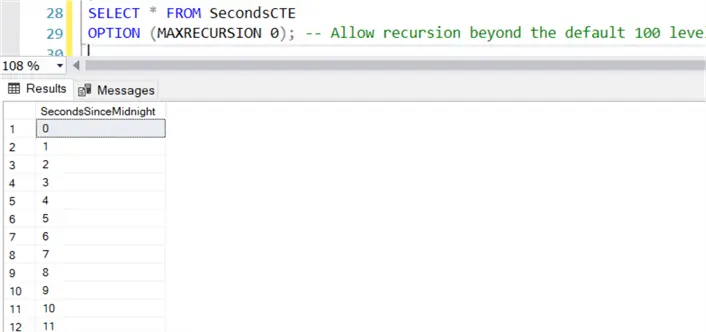
This option should work on most versions of SQL Server, except for Azure Synapse Dedicated SQL Pools and Fabric Warehouse.
Option 2 – Using Generate Series
In more recent versions of SQL Server (Azure SQL DB and SQL Server 2022 and up), we can use the GENERATE_SERIES function.
--MSSQLTips.com
WITH SecondsCTE AS
(
    SELECT SecondsSinceMidnight = [value] FROM GENERATE_SERIES(0,86399)
)
SELECT * FROM SecondsCTE
This syntax is a bit easier to remember. It works on Fabric Warehouse as well, but not on Azure Synapse Analytics.
Option 3 – Using CTE and Cross Joins
One final method is to use the Itzik Ben-Gan method by using CTEs and cross joins, which should work on any version/flavor of SQL Server.
-- MSSQLTips.com
WITH
    L0   AS (SELECT c FROM (SELECT 1 UNION ALL SELECT 1) AS D(c)),
    L1   AS (SELECT 1 AS c FROM L0 AS A CROSS JOIN L0 AS B),
    L2   AS (SELECT 1 AS c FROM L1 AS A CROSS JOIN L1 AS B),
    L3   AS (SELECT 1 AS c FROM L2 AS A CROSS JOIN L2 AS B),
    L4   AS (SELECT 1 AS c FROM L3 AS A CROSS JOIN L3 AS B),
    L5   AS (SELECT 1 AS c FROM L4 AS A CROSS JOIN L4 AS B),
    Nums AS (SELECT ROW_NUMBER() OVER (ORDER BY (SELECT NULL)) AS rownum
            FROM L5)
SELECT SecondsSinceMidnight = rownum - 1  FROM Nums
WHERE Nums.rownum <= 86400;
For the remainder of the tip, we’ll use the GENERATE_SERIES function as it has the shortest syntax. However, you can use any option you like or need, depending on your environment.
Convert Seconds to Time for SQL Time Dimension Table
To convert the number of seconds of the number sequence to an actual time, we use the DATEADD function like mentioned above:
-- MSSQLTips.com
WITH SecondsCTE AS
(
    SELECT SecondsSinceMidnight = [value] FROM GENERATE_SERIES(0,86399)
)
SELECT
     SecondsSinceMidnight
    ,PointInTime = DATEADD(SECOND, SecondsSinceMidnight, '00:00:00')
FROM SecondsCTE;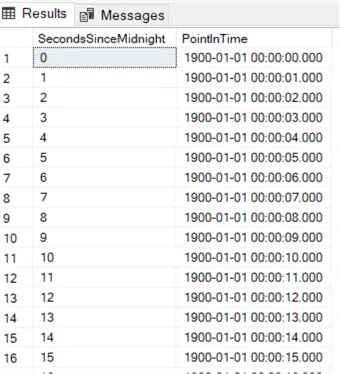
We’re only interested in the time portion, so we can drop the date part by converting to the TIME data type. We will use the PointInTime column in other calculations, though. I’m putting it inside another CTE so we can easily reference it in other expressions (since SQL Server still doesn’t allow us to reuse aliases in expressions).
We now have the first columns of the dimension:
-- MSSQLTips.com
WITH SecondsCTE AS
(
    SELECT SecondsSinceMidnight = [value] FROM GENERATE_SERIES(0,86399)
)
, PointInTimeCTE AS
(
    SELECT
         SecondsSinceMidnight
        ,PointInTime = DATEADD(SECOND, SecondsSinceMidnight, '00:00:00')
    FROM SecondsCTE
)
SELECT
     SK_Time        = SecondsSinceMidnight
    ,TimeOfDay      = CONVERT(TIME(0),PointInTime)
FROM PointInTimeCTE;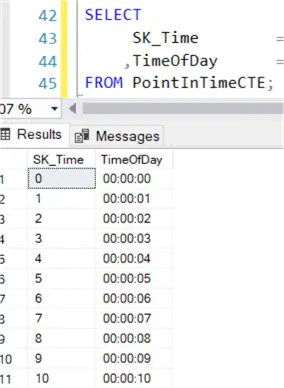
The SK_Time column is the surrogate key of the dimension, and it serves as the primary key as well. It’s a “smart key.” This means you can derive meaning from it, since its value represents the number of seconds after midnight. In the date dimension, we have something similar, i.e., a surrogate key value of 20250512 for May 12, 2025. We can also choose not to generate this column but rather create it as an IDENTITY column instead, but the result is almost the same.
The TimeOfDay column contains the actual time, represented by SQL Server’s time data type. This is the business key of the time dimension, and you might want to create a unique index on this column, like you would with normal dimensions.
Data Set for SQL Time Dimension Table
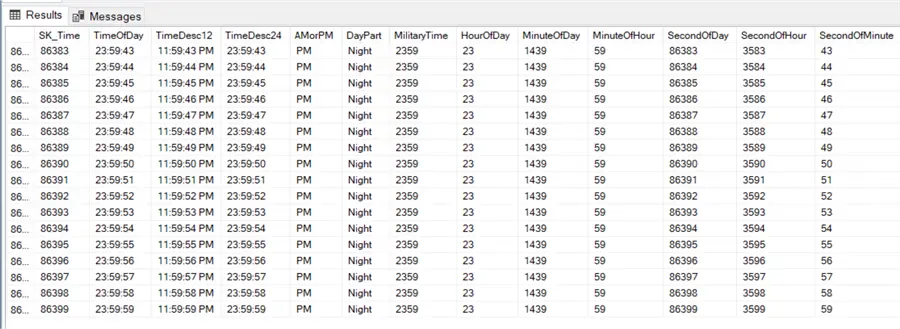
Now that we have the basis for our time dimension, we can add the following columns, which are all derived from the PointInTime column in some manner:
- TimeDesc12 – A text representation of the time using the 12-hour notation (AM and PM).
- TimeDesc24 – A text representation of the time using the 24-hour notation.
- AMorPM – An indicator of which half of the day the time belongs.
- DayPart – Contains the different parts of the day: Night, Morning, Afternoon, and Evening.
- MilitaryTime– A text representation of the time using military notation. For example, 07:24 PM becomes 1924. This notation only contains hours and minutes, and its values are thus not unique for every row.
- HourOfDay – The hour of the day (between 0 and 23).
- MinuteOfDay– The minute of the day (between 0 and 1439).
- MinuteOfHour – The minute of the current hour (between 0 and 59).
- SecondOfDay – The second of the day (between 0 and 86399). This is the same value as the SecondsSinceMidnight column from the numbers table.
- SecondOfHour– The second of the current hour (between 0 and 3599).
- SecondOfMinute – The second of the current minute (between 0 and 59).
Full Script
The full script, with table DDL and expanded with an INSERT statement, now looks like this:
-- MSSQLTips.com
DROP TABLE IF EXISTS dbo.Dim_Time;
CREATE TABLE dbo.Dim_Time
(
     SK_Time        INT         NOT NULL
    ,TimeOfDay      TIME(0)     NOT NULL
    ,TimeDesc12     CHAR(11)    NOT NULL
    ,TimeDesc24     CHAR(8)     NOT NULL
    ,AMorPM         VARCHAR(2)  NOT NULL
    ,TimeDivision   VARCHAR(9)  NOT NULL
    ,MilitaryTime   VARCHAR(4)  NOT NULL
    ,HourOfDay      INT         NOT NULL
    ,MinuteOfDay    INT         NOT NULL
    ,MinuteOfHour   INT         NOT NULL
    ,SecondOfDay    INT         NOT NULL
    ,SecondOfHour   INT         NOT NULL
    ,SecondOfMinute INT         NOT NULL
    ,CONSTRAINT PK_Time PRIMARY KEY CLUSTERED (SK_Time)
);
CREATE UNIQUE NONCLUSTERED INDEX BK_Time ON dbo.Dim_Time(TimeOfDay);
WITH SecondsCTE AS
(
    SELECT SecondsSinceMidnight = [value] FROM GENERATE_SERIES(0,86399)
)
, PointInTimeCTE AS
(
    SELECT
         SecondsSinceMidnight
        ,PointInTime = DATEADD(SECOND, SecondsSinceMidnight, '00:00:00')
    FROM SecondsCTE
)
INSERT INTO dbo.Dim_Time
(
     SK_Time
    ,TimeOfDay
    ,TimeDesc12
    ,TimeDesc24
    ,AMorPM
    ,TimeDivision
    ,MilitaryTime
    ,HourOfDay
    ,MinuteOfDay
    ,MinuteOfHour
    ,SecondOfDay
    ,SecondOfHour
    ,SecondOfMinute
)
SELECT
     SK_Time        = SecondsSinceMidnight
    ,TimeOfDay      = CONVERT(TIME(0),PointInTime)
    ,TimeDesc12     = FORMAT(PointInTime, 'hh:mm:ss tt')
    ,TimeDesc24     = FORMAT(PointInTime, 'HH:mm:ss')
    ,AMorPM         = IIF(DATEPART(HOUR, PointInTime) < 12
                        ,'AM'
                        ,'PM')
    ,DayPart        = CASE
                        WHEN DATEPART(HOUR, PointInTime) < 6  THEN 'Night'
                        WHEN DATEPART(HOUR, PointInTime) < 12 THEN 'Morning'
                        WHEN DATEPART(HOUR, PointInTime) < 17 THEN 'Afternoon'
                        WHEN DATEPART(HOUR, PointInTime) < 20 THEN 'Evening'
                        ELSE 'Night' END
    ,MilitaryTime   = RIGHT('0' + CONVERT(VARCHAR(2),DATEPART(HOUR  , PointInTime)), 2)
                    + RIGHT('0' + CONVERT(VARCHAR(2),DATEPART(MINUTE, PointInTime)), 2)
    ,HourOfDay      = DATEPART(HOUR, PointInTime)
    ,MinuteOfDay    = DATEPART(HOUR, PointInTime) * 60
                    + DATEPART(MINUTE, PointInTime)
    ,MinuteOfHour   = DATEPART(MINUTE, PointInTime)
    ,SecondOfDay    = SecondsSinceMidnight
    ,SecondOfHour   = DATEPART(MINUTE, PointInTime) * 60
                    + DATEPART(SECOND, PointInTime)
    ,SecondOfMinute = DATEPART(SECOND, PointInTime)
FROM PointInTimeCTE;
SELECT * FROM dbo.Dim_Time;
You can always add more columns depending on your business needs, such as busy/calm hours, start and end of shifts, etc.
Next Steps
- If you want to learn more about T-SQL date functions, you can check out this tutorial.
- Other useful T-SQL scripts can be found in the tip T-SQL Tips and Tricks.
- You can find all T-SQL tips in this overview.

Koen Verbeeck is a seasoned business intelligence consultant with over a decade of experience with the Microsoft Data Platform. He holds several certifications, including Azure Data Engineer. He’s a prolific writer, with over 375 articles on technologies such as Microsoft Fabric, SSIS, ADF, SSAS, SSRS, MDS, Power BI, Snowflake and Azure services. He has spoken at various events such as PASS, SQLBits, dataMinds Connect and many others. He frequently delivers educational webinars on MSSQLTips.com. For his efforts, Koen has been awarded the Microsoft MVP data platform award for many years.
- MSSQLTips Awards:
- Leadership Award (200+ Tips) – 2021
- Author of the Year – 2014/2020/2022
- Author Contender – 2024/2025


You can get the seconds after midnight with this simple statement:
select DATEDIFF(ss, cast(getdate() as date), getdate()) as Secs