Problem
SQL Server has a built-in function, DATEDIFF, that calculates the difference between two dates or datetimes. However, the returning result is a SINGLE integer value in a specific datepart, such as year, quarter, month, week, day, hour, minute, or seconds. Learn how to return the time difference for the SQL date time format in hh:mi:ss or hh:mi.
We often need to calculate the time duration between two dates or timestamps and present the result in a user-friendly format, like hh:mi:ss or hh:mi, for easy reading and absorption. Therefore, we must write our own code to perform calculations, conversions, and rounding to achieve the goal.
Solution
This tip will demonstrate how to calculate time duration and display the results in an easily readable and interpretable format using test data and T-SQL code. I will also show how to perform a “round up” for accuracy and discuss how to wrap the logic in cleaner user-defined functions for code maintainability, readability, and portability.
To demonstrate how to calculate and format time duration in detail, we will first set up a table with sample data, then show how to write T-SQL script to measure the time duration and format it in a specific format, such as hh:mi:ss. We will also round the result to the nearest minute. Finally, we will wrap the T-SQL in user-defined functions to complete the above work.
Sample Table and Data
Here is an example table to track various ETL process durations to identify performance bottlenecks and optimize the pipeline for efficiency. The table definition is:
CREATE TABLE ETLProcessTrackingLog(
    ID INT IDENTITY (1, 1) NOT NULL,
    ETLPackageName VARCHAR(30) NOT NULL,
    StartDT DATETIME NOT NULL,
    FinishDT DATETIME NOT NULL
)
Next, we will insert some sample data and query the table:
INSERT INTO ETLProcessTrackingLog
  (ETLPackageName,StartDT,FinishDT)
VALUES
  ('SQL Server SSIS Package 1', '2025-05-03 02:24:00.970', '2025-05-03 02:42:50.683'),
  ('SQL Server SSIS Package 2', '2025-05-03 02:20:22.353', '2025-05-03 03:22:42.570'),
  ('SQL Server SSIS Package 3', '2025-05-03 02:58:16.927', '2025-05-03 04:03:39.050'),
  ('SQL Server SSIS Package 4', '2025-05-03 03:05:06.260', '2025-05-03 04:47:27.540'),
  ('SQL Server SSIS Package 5', '2025-05-03 03:29:32.310', '2025-05-03 05:27:12.927'),
  ('SQL Server SSIS Package 6', '2025-05-03 03:48:51.100', '2025-05-03 06:00:35.883'),
  ('SQL Server SSIS Package 7', '2025-05-03 04:06:35.250', '2025-05-03 07:12:32.727'),
  ('SQL Server SSIS Package 8', '2025-05-03 04:15:44.050', '2025-05-03 06:48:32.133');

SELECT * FROM  ETLProcessTrackingLog
GO
The results:
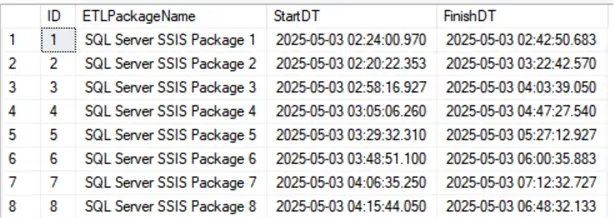
Calculate and Format Elapsed Time Between Two Datetime Fields in hh:mi:ss Format
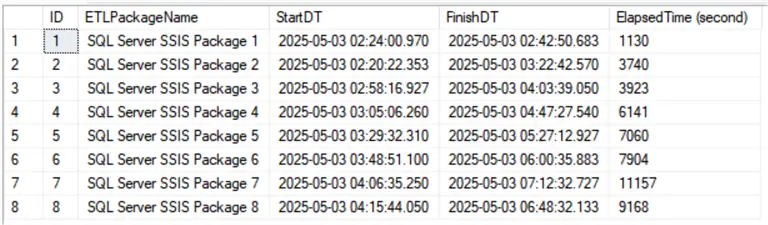
To calculate the length of time that has elapsed between StartDT to FinishDT for each SQL Server SSIS package, we can first use SQL Server’s DATEDIFF function specifying seconds as the datepart unit. This will return the result as an integer value of the time difference in seconds. The demonstration query and output follow:
Query Example with total seconds:
SELECT ID, ETLPackageName, StartDT, FinishDT, DATEDIFF(SECOND, StartDT, FinishDT) as 'ElapsedTime(second)'
FROM ETLProcessTrackingLog
Output:
Looking at the data, 1130 seconds or 11157 seconds are not an easy to absorb number format for time duration when the numbers get large.
Query Example show output using datetime:
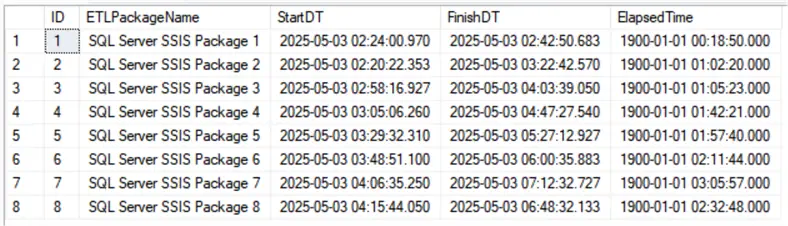
We need to present the duration in a more user-friendly way. To achieve that, we can cast the integer back to a datetime datatype.
SELECT ID, ETLPackageName, StartDT, FinishDT, DATEADD(SECOND, DATEDIFF(SECOND, StartDT, FinishDT), 0) as 'ElapsedTime'
FROM ETLProcessTrackingLog
Output:
Here we can use the time difference returned as a date but it also includes the year, month and day. Since these are the same day, the output shows 1900-01-01 which equates to a value of 0. Not exactly what we want.
Query Example show output in hh:mi:ss format:
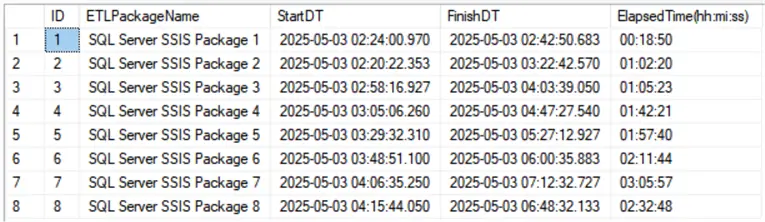
Finally, we can use SQL Convert to represent the duration in hh:mi:ss format:
SELECT ID, ETLPackageName, StartDT, FinishDT,
CONVERT(VARCHAR(8), DATEADD(SECOND,DATEDIFF(SECOND, StartDT, FinishDT), 0), 108) AS 'ElapsedTime(hh:mi:ss)'
FROM ETLProcessTrackingLog
Output:
Now we get the output in hh:mi:ss output.
Truncate vs Round from hh:mi:ss to hh:mi
Sometimes we need to know how many hours and minutes have elapsed, so the result must be in hh:mi format instead of hh:mi:ss. Here we can either truncate the time to the minute or round up or down seconds to the nearest minute.
Truncate seconds
To truncate the time duration to minutes, change CONVERT VARCHAR(8) to CONVERT VARCHAR(5) to format the result in hh:mi format.
SELECT ID, StartDT, FinishDT,
CONVERT(VARCHAR(8), DATEADD(SECOND,DATEDIFF(SECOND, StartDT, FinishDT), 0), 108) AS 'ElapsedTime(hh:mi:ss)',
CONVERT(VARCHAR(5), DATEADD(SECOND,DATEDIFF(SECOND, StartDT, FinishDT), 0), 108) AS 'ElapsedTimeTruncate(hh:mi)'
FROM ETLProcessTrackingLog
Output:
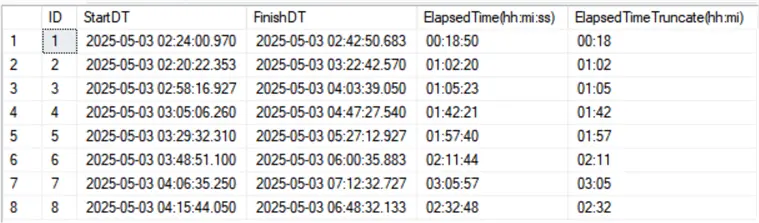
Notice that the above truncate method doesn’t take seconds into account; it only drops the seconds. For example, the elapsed time for ID 2 shows 2 minutes, 20 seconds have elapsed, but the truncate only shows the 2 minutes. Additionally, 18 minutes, 50 seconds appear for row ID 1, but the truncated time shows only 18 minutes have elapsed.
Round seconds
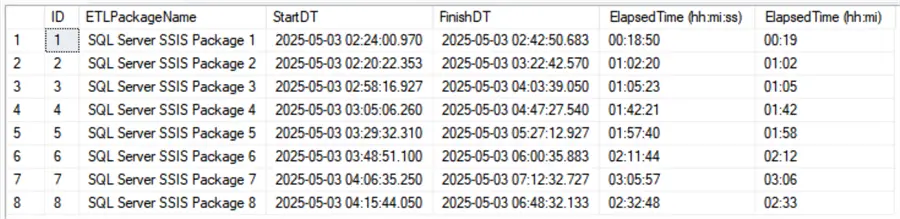
To show the time in hh:mi format more accurately, we need to round the time to the nearest minute. So, 00:18:50 will round up to 00:19, and 01:02:20 rounds down to 01:02.
A simple, efficient, and elegant way to round the time to the nearest minute is by adding half a minute (30 seconds) to the time duration. To do this, add up the value to the minute, then discard the seconds and milliseconds. See demonstration below:
DECLARE @dt datetime
SET @dt = '2025-05-05 16:46:05.850'
SELECT @dt As OriginalDT, DATEADD(mi, DATEDIFF(mi, 0, DATEADD(s, 30, @dt)), 0) AS RoundDT

SET @dt = '2025-05-05 16:46:56.430'
SELECT @dt As OriginalDT, DATEADD(mi, DATEDIFF(mi, 0, DATEADD(s, 30, @dt)), 0) AS RoundDT
Output:
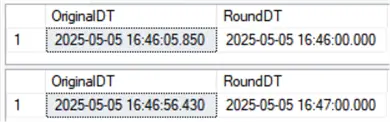
Round seconds refined query
We can use this rounding method to present our sample time elapsed in hh:mi format. Here, we only need to CONVERT to VARCHAR(5):
SELECT ID, ETLPackageName, StartDT, FinishDT,
CONVERT(VARCHAR(8), DATEADD(SECOND, DATEDIFF(SECOND, StartDT, FinishDT), 0), 108) as 'ElapsedTime (hh:mi:ss)',
CONVERT(VARCHAR(5), DATEADD(mi, DATEDIFF(mi, 0, DATEADD(s, 30, DATEADD(SECOND, DATEDIFF(SECOND, StartDT, FinishDT), 0))), 0), 108) as 'ElapsedTime (hh:mi)'
FROM ETLProcessTrackingLog
Output:
Create Time Duration Rounding and Formatting Function
Although the above T-SQL scripts to convert and round time duration in hh:mi:ss and hh:mi format work well, the codes are a bit complex to read, thus making them difficult or impractical to be reused in other parts of the codebase.
We can create user-defined functions to improve readability and reusability by encapsulating data and related functionalities within a well-defined structure.
Function to Convert Time Difference to hh:mi:ss
First, let’s create a user-defined function for converting time duration in hh:mi:ss format (below):
CREATE FUNCTION [dbo].[UDFConvertTimeDurationToHHMISS]
(
    @StartDT DATETIME,
    @FinishDT DATETIME
)
RETURNS VARCHAR(8)
AS
BEGIN
    RETURN
 CONVERT(VARCHAR(8), DATEADD(SECOND, DATEDIFF(SECOND, @StartDT, @FinishDT), 0), 108)
END

GO
Function to Convert Time Difference to hh:mi
Then, we will create another user-defined function for rounding time duration to the nearest minute in hh:mi format, as seen below:
CREATE FUNCTION [dbo].[UDFRoundTimeDurationToHHMI]
(
    @StartDT DATETIME,
    @FinishDT DATETIME
)
RETURNS VARCHAR(5)
AS
BEGIN
    RETURN
 CONVERT(VARCHAR(5), DATEADD(mi, DATEDIFF(mi, 0, DATEADD(s, 30, DATEADD(SECOND,DATEDIFF(SECOND, @StartDT, @FinishDT), 0))), 0), 108)
END

GO
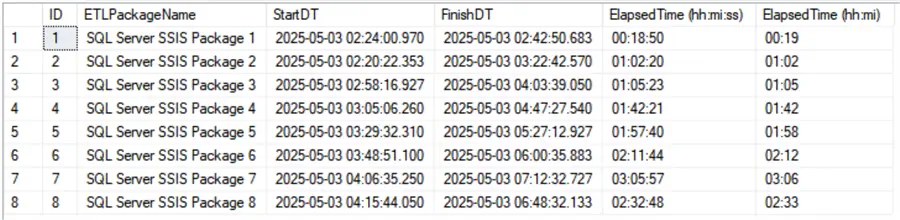
Now, we can use the two user-defined functions to calculate the time elapsed between the start and finish timestamps and put the results in hh:mi:ss and hh:mi format.
Query Example:
SELECT ID, ETLPackageName, StartDT, FinishDT,
  [dbo].[UDFConvertTimeDurationToHHMISS] (StartDT, FinishDT) AS 'ElapsedTime (hh:mi:ss)',
  [dbo].[UDFRoundTimeDurationToHHMI] (StartDT, FinishDT) AS 'ElapsedTime (hh:mi)'
FROM ETLProcessTrackingLog
Output:
Next Steps
- Please read the tip Learn about SQL Date Data Types – Date, DateTime, DateTime2, Time for more information on SQL Server’s various date and time data types.
- For more SQL Server convert date and time styles, please check Microsoft documentation: CAST and CONVERT.
- Here are more articles related to CAST and CONVERT.

Sean Lee has been a SQL Server Database Administrator for over 20 years. He has worked primarily with SQL Server database administration and development, data warehouse design, data analytics and data-intensive .NET application architecting and programming.
He obtained his Microsoft Certified Solutions Expert (MCSE): Data Management and Analytics in 2016.
Sean Lee is also the founder of SharpSQL.com which provides Microsoft SQL Server, Power BI and data science related training courses and resources.


