By: Jugal Shah | Comments (2) | Related: > Dynamic Management Views and Functions
Problem
Many times we want to split a string into an array and get a list of each word separately. The sys.dm_fts_parser function will help us in these cases. More over, this function will also differentiate the noise words and exact match words. The sys.dm_fts_parser can be also very powerful for debugging purposes. It can help you check how the word breaker and stemmer works for a given input for Full Text Search.
Solution
In SQL 2008 and forward, with Integrated Full Text Search (iFTS) we can now very easily split words in an array of strings with the help of the dynamic management function sys.dm_fts_parser. This function takes a full text query and breaks it up using the word breaker rules, applies stop lists and any configured thesaurus.
Permission Required
This requires membership of the sysadmin fixed server role and access rights to the specified stoplist.
Syntax
sys.dm_fts_parser('query_string', lcid, stoplist_id, accent_sensitivity)
| Parameter | Description |
|---|---|
| query_string | Query string that you want to parse. Query string can include logical operators,inflectional forms and thesaurus. |
| lcid | Locale identifier (LCID) of the word breaker |
| stoplist_id | stoplist_id accepts the Int value only. stoplist_id is used by the word breaker identified by lcid. If we specify NULL not stoplist will be used. If we specify 0 than the system STOPLIST will be used. |
| accent_sensitivity | Accepts the Boolean value only, 0 is for Insensitive and 1 is for sensitive. |
Examples
FORMSOF( THESAURUS, query_string)
You can check how the thesaurus expands or replaces all or part of the input using the below query
SELECT * FROM sys.dm_fts_parser ('FORMSOF( THESAURUS, "Management Studio")', 2057, 0, 0) 
FORMSOF( INFLECTIONAL, query_string)
To check how the word breaker and the stemmer parse a query term and its stemming forms, you can execute the below query.
SELECT * FROM sys.dm_fts_parser ('FORMSOF( INFLECTIONAL, "Operating System")', 2057, 0, 0) Output
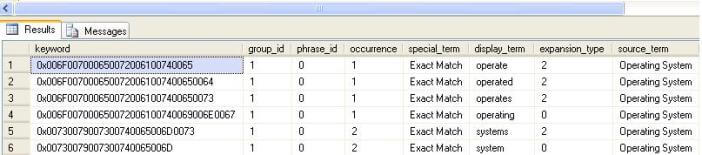
sys.dm_fts_parser('query_string', lcid, stoplist_id, accent_sensitivity)
This query will split the words in a string.
SELECT * FROM sys.dm_fts_parser ('SQL or MySQL or Oracle or DB or technologies or the or dbservers', 1033, 0, 0) Output
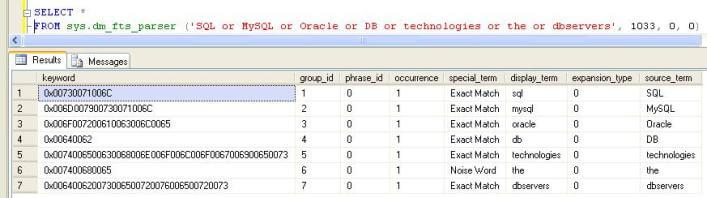
Next Steps
- Use the special character in the query string and test the output
- Use this function with a table using a Cross Apply join






About the author
 Jugal Shah has 8+ years of extensive SQL Server experience and has worked on SQL Server 2000, 2005, 2008 and 2008 R2.
This author pledges the content of this article is based on professional experience and not AI generated.
View all my tips
