By: Jugal Shah | Comments (12) | Related: 1 | 2 | > SQL Server Management Studio
Problem
There may be times when IntelliSense in SQL Server Management Studio 2008 is not working or does not display the latest schema changes. To resolve these issues you can follow the below solution.
Solution
One of the new features of SSMS 2008 is IntelliSense. IntelliSense is a feature which reads internal metadata and provides a list of available objects and properties while you are writing T-SQL. Sometimes IntelliSense does not work when using SQL Server Management Studio 2008. To fix this you can follow the below steps.
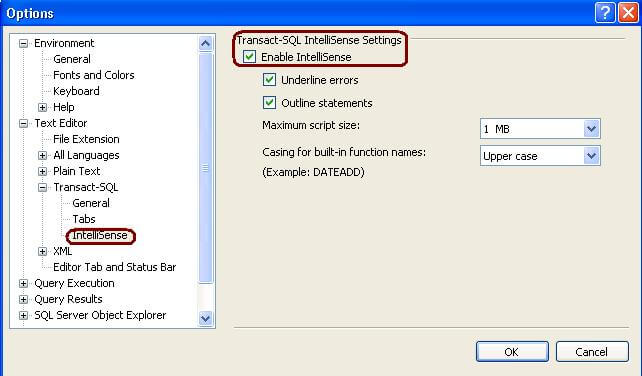
Step 1: Go to Tools > Options > Text Editor > Transact-SQL > IntelliSense and make sure the Enable IntelliSense checkbox is checked
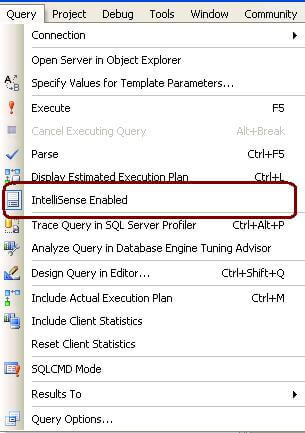
Step 2: To verify that it is enabled, go to the Query menu and check that IntelliSense is enabled as shown below.
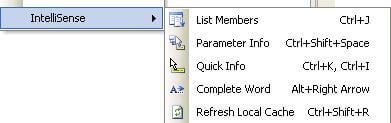
Step 3: If you are unable to see the IntelliSense for the latest schema changes then from a query window, go to Edit -> IntelliSense -> Refresh Local Cache. You can also use the Ctrl + Shift + R shortcut to refresh the cache.
Next Steps
- Use this tip to refresh the IntelliSense data for newly created objects
- Remember you can use the CTRL + SHIFT + R shortcut when you change database objects
- Note: IntelliSense does not work for earlier versions of SQL Server prior to SQL Server 2008






About the author
 Jugal Shah has 8+ years of extensive SQL Server experience and has worked on SQL Server 2000, 2005, 2008 and 2008 R2.
This author pledges the content of this article is based on professional experience and not AI generated.
View all my tips
