By: Murali Krishnan | Comments (4) | Related: > Replication
Problem
One of my clients contacted me about replicating data to non SQL Server databases. My client has a new business partner whose application runs on an Oracle database. Part of the business deal is to replicate data between the two environments. We are already using SQL Server to SQL Server replication and in this tip I cover some of the options available to replicate data between SQL Server and non SQL Server databases.
Solution
Considering the existing availability of replication in SQL Server and the need to support the new business partner, I suggested the use of Heterogeneous Replication. This type of replication allows Oracle to be a subscriber or a publisher.
Heterogeneous Replication
As you may know, a typical replication setup consists of a publisher, distributor and at least one subscriber. Heterogeneous replication works basically the same way, but means having a Non-SQL Server in the role of publisher or subscriber.
In previous versions, SQL Server supported only Non-SQL Server subscribers, but from SQL Server 2005 onwards, publishing data from Oracle was introduced as one of the enhancements to heterogeneous replication. Regarding enhancements, more information can be reviewed in this article.
SQL Server supports heterogeneous replication for both Transactional and Snapshot replication. With this feature, we are able to use SQL Server replication benefits even when there are different types of databases in the business environment.
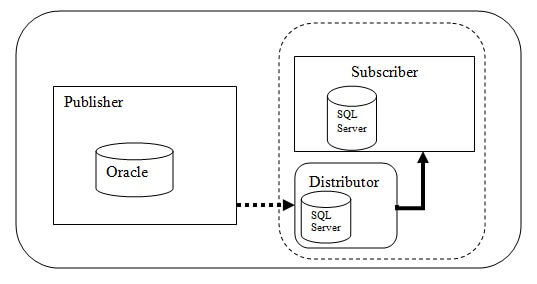
The below image illustrates heterogeneous replication with Oracle as a publisher.
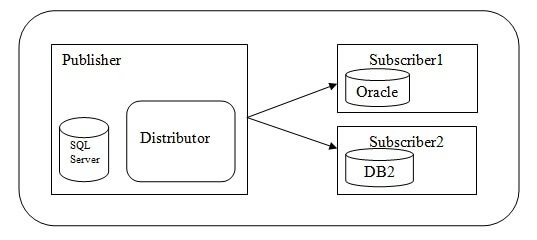
The below image illustrates heterogeneous replication with Oracle and/or DB2 as a subscriber.
Non-SQL Server Publishers:
In the SQL Server replication topology, the Non-SQL Server publisher can be an Oracle database. This means that Oracle can take on the publisher role. The detail steps and administrative considerations for configuring an Oracle publisher can be viewed in this article.. In addition to this, when we place Oracle in the publisher role, there are a few design consideration and limitations like an objects maximum size, case sensitivity, etc... The complete guidelines can be read in this MSDN library article.
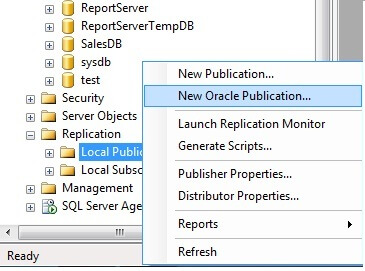
In SQL Server Management Studio, we have an option for creating an Oracle publisher as shown in the below image.
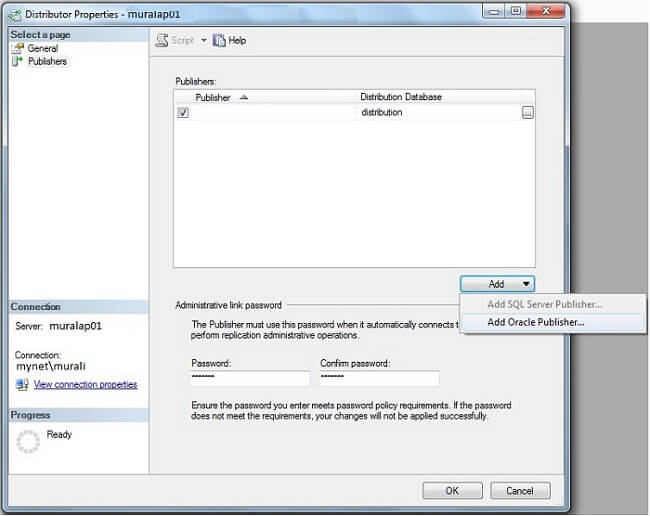
We need to configure Oracle as a publisher in the SQL Server distributor. When we do this, a linked server is created and configured with the Oracle database which is going to be used by replication. The below screen shot is the distributor and publisher mapping wizard.
Non-SQL Server Subscribers:
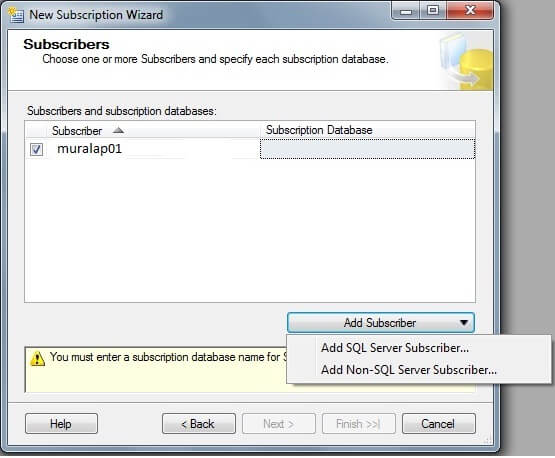
A Non-SQL Server subscriber can be Oracle or IBM DB2. In this type of replication, the subscription must be a PUSH type where all the replication agents and distributor agents are running at the publisher. Also in this type of implementation, there are a few design and constraint considerations such as how NULL and NOT NULL are handled between the different database platforms. More information can be found in this article.
In SQL Server Management Studio, there is a subscription wizard with options for Non-SQL Server subscribers as shown in the below screen shot.
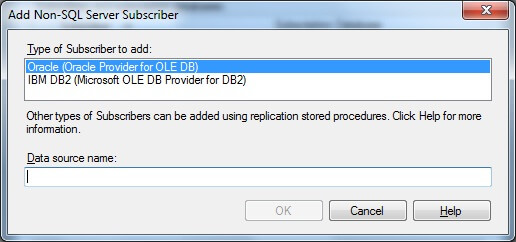
After the 'Add Non-SQL Server Subscriber' option is selected, on the next screen you will see a list for types of Non-SQL Server subscribers. (As of now, SQL Server 2008 supports Oracle and IBM DB2 with OLE DB Provider.)
Things to note:
- Publishing data from Oracle to SQL Server is only available in SQL Server Enterprise Edition.
- Non-SQL Server subscribers (Oracle / DB2 ) is available in both the Standard and Enterprise editions.
- Heterogeneous replication is a good option when we need to provide immediate updates to other databases such as Oracle and DB2. Using the built-in replication process eliminates the need for additional development and validation procedures. There are still design considerations and limitations, such as the maximum size limits and how NULLs are handled, so there is a need for in-depth analysis when using heterogeneous replication.
- When setting up Oracle as publisher, changes are tracked by creating triggers and tracking tables for each published table in the Oracle database. When data gets changed in the published table, the triggers on the table fire and update the required information into the tracking tables for each action. The Log Reader Agent on the SQL Server Distributor updates the information in the Distributor database from these Oracle tracking tables. The Distribution Agent then updates Subscribers with the necessary information.
Next Steps
- Read this overview of Heterogeneous Database Replication - SQL Server 2008
- Step by step procedures to implement Oracle as a publisher
- How to create a subscription for a Non-SQL Server Subscriber
- Review MSSQLTips category: Replication






About the author
 Murali Krishnan is a Lead Consultant with vast experience in Database/BI Design, Development and Administration.
This author pledges the content of this article is based on professional experience and not AI generated.
View all my tips
