By: Jugal Shah | Comments (16) | Related: 1 | 2 | 3 | 4 | 5 | 6 | 7 | 8 | > SQL Server Configurations
Problem
In this tip we look at the steps within SQL Server you need to follow if you change the physical server name for a standalone SQL Server.
Solution
As you may know, the internal SQL Server name is based on the physical server name, but changing the physical server name does not update the metadata within SQL Server.
When connecting to SQL Server, we use the physical server name for the default instance and physical server name\INSTANCE Name for a named instance. If you change the physical server name, there is no need to re-install SQL Server to reset the physical server name. You can follow the below steps to update the SQL Server system metadata which stores the physical server name in sys.servers.
The below solution works for default and named SQL instances on a standalone machine (non-clustered). Also, you need to follow the steps for each SQL Server instance on the machine.
Pre Update Steps
Check for Remote Logins
- If remote logins exist you have to drop them first, if you do not drop the remote logins you will get the below error when executing the sp_dropserver stored procedure.
Msg 15190, Level 16, State 1, Procedure sp_dropserver, Line 56
There are still remote logins or linked logins for the server 'sqldbpool'.
- You can run this query to get a list of remote logins that exist on the server.
-- Query to check remote login
select
srl.remote_name as RemoteLoginName,
sss.srvname
from sys.remote_logins srl join sys.sysservers sss on srl.server_id = sss.srvid
-- Query to remove the remote login
--Default Instance
sp_dropremotelogin old_physical_server_name
GO
--Named Instance
sp_dropremotelogin 'old_physical_server_name\instancename'
GO
Check for Replication
- SQL Server does not support renaming computers that are involved in replication. If the SQL Server is involved in replication you have to remove it first. If you do not remove replication, you will get the below error when updating SQL Server System metadata.
Msg 15185, Level 16, State 1, Procedure sp_dropremotelogin, Line 68
There is no remote user '(null)' mapped to local user '(null)' from the remote
server 'sqldbpool'.
- You can run this query to see if replication is in place. If so, you could script out the settings first so you can recreate afterwards and then remove replication.
-- Query to check if the SQL Instance databases are involved in replication
select name,is_published,is_subscribed,is_distributor from sys.databases
where is_published = 1 or is_subscribed =1 or is_distributor = 1
GO
Check for Reporting Services
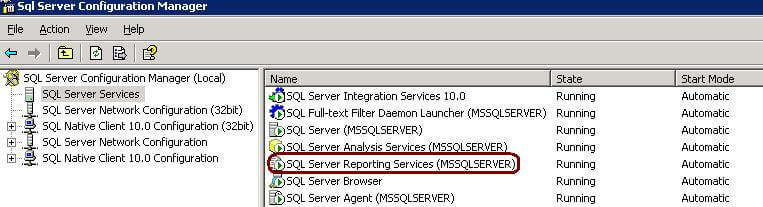
- If SQL Server Reporting Service is installed and configured, you have to first stop the Reporting Services service.
Check for Database Mirroring
- If database mirroring is enabled you have to remove mirroring and then re-establish mirroring once you have made the system metadata update.
--Query to find out the databases involved in DB mirroring
select database_id, db_name(database_id)
from sys.database_mirroring where mirroring_guid is not null
--Query to turn off the database mirroring
ALTER DATABASE SET PARTNER OFF
Steps to rename SQL Server
- Execute the below commands for each instance on the machine.
-- for a Default Instance
sp_dropserver <OLD_PHYSICAL_SERVER_NAME>
GO
sp_addserver <NEW_NAME>, local
GO

--for a Named Instance
sp_dropserver <'old_physical_server_name\instancename'>
GO
sp_addserver <'new_name\instancename'>, local
GO
- Restart the SQL Server services.
- Execute the below query in each instance to verify the updated system metadata.
SELECT @@SERVERNAME
Post Update Steps
- Add the remote logins using the sp_addremotelogin command.
sp_addremotelogin [ @remoteserver = ] 'remoteserver'
     [ , [ @loginame = ] 'login' ]
          [ , [ @remotename = ] 'remote_name' ]
- Reconfigure Replication if this was setup.
- Reconfigure Database Mirroring if this was setup.
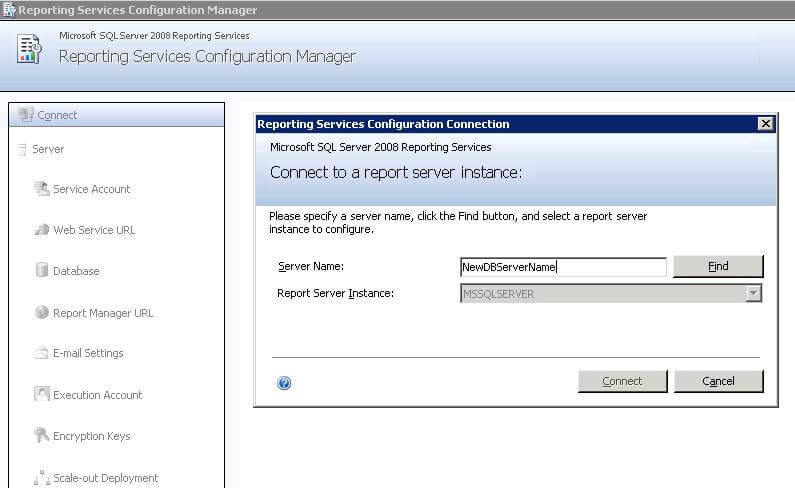
- Reconfigure Reporting Services if this was setup and connect to the new server name as shown below.
- If you also changed the Report Server computer name, you will have to edit the RSReportServer.config file and update the URLRoot setting. Do to this, open the RSWebApplication.config file and modify the ReportServerUrl setting to reflect the new server name.
Next Steps
- Change application connection strings pointing to the server
- Change linked servers pointing to the server






About the author
 Jugal Shah has 8+ years of extensive SQL Server experience and has worked on SQL Server 2000, 2005, 2008 and 2008 R2.
This author pledges the content of this article is based on professional experience and not AI generated.
View all my tips
