By: Ashish Kumar Mehta | Comments (2) | Related: 1 | 2 | > Functions System
Problem
SQL Server 2012 has a lot of new features to offer. A new set of features includes new Conversion Functions such as PARSE, TRY_PARSE and TRY_CONVERT which support data type casting and converting. In this tip we will take a look at these new conversion functions.
Solution
In this tip we will discuss how to utilize the below newly introduced Conversion Functions in SQL Server 2012.
1. PARSE Conversion Function
2. TRY_PARSE Conversion Function
3. TRY_CONVERT Conversion Function
PARSE Conversion Function
The PARSE function which is available in SQL Server 2012 can be used to convert any string value to a Numeric or to a Date and Time format. However, SQL Server 2012 will return an Error if it cannot convert a passed value to Numeric or to a Date and Time format. It is important to note the PARSE function relies on the presence of the .NET Framework Common Language Runtime (CLR).
To demonstrate this new conversion function, I will be using the StateProvinceCode column in the Person.StateProvince table of the AdventureWorks2008R2 database which uses NCHAR(3) as the data type. In the snippet below you can see the StateProvinceCode column of Person.StateProvince table stores character data, but we have both a character value "CA" and an numeric value "86" stored in this column.
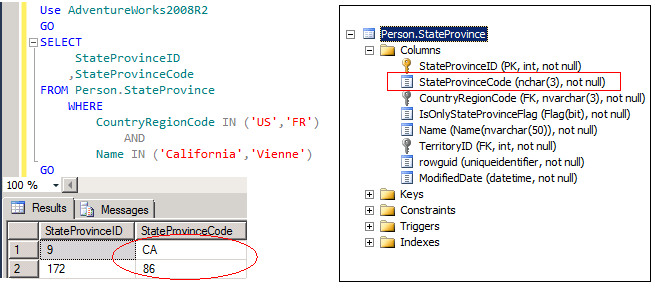
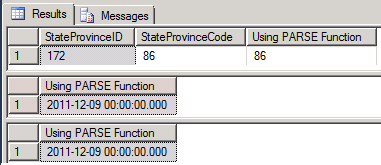
Let's execute the below TSQL code which will use the PARSE function to convert the StateProvinceCode column value to INT. Note that I am limiting the result set to a record that I know can be converted from character to integer otherwise this will error out.
Use AdventureWorks2008R2
GO
SELECT
  StateProvinceID
 ,StateProvinceCode
 ,PARSE(StateProvinceCode AS INT) AS [Using PARSE Function]
FROM Person.StateProvince
 WHERE
  CountryRegionCode IN ('FR')
   AND
  Name IN ('Vienne')
GO
/* Using PARSE Function to Convert String to Date Time */
SELECT PARSE('12/09/2011' AS datetime) AS [Using PARSE Function]
GO
SELECT PARSE('Friday, 09 December 2011' AS datetime USING 'en-US') AS [Using PARSE Function]
GO
TRY_PARSE Conversion Function
The TRY_PARSE function which is available in SQL Server 2012 can be used to convert any string value to a Numeric or to a Date and Time format. However, if SQL Server 2012 cannot convert a passed value to Numeric or to a Date and Time format, then it will return a NULL value rather than failing the entire TSQL code.
Use AdventureWorks2008R2
GO
SELECT
  StateProvinceID
 ,StateProvinceCode
 ,TRY_PARSE(StateProvinceCode AS INT) AS [Using TRY_PARSE Function]
FROM Person.StateProvince
WHERE
 CountryRegionCode IN ('US','FR')
  AND
 Name IN ('California','Vienne')
GO
/* Using PARSE Function to Convert String to Date Time */
SELECT TRY_PARSE('12/09/2011' AS datetime) AS [Using TRY_PARSE Function]
GO
SELECT TRY_PARSE('Friday, 09 December 2011' AS datetime USING 'en-US')
AS [Using TRY_PARSE Function]
GO
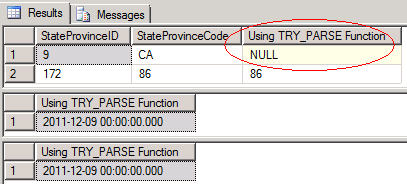
In the above snippet you can see that since SQL Server couldn't convert StateProvinceCode column value CA to an integer it returned a NULL value instead of failing the entire TSQL code.
TRY_CONVERT Conversion Function
The TRY_CONVERT function which is available in SQL Server 2012 takes the values passed to it and tries to convert it to a specified Data Type. If the conversion is successful then it will return the value as the specified data type. Otherwise it will return a NULL value. However if you request a conversion that is explicitly not permitted, then the TRY_CONVERT fails with an error.
Let's execute the below TSQL code wherein we are trying to convert NCHAR data type to INT using the CONVERT function which is available in the previous versions of SQL Server. You will notice that the conversion fails as StateProvinceCode column has both STRING and INT values.
Use AdventureWorks2008R2
GO
SELECT
  StateProvinceID
 ,StateProvinceCode
 ,CONVERT(INT,StateProvinceCode) AS [Using CONVERT Function]
FROM Person.StateProvince
WHERE
 CountryRegionCode IN ('US','FR')
  AND
 NAME IN ('California','Vienne')
GO
Error Message Msg 245, Level 16, State 1, Line 1 Conversion failed when converting the nvarchar value 'CA ' to data type int.
Now lets us execute the below TSQL code using the TRY_CONVERT function.
Use AdventureWorks2008R2
GO
SELECT
  StateProvinceID
 ,StateProvinceCode
 ,TRY_CONVERT(INT,StateProvinceCode) AS [Using TRY_CONVERT Function]
FROM Person.StateProvince
WHERE
 CountryRegionCode IN ('US','FR')
  AND
 Name IN ('California','Vienne')
GO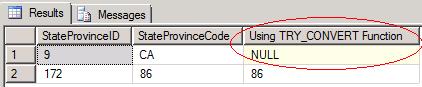
In the above snippet you can see that when we used the TRY_CONVERT function the query executed successfully and it returned a NULL value for StateProvinceCode value 'CA' since SQL Server cannot convert a String value to an Integer.
Next Steps
- Stay tuned for more tips on SQL Server 2012 and check out these related tips:






About the author
 Ashish Kumar Mehta has been contributing to the MSSQLTips.com community since 2009 with over 60 tips.
This author pledges the content of this article is based on professional experience and not AI generated.
View all my tips
