Free SQL Server Learning - Making the most out of SQL Server Agent
solving sql server problems for millions of dbas and developers since 2006


SQL Server DBA Tips SQL Server Developer Tips SQL Server Business Intelligence Tips SQL Server Career Tips SQL Server Tip Categories SQL Server Tutorials SQL Server Webcasts SQL Server Whitepapers SQL Server Tools SQL Server Questions and Answers MSSQLTips Authors About MSSQLTips SQL Server User Groups SQL Server Events I am MSSQLTips MSSQLTips Advertising Options

MSSQLTips Facebook Page MSSQLTips LinkedIn Page MSSQLTips RSS Feed MSSQLTips Pinterest Page MSSQLTips Twitter Page MSSQLTips Google+ Page


Identify blank and weak passwords for SQL Server logins

By:   |   Read Comments (8)   |   Related Tips: More > Security

Problem

I always wanted to find a way to track all SQL Server logins which have either the same password or a blank password. It's a precautionary measure to avoid any hacking as well as ensuring our SQL Server environment is secure. During one of my assignments, I found a Microsoft link to this function PWDCOMPARE, which can be used to find logins that have blank passwords, common passwords or the same password as the login name. Here I will explain how to use this function to find these password problems.

Solution

Microsoft always suggests you use complex and strong passwords. Weak or blank passwords are an invitation for security breaches.  We can use the PWDCOMPARE security function to find these types of logins and reset them with strong and complex passwords to avoid any type of security breach.

As per books online, PWDCOMPARE is the security function which basically hashes the password and compares the to hash to the existing password in the sys.syslogins table which is in the master database.

We will use this function to search for blank and weak passwords. We will pass two parameters 'text_password' and password_hash to run this function. It will return a "1" if the hash of the 'text_password' matches the password_hash parameter, and "0" if it does not match. We will put this function in a WHERE clause while accessing the logins from sys.sql_logins system catalog view.

Here is the process to find all such weak passwords.

Step 1

First we will create some logins with the same password, blank passwords and common passwords. Common means the same password is used for multiple logins. Here you can see wee created two logins, One is "mssqltips" with the same password as the login name and another one is "mssqltips_1" with a blank password. Also I created a user for each respective login and assigned them db_owner access on a database.

--Creating a Login which has same password as its login name. Then creating a user with same name 
--and assigned it db_owner access.
CREATE LOGIN mssqltips WITH PASSWORD='mssqltips'
, CHECK_POLICY=OFF
go
use KPO_Master
go
CREATE USER mssqltips for login mssqltips
go 
sp_addrolemember'db_owner',mssqltips
go
--Creating a Login without password. Then creating a user with same name and assigned it db_owner access.
CREATE LOGIN mssqltips_1 WITH PASSWORD=''
, CHECK_POLICY=OFF
go
use KPO_Master
go
CREATE USER mssqltips_1 for login mssqltips_1
go 
sp_addrolemember'db_owner',mssqltips_1
go

Step 2

Now to test for common passwords, I will create another login, "mssqltips_2" with the same password as the "mssqltips" login.

--Creating a Login with common password. Then creating a user with same name and assigned it 
--db_owner access.
CREATE LOGIN mssqltips_2 WITH PASSWORD='mssqltips'
, CHECK_POLICY=OFF
go
use KPO_Master
go
CREATE USER mssqltips_2 for login mssqltips_2
go 
sp_addrolemember'db_owner',mssqltips_2
go

Step 3

Now we can search for weak passwords on our SQL Server Instance.

Finding Common Passwords

Here we will get all logins which have common passwords. As the password is "mssqltips", we will pass this password into the PWDCOMPARE function to get all those logins. In the below screenshot, it's showing the two logins, mssqltips and mssqltips_2, have the same password. In this case, mssqltips is the password on this SQL Server Instance.

SELECT name,type_desc,create_date,modify_date,password_hash 
FROM sys.sql_logins 
WHERE PWDCOMPARE('mssqltips',password_hash)=1;
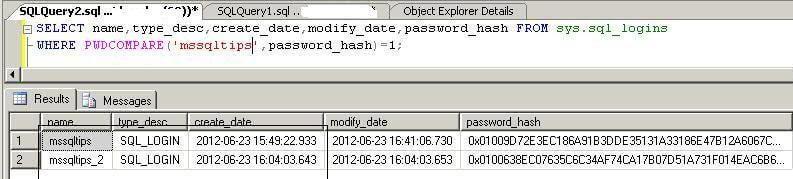
Finding common passwords from multiple logins

Finding Blank Passwords

Next we will find all logins that have blank passwords. As we are searching those logins, we will not pass any password into the security function PWDCOMPARE. Here you can see there is two logins which have a blank password which includes the one we created. This should be address immediately to make your instance more secure.

SELECT name,type_desc,create_date,modify_date,password_hash 
FROM sys.sql_logins 
WHERE PWDCOMPARE('',password_hash)=1;
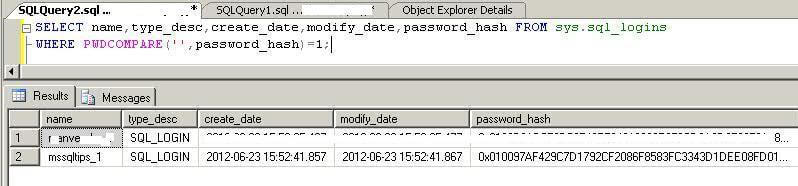
Find all logins with blank passwords

Finding Passwords that are the same as the Login name

Now to find all logins that have the same password as their login name. This is a very common scenario where people just create the login with the same password as the login name. Here we will pass the login name as the password text.

SELECT name,type_desc,create_date,modify_date,password_hash 
FROM sys.sql_logins 
WHERE PWDCOMPARE(name,password_hash)=1;

We can see there are four logins where the password matches the login name.
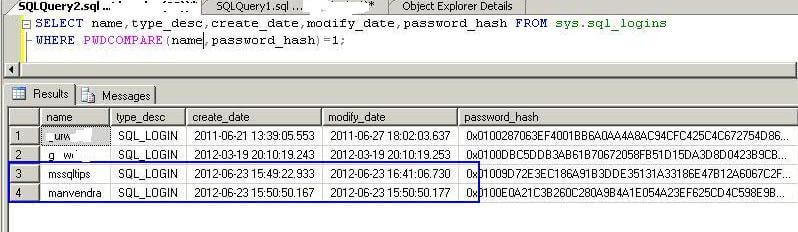
Find all logins with same password as their login name

Step 4

Now that you have identified logins that have either blank passwords or weak passwords, you can reset them with strong and complex passwords to make your environment more secure.

Next Steps


Last Update: 9/26/2012

About the author

Manvendra has over 5 years of experience with SQL Server and has focused on Database Mirroring, Replication, Log Shipping, etc.

View all my tips


Print  
Become a paid author


Comments and Feedback:

Wednesday, September 26, 2012 - 1:44:09 AM - Gopalakrishnan Arthanarisamy Read The Tip

Hi Manvendra,

Excelletn article to find logins with blank password, same login with the password. Great. Keep Going.


Gopalakrishnan Arthanarisamy,

SQL Server DBA, Unisys. Bangalore.


Wednesday, September 26, 2012 - 12:43:25 PM - Gene Wirchenko Read The Tip
This is a security issue then. SQL Server should not be using the same hash for each user. They should be salted differently. Sincerely, Gene Wirchenko

Wednesday, September 26, 2012 - 12:49:15 PM - Hashcat user Read The Tip

Kudos for doing password audits!  They're important in any environment where security is a factor, and are rarely done.

Doing them in SQL server, however, is extremely limiting - it's just not the right tool for the job. First, you probably need most of your CPU for other things (real work).  Second, you're not using GPU's.  Third, your code is only handling straight dictionary cracking (or perhaps straight brute force); not the more advanced, and more useful, rules based attacks.

SQL 2005-2008R2 use a single SHA-1 hash of the UCS-2 ("Unicode") password, while SQL 2012 uses a single SHA-512 hash.  None of this is a good practice - the hash should be done tens to hundreds of thousands of times or more, and it leaves weak passwords vulnerable.

A better tool for 2000-2008R2 is Hashcat (www.hashcat.net) and oclHashcat+ and oclHashcat-lite; 2012 support is coming out as well though it's apparently not quite here yet.  Alternately, Elcomsoft has paid software that has distributed options and a much easier UI.


Extract passwords with (SQL2000-2012):

SELECT LOGINPROPERTY(sys.syslogins.name,'PasswordHash') AS HashcatFormat
FROM sys.syslogins
LEFT OUTER JOIN sys.server_principals
ON sys.server_principals.sid = sys.syslogins.sid


Example hashcat (CPU) examples for SQL 2000-2008R2 passwords.

SQL2000_2008R2_brute_example.bat
rem for real use, the more comprehensive searches would apply to larger size passwords.
rem Very comprehensive 0-3 char search
hashcat-cli64 -m 131 -a 3 --pw-min 0 --pw-max 3 -1 ?a?h?D?F?R -o outSQL2000_2008R2_brute_example0_3.txt examples\A0.M131Unofficial.hash ?1?1?1
rem Upper Lower Number Symbol 4 char search
hashcat-cli64 -m 131 -a 3 --pw-min 4 --pw-max 4 -1 ?a -o outSQL2000_2008R2_brute_example4_4.txt examples\A0.M131Unofficial.hash ?1?1?1?1
rem Lower Number 5 char search
hashcat-cli64 -m 131 -a 3 --pw-min 5 --pw-max 5 -1 ?l?d -o outSQL2000_2008R2_brute_example5_5.txt examples\A0.M131Unofficial.hash ?1?1?1?1?1?1
rem limited lower case 6 char search with second position vowel
hashcat-cli64 -m 131 -a 3 --pw-min 6 --pw-max 6 -2 aeiou -o outSQL2000_2008R2_brute_example6_6.txt examples\A0.M131Unofficial.hash ?l?2?l?l?l?l
rem pathetically limited digit only 7-8 char search
hashcat-cli64 -m 131 -a 3 --pw-min 7 --pw-max 8 -1 ?d -o outSQL2000_2008R2_brute_example7_8.txt examples\A0.M131Unofficial.hash ?d?d?d?d?d?d?d?d
rem precision limited 9 char search to show what can be done if one guesses a prefix and assumes a single vowel in a logical position
hashcat-cli64 -m 131 -a 3 --pw-min 9 --pw-max 9 -1 ?l -3 aeiou -o outSQL2000_2008R2_brute_example9_9.txt examples\A0.M131Unofficial.hash DBA?1?3?1?1?1?1

SQL2000_2008R2_rules_example.bat
hashcat-cli64 -m 131 -a 1 -o outSQL2000_2008R2_rules_example.txt -r rules\d3ad0ne.rule examples\A0.M131Unofficial.hash examples\A0.M131UnofficialWithoutSuffix.word

SQL2000_2008R2_straight_example.bat
hashcat-cli64 -m 131 -a 1 -o outSQL2000_2008R2_straight_example.txt examples\A0.M131Unofficial.hash examples\A0.M131Unofficial.word


And a oclhashcat-plus example (very similar to hashcat)

oclhashcat-plus64 -m 132 -a 0 -o outSQL2005_2008R2_straight_example.txt hashcatexamples\A0.M132Unofficial.hash hashcatexamples\A0.M131Unofficial.word


Thursday, September 27, 2012 - 1:29:54 AM - Yadava Read The Tip

Hey very nice article..! Keep it up..!


Thursday, September 27, 2012 - 10:06:27 AM - SGolovko Read The Tip

Good article. Reminded me my old days with SQL Server 7/2000 :) I think the next step should be to set password policy for the login if you use SQL Server 2005 or higher.


Thursday, September 27, 2012 - 11:44:52 AM - tgrignon Read The Tip

Excellent article. Very useful for auditting.


Monday, October 01, 2012 - 11:44:54 AM - Ajay Read The Tip

Very good article.

Those who wants to extract logins with duplicate password can find my below script useful which shows the password and all logins related to that in column with 1 as the value if login_name column ha sduplicate password issue.

Regards,

Ajay

ww.bhaved.com


--======A report to list the logins with duplicate password =======

DECLARE @query varchar(4000) 

CREATE TABLE #weak_password_report

(

password_hash varbinary (256),

login_name    varchar(256)

)


INSERT INTO #weak_password_report

SELECT a.password_hash,

a.name FROM  

sys.sql_logins a

inner join  sys.sql_logins b

ON a.password_hash=b.password_hash

--and a.name <> b.name

GROUP BY  a.password_hash,a.name HAVING COUNT( a.password_hash)>1


--select * from #weak_password_report


/******* Extracting the column names to be used in the PIVOT report *******/


DECLARE @login_name varchar(2000)  

SELECT  @login_name = STUFF(( SELECT  


                         '],[' + login_name  


                         FROM    #weak_password_report  


                         ORDER BY '],[' + 

                         login_name


                         FOR XML PATH('')  


                         ), 1, 2, '') + ']' 

--select @login_name


/********************* Pivot Table *********************/

SET @query =  

'SELECT * FROM  

 (  

     SELECT password_hash,login_name  

     FROM #weak_password_report  

 )t  

 PIVOT (COUNT(login_name) FOR login_name  

 IN ('+@login_name+')) AS pvt' 


EXECUTE (@query) 

DROP TABLE #weak_password_report


Tuesday, October 09, 2012 - 12:53:52 PM - Sreenivas Reddy Read The Tip

Very nice one. It helps us a lot.


Post a Comment or Question

Keep it clean and stay on the subject or we may delete your comment.
Your email address is not published. Required fields are marked with an asterisk (*)

*Name   *Email Notify for updates

Signup for our newsletter


Comments
*Enter Code refresh code


Sponsor Information
"Amazing, Amazing, Amazing! SQL doctor is truly one of the most powerful tools I have seen."

NEW! Top 5 hard-earned lessons of a DBA from Grant Fritchey & the DBA Team. Read it now

Need SQL Server help and not sure where to turn? Reach out to expert consultants in the USA for a Health Check.

Join the over million SQL Server Professionals who get their issues resolved daily.

Free Webinar - Making the most out of SQL Server Agent with SQL Server MVP Jeremy Kadlec


Copyright (c) 2006-2013 Edgewood Solutions, LLC All rights reserved
privacy | disclaimer | copyright | advertise | about
authors | contribute | feedback | giveaways | user groups
Some names and products listed are the registered trademarks of their respective owners.


Edgewood Solutions LLC | MSSharePointTips.com | MSSQLTips.com