By: Ben Snaidero | Comments (26) | Related: 1 | 2 | 3 | 4 | > Temp Tables
Problem
If you've been a DBA for any amount of time I'm sure you've been asked the question: Which is better to use, a SQL Server temp table or a table variable? There are technical reasons why to use one over the other, but being that I am usually just interested in performance I am more concerned with which one will be faster and use fewer resources. In this tip we will compare the performance of a temp table vs a table variable using a few straightforward scenarios.
Solution
For those of us that aren't familiar with all the technical differences between the two objects here is a great tip that covers all you need to know regarding the differences between temporary tables and table variables.
SQL Server Table Setup for Performance Testing Temp Table vs Table Variable
For this test scenario we are going to load data into four tables, two will be temporary tables and two will be table variables. Each of these object groups will have one small table with only 2000 records and one larger one with 1000000 records so we can see if there are any differences based on the size of the temporary object as well.
-- Table creation logic
CREATE TABLE #temptable ([col1] [int] NOT NULL primary key,[col2] [int] NULL,
[col3] [int] NULL,[col4] [varchar](50) NULL)

DECLARE @tablevariable TABLE ([col1] [int] NOT NULL primary key,[col2] [int] NULL,
[col3] [int] NULL,[col4] [varchar](50) NULL)

CREATE TABLE #bigtemptable ([col1] [int] NOT NULL primary key,[col2] [int] NULL,
[col3] [int] NULL,[col4] [varchar](50) NULL)

DECLARE @bigtablevariable TABLE ([col1] [int] NOT NULL primary key,[col2] [int] NULL,
[col3] [int] NULL,[col4] [varchar](50) NULL)

-- Create index logic
CREATE NONCLUSTERED INDEX [IX_temptable] ON #temptable ([col2] ASC)
CREATE NONCLUSTERED INDEX [IX_bigtemptable] ON #bigtemptable ([col2] ASC)

-- Populate tables
DECLARE @val INT
SELECT @val=1
WHILE @val <= 2000
BEGIN
   INSERT INTO #temptable (col1, col2, col3, col4) VALUES (@val,@val,@val,'TEST')
   INSERT INTO @tablevariable (col1, col2, col3, col4) VALUES (@val,@val,@val,'TEST')
   INSERT INTO #bigtemptable (col1, col2, col3, col4) VALUES (@val,@val,@val,'TEST')
   INSERT INTO @bigtablevariable (col1, col2, col3, col4) VALUES (@val,@val,@val,'TEST')
   SELECT @val=@val+1
END
WHILE @val <= 1000000
BEGIN
   INSERT INTO #bigtemptable (col1, col2, col3, col4) VALUES (@val,@val,@val,'TEST')
   INSERT INTO @bigtablevariable (col1, col2, col3, col4) VALUES (@val,@val,@val,'TEST')
   SELECT @val=@val+1
END
Test Scenario for SQL Server Table Variables vs. Temp Tables Performance Testing
To test the performance of these objects we are going to run statements for each of the 4 basic DML operations, SELECT/INSERT/UPDATE/DELETE. For each operation we are going run statements that effect both single and multiple rows. We will also break up the statements so that each operation will test referencing primary key columns as well as non-key columns that are both indexed and not indexed. This will allow us to see how much benefit if any we get from having indexes on a column. Only temporary tables can have additional non-clustered indexes defined. Table variables can only have primary keys defined at creation so this may be an important factor to consider when it comes to performance. The comments inline within the script define what the statements are testing. Here is the code for all of our test scenarios.
-- simple insert
INSERT INTO #temptable (col1, col2, col3, col4) VALUES (2005,2005,2005,'TEST')
INSERT INTO @tablevariable (col1, col2, col3, col4) VALUES (2005,2005,2005,'TEST')
INSERT INTO #bigtemptable (col1, col2, col3, col4) VALUES (1000005,1000005,1000005,'TEST')
INSERT INTO @bigtablevariable (col1, col2, col3, col4) VALUES (1000005,1000005,1000005,'TEST')

-- select single row where primary key column equals value
SELECT * FROM #temptable where col1=1000
SELECT * FROM @tablevariable where col1=1000
SELECT * FROM #bigtemptable where col1=600000
SELECT * FROM @bigtablevariable where col1=600000

-- select range of rows where primary key column between values
SELECT * FROM #temptable where col1 between 450 and 500
SELECT * FROM @tablevariable where col1 between 450 and 500
SELECT * FROM #bigtemptable where col1 between 100000 and 100500
SELECT * FROM @bigtablevariable where col1 between 100000 and 100500

-- select single row where other indexed column equals value
SELECT * FROM #temptable where col2=1050
SELECT * FROM @tablevariable where col2=1050
SELECT * FROM #bigtemptable where col2=650000
SELECT * FROM @bigtablevariable where col2=650000

-- select range of rows where other indexed column between values
SELECT * FROM #temptable where col2 between 500 and 550
SELECT * FROM @tablevariable where col2 between 500 and 550
SELECT * FROM #bigtemptable where col2 between 150000 and 150500
SELECT * FROM @bigtablevariable where col2 between 150000 and 150500

-- select single row where other nonindexed column equals value
SELECT * FROM #temptable where col3=1100
SELECT * FROM @tablevariable where col3=1100
SELECT * FROM #bigtemptable where col3=700000
SELECT * FROM @bigtablevariable where col3=700000

-- select range of rows where other nonindexed column between values
SELECT * FROM #temptable where col3 between 550 and 600
SELECT * FROM @tablevariable where col3 between 550 and 600
SELECT * FROM #bigtemptable where col3 between 200000 and 200500
SELECT * FROM @bigtablevariable where col3 between 200000 and 200500

-- update single row where primary key column equals value
UPDATE #temptable set col4='TESTUPDATE' where col1=1150
UPDATE @tablevariable set col4='TESTUPDATE' where col1=1150
UPDATE #bigtemptable set col4='TESTUPDATE' where col1=750000
UPDATE @bigtablevariable set col4='TESTUPDATE' where col1=750000

-- update range of rows where primary key column between values
UPDATE #temptable set col4='TESTUPDATE' where col1 between 600 and 650
UPDATE @tablevariable set col4='TESTUPDATE' where col1 between 600 and 650
UPDATE #bigtemptable set col4='TESTUPDATE' where col1 between 250000 and 250500
UPDATE @bigtablevariable set col4='TESTUPDATE' where col1 between 250000 and 250500

-- update single row where other indexed column equals value
UPDATE #temptable set col4='TESTUPDATE' where col2=1200
UPDATE @tablevariable set col4='TESTUPDATE' where col2=1200
UPDATE #bigtemptable set col4='TESTUPDATE' where col2=800000
UPDATE @bigtablevariable set col4='TESTUPDATE' where col2=800000

-- update range of rows where other indexed column between values
UPDATE #temptable set col4='TESTUPDATE' where col2 between 650 and 700
UPDATE @tablevariable set col4='TESTUPDATE' where col2 between 650 and 700
UPDATE #bigtemptable set col4='TESTUPDATE' where col2 between 300000 and 300500
UPDATE @bigtablevariable set col4='TESTUPDATE' where col2 between 300000 and 300500

-- update single row where other nonindexed column equals value
UPDATE #temptable set col4='TESTUPDATE' where col3=1250
UPDATE @tablevariable set col4='TESTUPDATE' where col3=1250
UPDATE #bigtemptable set col4='TESTUPDATE' where col3=850000
UPDATE @bigtablevariable set col4='TESTUPDATE' where col3=850000

-- update range of rows where other nonindexed column between values
UPDATE #temptable set col4='TESTUPDATE' where col3 between 700 and 750
UPDATE @tablevariable set col4='TESTUPDATE' where col3 between 700 and 750
UPDATE #bigtemptable set col4='TESTUPDATE' where col3 between 350000 and 350500
UPDATE @bigtablevariable set col4='TESTUPDATE' where col3 between 350000 and 350500

-- delete single row where primary key column equals value
DELETE FROM #temptable where col1=1300
DELETE FROM @tablevariable where col1=1300
DELETE FROM #bigtemptable where col1=900000
DELETE FROM @bigtablevariable where col1=900000

-- delete range rows where primary key column between values
DELETE FROM #temptable where col1 between 750 and 800
DELETE FROM @tablevariable where col1 between 750 and 800
DELETE FROM #bigtemptable where col1 between 400000 and 400500
DELETE FROM @bigtablevariable where col1 between 400000 and 400500

-- delete single row where other indexed column equals value
DELETE FROM #temptable where col2=1350
DELETE FROM @tablevariable where col2=1350
DELETE FROM #bigtemptable where col2=950000
DELETE FROM @bigtablevariable where col2=950000

-- delete range of rows where other indexed column between values
DELETE FROM #temptable where col2 between 800 and 850
DELETE FROM @tablevariable where col2 between 800 and 850
DELETE FROM #bigtemptable where col2 between 450000 and 450500
DELETE FROM @bigtablevariable where col2 between 450000 and 450500

-- delete single row where other nonindexed column equals value
DELETE FROM #temptable where col3=1400
DELETE FROM @tablevariable where col3=1400
DELETE FROM #bigtemptable where col3=1000000
DELETE FROM @bigtablevariable where col3=1000000

-- delete range of rows where other nonindexed column values
DELETE FROM #temptable where col3 between 900 and 950
DELETE FROM @tablevariable where col3 between 900 and 950
DELETE FROM #bigtemptable where col3 between 500000 and 500500
DELETE FROM @bigtablevariable where col3 between 500000 and 500500
Note: This script must be run in a single batch (table setup and test scenario) as the scope of the table variables are limited to the current batch of sql statements.
Test Scenario Results for SQL Server Temp Tables vs. Table Variables
INSERT statement results for SQL Server Performance Testing of Temp Tables vs. Table Variables

The SQL Profiler trace from the INSERT statements show that the table variable outperforms the temporary table whether dealing with a small or large temporary object. This can probably be attributed to the fact that the temporary table has an extra index on the table that needs to be updated as well.
SELECT statement results for SQL Server Performance Testing of Temp Tables vs. Table Variables
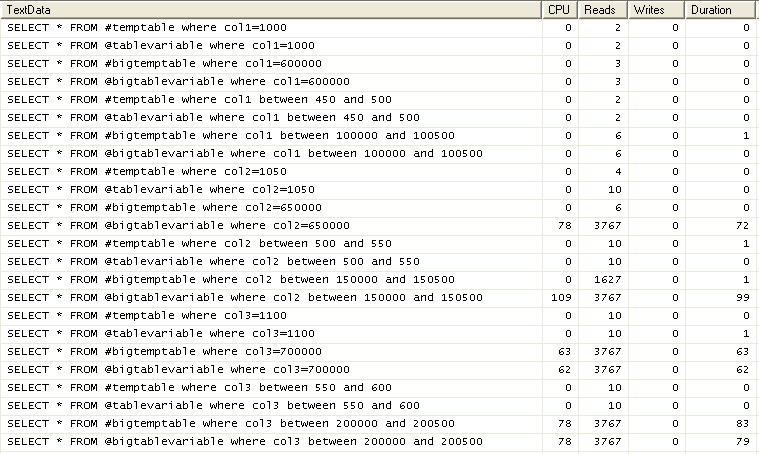
The SQL Profiler trace from the SELECT statements tell a different story. When querying rows based on the primary key column or the non-indexed column we get the same performance from both objects. However, when we query rows using the indexed column of the temporary table, which is not indexed in the table variable since this is not available for table variables, we see a really big increase in performance across all measures for the temporary table. In fact, using this index to query a specific value from the temporary table yields almost the same performance regardless of the size of the table.
UPDATE statement results for SQL Server Performance Testing of Temp Tables vs. Table Variables
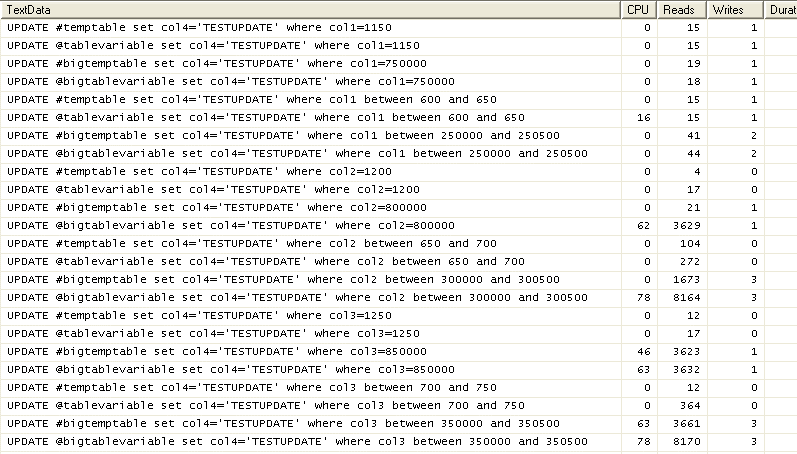
The SQL Profiler trace from the UPDATE statements shows a similar trend to that of the SELECT statements. When updating rows based on either the primary key or non-indexed column the performance is similar. When updating rows based on the indexed column the temporary table performs quite a bit better.
DELETE statement results for SQL Server Performance Testing of Temp Tables vs. Table Variables
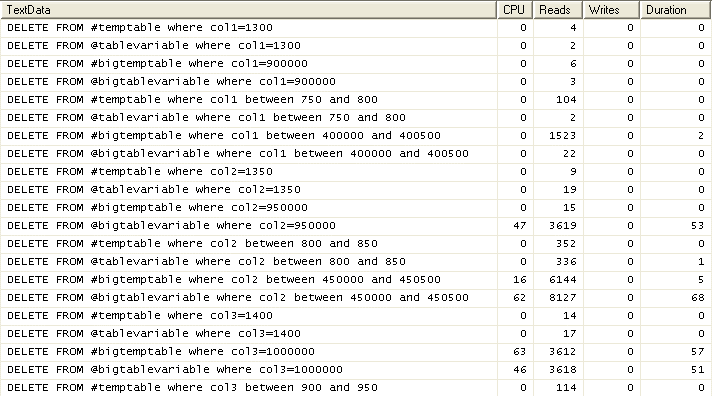
With the SQL Profiler trace for the DELETE statements we see an interesting result. When deleting rows based on the primary key the table variable outperforms the temporary table. As with the SQL Profiler results of the INSERT statement this is probably due to the fact that an extra index has to be updated. As with the other scenarios when deleting based on the indexed column the temporary table performs better than the table variable. When deleting rows based on the column with no index we see similar performance between the two objects with the temporary table only slightly better when dealing with a range of records. One thing I want to add with regards DELETEs is that I would not be as concerned with its performance since in most cases if you don't need the data in your temporary object then you can exclude it when performing the SELECT/INSERT rather than removing it after the fact.
Summary of Performance Testing for SQL Server Temp Tables vs. Table Variables
As we can see from the results above a temporary table generally provides better performance than a table variable. The only time this is not the case is when doing an INSERT and a few types of DELETE conditions. This increase in performance is especially evident when dealing with larger data sets as the ability to create indexes on the temporary table speeds up query execution significantly. When the data set is small the difference in performance is almost negligible. In my opinion if you are doing a lot of data manipulation with the temporary object after it has been created and the data set is fairly large a temporary table is the best option. As always it's best to test yourself to confirm which object gives you the best performance for your particular application.
Next Steps
- Perform further testing to check performance and determine the best option for your use cases.
- More information on temporary tables and table variables:
- Use a derived table in some cases as an alternative to temporary tables or table variables.






About the author
 Ben Snaidero has been a SQL Server and Oracle DBA for over 10 years and focuses on performance tuning.
This author pledges the content of this article is based on professional experience and not AI generated.
View all my tips
