By: Greg Robidoux | Comments (21) | Related: 1 | 2 | 3 | 4 | More > Database Administration
Problem
One crucial aspect of all databases is the transaction log. The transaction log is used to write all transactions prior to committing the data to the data file. In some circumstances the transaction logs can get quite large and not knowing what is in the transaction log or how much space is being used can become a problem. So how to you determine how much of the transaction log is being used and what portions are being used?
Solution
In most databases, the transaction log is generally just one (ldf) file, but inside the overall transaction log is a series of virtual log files as depicted below.
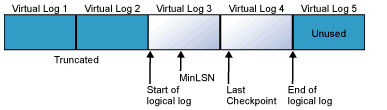
source (SQL Server Books Online)
The way the transaction log is used is that each virtual log file is written to and when the data is committed and a checkpoint occurs the space becomes useable again. Although this does depend on your database recovery model, whether you are using replication and your backup processing. If there are no additional virtual logs available, SQL Server will grow the transaction log, based on your database settings, to accommodate the additional space that is required.
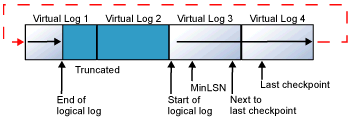
source (SQL Server Books Online)
The use of the file and the virtual logs all depends on how the database is used and other settings you have enabled in your database. If you are publishing data from this database or if the database is set to the Full or Bulk-Logged recovery mode, this will also affect whether the process loops back to the beginning of the file, if it uses the next available virtual log or it if needs to grow the transaction log and create additional virtual logs.
Get space used by transaction logs using DBCC SQLPERF(logspace)
One command that is extremely helpful in understanding how much of the transaction log is being used is DBCC SQLPERF(logspace). This one command will give you details about the current size of all of your database transaction logs as well as the percent currently in use. Running this command on a periodic basis will give you a good idea of how the transaction logs are being used and also give you an idea on how large they should really be. This is a question that is often asked by a lot of people that use SQL Server and as you run this you will find out there is no perfect answer it all depends on a lot of criteria such as:
- recovery model
- size of the transactions
- how large your tables are and therefore how much space is needed for index maintenance
- how frequently you run transaction log backups
- whether the database is published or not
- etc.
To run this command issue the following in a query window:
This is sample output:
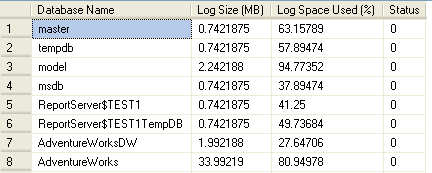
From here we can see the size of the transaction logs as well as how much space is being used. The current log space used will tell you how much of the transaction log is being used. If this percentage is high and the size of the log is quite big it is probably due to one of the items listed above.
Getting information about SQL Server virtual logs using DBCC LOGINFO
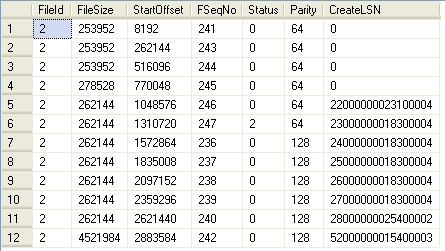
The next command to look at is DBCC LOGINFO. This will give you information about your virtual logs inside your transaction log. The primary thing to look at here is the Status column. Since this file is written sequentially and then looped back to the beginning, you want to take a look at where the value of "2" is in the output. This will tell you what portions of the log are in use and which are not in use Status = 0. Another thing to keep an eye on is the FSeqNo column. This is the virtual log sequence number and the latest is the last log. If you keep running this command as you are issuing transactions you will see these numbers keep changing.
To run this command issue the following in a query window:
This is sample output:
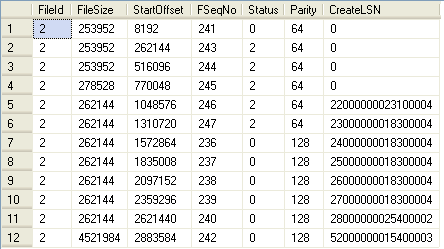
If we now run a transaction log backup such as the following:
BACKUP LOG DBUtil TO DISK = 'C:\Backup\DBUtil.trn'
and then rerun the command you will see how the Status=2 has changed in the file. The last entry is still marked as in use, but the previous entries have been reset to 0.
Finding open SQL transactions using DBCC OPENTRAN
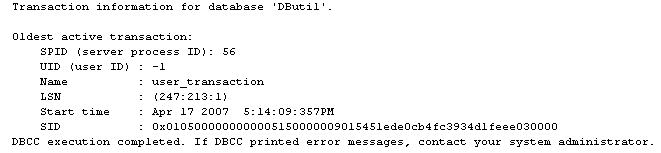
Another command to look at is DBCC OPENTRAN. This will show you if you have any open transactions in your transaction log that have not completed or have not been committed. These may be active transactions or transactions that for some reason never completed. This can provide additional information as to why your transaction log is so big or why you may not be able to shrink the transaction log file. This will show you both open transactions as well any un-replicated transactions if the database is published.
To run this command issue the following in a query window:
This is sample output:
Now that you have an idea how much of your transaction log is being used and what is being used you can start to make some decisions on how large the transaction log should be. One thing you should try to do is find that optimum size in order to eliminate having to shrink and grow the transaction log on a constant basis. As with all database and server activity it is best to minimize the overhead as much as you can and this is one of those areas that you can somewhat manage by creating and maintaining the optimum transaction log size.
Next Steps
- Make sure you are using the correct backup strategy based on your recovery model
- If you need to shrink your transaction log file take a look at DBCC SHRINKFILE.
- Here are some other tips regarding transaction log space.






About the author
 Greg Robidoux is the President and founder of Edgewood Solutions, a technology services company delivering services and solutions for Microsoft SQL Server. He is also one of the co-founders of MSSQLTips.com. Greg has been working with SQL Server since 1999, has authored numerous database-related articles, and delivered several presentations related to SQL Server. Before SQL Server, he worked on many data platforms such as DB2, Oracle, Sybase, and Informix.
This author pledges the content of this article is based on professional experience and not AI generated.
View all my tips
