By: Kun Lee | Comments (12) | Related: > Database Design
Problem
In an earlier tip (Building a SQL Server Data Dictionary with the Extended Properties and Third Party Tools) I outlined the value of using the extended properties across some of the industry leading data modeling tools. What if I do not have access to any of those tools? Is it possible to build the extended properties and then be able to generate reports by using Excel or Reporting Services? How can I capture the data dictionary at a point in time?
Solution
That is a great question. The easiest way to solve this problem is capture the values from the extended properties into physical table so that you can easily export the data by using Microsoft Excel, Reporting Services or any other reporting tool.
To start the process you need do deploy the store procedure dbo.sp_get_extendedproperty outlined below.
|
[dbo].[sp_get_extendedproperty] |
| USE [master] GO CREATE PROCEDURE [dbo].[sp_get_extendedproperty] @databasename varchar(128) = NULL as BEGIN SET NOCOUNT ON SET TRANSACTION ISOLATION LEVEL READ UNCOMMITTED IF @databasename IS NULL SET @databasename = db_name() DECLARE @sqltext nvarchar(4000) IF object_id(N'tempdb.dbo.##temp___DataDictionary') IS NOT NULL DROP TABLE ##temp___DataDictionary IF object_id(N'tempdb.dbo.##temp___DataDictionary_schema') IS NOT NULL DROP TABLE ##temp___DataDictionary_schema CREATE TABLE ##temp___DataDictionary( [tableschema] varchar(128) NULL, [tablename] varchar(128) NULL, [columnname] varchar(128) NULL, [xtype] varchar(8) NULL, [description] nvarchar(4000) NULL ) CREATE TABLE ##temp___DataDictionary_schema( [tableschema] varchar(128), [tablename] varchar(128) NULL, ) -- Deploy Database Property SET @sqltext = 'INSERT INTO ##temp___DataDictionary ([description], [xtype]) SELECT cast(value as nvarchar(4000)), ''D'' FROM ' + @databasename + '.sys.fn_listextendedproperty(default, default, default, default, default, default, default)' EXECUTE (@sqltext) -- Get table level data dictionary SET @sqltext = 'INSERT INTO ##temp___DataDictionary_schema SELECT DISTINCT TABLE_SCHEMA, TABLE_NAME FROM ' + @databasename + '.INFORMATION_SCHEMA.TABLES' EXECUTE(@sqltext) DECLARE table_cursor CURSOR FOR SELECT DISTINCT [tableschema] FROM ##temp___DataDictionary_schema DECLARE @TABLE_SCHEMA VARCHAR(128) OPEN table_cursor FETCH NEXT FROM table_cursor INTO @TABLE_SCHEMA WHILE @@FETCH_STATUS = 0 BEGIN SET @sqltext = 'INSERT INTO ##temp___DataDictionary ([tableschema], [tablename],[description], [xtype]) SELECT ' + '''' + @TABLE_SCHEMA + '''' + + ', objname, cast(value as nvarchar(4000)), ''U'' FROM ' + @databasename + '.sys.fn_listextendedproperty (NULL, ''schema'', ' + '''' + @TABLE_SCHEMA + ''''+ ', ''table'', default, NULL, NULL)' EXECUTE(@sqltext) FETCH NEXT FROM table_cursor INTO @TABLE_SCHEMA END CLOSE table_cursor DEALLOCATE table_cursor CREATE TABLE ##temp___DataDictionary_keys( [tableschema] varchar(128) NULL, [tablename] varchar(128) NULL, [columnname] varchar(128) NULL, [xtype] varchar(8) NULL ) -- Populate all the key types SET @sqltext = 'INSERT INTO ##temp___DataDictionary_keys SELECT U.TABLE_SCHEMA,U.TABLE_NAME, U.COLUMN_NAME, xtype ' + 'FROM ' + @databasename + '.INFORMATION_SCHEMA.CONSTRAINT_COLUMN_USAGE U ' + 'JOIN ' + @databasename + '.sys.sysobjects O ON U.CONSTRAINT_NAME = O.name WHERE O.xtype in (''F'',''PK'')' EXECUTE(@sqltext) -- Get column level DECLARE @TABLE_NAME varchar(128) DECLARE column_cursor CURSOR FAST_FORWARD FOR SELECT [tableschema], [tablename] FROM ##temp___DataDictionary_schema OPEN column_cursor FETCH NEXT FROM column_cursor INTO @TABLE_SCHEMA, @TABLE_NAME WHILE @@FETCH_STATUS = 0 BEGIN -- display all columns under MyTable SET @sqltext = 'INSERT INTO ##temp___DataDictionary ([tableschema], [tablename],[columnname], [description]) SELECT ' + '''' + @TABLE_SCHEMA + '''' + ',' + '''' + @TABLE_NAME + '''' + ', objname, cast(value as nvarchar(4000))' + ' FROM ' + @databasename + '.sys.fn_listextendedproperty (NULL, ''schema'', ' + '''' + @TABLE_SCHEMA + '''' + ', ''table'', ' + '''' + @TABLE_NAME + '''' + ', ''column'', default)' EXECUTE(@sqltext) FETCH NEXT FROM column_cursor INTO @TABLE_SCHEMA, @TABLE_NAME END CLOSE column_cursor DEALLOCATE column_cursor UPDATE D SET D.[xtype] = K.[xtype] FROM ##temp___DataDictionary D JOIN ##temp___DataDictionary_keys K ON D.tableschema = K.tableschema AND D.tablename = K.tablename AND D.columnname = K.columnname SELECT @@servername as servername,@databasename as dbname,tableschema,tablename,columnname,[xtype],[description] FROM ##temp___DataDictionary ORDER BY @@servername ,dbname,tableschema,tablename,columnname,[xtype] asc DROP TABLE ##temp___DataDictionary DROP TABLE ##temp___DataDictionary_keys END |
Second, you need to create a database and table to store the data for reporting purposes. For this tip, I have created a database called 'DBA' and a table called 'DataDictionary' to store the final data for reporting purposes.
| -- Create DBA Database CREATE DATABASE DBA GO USE DBA -- Create Table CREATE TABLE [dbo].[DataDictionary]( [sqlinstance] [varchar](128) NOT NULL, [databasename] [varchar](128) NOT NULL, [tableschema] [varchar](128) NULL, [tablename] [varchar](128) NULL, [columnname] [varchar](128) NULL, [xtype] [varchar](8) NULL, [description] [nvarchar](4000) NULL ) |
Third, let's run the stored procedure to populate the table with the data from the "AdventureWorks2008" database for this sample.
| INSERT INTO DBA.dbo.[DataDictionary] exec sp_get_extendedproperty 'AdventureWorks2008' |
Now, you can use one of the well known Microsoft SQL Server system store procedures 'sp_MSforeachdb' to populate the table from each of the databases.
| TRUNCATE TABLE DBA.dbo.[DataDictionary] EXEC master.sys.sp_MSforeachdb 'INSERT INTO DBA.dbo.[DataDictionary] exec sp_get_extendedproperty "?"' |
Now, if you issue a simple select statement against the [dbo].[DataDictionary] table, you will see results like this:
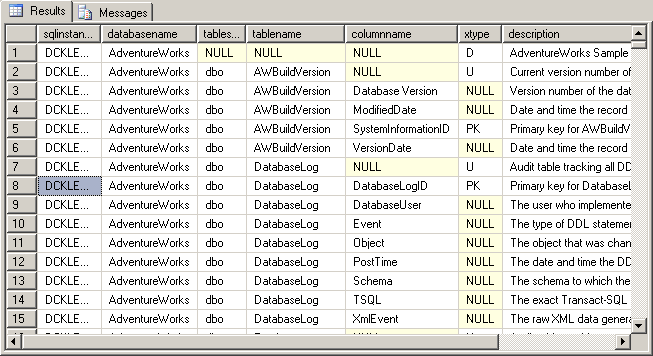
Now, you just need to report on the data from the [dbo].[DataDictionary] table. Check out the tips below to report on the data from Excel, Reporting Service, Access, etc.
- Inserting, Updating or Deleting Data in SQL Server from an Excel Spreadsheet
- SQL Server Reporting with Microsoft Excel
- Export data from SQL Server to Excel
- Importing Excel data with SQL Server Integration Services (SSIS ...
- Creating SQL Server performance based reports using Excel
Here is a sample result set in Excel:
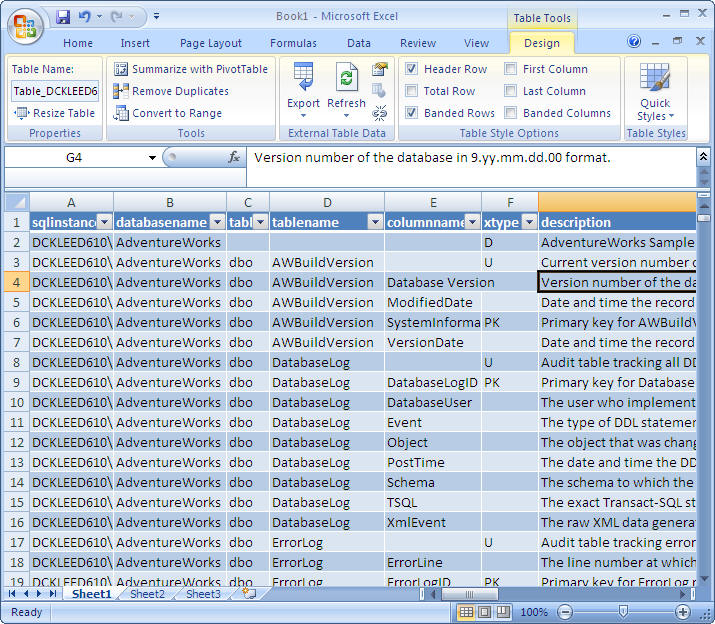
So, now you have it. Wasn't that easy to manage? Here is another reason to use Extended Properties to build a Data Dictionary.
Next Steps
- Keep in mind how easy it is to build and use the Extended Properties to build a Data Dictionary and leverage third party tools or your own solution.
- If you build your own solution, you can setup Reporting Services or Excel to extract the data dictionary and share it with users.
- If you have a lot of servers, I would consider writing an SSIS package to pull the data from all the server into one repository. In the table used in this tip, that is the reason I included the SQL instance name.
- If you want to force SQL Server Developer to force to fill out data dictionary, you can also modify the query and write an alert based on missing data dictionary values and send the report to the application owner to update the data dictionary.






About the author
 Kun Lee is a database administrator and his areas of interest are database administration, architecture, data modeling and development.
This author pledges the content of this article is based on professional experience and not AI generated.
View all my tips
