By: Ken Simmons | Updated: 2022-01-14 | Comments (2) | Related: > Database Design
Problem
SQL Server 2008 introduced a new way to store data for columns that contain excessive NULL values called Sparse Columns. What this means is that when you declare a column as Sparse and any time a NULL value is entered in the column it will not use any space.
Is there a way to identify what columns would make a good candidate for this
without having to analyze each column individually?
Solution
With the introduction of the new Sparse Column feature in SQL Server, it is now possible to declare a column as Sparse and any time a NULL value is entered in the column it will not use any space. One of the tricks here is to figure out when to determine when a column should be defined as Sparse or not.
Create Sample Table with Sparse Columns
In the following example Address Lines 1 through 3 are required, Address Lines 4 and 5 are not required but often used, and Address Lines 6 through 8 are rarely used at all. When creating the table for Address Lines 6 through 8 we are using the SPARSE option, since we know this data will be rarely stored.
CREATE TABLE CustomerInfo
(
  CustomerID INT PRIMARY KEY,
  Address_Line1 VARCHAR(100) NOT NULL,
  Address_Line2 VARCHAR(100) NOT NULL,
  Address_Line3 VARCHAR(100) NOT NULL,
  Address_Line4 VARCHAR(100) NULL,
  Address_Line5 VARCHAR(100) NULL,
  Address_Line6 VARCHAR(100) SPARSE NULL,
  Address_Line7 VARCHAR(100) SPARSE NULL,
  Address_Line8 VARCHAR(100) SPARSE NULL,
)
So why not just declare all columns as Sparse Columns?
Sparse Columns require four extra bytes of storage for each non NULL fixed-length data type value in the table and zero bytes to store a NULL value; therefore it is very important to have the correct threshold per data type or you will end up using more space instead of gaining it. The fewer bytes a data type uses, the higher the percentage of NULL values are required to save space.
There is a table on MSDN that gives recommended percentages for using Sparse Columns. Take a look at this to help identify when you will get the benefits of Sparse Columns.
Using
this table as a guideline, the following script will identify any columns that
may qualify for the new Sparse Columns feature. By searching for columns in the
database that have NULL values over a certain threshold, you can easily analyze
the results and determine if the new feature may be applicable. The thresholds for
the fixed-length columns are stored in a temp table and the data types that are
dependent on precision and length will default to sixty percent.
USE AdventureWorks
GO

SET NOCOUNT ON
DECLARE  @SQL VARCHAR(MAX)

CREATE TABLE #SPARCEPERCENTAGE (
  DATATYPE VARCHAR(50),
  PRCENT   INT)

INSERT INTO #SPARCEPERCENTAGE
SELECT 'bit', 98
UNION ALL SELECT 'tinyint', 86
UNION ALL SELECT 'smallint', 76
UNION ALL SELECT 'int', 64
UNION ALL SELECT 'bigint', 52
UNION ALL SELECT 'real', 64
UNION ALL SELECT 'float', 52
UNION ALL SELECT 'smallmoney', 64
UNION ALL SELECT 'money', 52
UNION ALL SELECT 'smalldatetime', 64
UNION ALL SELECT 'datetime', 52
UNION ALL SELECT 'uniqueidentifier', 43
UNION ALL SELECT 'date', 69

CREATE TABLE #TMP (
  CLMN       VARCHAR(500),
  NULLCOUNT  INT,
  DATATYPE   VARCHAR(50),
  TABLECOUNT INT)

SELECT @SQL = COALESCE(@SQL,'') + CAST('INSERT INTO #TMP Select ''' + TABLE_SCHEMA + '.' + REPLACE(TABLE_NAME,'''','''''') + '.' + COLUMN_NAME + ''' AS Clmn, count(*) NullCount, ''' + DATA_TYPE + ''', (Select count(*) FROM ' + TABLE_SCHEMA + '.[' + TABLE_NAME + ']) AS TableCount FROM ' + TABLE_SCHEMA + '.[' + TABLE_NAME + '] WHERE [' + COLUMN_NAME + '] IS NULL ;' + CHAR(13) AS VARCHAR(MAX))
FROM   INFORMATION_SCHEMA.COLUMNS
JOIN   sys.sysobjects B ON INFORMATION_SCHEMA.COLUMNS.TABLE_NAME = B.NAME
WHERE  XTYPE = 'U'
--AND INFORMATION_SCHEMA.COLUMNS.TABLE_SCHEMA = 'Person'
--AND INFORMATION_SCHEMA.COLUMNS.TABLE_NAME = 'Contact'

EXEC( @SQL)

SELECT   A.CLMN,
         A.NULLCOUNT,
         A.TABLECOUNT,
         A.DATATYPE,
         (A.NULLCOUNT * 1.0 / A.TABLECOUNT) NULLPERCENT,
         ISNULL(B.PRCENT,60) * .01          VALUEPERCENT
FROM     #TMP A
         LEFT JOIN #SPARCEPERCENTAGE B
           ON A.DATATYPE = B.DATATYPE
WHERE    A.NULLCOUNT > 0
         AND (A.NULLCOUNT * 1.0 / A.TABLECOUNT) >= ISNULL(B.PRCENT,60) * .01
ORDER BY NULLPERCENT DESC

DROP TABLE #TMP
DROP TABLE #SPARCEPERCENTAGE
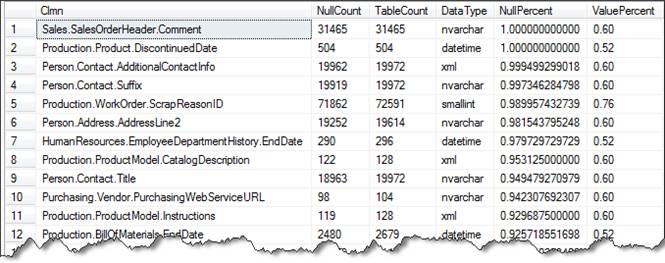
Here is a sample of the output when run against the AdventureWorks database. The NullPercent column should be compared to the ValuePercent column to determine if there is an advantage of using Sparse Columns. As you can see in row one all rows for Sales.SalesOrderHeader for column Comment are NULL therefore the NullPercent is 100% and the ValuePercent is 60%, so this is a great candidate for using Sparse Columns. Note: the query above limits the output to only show which columns would gain the benefit of using Sparse Columns.
In the code above I commented out two lines, shown below, that can be used to limit the search to one table at a time. Just uncomment these and change the Schema and Table values for the table you want to analyze.
--AND INFORMATION_SCHEMA.COLUMNS.TABLE_SCHEMA = 'Person'
--AND INFORMATION_SCHEMA.COLUMNS.TABLE_NAME = 'Contact'
Next Steps
- Review the article on Using Sparse Columns in Books Online.
- Make note of the restrictions that are placed on Sparse Columns.
- Use this script to analyze your existing data to see if you can gain some benefits using the SPARSE option






About the author
 Ken Simmons is a database administrator, developer, SQL Server book author and Microsoft SQL Server MVP.
This author pledges the content of this article is based on professional experience and not AI generated.
View all my tips
Article Last Updated: 2022-01-14
